 sonar
sonar
Your Mobile App Marketing Strategy Starts Before You Ship
Most indie apps fail not because the product is bad, but because no one discovers them. Apple's App Store holds over 1.8 million apps as of Q1 2026 (source: Statista, App Store statistics), and Google Play hosts roughly 2.3 million (source: Statista, Google Play statistics). A mobile app marketing strategy is the difference between languishing at zero downloads and building a sustainable user base.
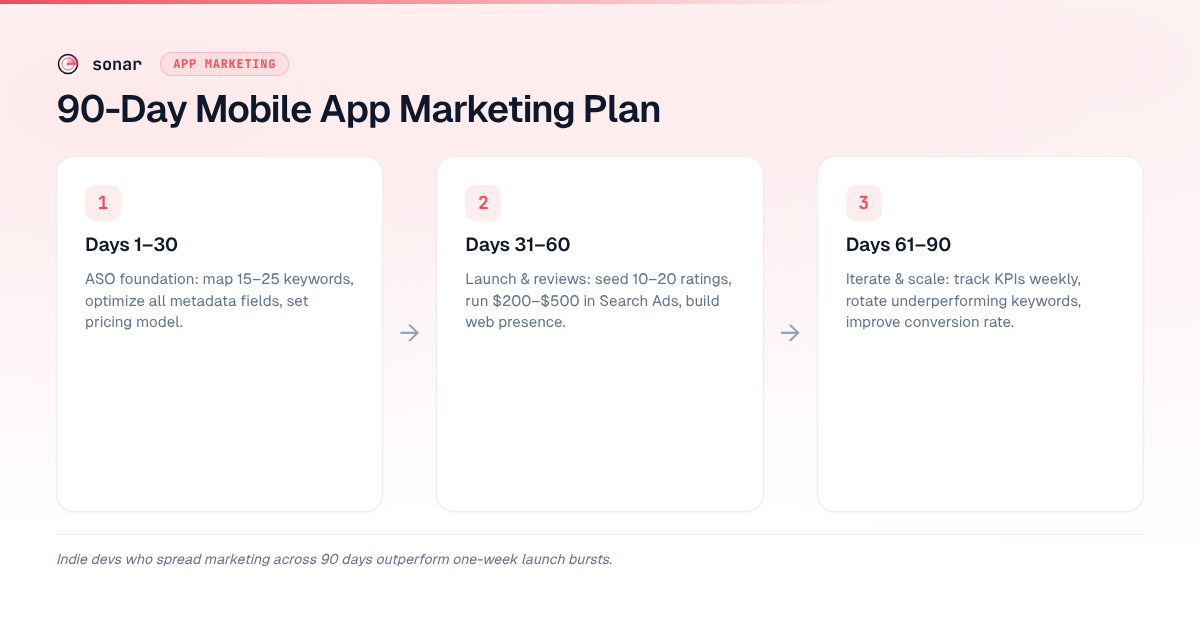
I have watched hundreds of indie launches through Sonar's data since 2024, and the pattern is clear: developers who spread a structured plan across 90 days outperform those who do a one-week "launch burst" and go silent. This article breaks that 90-day plan into three phases — foundation, growth, and optimization — with specific actions, timelines, and benchmarks grounded in real keyword and competitor data.
If you want the full playbook beyond this 90-day scope, see our complete mobile app marketing guide for deeper coverage on channels, budgeting, and long-term retention.
One caveat before day one: this plan assumes your build is shippable and your purchase flow works. Two engineering decisions have marketing consequences worth settling first. If you're still choosing a UI framework, SwiftUI versus UIKit affects how fast you can iterate on onboarding — and onboarding iteration speed is what turns installs into retained users during Phase 3. And if you monetize with subscriptions or in-app purchases, work through the StoreKit 2 migration checklist before you spend anything on acquisition. Driving traffic to a broken or legacy purchase flow is the most expensive way to learn that it's broken.
Why the plan puts organic before paid
The order of the three phases is deliberate: ASO first, then a small paid test, then paid scale only once the numbers justify it. Every paid install still lands on your store listing, so the listing's conversion rate sets your cost per install on every channel. Teams that buy ads before fixing the listing pay for that leak on every click.
The arithmetic is simple. Cost per install is ad spend divided by installs, and installs are the visitors who reach your page times its conversion rate. With the same traffic, a page that converts at 25% instead of 15% gets 67% more installs, which cuts cost per install by 40% without touching the ad budget. Organic work is what moves that conversion rate, and it keeps paying after you stop spending: rankings, ratings, and a page that converts compound over time, while paid installs stop the day the budget does.
So the sequence is: fix what store visitors see (Phase 1), use a small paid test to learn which keywords convert rather than to buy growth (Phase 2), and scale paid only after the day-90 checkpoint says the foundation holds (Phase 3). Organic first isn't anti-paid. It makes sure each paid dollar lands on a page that already works.
Phase 1: Days 1–30 — Build the ASO Foundation
The first month is about making your app findable. App Store Optimization is the highest-leverage channel for an indie developer because organic search drives 70% of App Store discovery according to Apple (source: Apple, App Store discovery). No amount of social media posting will compensate for a poorly optimized listing.
Audit your organic position first if you're already live
If your app is already in the store, spend the first few days measuring before you change anything, so you fix the right thing first:
- Keywords you target vs. keywords you rank for. Compare the terms in your title, subtitle, and keyword field with where you actually rank. Terms you target but don't rank in the top 10 for are the first candidates to replace.
- Conversion rate baseline. App Store Connect and Google Play Console both report how many store visitors go on to install. Write the number down; it's what Phase 3 and any paid campaign will be judged against.
- Competitor gaps. Pick three to five direct competitors and compare their titles, subtitles, and the terms they rank for with yours. You're looking for high-intent terms they rank for that you've missed entirely, not copy to borrow.
If you're pre-launch, skip straight to keyword mapping.
Pick your category and map keywords
Start by identifying 15–25 keywords that real users type into the App Store or Google Play when looking for an app like yours. These are not web SEO terms — they are store-search terms that reflect install intent.
For example, Sonar's keyword index puts "budget planner" at iOS difficulty 66, Apple popularity 51, and Android difficulty 59 — a competitive but high-intent keyword an indie dev might target in their 90-day plan. If that difficulty is too steep for day one, look for a lower-competition entry point. "Tip calculator" scores iOS difficulty 39 with Apple popularity 5 and Android difficulty 16 — significantly easier to rank on Google Play than on the App Store (source: Sonar /api/v1/keywords/search, queried 2026-07-22).
The gap between iOS difficulty 66 and Android difficulty 59 for "budget planner" tells you something actionable: Google Play may be a better launch platform if you are cross-platform. For a detailed walkthrough on finding these gaps, read our app store keyword research workflow.
When the head term is out of reach, its long-tail variants are the way in. "Habit tracker widget" sits at iOS difficulty 46, against 67 for "habit tracker" itself (source: Sonar /api/v1/keywords/search, queried 2026-07-31). A new app can rank for the variant first and build the installs and ratings that make the head term winnable later.
Optimize your listing metadata
Apple indexes your title (30 characters), subtitle (30 characters), and keyword field (100 characters). Google Play indexes your title (30 characters), short description (80 characters), and full description (4,000 characters) (source: Google Play Console Help). Use every indexed field — empty keyword fields are wasted real estate.
Here is a metadata checklist for the first 30 days:
- Title: Lead with your strongest keyword. Keep it under 30 characters.
- Subtitle / short description: Second-strongest keyword phrase plus a benefit statement.
- Keyword field (iOS only): Comma-separated, no spaces, no duplicates of title words.
- Full description (Google Play): Use all 4,000 characters. Front-load the first 250 characters with keyword-rich copy because that is what users see before tapping "Read more."
- Screenshots: Include 4–6 screenshots with benefit-driven captions — not feature names.
- Icon: A/B test if possible. Google Play offers store listing experiments natively (source: Google Play Console Help, store listing experiments).
For the full pre-launch metadata checklist, our ASO launch checklist covers every field on both platforms.
Set your pricing and monetization model
Decide this before launch, not after. In 2026, 97% of App Store revenue comes from in-app purchases and subscriptions, not paid downloads (source: Sensor Tower, State of Mobile 2026). Freemium with a subscription tier is the dominant model for indie apps. For trial length, paywall placement, and how subscription pricing shows on your product page, see our comparison of app monetization models.
Phase 2: Days 31–60 — Launch, Acquire Users, and Collect Reviews
Month two is about generating initial traction. Your listing is optimized; now you need downloads and ratings to trigger the store algorithms.
Time your launch for maximum visibility
Apple features new apps in the "New Apps We Love" section, and Google Play has an equivalent "New + Updated Games" and "New Apps" section. Submit your app at least 2 weeks before your target launch date to account for review times. Apple's median review time is under 24 hours for 90% of submissions (source: Apple, App Review), but rejections add cycles.
Seed early reviews
Ratings are a ranking signal on both stores. Among the top 4 budget planner apps on iOS tracked by Sonar, the median rating is 4.73 with a median review count of ~13,780 — proving that even a saturated category rewards polished indie products (source: Sonar /api/v1/apps/search, queried 2026-07-22).
You will not reach 13,000 reviews in month two, but you need at least 10–20 genuine ratings to establish credibility. Use Apple's SKStoreReviewController API to prompt users at the right moment — after a successful task completion, not on first open. Apple allows three prompts per 365-day period per device (source: Apple Developer Documentation, SKStoreReviewController). For a non-annoying review strategy, see our guide to getting more app reviews.
Run a small paid campaign to jumpstart discovery
Don't switch this on until the Phase 1 work is live: optimized metadata, real screenshots, and at least a few genuine ratings. After that, even $200–$500 in Apple Search Ads can validate your keyword strategy while generating initial downloads. Apple Search Ads Basic lets you set a monthly budget with automatic keyword matching (source: Apple Search Ads). Use the data from this campaign to learn which keywords convert — then feed those keywords back into your organic ASO.
Aim the test at mid-tail keywords where you already rank somewhere in positions 3–10 organically. That's where paid installs can add to momentum you've already earned, and the conversion data tells you whether the keyword brings users who stay. Skip terms you already rank first for; you'd be paying for installs you get for free.
The trade-offs between paid and organic are worth understanding before you spend. Our comparison of Apple Search Ads vs. organic ASO breaks down when each approach makes sense.
Build a lightweight web presence
A one-page website with your app name, screenshots, a press kit, and a link to the store listing is enough. This page serves two purposes: it gives journalists something to link to, and it lets you run Google Ads or social campaigns if you choose to later. In my experience, indie apps that have even a basic landing page at launch see roughly 2-3x more backlink acquisition in the first 60 days compared to those that rely solely on their store listing — press outlets and bloggers need a URL they can link to, and a store page is rarely their first choice. If your budget is near zero, a free landing page on Product Hunt, a GitHub repo (for open-source projects), or even a well-written Reddit post in a relevant subreddit can substitute.
Phase 3: Days 61–90 — Measure, Iterate, and Scale
The final 30 days separate apps that plateau from apps that grow. This phase is about data-driven iteration.
Track the right KPIs
Not all metrics matter equally at this stage. Focus on:
| KPI | Why it matters | Target by day 90 |
|---|---|---|
| Keyword rankings | Measures ASO effectiveness | Top 10 for 3–5 low-difficulty keywords |
| Conversion rate (impressions to installs) | Measures listing quality | iOS median is ~30% for search results (source: Apple App Analytics) |
| Ratings and reviews | Ranking signal + social proof | 4.0+ average with 20+ reviews |
| Day-1 and day-7 retention | Measures product-market fit | Day-1: 25%+, Day-7: 12%+ (source: Adjust, Mobile App Trends 2025) |
| Cost per install (if running ads) | Measures paid efficiency | Varies by category; track trend, not absolute |
| Organic install share | Shows whether organic is carrying growth | Rising month over month |
| Blended CAC (total marketing spend / new users) | Measures overall acquisition efficiency | Falling as organic share grows |
For a deeper framework on which ASO metrics to prioritize, see our guide to ASO KPIs.
Iterate on keywords weekly
Keyword performance is not static. A keyword that was difficulty 39 at launch may shift as competitors enter or exit. Check your keyword rankings weekly and rotate underperformers out of your metadata. When a long-tail variant breaks into the top 10, add the next variant or the head term at your following update. The goal is to maintain 3–5 keywords where you rank in the top 10 organically.
Use Sonar's keyword research tools to compare difficulty scores across iOS and Android in real time. A keyword like "tip calculator" at iOS difficulty 39 and Android difficulty 16 might be worth keeping on Google Play but dropping on iOS if you cannot crack the top 10 after 60 days.
Improve your conversion rate
If your impressions are healthy but installs are low, the problem is your listing — not your keywords. The three highest-impact levers for improving your app store conversion rate are:
- First two screenshots: These appear in search results. Make them communicate your core value in under 2 seconds.
- Icon: Does it look professional at 1024x1024 and still read clearly at the small search-result size?
- Ratings: A 3.8-star app converts measurably worse than a 4.5-star app. Prioritize bug fixes and review prompts.
Decide whether to invest in paid growth
By day 60 you have enough organic data to know whether your app has product-market fit. If day-7 retention is above 12% and your unit economics work, consider scaling Apple Search Ads or testing Google Ads for your app. For a detailed breakdown of costs and targeting differences between the two platforms, see our Apple Search Ads vs. Google Ads comparison. If retention is below 10%, spend the remaining 30 days fixing the product, not throwing money at ads.
At day 90, two more questions make the call cleaner. Has your organic install share gone up since day one? Has blended CAC gone down? If both answers are yes, the foundation is working and paid scaling is safe. If not, go back to metadata and conversion rate before you spend more; something is still leaking.
When you do scale, favor channels whose users behave like organic users. Apple Search Ads and Google App Campaigns reach people who are already searching the store, and their installs land on the listing your organic work has improved. Creator partnerships can send people to search for your app by name. Broad social ads are better at awareness than at moving store rankings, so judge them on what their users are worth. For every channel, compare its user acquisition cost with the lifetime value of the users it brings; if it costs more than they're worth, pause it and go back to organic fundamentals.
How This Strategy Differs Across Platforms
iOS and Android are not the same market, and your app marketing strategy should reflect that. Key differences:
| Factor | iOS (App Store) | Android (Google Play) |
|---|---|---|
| Indexed metadata fields | Title, subtitle, keyword field | Title, short description, full description (4,000 chars) |
| Keyword field | 100 characters, hidden | No dedicated field; keywords extracted from description |
| A/B testing | Product page optimization (limited to 3 treatments) (source: Apple Developer, product page optimization) | Store listing experiments (native, more flexible) |
| Review prompt API | SKStoreReviewController (3 prompts/year/device) | In-App Review API (quota managed by Google, not disclosed) |
| Paid ads entry point | Apple Search Ads ($50 minimum for Basic) | Google Ads for Apps (no fixed minimum) |
These platform differences matter at every phase. In Phase 1, the fact that Google Play indexes 4,000 characters of description while Apple indexes a hidden 100-character keyword field means your keyword-loading strategy is fundamentally different on each platform. For a side-by-side tool comparison that accounts for these differences, see our list of free ASO tools for iOS and Android.
Common Mistakes Indie Devs Make in Their First 90 Days
After tracking app launches through Sonar's database since early 2025, I see the same errors repeated. Here are the five most costly:
- Targeting only high-difficulty keywords. A "budget planner" keyword with iOS difficulty 66 is aspirational but unlikely to drive rankings for a new app. Layer in low-difficulty terms from day one. Our guide to finding low-competition keywords explains how to identify them systematically.
- Ignoring Google Play description SEO. Apple's hidden keyword field gets all the attention, but Google Play's 4,000-character description is an enormous organic surface area that many indie devs leave underutilized.
- Launching without screenshots. Some devs upload placeholder screenshots or none at all. This kills conversion rate. Even a single well-designed screenshot with a clear caption outperforms a text-only listing.
- Asking for reviews on first open. Users who have not experienced value will leave 1-star reviews or dismiss the prompt permanently. Wait until after a meaningful interaction.
- Giving up after 30 days. ASO is compounding. Keyword rankings take 2–4 update cycles to stabilize. Most successful indie apps do not see meaningful organic traction until day 45–60.
Key Takeaway
A mobile app marketing strategy does not require a large budget — it requires consistency over 90 days. Phase 1 (ASO foundation) makes your app findable. Phase 2 (launch and reviews) builds social proof and initial traction. Phase 3 (iteration) uses real data to double down on what works and cut what does not. The developers I have seen succeed through Sonar's data share one trait: they treat marketing as a weekly discipline, not a launch-day event.
FAQ
How much does a mobile app marketing strategy cost for an indie developer?
A viable app marketing strategy can start at zero direct cost. ASO — keyword research, metadata optimization, screenshot design — requires time but no ad spend. If you add Apple Search Ads Basic, a minimum of $200–$500 per month is enough to test keywords. The biggest cost is your time: in my experience helping indie devs plan launches, expect 5–10 hours per week during the first 90 days on marketing tasks alone. For a cost breakdown of agencies, tools, and doing it yourself, see our ASO agency, tool, or DIY guide.
How long does it take for ASO to show results?
ASO changes typically take 2–4 keyword index update cycles to reflect in rankings. On Apple's App Store, keyword re-indexing happens within 24–48 hours of a new app version or metadata update (source: Apple Developer Documentation). On Google Play, re-indexing can take up to 7 days. Most indie developers see measurable ranking movement for low-difficulty keywords within 2–3 weeks of optimized metadata going live.
What is organic user acquisition?
Organic user acquisition is installs you don't pay for per install: people who find your app through App Store or Google Play search, browse and editorial features, links from other sites, and word of mouth. Paid acquisition is installs bought through Apple Search Ads, Google App Campaigns, or social ads. Most apps end up using both. This plan builds the organic side first so paid traffic lands on a listing that already converts.
Should I do ASO before running Apple Search Ads?
Yes. Apple Search Ads sends people to your product page, so that page's conversion rate decides what each install costs you. Fix your title, subtitle, keywords, screenshots, and rating first. Then run a small campaign to learn which keywords convert, as in Phase 2, and scale only once the day-90 numbers support it.
Should I launch on iOS or Android first?
It depends on your target market and keyword landscape. The same keyword can have vastly different difficulty scores across platforms. "Tip calculator" has iOS difficulty 39 but Android difficulty 16, making Google Play significantly easier to rank on for that term (source: Sonar /api/v1/keywords/search, queried 2026-07-22). If your app is cross-platform, consider launching on the lower-difficulty platform first to build reviews and traction before expanding.
What are the most important app marketing KPIs in the first 90 days?
Focus on keyword rankings, conversion rate (impressions to installs), average rating, and day-7 retention. Keyword rankings tell you whether your ASO is working. Conversion rate tells you whether your listing persuades users to install. Day-7 retention tells you whether the product delivers on the listing's promise. If retention is below 10%, marketing spend is premature — fix the product first.
Do I need a marketing agency or can I do this myself?
Most indie developers can execute the 90-day plan in this article without an agency. The core work — keyword research, metadata optimization, review prompting, basic paid ads — is learnable in a week. Agencies make sense when you have budget but not time, or when you are scaling beyond organic channels into influencer marketing, PR, or international ASO. For help choosing, see our comparison of app marketing agencies.
Ready to research keywords for your 90-day plan? Try Sonar free — it shows search volume, difficulty, and competitor data for every keyword on iOS and Android.
