
You Can't Optimize What You Don't Measure
Most indie developers do ASO by intuition. They pick some keywords, tweak their metadata, and check back a month later to see if downloads went up. Without tracking specific ASO metrics, you have no way to know which changes helped, which hurt, and which did nothing.
ASO has a small number of KPIs that actually matter. Each one tells you something different about how your app is performing in the store, and together they form a complete picture of your visibility and conversion pipeline. Here are the seven ASO KPIs worth tracking — how to measure them, what good looks like, and what to do when numbers are bad.
1. Keyword Rankings
What it measures: Where your app appears in search results for a given keyword.
Why it matters: Search is the primary discovery channel on both the App Store and Google Play. If you're not ranking in the top 10 for your target keywords, most users will never see your app. Position 1 gets roughly 10x the taps of position 10, and anything beyond position 20 is effectively invisible.
How to measure it: Daily automated rank checks for each keyword you're targeting. Track position over time to see trends, not just snapshots. For a deeper look at setting up tracking, see our rank tracking guide.
Benchmarks:
| Metric | Poor | Average | Good | Excellent |
|---|---|---|---|---|
| Position (target keywords) | 50+ | 11-50 | 4-10 | 1-3 |
| Keywords in top 10 | 0-2 | 3-10 | 11-30 | 30+ |
| Week-over-week stability | Swings of 20+ | Swings of 10-20 | Swings of 3-10 | Stable within 3 |
- Place high-priority keywords in your app title and subtitle (iOS) or short description (Android). Title carries the most weight. Our metadata optimization guide covers field-by-field strategy. Check stock tracker keyword difficulty or crypto portfolio keyword difficulty for real competition data.
- Use the full 100-character keyword field on iOS. Don't repeat words already in your title.
- Update metadata when you notice ranking declines. Algorithms re-index after updates.
- Target keywords where your app has a realistic chance of competing — keyword difficulty scores help you assess this. A solo developer's meditation app won't outrank Calm for "meditation" — but "sleep meditation timer" might be within reach.
2. Search Impressions
What it measures: How many times your app appeared in search results, browse sections, or featured placements.
Why it matters: Impressions are the top of your funnel. If nobody sees your app, nothing else matters. Rising impressions with stable rankings usually means the keywords you're targeting are growing in popularity. Falling impressions with stable rankings means the opposite.
How to measure it: App Store Connect provides impression data for iOS. Google Play Console shows store listing visitors. Both break down impressions by source (search, browse, referral).
Benchmarks:
| App Stage | Daily Impressions (iOS) | Daily Impressions (Android) |
|---|---|---|
| New/unknown | 50-500 | 100-1,000 |
| Established niche | 500-5,000 | 1,000-10,000 |
| Category leader | 5,000-50,000 | 10,000-100,000 |
These ranges vary heavily by category. A fitness app and a barcode scanner app in the same ranking position will see very different impression counts because of category search volume.
- Target more keywords to increase the number of searches where your app appears.
- Improve rankings for existing keywords (higher position = more impressions per keyword).
- Localize your listing for additional countries. Each new market adds its own impression pool.
- Seasonal keywords can create impression spikes — "tax calculator" surges every March-April.
3. Conversion Rate (Impressions to Installs)
What it measures: The percentage of users who install your app after seeing it in search results or on your store listing page.
Why it matters: This is where ASO and marketing meet product quality. We have a full guide on app store conversion rate optimization with category benchmarks. You can rank #1 for every keyword and still fail if nobody installs after seeing your listing. Conversion rate is also a ranking signal — both Apple and Google reward apps that convert well for a given keyword.
How to measure it: App Store Connect and Google Play Console both report conversion rates. iOS shows "tap-through rate" (impression to product page view) and "download rate" (product page view to install) separately. Multiply them for end-to-end conversion. Google Play shows a combined "store listing conversion rate."
Benchmarks:
| Metric | Poor | Average | Good | Excellent |
|---|---|---|---|---|
| Impression to install (iOS) | <2% | 2-5% | 5-10% | 10%+ |
| Store listing conversion (Android) | <15% | 15-30% | 30-50% | 50%+ |
| Product page view to install (iOS) | <20% | 20-40% | 40-60% | 60%+ |
Android conversion rates appear higher because Google Play shows conversions differently — the denominator is store listing visitors rather than all search impressions. Don't compare iOS and Android rates directly.
- Test your icon. It's the single biggest factor in tap-through rate from search results. Run A/B tests (Google Play has native support, iOS has product page optimization).
- Write a first sentence in your description that immediately communicates value. Most users read only the first 1-2 lines before the "more" fold.
- Use all screenshot slots. Show your app doing the thing the user searched for. The first two screenshots are the most important because they appear in search results on iOS.
- Keep your app size under 200MB. Large apps deter users on cellular connections.
- Social proof matters. An app with 4.7 stars and 2,000 ratings converts better than 4.8 stars with 12 ratings, because the volume provides confidence.
4. Install Volume
What it measures: Total number of new installs over a given period.
Why it matters: Installs are the clearest signal of whether your ASO is working. But raw install counts are less useful than understanding where they come from. A spike in installs from search means your keyword strategy is working. A spike from browse means you got featured or are benefiting from category trends.
How to measure it: Both app store consoles report install volume, broken down by source. Track daily installs and compare week-over-week to smooth out day-of-week effects.
Benchmarks:
| App Category | Indie App (monthly) | Established App (monthly) |
|---|---|---|
| Utilities | 500-3,000 | 10,000-50,000 |
| Health & Fitness | 1,000-5,000 | 20,000-100,000 |
| Productivity | 500-3,000 | 15,000-75,000 |
| Games (casual) | 2,000-10,000 | 50,000-500,000 |
These are rough ranges for apps with decent ASO in English-speaking markets. Your numbers will vary with category competition and marketing spend.
- Everything above — better rankings, more impressions, higher conversion rates — compounds into more installs.
- Launch with a coordinated push. A burst of installs in a short window boosts trending signals, feeding back into organic visibility.
- Cross-promote between your own apps if you have a portfolio.
5. Ratings and Reviews
What it measures: Your average star rating and the volume/recency of reviews.
Why it matters: Ratings affect both conversion rate and rankings. Apps below 4.0 stars face a steep conversion penalty — many users won't even consider installing them. Apple and Google also use ratings as a quality signal in their ranking algorithms. Volume and recency matter too: fresh reviews indicate an active, maintained app.
Benchmarks:
| Metric | Concerning | Acceptable | Strong | Exceptional |
|---|---|---|---|---|
| Average rating | <3.5 | 3.5-4.2 | 4.2-4.6 | 4.6+ |
| Reviews per month | 0-2 | 3-10 | 10-50 | 50+ |
| Reply rate | 0% | <25% | 25-75% | 75%+ |
- Use the native review prompt (SKStoreReviewController on iOS, Google In-App Review API on Android). Trigger it after a positive experience — our guide on how to get app reviews covers timing and strategy in detail — completing a task, reaching a milestone, returning for the 5th session.
- Don't prompt too early. Users who haven't experienced value yet will either dismiss the prompt or leave a low rating.
- Reply to negative reviews. A thoughtful response can prompt users to update their rating, and it signals to other users that you're responsive.
- Fix bugs and crashes before asking for reviews. Nothing tanks ratings faster than instability.
6. Retention Rate
What it measures: The percentage of users who return to your app after installing it, typically measured at Day 1, Day 7, and Day 30.
Why it matters: Retention is the ASO KPI that most developers overlook, but it's quietly one of the most important. Both Apple and Google track retention as a quality signal. An app with high installs but terrible retention sends a signal that users aren't finding what they expected — and the algorithms respond by reducing visibility over time. Retention also directly affects lifetime value, which determines how much you can afford to spend on acquisition.
Benchmarks:
| Timeframe | Poor | Average | Good | Excellent |
|---|---|---|---|---|
| Day 1 | <15% | 15-25% | 25-40% | 40%+ |
| Day 7 | <5% | 5-12% | 12-25% | 25%+ |
| Day 30 | <2% | 2-6% | 6-15% | 15%+ |
These benchmarks apply to non-game apps. Games have a wider range — casual games often see higher Day 1 but steeper drop-offs by Day 30.
- Align your store listing with your actual app experience. Misleading screenshots or descriptions create expectation mismatches that kill Day 1 retention.
- Onboarding matters. Users who understand what to do in their first session are far more likely to return.
- Push notifications (used sparingly and with value) are the strongest Day 7 and Day 30 retention lever.
- Track which keywords drive installs with the worst retention. If users searching "free photo editor" churn at 3x the rate of users searching "raw photo editor," your keyword strategy should reflect that.
7. Revenue Per Install
What it measures: Total revenue divided by total installs over a given period. Sometimes called ARPI (Average Revenue Per Install).
Why it matters: Revenue per install tells you the quality of your users, not just the quantity. It's the metric that connects ASO to business outcomes. A keyword that drives 1,000 installs per month with $0.02 ARPI is worth less than a keyword driving 200 installs with $0.50 ARPI.
Benchmarks:
| Monetization Model | Low | Average | Good |
|---|---|---|---|
| Ad-supported | $0.01-0.03 | $0.03-0.10 | $0.10+ |
| Freemium (subscription) | $0.05-0.20 | $0.20-1.00 | $1.00+ |
| Paid upfront | Equal to app price minus Apple/Google cut | - | - |
| In-app purchases | $0.02-0.10 | $0.10-0.50 | $0.50+ |
- Identify which traffic sources (keywords, countries, referrals) produce the highest-value users and prioritize them.
- Localize pricing for different markets. A user in Norway has different purchasing power than a user in Brazil.
- Test your paywall placement and design. A/B test timing (when to show it), pricing (monthly vs. annual emphasis), and copy.
- For ad-supported apps, higher retention directly increases ARPI because each retained user generates more ad impressions over time.
Putting It All Together
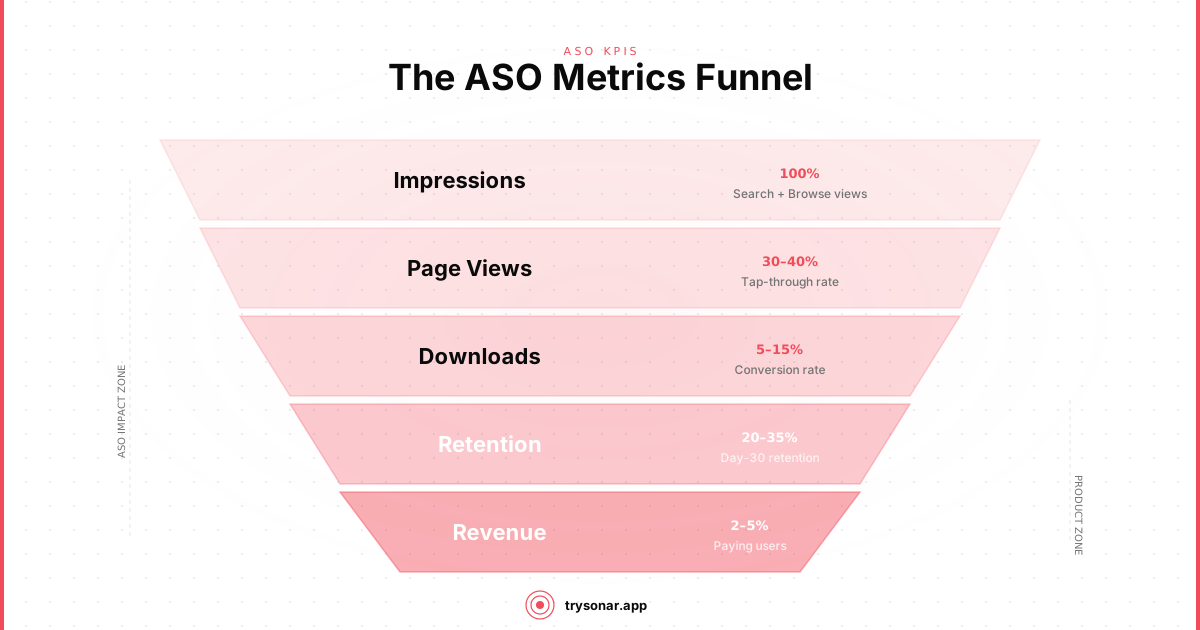
These seven ASO KPIs form a funnel:
Keywords ranked drive impressions, which with a good conversion rate produce installs. Those installs only matter if users stick around (retention), leave positive feedback (ratings/reviews), and generate revenue.
The mistake most developers make is optimizing one metric in isolation. Chasing install volume through misleading metadata will tank conversion rates and retention. Obsessing over star ratings while ignoring keyword rankings means a well-rated app that nobody can find.
Track all seven ASO metrics weekly. When one drops, diagnose whether the problem is upstream (fewer impressions feeding into fewer installs) or at that specific stage (same impressions but lower conversion). Tools like Sonar can automate the keyword ranking and competitive tracking side, freeing you to focus on conversion and retention.
The goal isn't perfect numbers across every metric. It's understanding the relationship between them so you can make informed decisions instead of guessing.