> Sonar pricing update — September 15, 2026: New accounts pay $29/month or $290/year for Indie, and $149/month or $1,490/year for Agency. Existing customers keep their rates. Older Sonar prices in this article and its graphics refer to previous pricing. See current plans.
Most ASO Tools Aren't Built for You
The ASO tool market has a pricing problem. The big players — Sensor Tower, data.ai, AppTweak — charge hundreds or thousands per month because their customers are enterprise mobile teams with six-figure marketing budgets. If you're an indie developer shipping utility apps and hoping to cover your $99/year Apple Developer fee, those tools are irrelevant. (For a full comparison including paid options, see our best ASO tools roundup.)
But that doesn't mean you're stuck guessing. There are genuinely useful free tools, and a handful of paid tools that make sense at indie budgets. Here's what actually works.
Best Free ASO Tools in 2026
The best free ASO tools in 2026 are Apple's App Store Connect, Google Play Console, Google Trends, store autocomplete, and the free keyword and audit tools from Sonar (trysonar.app). Together they cover keyword research, difficulty scoring, conversion tracking, and A/B testing at zero cost — no account or credit card required for any of them. In my experience building Sonar, the four core ASO tasks — keyword research, rank tracking, competitor analysis, and metadata auditing — are what most indie developers I talk to ask about. The free options below handle most of that work; the main gaps (daily rank tracking and historical data) require a paid tool starting at $10/month with Appfigures. If you want to try a full-featured ASO tool before committing, both Sonar and Appfigures offer free trials — see the paid tools section below. For a deeper look at what ASO costs overall, see our breakdown of ASO pricing.
App Store Connect and Google Play Console
You already have access to the best free ASO data source — your own developer console.
- Impressions and product page views for every keyword that drove traffic to your app
- Conversion rate (impressions to downloads) broken down by source
- Top search terms that led users to your app (under App Analytics > Metrics > Search Terms)
- Download and revenue data by territory
This is real data, not estimates. No third-party tool can match the accuracy of first-party analytics for your own app (see Apple's App Analytics documentation). The limitation is that you only see data for apps you own, and Apple doesn't show search popularity scores or competitor data here.
- Store listing visitors and installers with conversion rates
- Search terms that led to your listing (under Store Listing Performance)
- Acquisition reports broken down by country and source
- A/B testing for store listing experiments (icons, screenshots, descriptions)
Google Play's built-in store listing experiments are particularly valuable. You can test different titles, descriptions, and screenshots against each other with statistical significance — a feature that costs extra on most paid ASO platforms.
Bottom line: If you're not checking these dashboards at least monthly, start there before paying for anything. Our App Store Connect analytics guide covers exactly which metrics to focus on.
Google Trends
Google Trends doesn't directly measure App Store search volume, but it's a solid proxy for overall interest in a topic. If "budget tracker" is trending up on Google, it's likely trending up in app store searches too.
- Seasonal trends — is "calorie counter" search volume spiking every January? Time your metadata updates and screenshots for New Year's resolution season.
- Comparing keyword demand — "habit tracker" vs "habit journal" vs "daily routine" — which term has more sustained interest?
- Regional differences — a keyword that's popular in the US might not resonate in the UK or Australia.
It won't give you app store-specific difficulty or ranking data, but it's free, fast, and useful for directional decisions.
Store Autocomplete (Manual Keyword Research)
This sounds primitive, but typing keywords into the App Store or Google Play search bar is legitimate research. The autocomplete suggestions that appear are real queries with meaningful search volume — Apple and Google don't suggest keywords nobody searches for.
Here's how to do it systematically:
- Open the App Store or Google Play
- Type your primary keyword ("meditation")
- Write down every autocomplete suggestion
- Try variations: "meditat," "mindful," "calm," "breathing"
- Try your competitors' names — autocomplete often suggests related generic keywords
This method is free, always up-to-date (autocomplete reflects current search behavior), and gives you keyword ideas that paid tools sometimes miss. The downside is that you don't get volume or difficulty data — just keyword ideas. Our ASO keyword research guide explains how to turn raw autocomplete suggestions into a prioritized keyword list.
Sonar's Free Tools
I built these tools because when I started Sonar, the cheapest keyword difficulty data started around €79/month — too much for most indie developers. So we made three web tools plus a keyless API tier that anyone can use without creating an account or starting a trial:
ASO Score Checker — paste any app's store URL and get an instant ASO audit scored 0-100. It analyzes your title, subtitle, keyword field usage, description, screenshots, ratings, and update frequency. You get a breakdown of what's strong and what needs work, plus specific recommendations. This is the quickest way to identify low-hanging fruit in your listing — pair it with our metadata optimization guide to act on the results.
Keyword Generator — enter a seed keyword and get suggestions with difficulty scores and opportunity ratings. It combines autocomplete data with competitive analysis to surface keywords where you have a realistic chance of ranking. Try it with seeds like "expense tracker" or "sleep tracker" to see the range of opportunities.
Keyword Difficulty Database — browse 500+ pre-analyzed keywords across popular app categories with difficulty scores, search popularity estimates, and competitive breakdowns. Useful for finding low-competition niches without running individual searches — for example, compare password manager vs flashcard app to see the range of difficulty across categories. See our guide on finding low-competition keywords for strategies on using difficulty data effectively.
Keyless API and MCP access — six of Sonar's ten stateless API endpoints work with no API key and no signup: app lookup, app search, ASO score, keyword extraction, keyword suggestions, and keyword metrics. The shared limit is 30 requests/day per IP, plus difficulty and popularity for 5 keywords/day. The same free mode works through Sonar's MCP server, so npx -y @sonarapp/mcp@latest with no SONAR_API_KEY set gives Claude or Cursor working ASO tools at zero cost. The OpenAPI spec is at trysonar.app/openapi.json.
These are genuinely free — not "free with a 50-query limit" or "free but we watermark the results." The web tools have no account requirement and no query cap at all; the keyless API has the daily limits above. They exist because we think the best way to sell an ASO tool is to let developers see what good keyword data looks like.
Free ASO Audit Tools
A free ASO audit tool scores your app listing against best practices and flags specific issues to fix — title length, keyword coverage, screenshot count, rating health, and update frequency. Four options currently offer free ASO audits without requiring a paid subscription:
- Sonar ASO Score Checker — the free audit tool described in the Sonar's Free Tools section above. No account required, unlimited checks.
- Appfigures ASO audit — available during Appfigures' free trial; provides a listing quality report with optimization suggestions. Requires creating an account.
- App Radar free plan — includes a basic ASO score for one app with limited keyword suggestions (source: App Radar pricing page).
- Google Play Console pre-launch report — if you're on Android, Google's pre-launch report automatically tests your app on real devices and flags crashes, accessibility issues, and performance problems that can hurt your store ranking. It's not a metadata audit, but it catches technical issues that directly affect your ASO.
If you only audit one thing, start with your title and subtitle — in my experience building Sonar, those two fields account for the majority of ranking impact on iOS, and the title plus short description drive most of the signal on Google Play.
Free ASO Tools for Android
The best free ASO tools for Android in 2026 are Google Play Console (search-term reports, conversion data, and built-in A/B testing), Sonar's free keyword generator (supports Google Play keyword difficulty lookups for any app), Google Trends (keyword demand validation), and Play Store autocomplete (manual keyword discovery). Android developers get more free ASO functionality than iOS developers because Google Play Console includes built-in store listing experiments and indexes roughly 4,000 characters of keyword-eligible metadata versus iOS's ~100 characters. This means free tools cover a larger share of the optimization surface on Android (source: Google Play Console Help).
In my experience optimizing Android listings for Sonar users, the long description alone often surfaces keyword opportunities that iOS developers never get — it's the single biggest free advantage on the Play Store.
Here's what makes Android ASO tooling different from iOS:
- Google Play indexes the full long description for keywords, not just the title and short description. This means you have roughly 4,000 characters of keyword-indexable metadata versus iOS's ~100 characters across title, subtitle, and keyword field (source: Google Play Developer documentation; iOS limits per Apple App Store Connect Help). Our guide on Google Play long description keyword structure explains how to use that space effectively.
- Store listing experiments are free and built in. You can A/B test your app icon, screenshots, short description, and full description directly in Google Play Console with no third-party tool. On iOS, conversion testing requires either Apple's product page optimization (limited to 3 treatments) or a paid tool.
- Custom store listings let you create country-specific metadata variants at no cost — useful for localizing keywords without a paid localization tool.
- Google Play's ranking algorithm weighs different signals than Apple's, including engagement metrics, crash rate, and Android vitals. Free tools like Google Play Console's Android vitals dashboard surface performance data that directly affects your Play Store ranking. For a full breakdown, see how Play Store ranking works.
For a complete Android ASO workflow using only free and low-cost tools, see our Android ASO tools and workflow guide. If you're new to Android optimization entirely, our Android ASO guide covers the fundamentals.
Paid Tools Worth Considering
When free tools aren't enough — typically once you're tracking rankings over time and need historical data — here are the paid options that make sense for indie budgets, ordered by price. For a full comparison of paid ASO tools at every price point, see our best ASO tools roundup.
ASO Free Trials — What You Get Before You Pay
If you're not ready to commit to a paid ASO tool, starting with a free trial is the lowest-risk way to evaluate whether daily rank tracking and historical data are worth the monthly cost. Here's what each ASO tool offers during its free trial:
| Tool | Free Trial Length | What's Included | Credit Card Required |
|---|---|---|---|
| Sonar | 7 days | Full access — 10 apps, 2,500 keywords, rank tracking, competitor analysis, API (Sonar pricing) | Yes (cancel anytime, zero charge) |
| Appfigures | 14 days | Rank tracking, keyword research, review monitoring (Appfigures pricing) | Yes |
| AppTweak | Limited demo | Restricted dashboard access; full trial requires contacting sales (AppTweak pricing) | No (demo) |
Trial lengths verified as of July 2026: Sonar pricing, Appfigures pricing, AppTweak pricing.
In my experience, most Sonar trial users identify at least one actionable keyword opportunity before the 7 days are up — the combination of keyword difficulty scores and competitor gap analysis surfaces opportunities that free tools miss.
Appfigures — from $10/month
The most affordable entry point for paid ASO. Appfigures started as an app analytics aggregator and added ASO features over time. You get basic rank tracking, keyword research, and review monitoring. The data quality is solid for the price, though the keyword database isn't as deep as more expensive tools. Good choice if you mainly want rank tracking and don't need advanced keyword research.
Sonar — $19/month (or $189/year)
Our tool, built for indie developers. 10 apps and 2,500 tracked keywords (competitors never count against the caps), both iOS and Android, daily rank tracking, keyword difficulty scoring, competitor analysis, keyword gap analysis, and full historical data. API and CLI included. The 7-day free trial gives you full access to every feature — cancel anytime during the trial with zero charge. In my experience, most users who start the free trial find at least one actionable keyword opportunity before the trial ends. For scripts and AI agents there are prepaid API credit packs from $10 (no subscription, 50 free credits on signup), plus an official MCP server (@sonarapp/mcp, 47 tools) that also runs keyless. Full plan details are on the Sonar pricing page.
Beyond indie budgets
Once you move past the $10–20/month tier, you're into mid-market and enterprise territory — Astro (iOS-only, Mac-native, $9/month billed annually), AppTweak (from €79/month), App Radar, and at the top end Sensor Tower and data.ai at thousands per month. Those tools solve problems most indie developers don't have yet, and reviewing them is out of scope for a free-tools guide. When you're ready to compare the full paid landscape, our roundup of the best ASO tools covers all of them with honest assessments of price versus value.
Feature Comparison
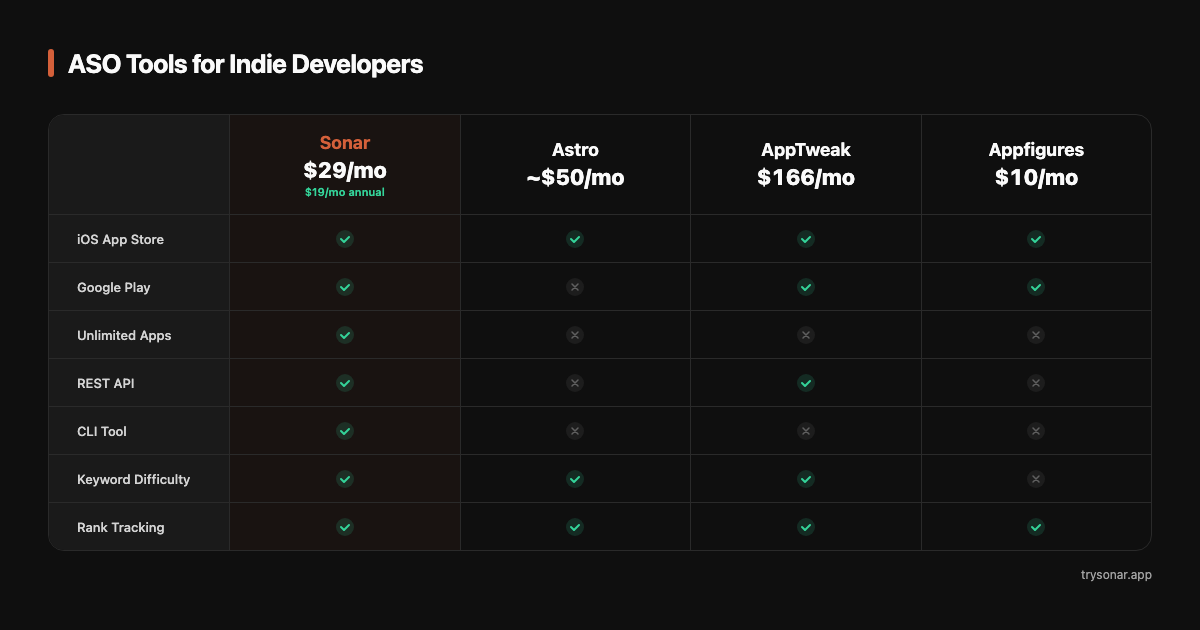
After testing all six tools listed here, the difference that stood out most to me was data freshness — free tools give you a snapshot, while paid tools with daily rank tracking show you the trend over time, which is where the real optimization insights come from. Note that iOS and Android handle ASO metadata differently, which affects which free tools matter most for each platform — see our iOS vs Google Play ASO comparison for the full breakdown.
| Tool | Price | iOS + Android | Apps | API / CLI | Keyword Difficulty | Rank Tracking |
|---|---|---|---|---|---|---|
| App Store Connect | Free | iOS only | Own apps only | No | No | No |
| Google Play Console | Free | Android only | Own apps only | No | No | No |
| Google Trends | Free | N/A | N/A | No | No | No |
| Sonar Free Tools | Free | Both | Any app | Yes (keyless, 30 req/day per IP) | Yes | No |
| Appfigures | From $10/mo | Both | Plan-dependent | Limited | Yes | Yes |
| Sonar | $19/mo | Both | 10 (+ competitors) | Yes | Yes | Yes |
Pricing and features verified against each tool's public pricing page as of July 2026: Appfigures.
What to Use at Each Stage
Pre-launch (no budget)
You don't need to spend money on ASO before your app exists. Use the free tools:
- Google Trends to validate keyword demand for your app concept
- Store autocomplete to build a keyword list of 30-50 candidates
- Sonar's free tools to score keyword difficulty and find low-competition opportunities
- App Store Connect / Google Play Console for analytics once your app is live
This combination covers keyword research, competitive analysis, and basic optimization. It's manual and time-consuming, but it costs nothing and teaches you how ASO works. For a step-by-step pre-launch workflow, see our ASO checklist.
Post-launch (first few hundred downloads)
At this stage, you need to know whether your ASO strategy is working. That means rank tracking — and free tools don't do this well manually. Our free app rank checker gives you a quick manual snapshot for a handful of keywords; for daily tracking you'll want a paid tool.
Consider either Sonar or Appfigures. The question is whether you want basic tracking (Appfigures, $10/month) or the full toolkit with keyword research and competitor analysis included (Sonar, $19/month). If your app is generating any revenue, the ROI math on a $10-20/month tool pencils out quickly — in one case, a Sonar user moved from position 15 to position 3 for a mid-volume keyword and saw roughly 40 extra organic downloads per day.
Growing (1K-10K downloads)
Once you're past 1K downloads, you have enough data in App Store Connect to make informed decisions, and enough revenue to justify a proper tool. This is where daily rank tracking, keyword gap analysis, and competitor monitoring start delivering measurable value.
A full ASO tool at this stage typically pays for itself within the first month by surfacing keyword opportunities you wouldn't find manually.
The API-First Difference
Most ASO tools assume you'll research keywords by clicking around a web dashboard. That works, but it's slow and doesn't scale if you manage multiple apps.
If you're a developer — and if you're reading this, you probably are — you should care whether your ASO tool has an API. Here's why:
Automated keyword tracking. Instead of logging into a dashboard every Monday, a cron job calls the API and pipes results into a spreadsheet, database, or Slack channel. Track keywords like to-do list or voice recorder programmatically instead of manually checking the store.
CI/CD metadata validation. Add a step to your release pipeline that checks your ASO score before each app update. If your score dropped because you accidentally removed a keyword from your subtitle, you catch it before the release goes live.
Competitor monitoring scripts. A script that runs daily, fetches competitor metadata, and diffs it against yesterday's snapshot. When a competitor changes their title or keywords, you know about it within 24 hours. For the manual version of this workflow, see our guide to competitor keyword analysis.
AI agent integration. Feed ASO data into Claude, GPT, or any LLM as tool calls. Ask it to analyze your keyword strategy, suggest optimizations, or generate metadata variations — with real data, not hallucinated keyword volumes.
Sonar's prepaid API credits exist specifically for this use case. Ten stateless endpoints, structured JSON responses, packs from $10 with 50 free credits on signup — no subscription. Six of those ten endpoints need no key at all (30 requests/day per IP), and the official MCP server (@sonarapp/mcp, 47 tools) runs in the same keyless free mode, so you can wire an agent up before you spend anything. It's the cheapest programmatic ASO data access available — the next closest option with an API is AppTweak, from €79/month.
Which Tool Should You Pick?
Skip the analysis paralysis. Here's a simple framework:
If you have zero budget: Use App Store Connect, Google Play Console, store autocomplete, and Sonar's free tools. This covers most of what you need.
If you want basic rank tracking on a tight budget: Appfigures at $10/month gets you started.
If you want a complete toolkit that respects indie budgets: Sonar at $19/month (or $189/year) gives you the full toolkit — 10 apps, 2,500 keywords, daily tracking — plus API access.
If you're iOS-only and prefer native Mac apps: Look at Astro.
If you only need API access for automation: Sonar's prepaid API credits, from $10 with 50 free credits on signup.
If your app revenue justifies enterprise features: AppTweak is the best in class.
In my experience, the best ASO tool is the one you actually use consistently. A free tool you check weekly beats a €79/month tool you forget to log into. Start with free, add paid when you hit the limits of what manual research can do, and pick the tool that fits how you work — whether that's a dashboard, a terminal, or an AI agent.
FAQ
Q: What are the best free ASO tools in 2026?
A: The best free ASO tools in 2026 are App Store Connect (iOS first-party analytics), Google Play Console (Android first-party analytics with built-in A/B testing), Google Trends (keyword demand proxy), store autocomplete (manual keyword discovery), and Sonar's free tools (keyword difficulty scoring and ASO audit). These five cover keyword research, competitive analysis, and conversion tracking without any subscription. The main gap is daily rank tracking, which requires a paid tool — the cheapest option with rank tracking is Appfigures at $10/month.
Q: What are the best free ASO tools for Android?
A: The best free ASO tools for Android are Google Play Console (search-term reports, conversion data, and built-in A/B testing via store listing experiments), Sonar's free keyword generator (supports Google Play keyword difficulty lookups), Google Trends (keyword demand validation), and Play Store autocomplete (manual keyword discovery). Android developers get more free ASO capability than iOS developers because Google Play Console includes A/B testing and indexes the full 4,000-character long description for keywords. For the complete Android workflow, see our Android ASO guide.
Q: Are free ASO tools accurate enough for keyword research?
A: Free tools provide directionally accurate keyword data but lack precision on search volume and difficulty. App Store Connect and Google Play Console report exact impressions and conversion rates for your own app — that data is first-party and fully accurate (source: Apple App Store Connect Help, Google Play Console Help). Store autocomplete reflects real user queries. Where free tools fall short is estimating competitor keyword rankings and historical trend data, which require paid tools with their own keyword indexes.
Q: Do I need a paid ASO tool as an indie developer?
A: Not at launch. Free tools cover keyword research, ASO scoring, and basic analytics for pre-launch and early-stage apps. Once your app starts generating steady downloads and some revenue, in my experience, users who add a $19/month tool typically find at least one keyword opportunity in the first week that they would have missed manually. For a full breakdown of when paid tools make financial sense, see our guide to ASO costs.
Q: Can I do ASO with only Apple and Google's free dashboards?
A: You can handle a significant portion of ASO work with App Store Connect and Google Play Console alone. They give you real conversion data, search term reports, and (on Google Play) A/B testing. What they cannot do is show competitor keyword rankings, provide keyword difficulty scores, or track your rank changes over time. Adding a free tool like Sonar's keyword generator or keyword difficulty database fills the competitive-analysis gap without adding cost.
Q: Is there a free ASO audit tool?
A: Yes. Sonar's ASO Score Checker lets you audit any App Store or Google Play listing for free — no account required. See the Free ASO Audit Tools section above for a full comparison of free audit options, including App Radar's free plan and Google Play Console's pre-launch report.
Q: Do any ASO tools offer a free trial?
A: Yes — three paid ASO tools offer free trials as of July 2026. Sonar offers a 7-day free trial with full access to app tracking, keyword research, daily rank tracking, competitor analysis, and API — cancel anytime during the trial with zero charge (Sonar pricing). Appfigures offers a 14-day free trial on its paid plans covering rank tracking and keyword research. AppTweak provides a limited demo dashboard but requires contacting sales for a full trial. If you're searching for an ASO free trial to evaluate whether paid features like daily rank tracking and historical data justify the cost, starting with Sonar or Appfigures gives you the most functionality at zero risk.