Apple Gives You Data. Understanding It Is on You.
App Store Connect analytics is the first place most developers look after launching an app. It's free, it's official, and it shows you numbers that feel important — impressions, downloads, conversion rates.
But the dashboard doesn't explain what those numbers actually mean in practice or what's missing entirely. This guide walks through every major metric, explains what it tells you, what it doesn't, and where the gaps are significant enough that you need other tools to fill them.
Impressions — The First Metric in App Store Connect Analytics
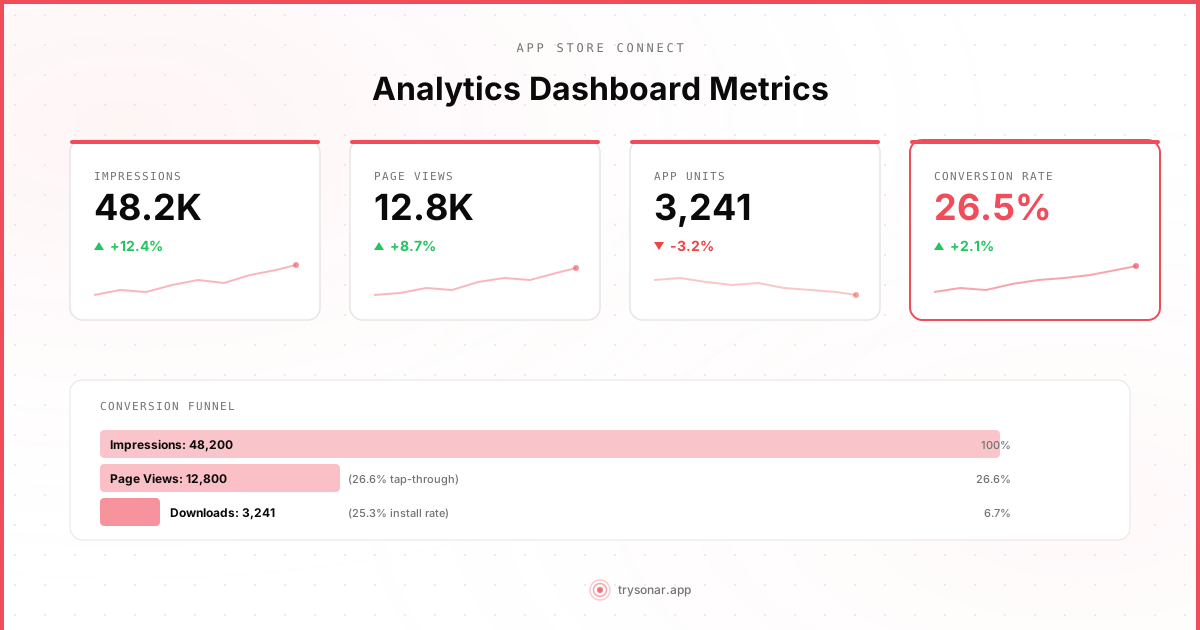
An impression is counted every time your app's icon, name, or preview appears on screen in the App Store. This includes search results, the Today tab, category listings, editorial features, and "You Might Also Like" sections.
On the surface, impressions look like a reach metric — how many people saw your app. In practice, the number is less useful than it appears.
The problem is that impressions are aggregated across all contexts. If your app appears in a search result for "weather" and separately in a "You Might Also Like" section under a competitor, both count as impressions. You can't tell which search query generated which impressions.
A sudden increase could be great news (your app started ranking for a high-volume keyword) or meaningless (Apple started showing your app in more "related apps" carousels where nobody taps). Without keyword-level attribution, you're guessing.
What impressions are good for: Tracking macro trends. If impressions are steadily growing month over month, something is working — your ASO changes, a seasonal trend, or improved rankings. If they're declining, something changed and you need to investigate.
What they're not good for: Diagnosing specific ASO changes. You updated your subtitle and impressions went up? Maybe. Or maybe an unrelated editorial feature drove the increase. You can't isolate the cause from this metric alone.
Product Page Views
A product page view is counted when someone taps on your app and lands on your full product page. This is the step between seeing your app in a list and deciding to download it.
The ratio of product page views to impressions tells you how compelling your listing looks in search results and browse contexts. A low ratio means people see your app but aren't interested enough to tap — your icon, name, subtitle, or first screenshot isn't doing its job.
Apple breaks product page views into "unique device" and "total" counts. The unique count is more useful for understanding actual user interest, since the total count can be inflated by the same person viewing your page multiple times.
Practical use: If you change your app icon or first screenshot and product page views increase relative to impressions, you have evidence the change worked. This is one of the few A/B tests you can run indirectly through App Store Connect data, though Apple also offers official product page optimization tests.
App Units (Downloads)
App Units represent the number of first-time downloads of your app. Re-downloads by users who previously installed your app are not counted. This is an important distinction — if someone deletes your app and reinstalls it, that doesn't register as a new app unit.
For paid apps, app units directly represent revenue. For free apps (which is most indie apps), app units represent the top of your monetization funnel.
App units are the metric most developers fixate on, but in isolation they don't tell you much. A hundred downloads from a well-targeted keyword are more valuable than a thousand from users who churn in 24 hours. App Store Connect gives you the count but no context about user quality.
One thing to watch: Compare app units to product page views to get your product page conversion rate. If people are landing on your page but not downloading, your screenshots, description, reviews, or price might be turning them away.
Conversion Rate
App Store Connect shows conversion rate as the percentage of product page viewers who downloaded your app. This is arguably the most actionable metric in the entire dashboard.
A typical conversion rate for a free app ranges from 20% to 40%, depending on category and competition. For detailed benchmarks, see our app store conversion rate guide. Paid apps tend to convert lower — 2% to 8% is common. If your conversion rate is significantly below these ranges, your product page has a problem.
The main levers that affect conversion rate:
- Screenshots and app previews. This is the single biggest factor. Users make snap decisions based on your first two screenshots. If they don't immediately communicate what your app does and why it's good, people bounce.
- Ratings and reviews. Apps below 4.0 stars see measurably lower conversion rates. See our guide on how to get more reviews. A handful of negative reviews at the top of your review section can tank conversions even if your overall rating is fine.
- App size. Apps over 200MB require Wi-Fi to download, which creates friction. This matters more than most developers realize.
- Price. Obvious, but worth stating. Free with in-app purchases converts significantly better than upfront paid, even at $0.99.
The limitation: App Store Connect shows you one conversion rate across all traffic sources. But conversion rates vary dramatically by source. Users who searched for your exact app name convert at 70%+, while users who found you through a generic keyword might convert at 15%. The blended number hides these differences, making it hard to optimize for specific channels.
Sources: Where App Store Connect Analytics Says Your Traffic Comes From
App Store Connect breaks traffic into several sources. Understanding what each one means — and doesn't mean — is critical.
App Store Search
This is traffic from users who typed a query into the App Store search bar. For most apps, this is the largest source of organic traffic — Apple has stated that over 65% of all app downloads come through search.
Here's the frustrating part: App Store Connect tells you how many impressions and downloads came from search, but not which keywords drove that traffic. You know 500 people found your app through search last week, but not whether they searched "weather app," "rain forecast," or your app's name.
This is the single biggest gap in App Store Connect's analytics. Keyword-level data is essential for ASO — without it, you can't know which keywords drive downloads, which you're wasting effort on, or which opportunities you're missing. This is the primary reason ASO tools exist.
App Store Browse
Browse traffic comes from users who discovered your app through non-search surfaces — the Today tab, category charts, "You Might Also Like" recommendations, and curated lists.
Browse traffic tends to be spikier and less controllable than search traffic. If Apple features your app in the Today tab, you'll see a massive spike that has nothing to do with your ASO efforts. Conversely, browse traffic can drop for no apparent reason as Apple's algorithms shift.
For indie developers, browse traffic is nice when it happens but shouldn't be part of your growth strategy. You can't reliably influence it.
Web Referral
Web referral traffic comes from links on websites, social media, and other web sources that lead to your App Store listing. This captures everything from Product Hunt listings to your own website's download buttons. It's one of the few sources you have direct control over.
App Referral
App referral traffic comes from links within other apps. This includes cross-promotion from your own apps, referral programs, or third-party apps that link to yours. If you run a portfolio of apps — common among indie developers — cross-promotion between your own apps shows up here.
Retention
App Store Connect provides day-1, day-7, and day-28 retention metrics, showing what percentage of users who downloaded your app returned to it on those days.
Retention data is critical because it tells you whether you're acquiring the right users and whether your app delivers on the promise your listing makes. High downloads with poor retention usually means one of two things: your marketing is reaching the wrong audience, or your app's onboarding experience isn't good enough.
Typical retention benchmarks vary widely by category, but as rough guideposts: day-1 retention above 25% is decent for most utility apps, and day-28 above 8% is reasonable. Social and habit-forming apps should aim higher.
The limitation: Retention data has a significant lag — it takes days to populate, and you can't slice it by acquisition source. Users acquired through search might retain completely differently from those acquired through browse, but you see them blended together.
What App Store Connect Analytics Doesn't Show You
The gaps are well-documented but worth restating, because they define where you need supplementary tools:
No keyword-level data. You cannot see which keywords drive your impressions, product page views, or downloads. Understanding keyword rank tracking fills this gap. You know search is your biggest channel, but you're blind to which terms matter. This is the gap that matters most for ASO.
No competitor data. You can see your own metrics, but you have zero visibility into competitor download numbers, keyword rankings, or conversion rates. Competitor keyword analysis tools fill this gap. You're optimizing in a vacuum.
No keyword rankings. App Store Connect doesn't tell you where you rank for any keyword. You might be position 3 for your most important keyword or position 150 — you'd never know from Apple's dashboard alone.
Limited historical data. Apple retains analytics data for a rolling window. You can't easily look back years to understand long-term trends or seasonal patterns.
No real-time data. Most metrics update daily with a 24-48 hour delay. If you push a metadata update and want to see its impact, you're waiting at minimum two days for directional data and a week or more for statistically meaningful trends.
Blended metrics. Almost everything is aggregated across all traffic sources and all keywords. This makes it difficult to attribute changes in performance to specific actions you took.
Where ASO Tools Fit In
App Store Connect tells you what happened at a high level. ASO tools tell you why it happened and what to do about it.
The core value of an ASO tool is keyword-level visibility: which keywords you rank for, where you rank, how that rank changes over time, and how much traffic each keyword drives. This is the data Apple doesn't provide.
Good ASO tools also give you competitor intelligence — what keywords your competitors rank for, how their rankings change, and where there are gaps you can exploit. Combined with App Store Connect's conversion rate data, this gives you a complete picture: ASO tools drive the right traffic, App Store Connect measures whether it converts.
A tool like Sonar is built for indie developers who need keyword-level data without the enterprise price tag. Keyword rank tracking, difficulty scoring, and competitor analysis fill exactly the gaps that App Store Connect leaves open.
Making the Data Work Together
The practical workflow looks like this:
- Use App Store Connect to monitor overall trends — impressions, conversion rate, retention. These are your outcome metrics.
- Use an ASO tool to track keyword rankings and identify opportunities. These are your input metrics — the levers you can pull.
- When you make a change (update subtitle, add keywords, refresh screenshots), check both. The ASO tool shows whether your rankings moved. App Store Connect shows whether that ranking change translated to more impressions and downloads.
- Watch conversion rate closely. If rankings improve but conversion drops, you might be ranking for keywords where user intent doesn't match your app. Adjust your keyword strategy or your product page accordingly.
- Check sources periodically. A healthy app gets most organic traffic from search. If browse is your dominant source, your rankings may be weaker than you think and you're relying on algorithmic placement that could disappear.
App Store Connect analytics is a useful baseline, but it was designed as a reporting tool, not an optimization tool. Understanding what each metric actually means — and what's missing — is the first step toward making data-driven ASO decisions instead of guessing.