Most Apps Fail at Discovery, Not Quality
You built something good. Your code is solid, the UI is clean, and the beta testers love it. Then you launch, and nothing happens. No downloads, no rankings, no visibility.
According to industry estimates, roughly 70% of apps get fewer than 1,000 downloads in their first month. Not because the apps are bad, but because the developers treated ASO as an afterthought — something to figure out after launch day. That's backwards. Your app store optimization checklist should start weeks before you submit your binary.
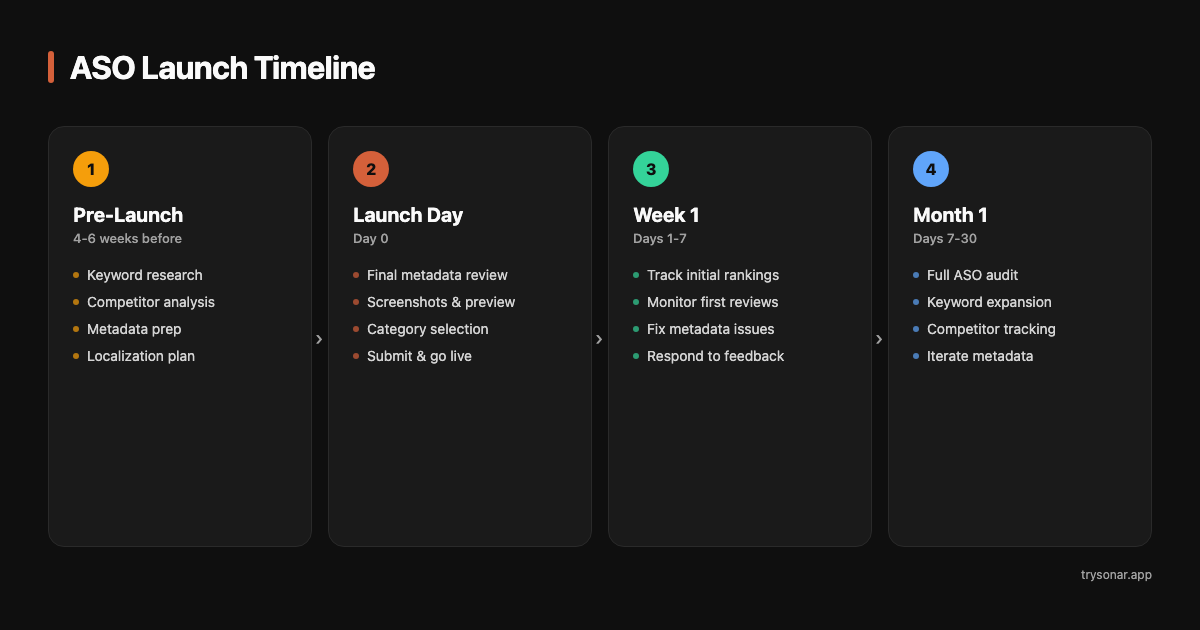
Pre-Launch: 4-6 Weeks Before Submit
This is where most of your ASO work happens. Launch day itself is mostly execution — the strategy happens now.
Keyword Research
Start with 40-50 candidate keywords. You'll narrow this down to 20-30, but you need a wide funnel to find the good ones.
Where to find keywords:
- Autocomplete suggestions. Open the App Store or Google Play and type the first 2-3 letters of terms related to your app. Every suggestion is a real query with real volume. If you're building a habit tracker, type "hab," "track," "daily," "streak," "rout" — and write down every suggestion.
- Competitor titles and subtitles. Find the top 5 apps in your space. What keywords do they use in their titles? These are proven, high-value terms that someone already validated.
- Synonyms and adjacent terms. Users search in different ways. "Focus timer" and "pomodoro app" describe the same thing. "Recipe organizer" and "meal planner" overlap. Cover the variations.
- Category keywords. What would someone search to find any app in your category? These are broader but can drive discovery.
Score every keyword on two dimensions:
- Search Popularity — how many people search for this term
- Keyword Difficulty — how strong the competition is in the top 10 results
For a new indie app, the sweet spot is SP 35-55 with difficulty under 35. These keywords have enough volume to drive real downloads (2,300-7,600 daily impressions on iOS) while being achievable with good metadata and a modest review count.
Don't target "photo editor" (difficulty 90). Do target "batch photo resize" (difficulty 20). You can check difficulty scores for any keyword at trysonar.app/tools/keyword-generator. See our complete keyword research guide for the full workflow.
Competitive Analysis
Before you write a single character of metadata, know who you're competing against.
- Search for it in the store and note the top 5 results
- How many reviews do they have? What are their ratings?
- Do they have the keyword in their title?
- When were they last updated?
This tells you what you're up against. If every top result for "habit tracker" has 50K+ reviews and a 4.8 rating, you need to target longer-tail variants like "simple habit tracker" or "daily habit journal" instead.
Look for keywords where the top results are a mix of indie apps and larger players, especially where some top apps haven't been updated in over a year. Stale competitors are the best competitors.
Metadata Preparation
This is the most important pre-launch task. Your metadata determines which searches your app appears in.
Here's what you're working with on each platform:
| Field | iOS | Android |
|---|---|---|
| Title | 30 characters, highest ranking weight | 30 characters, highest ranking weight |
| Subtitle / Short Description | 30 characters (subtitle), indexed | 80 characters (short description), indexed |
| Hidden Keyword Field | 100 characters, indexed, invisible to users | Does not exist |
| Long Description | Not indexed for search | 4,000 characters, indexed for search |
| Total indexed characters | ~160 | ~4,110 |
The strategic difference is clear: iOS gives you limited but precise keyword slots. Google Play gives you much more space but requires you to weave keywords into readable text. For a detailed comparison, see iOS vs Google Play ASO.
For iOS, assign keywords to fields in priority order:
- Title: Your brand name + your single best keyword. Example:
FocusFlow - Pomodoro Timer - Subtitle: Your second-best keyword, with zero word overlap with the title. Example:
Study Sessions & Focus Music - Keyword field: All remaining keywords, comma-separated, no spaces. Don't repeat any word from title or subtitle — Apple deduplicates across fields, so repetition wastes characters.
For Google Play:
- Title: Same strategy — brand + primary keyword
- Short description: 2-3 secondary keywords in a readable sentence
- Long description: Weave target keywords naturally throughout. Aim for 3-5 mentions of your primary keyword across 4,000 characters. Front-load the first two sentences with your most important terms.
Write your metadata drafts now, not on launch day. Let them sit for a few days and revisit. You'll almost always find ways to fit more keywords or improve readability. For a deep dive on metadata fields, see our metadata optimization guide.
Localization Priorities
You don't need to localize into 40 languages on day one. But you should localize your metadata (not your app) for high-value markets beyond your primary language.
- Spanish (US Hispanic market + Latin America + Spain)
- Portuguese (Brazil — huge App Store market)
- German and French (large European markets with strong App Store spend)
- Japanese (high revenue per user)
Metadata localization means translating your title, subtitle, keyword field (iOS), and description. For example, if you're launching a focus timer app, you'd target "minuteur concentration" for the French App Store and "temporizador de enfoque" for the Spanish one — these are the actual search terms users type in those markets. It's a few hundred words per language — worth the effort for the search visibility it unlocks.
Launch Day Checklist
You've done the hard work. Launch day is about executing cleanly.
Final Metadata Review
- No repeated words across iOS fields
- No spaces after commas in the keyword field
- All 30 characters used in title and subtitle
- All 100 characters used in the keyword field
- Your Google Play description mentions primary keywords 3-5 times naturally
Screenshots and App Preview
Screenshots are your conversion lever. Users who land on your listing from a search decide whether to download based on your icon, rating, and screenshots — in that order.
- First screenshot is everything. Most users never scroll. Make it show your app's core value proposition clearly.
- Show the real app UI with brief captions explaining the benefit, not just the feature. "Track your streaks" is better than "Calendar view."
- 5-6 portrait screenshots is the standard. If your app has a landscape mode, include 1-2 landscape shots.
- If you have an app preview video, keep it under 30 seconds and show the core workflow. Don't waste time on logo animations.
Category Selection
Pick the category that best describes your app, not the one with the least competition. Apple and Google both use your category for browse recommendations, and miscategorization hurts more than it helps.
If your app genuinely fits two categories (e.g., a meditation app could be Health & Fitness or Lifestyle), check which category has a more favorable top charts landscape for a new app. The secondary category on iOS gives you a second chance at chart placement.
App Store Connect / Google Play Console Settings
The settings that matter for ASO:
- Pricing: Set your price or in-app purchase model. Free apps get more downloads but need monetization elsewhere.
- Age rating: Complete the questionnaire accurately. A wrong age rating can restrict your app from appearing in certain searches.
- Privacy policy URL: Required for both stores. Don't skip it — missing it can delay review.
- App Review notes (iOS): If your app requires a login, provide test credentials. Rejected reviews delay your launch and kill momentum.
- Content rating (Google Play): Complete the IARC questionnaire. Your app won't be published without it.
- Release type: Consider a phased rollout on Google Play if you're nervous about stability. On iOS, you can choose manual release after approval to time your launch.
Week 1 Post-Launch
Your app is live. Now the real work starts.
Track Initial Rankings
Within 24-48 hours of your metadata going live, search for your target keywords manually. Can you find your app? Note your position for each keyword — this is your baseline.
Set up daily rank tracking for your top 15-20 keywords. You need data to know what's working. Without it, you're guessing.
- Appearing at all — if you're not indexed for a keyword, check that it's actually in your metadata
- Position 20-50 — normal for a new app with no reviews. This will improve as quality signals build.
- Position 1-10 for any keyword — great sign. This keyword has low enough difficulty that your metadata alone got you there. Consider it a keeper.
Monitor Reviews
Your first reviews disproportionately affect your ranking trajectory. A 4.5+ average from your first 10-20 reviews sends strong quality signals. A 3.5 average does real damage.
- Don't trigger review prompts in the first 24 hours. Let users experience your app first.
- When you do trigger them, use
SKStoreReviewController(iOS) or Google's In-App Review API — not custom dialogs. Native prompts have higher completion rates. - Time the prompt after a positive moment: completing a task, hitting a streak, finishing a level.
- Respond to every negative review. A thoughtful response shows users (and the algorithm) that the app is actively maintained.
Identify Quick Wins
Some keywords will surprise you. You might rank #12 for a keyword you didn't prioritize, or #3 for a long-tail term you almost cut from your keyword field. These are signals.
If you're ranking well for a keyword that's currently only in your keyword field, consider promoting it to your subtitle in your next update. Moving a keyword from the keyword field to the subtitle gives it a ranking boost.
Month 1 Post-Launch
You now have 4 weeks of ranking data. Time for your first real optimization cycle.
Full ASO Audit
Review your entire keyword strategy against actual performance:
- Which keywords are you ranking for? Keep and protect these.
- Which keywords show no ranking at all? Either difficulty is too high or there's a metadata issue. Investigate each one.
- Which keywords are trending up vs. down? Upward trends mean your quality signals are working. Downward trends may indicate new competitors.
Run a free ASO audit at trysonar.app/tools/aso-score to get a structured view of where your metadata has gaps. Our ASO audit guide walks through each category step by step.
Keyword Expansion
Your initial keyword list was your best guess. Now you have data. Expand by:
- Mining autocomplete again — new suggestions may have appeared based on seasonal trends or new search patterns. Check keyword difficulty pages like expense tracker or daily planner to see if competitive landscapes have shifted
- Checking what keywords competitors added — did any competitor in your space update their metadata recently?
- Looking at gap keywords — terms your competitors rank for that you don't. These are proven keywords in your niche that you may have missed.
Swap underperforming keywords (no ranking movement after 4 weeks) for new candidates. Your keyword field has limited space — every slot should be earning its keep.
Competitor Tracking Setup
By now, you should know who your real competitors are — not who you thought they'd be, but who actually shows up next to you in search results.
- What keywords are they ranking for?
- What are their ratings and review trends?
- When do they update their metadata?
Competitor monitoring isn't about copying — it's about finding opportunities they've missed and defending keywords they're targeting.
Plan Your First Metadata Update
Based on everything above, draft your updated metadata. Wait until you have at least 3-4 weeks of ranking data before making changes — anything sooner and you won't know what was working.
- Promote any keyword that's ranking well from a lower-priority field to a higher-priority one
- Drop keywords with zero ranking movement after 4 weeks
- Add 3-5 new keywords from your expansion research
- Keep your title keyword stable unless you have a clear reason to change it (title changes can temporarily disrupt rankings)
Submit the update and start the tracking cycle again. This is your ASO rhythm going forward: track, analyze, update, repeat — every 4-6 weeks.
The Checklist, Summarized
- Build a keyword list of 40-50 candidates
- Score each for popularity and difficulty
- Analyze top 10 results for your target keywords
- Write metadata for iOS and Android separately
- Localize metadata for 3-5 top markets
- Prepare screenshots with benefit-focused captions
- Final metadata review — no wasted characters, no repeated words
- Screenshots uploaded, app preview video ready
- Category selected, pricing set, privacy policy linked
- Release submitted with review notes and test credentials
- Search for your app manually on target keywords
- Set up daily rank tracking for top 15-20 keywords
- Monitor first reviews and respond to negatives
- Identify surprise rankings for quick-win optimization
- Full keyword performance review
- Swap underperforming keywords for new candidates
- Set up competitor tracking for 3-5 apps
- Submit first metadata update
ASO isn't a launch-day task. It's a continuous process that starts before you ship and runs as long as your app is in the store. The developers who treat it that way are the ones whose apps get found.