
Most indie developers spend weeks building their app and five minutes picking keywords. Those five minutes determine whether anyone finds it. The difference between a keyword with difficulty 20 and difficulty 60 can be the difference between page one and page nowhere — even if your app is better than everything above it.
This is the definitive deep-dive on app store keyword research: methodology, metrics, tools, and workflows for both iOS and Google Play. For a broader overview of ASO strategy, see our indie developer's guide to ASO. This article focuses exclusively on keyword research in depth.
How App Store Search Actually Works
Before researching keywords, you need to understand what each store actually indexes.
iOS App Store
Apple indexes three metadata fields for search ranking:
- App Name (30 characters) — the most heavily weighted field
- Subtitle (30 characters) — second most important
- Keyword Field (100 characters) — hidden from users, visible only to the algorithm
Your app description is not indexed for search on iOS. You can write whatever you want in it — Apple won't use it to determine which searches your app appears in. This is the single biggest difference from Google Play, and many developers waste time optimizing iOS descriptions for keywords that will never be read by the algorithm.
Apple also combines keywords across fields. If your title contains "focus" and your keyword field contains "music," you can rank for "focus music" without that phrase appearing anywhere as a unit. This combination effect makes the 100-character keyword field extremely powerful.
Google Play
Google Play works more like web search. It indexes:
- App Title (30 characters) — strongest signal, same as iOS
- Short Description (80 characters) — heavily weighted
- Full Description (4,000 characters) — indexed for search, making keyword density a real factor
Because Google indexes the full description, Play Store ASO has more surface area for keywords but also more room to get it wrong. Google's algorithms detect keyword stuffing, and unnatural repetition can hurt your ranking rather than help it.
Ranking Signals Beyond Keywords
On both stores, metadata gets you into search results, but other factors determine where you rank:
- Download velocity — how many installs you're getting per day relative to competitors
- Ratings and review count — apps with higher ratings and more reviews rank better
- Retention and engagement — both stores factor in whether users keep using your app after installing
- Conversion rate — if users see your listing in search results but don't install, your ranking drops over time
Keywords open the door. Everything else determines how far you get through it.
The Three Metrics That Matter
Every keyword can be evaluated on three dimensions. Get these right and the rest of keyword research follows logically.
Search Popularity / Volume
Search popularity measures how often users search for a keyword. On iOS, this comes from Apple's Search Popularity (SP) score — a relative number from 5 to 100 available through the Apple Search Ads API. The relationship is exponential: each 10-point increase roughly doubles search volume. An SP 40 keyword generates about 2,800 daily impressions. An SP 60 keyword generates about 10,000.
For Google Play, there's no official keyword volume metric. The best proxy is the Google Ads Keyword Planner, which provides web search volume. App-specific volume is harder to pin down, so most ASO tools estimate it from autocomplete signals and ranking positions.
The key constraint: since October 2025, Apple only returns SP data for keywords scoring 35 or above. For lower-volume terms, autocomplete priority (0-10,000 scale) is the best free proxy.
Keyword Difficulty
Difficulty estimates how hard it is to rank in the top results for a keyword. (For an in-depth look at how this metric works, see keyword difficulty explained.) It's driven primarily by the strength of apps currently ranking for that term — their install counts, review counts, ratings, and how deliberately they're targeting the keyword in their titles.
A difficulty of 20 means the top 10 is mostly indie apps with hundreds of reviews. A difficulty of 70 means you're competing against apps with millions of installs.
We calculate difficulty using a geometric mean of competitor strength scores, which prevents a single dominant app from inflating the score for an otherwise accessible keyword. Title match ratio — how many top-10 apps use the keyword in their name — is a strong secondary signal.
Opportunity
Opportunity is where volume and difficulty intersect. The formula is simple: high search volume + low difficulty = high opportunity.
You can formalize this as opportunity = volume - difficulty or use a ratio, but the concept matters more than the math. A keyword with SP 45 and difficulty 25 is worth far more than one with SP 75 and difficulty 80. You'll never rank for the latter. You can realistically reach the top 5 for the former.
The sweet spot for indie apps: SP 35-55 with difficulty under 35. These keywords have enough volume to drive meaningful downloads while being achievable with a few hundred reviews and well-optimized metadata.
Six Sources of Keyword Ideas
Generating a strong initial keyword list is the foundation of the entire process. Here are the six most reliable sources, roughly in order of usefulness.
1. App Store Autocomplete
Type the first few letters of a keyword into the App Store or Play Store search bar and the store suggests completions. These aren't random — they represent real user queries with meaningful search volume.
For a habit tracker app, typing "habit" might surface: "habit tracker," "habit tracker daily," "habit builder," "habit streak," "habit journal." Each of these is a confirmed user search term.
Go beyond the obvious. Try typing partial phrases like "track my," "daily," or "simple" followed by your category. You'll discover keyword combinations you wouldn't have thought of. Sonar's keyword suggestions tool automates this, pulling autocomplete data for both stores at scale.
2. Competitor Metadata Analysis
Find 5-10 apps similar to yours and examine their titles, subtitles, and descriptions. What keywords are they targeting? Which keywords are they ranking for that you're not?
This is especially valuable because competitors have already done research for you. If three competing recipe apps all include "meal planner" in their metadata, that's a strong signal that "meal planner" has volume worth pursuing.
The gap analysis angle is even more powerful: find keywords where competitors rank but you don't. These represent proven opportunities you're currently missing.
3. Apple Search Ads Keyword Suggestions
If you have an Apple Search Ads account (free to create), the Ads platform will suggest related keywords when you set up a campaign. These suggestions come from Apple's own data on what users search for, making them higher quality than most third-party sources.
You don't need to run any ads. Just create a campaign, add your app, and look at the suggested keywords. Apple will show you volume estimates alongside each suggestion.
4. User Reviews
Read your reviews and your competitors' reviews. Pay attention to the language users use to describe features and problems. If users keep writing "I needed a simple budget tracker" in reviews of competing apps, "simple budget tracker" is a keyword worth investigating.
Review mining catches keywords that pure data tools miss — especially conversational, long-tail phrases that match how real people search.
5. Category and Related App Browsing
Browse the top charts in your category. Look at the top 50 apps and note what keywords appear repeatedly in titles and subtitles. These represent the established keyword landscape for your category.
Also check the "You Might Also Like" section on competitor listings. The apps Apple and Google suggest as related often target adjacent keywords that could work for your app too.
6. Google Trends and Web Search Data
Web search data isn't a direct proxy for app store search, but it reveals trends and seasonal patterns. Google Trends can show you whether "focus timer" is gaining or losing interest over time, and whether "pomodoro timer" spikes during certain months (it does — September and January, when students start new semesters and people set New Year's resolutions).
Use web data for direction, not precise volume.
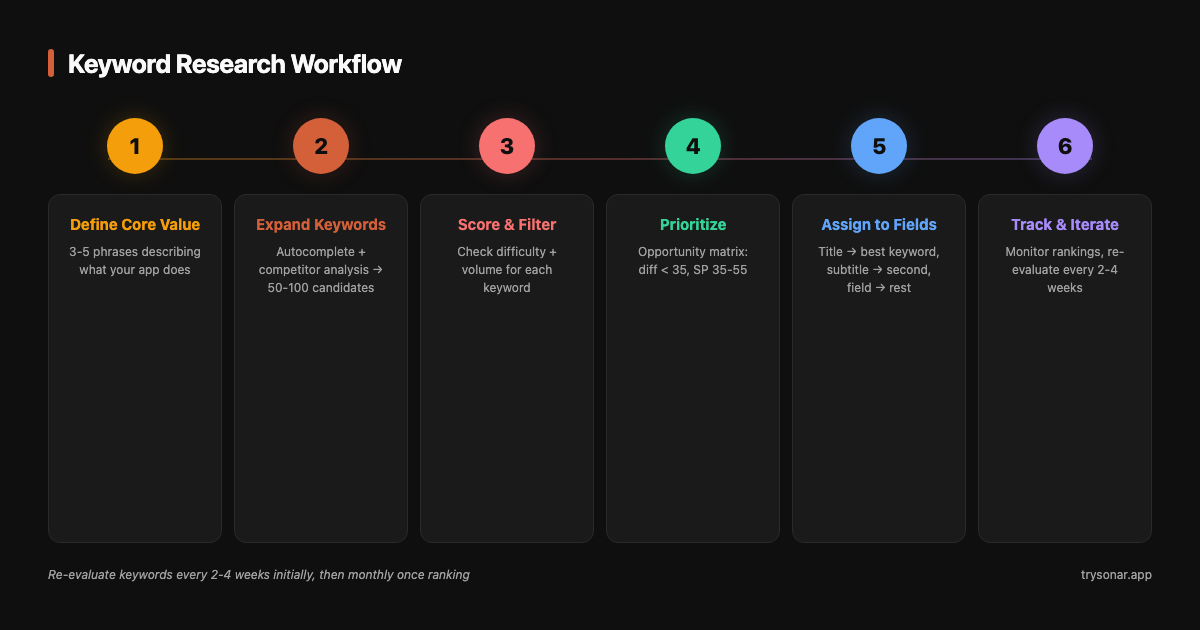
The Keyword Research Workflow
Here's the step-by-step process from blank slate to optimized metadata.
Step 1: Define Your App's Core Value in 3-5 Phrases
Before touching any tool, write down 3-5 phrases that describe exactly what your app does in the language a user would use. Not marketing language — search language.
For a focus timer app: "focus timer," "pomodoro timer," "productivity timer," "distraction blocker," "study timer."
For a recipe organizer: "recipe organizer," "meal planner," "recipe saver," "cookbook app," "recipe manager." You can check how hard it is to rank for calorie counter to understand the competitive landscape in the food category.
These are your seed keywords. Everything else builds from here.
Step 2: Expand With Autocomplete and Competitor Analysis
Take each seed keyword and expand it using the six sources above. Aim for 50-100 candidate keywords. At this stage, cast a wide net. Include long-tail variations ("simple habit tracker for students"), category-adjacent terms ("daily journal" for a habit tracker), and feature-specific phrases ("habit streak counter").
Don't filter yet. The goal is volume of candidates, not quality. Quality comes in the next step.
Step 3: Score Each Keyword on Difficulty and Volume
For every candidate keyword, get two data points: search popularity (or estimated volume) and difficulty. You can do this manually through Apple Search Ads, or use Sonar's keyword research to score your entire list at once.
Drop anything that fails the relevance test — if a user searching for that keyword would be confused to find your app, remove it regardless of the numbers.
Step 4: Prioritize Using the Opportunity Matrix
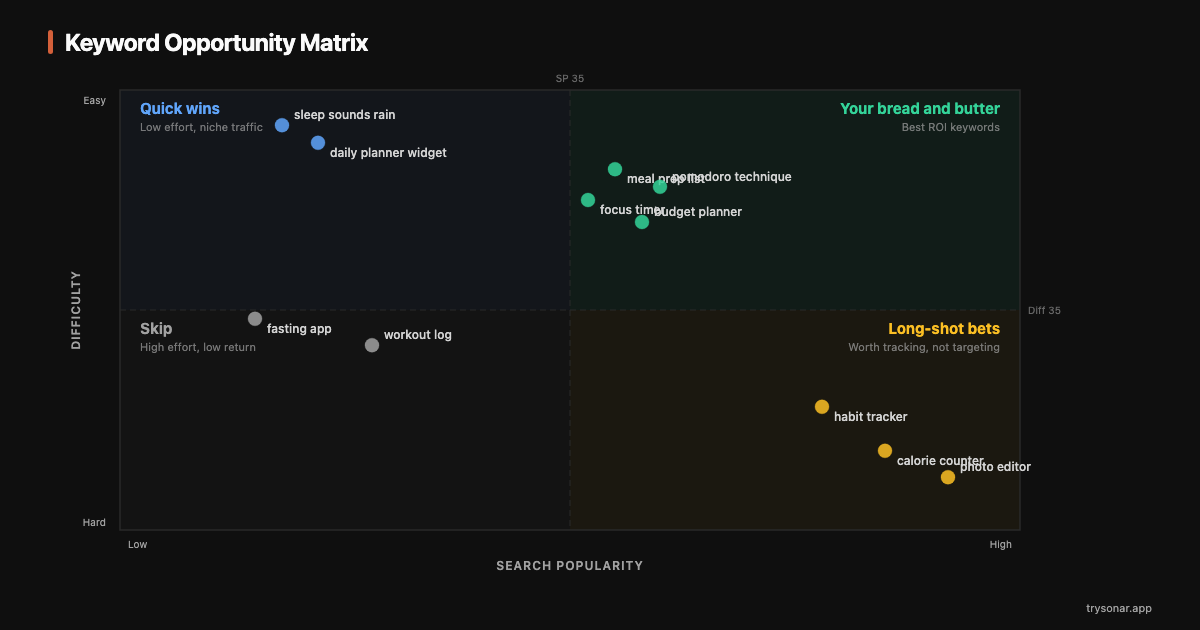
Plot your keywords on two axes: volume (vertical) and difficulty (horizontal). This creates four quadrants:
| Low Difficulty | High Difficulty | |
|---|---|---|
| High Volume | Your bread and butter — pursue aggressively | Long-shot bets — target only if you're already established |
| Low Volume | Quick wins — good for filling keyword field slots | Skip — low reward, high effort |
Your primary keywords (for title and subtitle) should come from the top-left quadrant: high volume, low difficulty. Our low-competition keywords guide covers five strategies for finding these opportunities. Here's what that looks like for a focus timer app:
| Keyword | SP Score | Difficulty | Opportunity |
|---|---|---|---|
| focus timer | 49 | 52 | Low (too competitive) |
| pomodoro timer | 46 | 45 | Low-Medium |
| pomodoro technique | 42 | 28 | High |
| deep work app | 38 | 19 | High |
| concentration timer | 37 | 21 | High |
| study timer | 44 | 34 | Medium-High |
| work focus app | 36 | 17 | High |
| productivity timer | 41 | 32 | Medium-High |
| distraction blocker | 39 | 30 | Medium-High |
| focus music timer | 35 | 15 | High |
"Focus timer" has the highest volume but also the highest difficulty — a new app won't crack the top 10. "Deep work app," "concentration timer," "work focus app," and "pomodoro technique" are the better targets: solid volume with achievable difficulty. Check the focus timer keyword difficulty and pomodoro timer keyword difficulty pages for full competitive breakdowns.
Step 5: Assign Keywords to Metadata Fields
Now distribute your prioritized keywords across your metadata:
- Title: Your brand + best opportunity keyword. Example:
DeepFlow - Focus Timer - Subtitle: Second-best keyword, no word overlap with title. Example:
Pomodoro & Deep Work Sessions - Keyword field: Remaining keywords, comma-separated, no spaces, singular forms, no words already used in title or subtitle. Example:
study,concentration,productivity,distraction,blocker,music,technique,break,interval,task,schedule,habit,routine,zen,calm,silent,clock,countdown
- Title: Same as iOS — brand + primary keyword
- Short description: A natural sentence including 2-3 secondary keywords. Example:
Stay focused with pomodoro sessions, deep work timers, and distraction blocking. - Long description: Weave remaining keywords naturally throughout. Mention primary keywords 3-5 times across 4,000 characters.
Step 6: Track Rankings and Iterate
Submit your updated metadata and wait 1-2 weeks for rankings to stabilize. Then check where you're appearing for each target keyword using rank tracking.
Keywords where you're not ranking after two update cycles should be re-evaluated. Either the difficulty is too high, or the keyword isn't well-supported by your metadata structure.
iOS-Specific Tips
The 100-character keyword field is unique to iOS and it's the most underutilized tool in ASO. Here's how to maximize it:
- Comma-separated, no spaces after commas (
timer,clock,alarmnottimer, clock, alarm) - Singular forms only — Apple handles pluralization automatically
- Don't repeat any word from your title or subtitle — Apple deduplicates across all three fields
- Don't include your app name, category name, or the word "app"
Combination strategy: Every word in your keyword field can combine with every word in your title and subtitle. If your title contains "focus timer" and your keyword field includes "study,work,session,break," you can rank for "focus study," "work timer," "study session," "break timer," and dozens of other combinations. Think of the keyword field as a multiplier, not a list.
Character optimization: Strip unnecessary words. "Meditation timer for sleep" in the keyword field should be just meditation,sleep (assuming "timer" is already in your title). That saves 20 characters for additional keywords.
Update cadence: Apple allows metadata updates with every app version. You can also update keywords without a new binary by submitting a metadata-only update. Test new keywords in batches — change 20-30% of your keyword field each cycle and measure the impact.
Google Play-Specific Tips
Google Play's algorithm is closer to web search, which creates different optimization dynamics:
Description keyword density matters, but subtly. Include your primary keyword 3-5 times across 4,000 characters. That's roughly once every 800-1,300 characters — natural for a well-written description. If you have to force a keyword in, you're overdoing it.
The short description punches above its weight. At 80 characters, the short description is more heavily weighted per character than the long description. Treat it like a meta description in web SEO — concise, keyword-rich, and readable.
Install count is a bigger ranking factor on Google Play than on iOS. Google makes install counts public and weights them heavily. This means new apps face a steeper climb on the Play Store for competitive keywords. Compensate by targeting lower-difficulty keywords initially and building install momentum.
Google reads your full description for semantic understanding. Unlike iOS where search is purely keyword-matching, Google uses NLP to understand what your app does. Writing natural, descriptive text about your features genuinely helps — Google can associate your app with related queries even if the exact keyword isn't in your metadata.
Common Mistakes
Targeting keywords that are too competitive. The most common mistake. A new habit tracker app targeting "habit tracker" (difficulty 55+) won't rank on page one. Target "simple daily habit tracker" or "habit streak counter" instead and work up from there.
Not using all available character space. Leaving 30 characters unused in the iOS keyword field is like leaving money on the table. Those characters could add 5-8 more searchable keywords. Every character should work for you.
Repeating keywords across iOS fields. If "timer" is in your title, putting "timer" in your keyword field wastes 5 characters. Apple already indexes it from your title. Use those characters for new keywords.
Ignoring localization opportunities. Your app's metadata can be localized for every market Apple and Google support. Even if your app is English-only, localizing metadata for Spanish, Portuguese, German, and French markets can significantly expand your reach. Many keywords have lower competition in non-English locales.
Researching once and never iterating. The keyword landscape changes constantly. New apps enter the market, search trends shift with seasons, and competitors update their metadata. A keyword strategy from six months ago is stale. Treat keyword research as an ongoing process, not a one-time task.
How Often to Update Your Keywords
First 8 weeks after launch: Re-evaluate keywords every 2 weeks. You're learning which keywords your app can realistically rank for and which are out of reach. Swap underperforming keywords aggressively during this period.
Months 2-6: Shift to monthly reviews. At this point, you should have a stable set of primary keywords that you're ranking for. Monthly checks catch gradual ranking changes and identify new opportunities from competitor changes.
Ongoing: Once your keyword strategy is mature, monitor rankings monthly and do a full keyword research refresh every quarter. Major app updates are also a good time to revisit your keyword strategy from scratch — new features open up new keyword opportunities.
Seasonal adjustments: Some keywords have predictable volume spikes. "Tax calculator" surges in March-April. "Workout tracker" peaks in January. "Back to school" apps see spikes in August-September. Plan your metadata updates 2-3 weeks before these peaks to give the algorithm time to re-index.
The Workflow in Summary
- Write 3-5 seed phrases that describe your app in user language
- Expand to 50-100 candidates using autocomplete, competitors, reviews, and related apps
- Score every candidate on search volume and difficulty
- Prioritize keywords in the high-volume, low-difficulty quadrant
- Assign top keywords to title and subtitle, fill remaining slots with long-tail terms
- Track rankings, drop what doesn't work, test new keywords every 2-4 weeks
Keyword research isn't a launch checklist item — it's an ongoing discipline. The developers who consistently rank well are the ones who treat their keyword strategy as a living document, not a one-time optimization. For a practical guide to choosing the right app store keywords, start there next.