
Finding the right app store keywords is the highest-leverage thing you can do for organic growth. You can have the best meditation app on the store, but if your metadata targets "meditation" (difficulty 85) instead of "breathing timer for sleep" (difficulty 14), nobody will ever see it.
This article walks through the exact process I use for ASO keyword research: brainstorm, expand with autocomplete, analyze the competition, and prioritize. We'll use a hypothetical meditation app called "StillMind" as a worked example so every step has a concrete output.
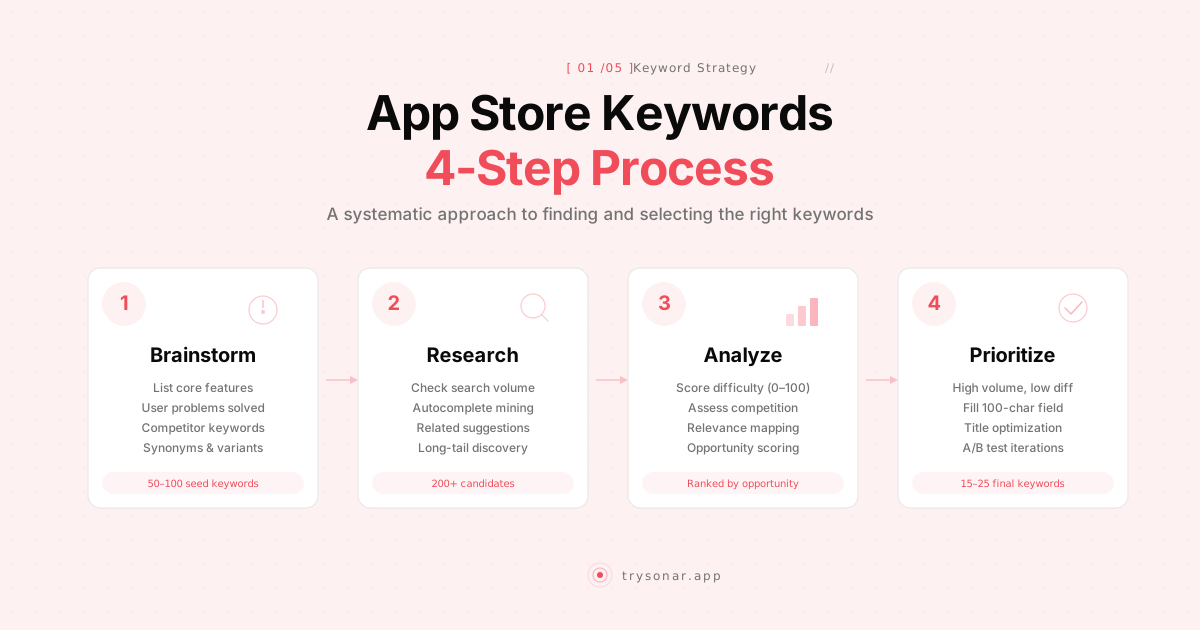
Step 1: Brainstorm Your Seed Keywords
Start with a raw list of terms a user might type when looking for an app like yours. Don't filter yet. The goal is quantity. Open a blank document and spend 15 minutes writing down every term you can think of.
For StillMind, our seed list might look like this:
- meditation
- meditate
- mindfulness
- breathing exercises
- calm
- sleep sounds
- guided meditation
- stress relief
- anxiety relief
- focus timer
- relaxation
- sleep meditation
- breathing timer
- daily meditation
- meditation timer
That's 15 seeds. Most developers stop here and pick the five that feel right. That's a mistake — proper app keyword research starts with seeds, not ends with them. These are inputs to the process, not outputs.
Where to Pull Seeds From
Your own vocabulary is the obvious starting point, but it's limited by your own perspective. Expand it with these sources:
- App store categories and subcategories. Browse the Health & Fitness and Lifestyle categories. Read the titles and subtitles of the top 50 apps. You'll find phrases you hadn't considered.
- Competitor app descriptions. Read the full descriptions of 5-10 competitors. Highlight every noun and verb phrase a user might search for.
- Reddit and forums. Search r/meditation, r/anxiety, and similar subreddits for how real people describe the problems your app solves. Users don't search for "cognitive behavioral therapy breathing exercise" — they search for "app to help me fall asleep."
- App reviews. Read 1-star and 5-star reviews of competing apps. Reviews contain exact user language: "I needed something for my panic attacks" translates to the seed keyword "panic attack app."
After this exercise, StillMind's seed list grows from 15 to 40+ terms. That's the volume you want before moving to step 2.
Step 2: Expand With Autocomplete
Autocomplete is the single most underrated source of app keyword research data. Both the App Store and Google Play suggest search completions based on real user queries. If a term shows up in autocomplete, people are searching for it.
The technique is systematic. Take each seed keyword and type it into the store's search bar, then append each letter of the alphabet:
- "meditation a" suggests: meditation app, meditation and sleep, meditation anxiety
- "meditation b" suggests: meditation breathing, meditation beginner, meditation bells
- "meditation s" suggests: meditation sleep, meditation sounds, meditation stress
Do this for your top 10-15 seeds. Yes, it's tedious. You'll generate 100-200 keyword candidates in about an hour. That hour will pay for itself many times over.
What to Look For
Pay attention to long-tail suggestions — phrases with three or more words. "Meditation" has a difficulty north of 80. "Meditation timer no music" might sit at 12. Long-tail keywords have less volume individually, but they convert better (the searcher knows exactly what they want) and they're far easier to rank for.
Also note unexpected angles. When I ran autocomplete for StillMind, "meditation for men" appeared — a niche I hadn't considered. That's a real keyword with real volume and very few apps targeting it directly.
After this step, StillMind has a working list of about 180 keyword candidates. Most of them won't make the cut, and that's fine. The next step is figuring out which ones are worth targeting.
Step 3: Check Competition and Volume
Now you need data on two things for each keyword: how many people search for it, and how hard it will be to rank.
Search Volume
On iOS, search volume comes from Apple's Search Popularity (SP) score — a number from 5 to 100 available through the Apple Search Ads API. The relationship is exponential: SP 30 means about 1,600 daily impressions; SP 60 means about 10,000. Since October 2025, Apple only reports keywords with SP 35 or above, so anything below that threshold needs to be estimated from autocomplete priority signals.
On Google Play, there's no official keyword volume metric. The best proxy is the Google Ads Keyword Planner, which gives web search volume. You can also look at autocomplete position — terms suggested earlier tend to have higher search volume.
Keyword Difficulty
Difficulty tells you how hard it is to break into the top 10 results for a given keyword. A good difficulty score accounts for:
- Title matches — how many of the current top 10 apps have the keyword in their title. More title matches means more intentional competition.
- Review counts and ratings — apps with 100K+ reviews are entrenched. Apps with 200 reviews are beatable.
- Install counts (Google Play only) — direct signal of competitive strength.
- Update recency — abandoned apps with old versions are weaker competitors.
You can check this manually by searching each keyword on the store and eyeballing the results. For 10 keywords, that's fine. For 180, you need an app store keyword tool.
Running the Numbers for StillMind
Here's what the data looks like for a subset of StillMind's keyword candidates:
| Keyword | Search Popularity | Difficulty | Opportunity |
|---|---|---|---|
| meditation app | 72 | 85 | Low |
| guided meditation | 58 | 62 | Low |
| meditation timer | 48 | 35 | Medium |
| breathing exercises | 52 | 42 | Medium |
| sleep tracker | 55 | 55 | Low |
| meditation for beginners | 42 | 22 | High |
| breathing timer | 38 | 18 | High |
| meditation no music | 35 | 12 | High |
| calm breathing | 40 | 28 | High |
| panic attack breathing | 36 | 15 | High |
The pattern is clear. The high-volume, obvious keywords ("meditation," "guided meditation") are dominated by apps with millions of downloads. The mid-tail and long-tail keywords have real volume and dramatically lower competition. "Meditation for beginners" at difficulty 22 is a keyword StillMind could realistically rank in the top 5 for within a few weeks.
Step 4: Analyze Competitor Keywords
Your competitors have already done keyword research — you might as well learn from it. Competitor keyword analysis reveals two things: which keywords are driving their downloads, and which keywords they're missing.
Finding Competitor Keywords
Pick 3-5 direct competitors. For StillMind, those might be Insight Timer, Simple Habit, and Oak Meditation. For each competitor, look at:
- Their app title and subtitle. Whatever keywords they put here, they've decided are their most important. Oak's subtitle is "Meditation & Breathing" — that tells you they're targeting both terms.
- Their keyword field (iOS only, not publicly visible). You can't see it directly, but you can infer it by searching for terms and checking if the competitor appears in results. If Oak shows up when you search "box breathing" but that phrase isn't in their title, subtitle, or description, it's in their keyword field.
- Keywords they rank for. An ASO tool like Sonar can show you every keyword a competitor ranks for and their position. This is the fastest way to build a competitor keyword map.
Gap Analysis
The real value is in the gap — keywords where competitors rank but you don't. Our guide on spying on competitor keywords covers the full process. If Insight Timer ranks #4 for "morning meditation routine" and StillMind doesn't rank at all, that's a keyword to evaluate.
Sort the gaps by opportunity: keywords where competitors rank, the difficulty is under 30, and the search popularity is above 35. These are proven keywords (real users search for them, real apps rank for them) that you haven't targeted yet. For a new or small app, this list is gold.
For StillMind, the competitor gap analysis turned up keywords I hadn't thought of:
| Keyword | Competitor Rank | SP | Difficulty |
|---|---|---|---|
| morning meditation routine | Insight Timer #4 | 41 | 24 |
| 5 minute meditation | Simple Habit #7 | 45 | 28 |
| box breathing app | Oak #2 | 38 | 16 |
| meditation bell timer | Insight Timer #9 | 36 | 14 |
| breathing exercise for anxiety | Oak #5 | 43 | 20 |
Every one of these has real volume and beatable difficulty. Without competitor analysis, I would have missed all of them.
Step 5: Prioritize and Allocate
You have a scored, filtered list of keyword candidates. Now you need to decide which ones go into your metadata — and where.
The Prioritization Framework
Rank every keyword by a simple opportunity score:
Opportunity = Search Popularity x (100 - Difficulty) / 100
This gives you a single number that balances volume against competition. A keyword with SP 45 and difficulty 20 scores 36. A keyword with SP 70 and difficulty 75 scores 17.5. The first keyword is the better target for an indie app despite having lower raw volume.
For StillMind, applying this formula to the full candidate list and sorting by opportunity score gives a clear top 15-20 keywords to target.
Allocating Keywords to Metadata Fields
On iOS, you have three fields:
- App Name (30 characters): Your most important keywords go here. For StillMind: "StillMind - Breathing Timer"
- Subtitle (30 characters): Second-tier keywords. "Meditation & Calm Exercises"
- Keyword Field (100 characters): Everything else, comma-separated, no spaces after commas, no duplicates of words already in your title or subtitle. Apple combines words across fields, so if "meditation" is in your title, you don't need it in your keyword field — use those characters for unique terms.
On Google Play, you have more room:
- Title (30 characters): Same strategy as iOS.
- Short Description (80 characters): Work in 2-3 keyword phrases naturally.
- Full Description (4,000 characters): Use your target keywords 3-5 times each, distributed naturally throughout the text. Google indexes this field and penalizes stuffing.
StillMind's Final Metadata (iOS)
| Field | Content | Keywords Covered |
|---|---|---|
| Title | StillMind - Breathing Timer | breathing timer, breathing |
| Subtitle | Meditation & Calm Exercises | meditation, calm, exercises |
| Keyword Field | sleep,anxiety,panic,box,morning,routine,focus,stress,relief,no music,guided,5 minute,bell,daily,simple,beginner | 16 additional keyword stems |
That keyword field is 99 characters — nearly maxed out. Every word combines with the title and subtitle words to cover dozens of search queries. "Meditation for beginner," "breathing exercises for anxiety," "calm meditation no music," "5 minute breathing" — all covered through Apple's keyword combination behavior.
Step 6: Track, Measure, and Iterate
App store keyword optimization is not a one-time task. Keywords shift in popularity. New competitors enter. Apple and Google adjust their algorithms. The apps that sustain organic growth are the ones that treat keyword research as an ongoing process.
What to Track
After you submit your keyword-optimized metadata, monitor three things weekly:
- Rank position for your target keywords. Are you climbing, stable, or dropping?
- Impressions (available in App Store Connect and Google Play Console). Did your search impressions increase after the metadata update?
- Conversion rate from impression to install. High impressions with low installs means you're ranking for keywords that don't match user intent — or your screenshots and description aren't compelling enough.
When to Update
Give your keywords 2-3 weeks to settle after a metadata change. Apple's algorithm needs time to index and rank you. If after three weeks a keyword hasn't moved you into the top 20, it might not be the right keyword for your app's current authority level — swap it for something with lower difficulty.
A good cadence is monthly keyword audits: check which keywords are performing, which aren't, and whether new opportunities have emerged. Each update is a chance to refine your keyword strategy based on real data rather than guesses.
Common Mistakes
A few patterns I see repeatedly:
Targeting only high-volume keywords. "Meditation" gets 50,000+ daily impressions. You will never rank for it as an indie developer. Target keywords in the SP 35-50 range with difficulty under 30. Browse our keyword difficulty pages to find realistic targets — compare metronome (niche, lower competition) with calculator app (broad, high competition).
Duplicating words across iOS metadata fields. If "meditation" is in your title, don't put it in your keyword field. Apple combines words automatically. That's wasted characters.
Ignoring Google Play's full description. Google indexes it. iOS doesn't. If you copy your iOS strategy to Android without using the description field for keywords, you're leaving rankings on the table. See our Android ASO guide for the Google Play-specific approach.
Researching once and forgetting. Keywords that were low-competition six months ago might not be today. New apps enter, popular apps shift their targeting. Keyword research is a recurring task, not a project.
Optimizing for keywords that don't match your app. If users search "meditation timer" and install your app expecting a timer but find a course library instead, they'll uninstall within a day. High uninstall rates hurt your ranking for every keyword, not just that one.
The Bottom Line
App store keyword optimization comes down to a repeatable process: brainstorm broadly, expand systematically with autocomplete, score every candidate on volume and difficulty, steal ideas from competitors, and allocate your best keywords to the metadata fields that matter most. Then do it again next month.
The indie developers who get this right aren't the ones with the best apps — they're the ones who treat ASO keyword research as a craft worth practicing. Start with the process outlined here, refine it based on what you learn from your own data, and your organic downloads will reflect the work.