ASO Meaning: The Short Version
ASO stands for App Store Optimization. It's the process of improving your app's visibility in the App Store and Google Play search results so more people find and download it without you paying for every install.
Think of it as SEO for apps. Where SEO optimizes web pages for Google Search, ASO optimizes your app listing for store search. The mechanics are different, but the core idea is the same: understand what people search for, then make sure your app shows up.
If you've ever launched an app and wondered why nobody found it despite it being genuinely useful — that's an ASO problem.
Why App Store Optimization Matters
Here's the number that should get your attention: 65-70% of app discoveries happen through store search. Not ads, not social media, not press coverage — people typing words into the search bar.
For indie developers running a portfolio of 3-5 small apps, this changes everything. You don't need any single app to be a hit. You need each app to capture a handful of keywords well enough to generate 10-50 downloads per day. ASO is what makes that math work without an ad budget.
Consider two apps that do exactly the same thing — track water intake. One has "Water Tracker" in the title and relevant keywords in the subtitle. The other is called "AquaLife" with a subtitle about "healthy living." The first app will get found by the 15,000+ people searching "water tracker" every month. The second won't.
The difference isn't quality. It's ASO.
The Numbers Behind Organic vs. Paid
Paid acquisition costs have been climbing steadily. Average cost-per-install numbers:
- iOS (US): $3.50-5.00 per install
- Android (US): $1.50-2.80 per install
- iOS gaming: $5.00-8.00+ per install
At those prices, spending $1,000 on ads gets you 200-650 installs. A well-optimized app listing can drive that many organic installs every month, indefinitely, for free.
This doesn't mean ads are useless — they're great for initial traction and testing demand. But organic search is the compounding channel. Every day your app ranks #3 for "expense tracker," you get downloads without spending another dollar.
How App Store Search Actually Works
Before you can optimize, you need to understand what you're optimizing for. The App Store and Google Play have different ranking algorithms, but they share the same fundamental inputs.
What Both Stores Care About
Textual relevance — Does your app's metadata match the search query? This includes your app name/title, subtitle (iOS) or short description (Android), keyword field (iOS only), and full description.
Download velocity — How many people download your app after searching for a keyword? Stores interpret downloads as a quality signal. More downloads for a given keyword = higher rank for that keyword.
Ratings and reviews — Apps with higher ratings and more reviews tend to rank better. A 4.6-star app with 500 reviews will generally outrank a 4.2-star app with 50 reviews, all else being equal.
Engagement and retention — Both stores factor in whether people actually use your app after downloading it. High uninstall rates hurt rankings.
Where iOS and Google Play Differ
The two stores look similar on the surface, but their ASO mechanics diverge in important ways:
| Factor | iOS App Store | Google Play |
|---|---|---|
| Keyword input | 100-char keyword field (hidden from users) | Full description is indexed (4,000 chars) |
| Title length | 30 characters | 30 characters |
| Subtitle / Short description | 30 characters (subtitle) | 80 characters (short description) |
| Description indexed? | No — description is NOT indexed for search | Yes — every word in the description can rank |
| Install counts visible? | No | Yes (approximate) |
| Algorithm weight | Heavier on keyword field + title | Heavier on description + title + backlinks |
The biggest practical difference: on iOS, your description doesn't affect search rankings at all. You have exactly 160 characters (title + subtitle + keyword field) to work with. Every character counts.
On Google Play, your full description is a ranking factor. This gives you far more room to include keyword variations, but it also means competitors can target more keywords simultaneously.
The Five Pillars of ASO
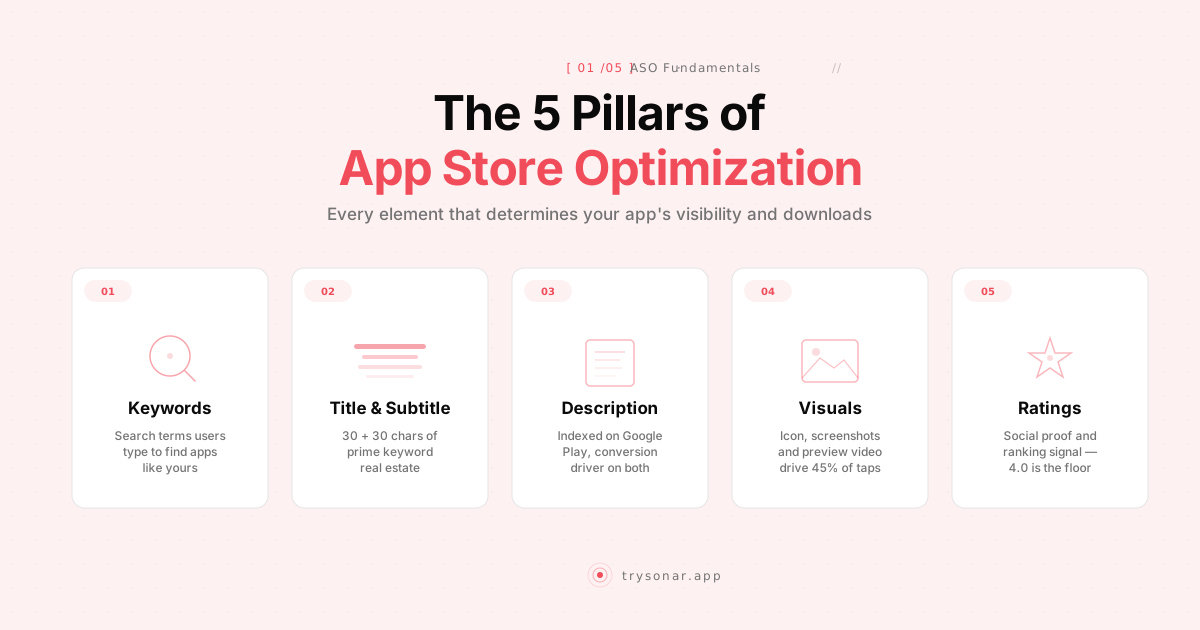
App store optimization breaks down into five areas. Most beginners focus only on the first one and ignore the rest.
1. Keyword Research
This is the foundation. Before you write a single character of metadata, you need to know what people actually search for.
Keyword research for ASO means finding terms that have:
- High search volume — enough people searching to matter
- Low competition — realistic chance of ranking in the top 10
- High relevance — actually related to what your app does
The intersection of these three is where opportunity lives. "Photo editor" has massive volume but impossible competition. "Vintage film grain overlay" has low competition but barely any searches. "Photo compress" might hit the sweet spot.
Here's something most ASO guides won't tell you: the big players (Sensor Tower, data.ai) charge $500+/month for keyword volume data, but you can get surprisingly far for free. Apple's Search Ads platform (free to create an account) gives you the same Search Popularity scores the paid tools use. Autocomplete suggestions from both stores reveal what real users search for. And your competitors' metadata is public — just read their titles and subtitles to see which keywords they're targeting.
For iOS, Apple's Search Ads platform provides a "Search Popularity" score from 5 to 100. This is the closest thing to official search volume data. A score of 50 translates to roughly 5,000 daily impressions; a score of 70 means around 20,000. (For a deeper dive, see our guide on keyword difficulty and how it interacts with search volume.)
Google Play doesn't offer anything equivalent. You can use Google Ads keyword data as a rough proxy, or rely on autocomplete suggestions to gauge relative popularity.
2. Metadata Optimization
Once you know your target keywords, you place them strategically in your app listing:
Title — Your most powerful ranking signal. Put your primary keyword here. "Expense Tracker - Budget App" is better for ASO than "PennyWise" alone, even if PennyWise is a great brand name.
Subtitle (iOS) / Short description (Android) — Your second-strongest signal. Use it for secondary keywords, not a tagline. "Track spending, save money" beats "The smarter way to budget."
Keyword field (iOS only) — 100 characters, comma-separated, no spaces after commas. Don't repeat words already in your title or subtitle — Apple already combines them. Use singular forms (Apple handles pluralization). This is where most beginners waste space by duplicating keywords.
Description (Android) — Since Google indexes this, naturally incorporate keyword variations. Don't stuff. Write for humans first, then check that your target terms appear 2-3 times across 4,000 characters.
A practical example: Say you're building a meditation app. Your research shows "meditation app," "sleep sounds," and "breathing exercises" all have good volume and moderate difficulty.
- Title: "Calm Mind: Meditation & Sleep"
- Subtitle (iOS): "Breathing exercises, sleep sounds"
- Keyword field: "meditate,relax,mindfulness,stress,anxiety,guided,timer,focus,nature,rain"
That's three high-value keywords covered across title and subtitle, with ten additional terms in the keyword field. No repetition, maximum coverage.
3. Visual Optimization (Conversion Rate)
Rankings get you impressions. Visuals turn impressions into downloads.
Your icon is the first thing people see in search results. It needs to be recognizable at 60x60 pixels. Avoid text in icons — it's illegible at small sizes. Use bold colors and simple shapes.
Your screenshots are your sales pitch. The first three screenshots appear in search results on iOS (first one on Google Play). These must communicate your app's value proposition in 2-3 seconds. Best practices:
- Lead with the benefit, not a feature tour
- Add text overlays that explain what the user is seeing
- Show the app in action, not splash screens
- Test different ordering — the first screenshot matters most
Your preview video (optional) auto-plays in search results on iOS. If you use one, make the first 3 seconds count — most people won't watch the full 30 seconds.
Conversion rate optimization is often the highest-leverage ASO activity. Doubling your conversion rate from 15% to 30% has the same effect as doubling your search impressions — and it compounds with every keyword you rank for.
4. Ratings and Reviews
A strong rating is both a ranking factor and a conversion factor. Users skip apps below 4.0 stars, and the algorithm deprioritizes them too.
Practical approaches that work:
- Use the native rating prompt (SKStoreReviewController on iOS, in-app review API on Android). Trigger it after a positive moment — completing a task, reaching a streak, using a feature for the fifth time.
- Don't prompt too early. Asking for a rating on first launch annoys users. Wait until they've experienced value.
- Respond to negative reviews. On Google Play, developer responses can prompt users to update their rating. On iOS, it shows future readers that you care.
- Fix the problems reviews mention. This sounds obvious, but many developers treat reviews as noise. If three people mention the same bug, fixing it and mentioning the fix in release notes directly improves your rating over time.
5. Ongoing Monitoring and Iteration
ASO isn't a one-time setup. Rankings fluctuate. Competitors optimize. New keywords emerge.
What to track:
- Keyword rankings — Where does your app rank for each target keyword? Track weekly at minimum.
- Conversion rate — What percentage of people who see your listing actually download? Available in App Store Connect and Google Play Console.
- Impressions and downloads by keyword — Which keywords actually drive installs?
- Competitor movements — Did a competitor change their metadata? Are new apps entering your space?
Most developers update their keywords every 4-8 weeks based on ranking data. If you're not moving up for a keyword after 2-3 update cycles, it's usually better to replace it with a different target than to keep trying.
Common ASO Mistakes
After watching hundreds of indie developers optimize their listings, these are the patterns that consistently hold people back:
Choosing a clever name over a discoverable one. "Zephyr" tells nobody what your app does. "Zephyr Weather" at least has a chance. You can build brand recognition after you have users.
Stuffing keywords unnaturally. "Best Free Photo Editor Camera Filter Collage Beauty" as an app title triggers spam filters and turns off users. The stores are smarter than that, and so are your potential users.
Ignoring localization. If your app works internationally, localize your metadata for your top markets. The Japanese App Store has different keywords and different competition than the US store. Even localizing for Spanish, Portuguese, and German can meaningfully expand your reach.
Optimizing once and forgetting. The app stores aren't static. Search trends shift, competitors enter and leave, and algorithm updates change what works. Schedule a monthly review of your keyword performance.
Focusing only on high-volume keywords. A keyword with 50,000 monthly searches where you rank #200 drives zero downloads. A keyword with 500 monthly searches where you rank #3 drives real installs every day. For indie apps, a portfolio of 10-15 medium-volume, low-competition keywords usually outperforms one high-volume keyword you'll never rank for. Browse our keyword difficulty database to see real competitive data for keywords like compass app or savings tracker.
Treating ASO as a manual, artisanal process. If you're managing 3+ apps across both stores, manually checking autocomplete suggestions and eyeballing competitor metadata doesn't scale. The indie developers who do ASO well automate the tedious parts (tracking, data collection) so they can spend their limited time on the strategic parts (picking keywords, writing metadata, designing screenshots).
ASO vs. Paid Acquisition: Not Either/Or
A common misconception is that ASO and paid ads are competing strategies. They actually reinforce each other.
When you run Apple Search Ads for a keyword and get installs, those installs boost your organic ranking for that keyword. Your organic rank then generates free downloads, which further strengthens your position. This flywheel effect means a well-timed ad campaign can permanently improve your organic rankings.
The smart approach for indie developers:
- Start with ASO fundamentals — optimize your metadata, get your conversion rate up
- Use small ad budgets to test keywords — $5-10/day on Apple Search Ads tells you which keywords convert
- Double down organically on winners — put converting keywords in your title and subtitle
- Reduce ad spend as organic takes over — let the flywheel spin on its own
Getting Started: A Practical Checklist
If you're new to app store optimization, here's where to start this week:
- Research 20-30 keywords relevant to your app. Use autocomplete suggestions in both stores, look at what competitors rank for, and check search volume estimates.
- Audit your current metadata. Are you using all available characters? Are your highest-value keywords in the title?
- Update your title and subtitle with your top 2-3 keywords. Keep it natural and readable.
- Fill your iOS keyword field completely. 100 characters, no wasted space, no duplicates from title/subtitle.
- Review your first three screenshots. Do they communicate value in 3 seconds?
- Set up rank tracking so you can measure changes. ASO tools like Sonar let you track keyword rankings across both stores and identify opportunities your competitors are missing. See our comparison of the best ASO tools for options at every budget.
- Schedule a monthly review. Set a calendar reminder to check rankings, swap underperforming keywords, and test new ones.
The Bottom Line
App store optimization is the most cost-effective growth channel available to indie developers. It compounds over time, costs nothing beyond your effort, and directly connects you with people who are actively looking for what you built.
The uncomfortable truth about ASO is that it's not hard — it's just tedious. The concepts fit in a single article (you just read it). The execution requires consistently tracking data, testing changes, and iterating. Most indie developers know they should do ASO. The ones who actually win are the ones who build it into their monthly routine instead of treating it as a launch-day checkbox.
You don't need to be perfect. You just need to be more intentional than your competitors, and most of them aren't trying at all.