You updated your app's title, rewrote the subtitle, and carefully filled all 100 characters of the keyword field. Now what? Without an app store rank tracker, you have no idea whether any of it worked.
Most indie developers treat ASO as a one-time task: pick keywords, fill in metadata, ship the update, move on. But ASO is an ongoing process, and rank tracking is the feedback loop that makes it work. It tells you which keywords are gaining traction, which ones are stalled, and where competitors are eating into your visibility.
This guide covers why rank tracking matters, what metrics to monitor beyond raw position numbers, how to choose between manual and automated tracking, and — most importantly — what to actually do with the data once you have it.
What Is App Rank Tracking?
App rank tracking is the process of monitoring where your app appears in App Store and Google Play search results for specific keywords, recorded daily and compared over time. Around 70% of app discovery happens through store search, so your position for a given keyword directly determines how many users see your listing. An app rank tracking tool automates this by querying the store for each keyword, recording your position, and surfacing trends — climbing, declining, stable, or newly indexed — so you can act on changes rather than guess. If you want to integrate app rank tracking into your own scripts or dashboards, see our guide to the App Store rank tracking API.
The difference between app rank tracking and a one-time rank check is continuity. A single lookup tells you where you stand today; daily tracking reveals whether you are gaining or losing ground, how fast the change is happening, and whether competitors are driving the shift. That historical context is what turns a raw position number into an actionable signal. For a deeper look at the key ASO KPIs that sit alongside rank data — retention, conversion rate, download velocity — see our dedicated guide.
Why Tracking Your App Store Rankings Matters
The App Store and Google Play are search engines. Around 70% of app discovery happens through search, which means your ranking position for relevant keywords directly determines how many people find your app.
But rankings are not static. They shift constantly based on algorithm updates, competitor activity, seasonal trends, and your own app's performance signals. A keyword where you ranked #5 last month might be #12 today — and you'd never know without tracking.
Here's what makes rank tracking essential rather than just nice-to-have:
It validates your ASO strategy. You changed your subtitle to include "habit tracker" — did your ranking for that keyword actually improve? Without data, you're guessing. With rank tracking, you can see the effect within 1-2 weeks and decide whether the change was worth the tradeoff.
It reveals problems before they become crises. Say you rank #6 for a keyword with an Apple Search Popularity score of 55 — an estimated several thousand daily impressions. Over six weeks, you slip to #14. At position 14, most users never scroll far enough to see your app. That's thousands of lost impressions per day, compounding silently. By the time you notice the drop in downloads, you've already lost weeks of potential installs. An app ranking tool catches this decline at week two, when a small metadata adjustment can still reverse it.
It exposes competitor moves. When a competitor updates their metadata to target a keyword you rank well for, their ranking goes up and yours may drop. Tracking both apps on the same keyword lets you distinguish between "my app got worse" and "a competitor got more aggressive."
It prevents wasted effort. If your ranking for a keyword hasn't budged in three months despite it being in your metadata, that keyword isn't going to work for your app. Tracking gives you the evidence to drop it and try something better.
What to Track: Beyond Position Numbers
Raw position — "I rank #8 for 'budget planner'" — is just the starting point. An effective app store rank tracker monitors several dimensions that together paint a complete picture.
Rank Position and History
Your current position for each tracked keyword, recorded daily, plotted over time. Daily granularity matters because weekly snapshots miss short-lived spikes and drops that signal algorithm changes or competitor updates.
A single position number in isolation is almost meaningless. Ranking #10 could be excellent news or terrible news depending on where you were last week and last month. Which is why the next metric matters more.
Trend Direction
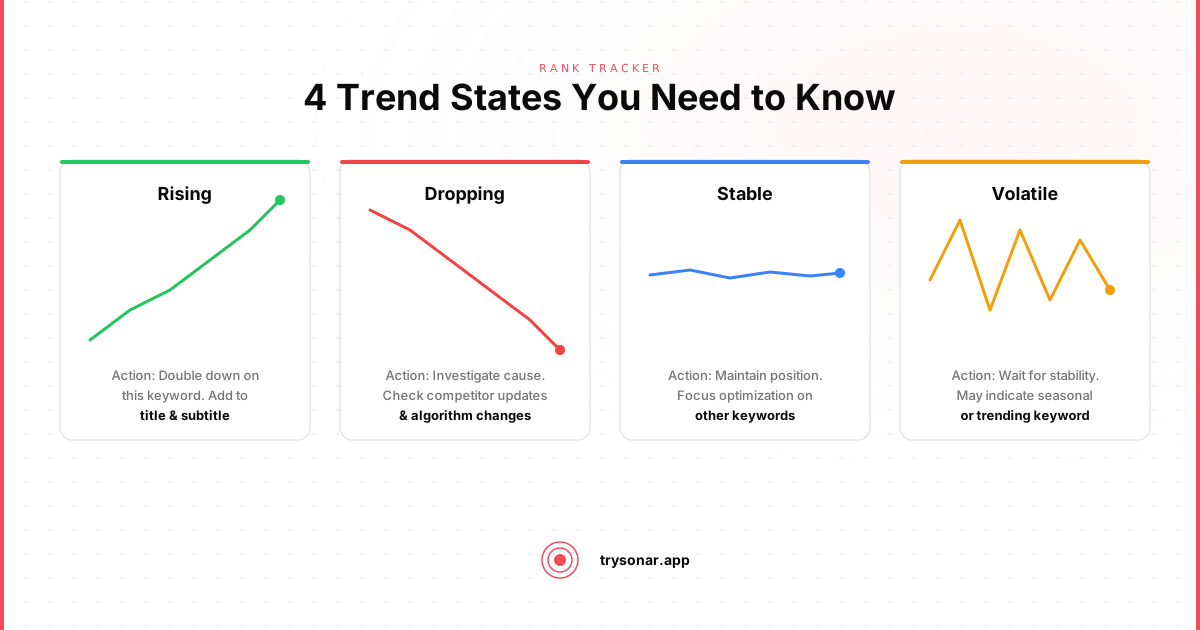
Many developers fixate on the current number without considering the trajectory. An app at position #15 that's been climbing 1-2 positions per week is in a much better spot than an app at position #8 that's been sliding down from #3.
Categorize each keyword into one of four states:
- Climbing: Improved 3+ positions over the past 30 days
- Stable: Fluctuating within a 3-position range
- Declining: Dropped 3+ positions over the past 30 days
- New: Added in the last 14 days, still in the indexing phase
This categorization immediately tells you where to focus attention and what action to take:
- Climbing keywords: leave them alone. Whatever you're doing is working. Resist the urge to tinker.
- Stable keywords: no action needed unless the position is too low. If you're stable at #5, great. Stable at #25? Consider whether better metadata or improved app quality could break through.
- Declining keywords: investigate immediately using the diagnostic checklist later in this article. The cause determines the fix.
- New keywords: wait at least 3 weeks before evaluating. Early rankings are unreliable during the indexing phase.
Velocity of Change
How fast is the position changing? A keyword that dropped from #5 to #15 overnight is a different signal than one that drifted from #5 to #15 over two months.
- An algorithm update affecting your category
- A competitor's metadata update taking effect
- A seasonal event shifting search behavior
- An app update that accidentally removed a keyword from metadata
- Your app quality signals (reviews, downloads) are strengthening or weakening relative to competitors
- A slow shift in keyword difficulty as new apps enter the space
- Natural market evolution
The response to each is different. Sudden drops warrant immediate investigation. Gradual declines call for strategic reassessment.
Competitor Movement
Tracking your own rankings in isolation is like watching a race with blinders on. You need to see at least 2-3 competitors on the same keywords to understand the full picture.
When your ranking drops and a competitor's rises on the same keyword, that's competitive displacement. When everyone drops simultaneously, that's an algorithm update — and the response is different (usually: wait it out).
Pick your closest competitors — apps with similar download counts, ratings, and target audiences. Tracking the #1 app in your category is less useful than tracking the apps fighting for positions 5-15 alongside you. For a structured method of identifying which competitor keywords to monitor, see our guide to competitor keyword analysis.
Keyword Metadata
A ranking number means nothing without context about the keyword itself. For each tracked keyword, you should know:
- Search popularity / volume: Is this a keyword worth ranking for? Moving from #15 to #5 on a keyword nobody searches for won't move the needle.
- Difficulty score: How hard is this keyword to crack? Check pages like wifi analyzer keyword difficulty to set realistic expectations about where you can rank.
- Your app's relevance: Is this keyword in your title (strongest signal), subtitle, keyword field, or description?
When these dimensions are combined with rank data, you can calculate something much more valuable than raw position: estimated visibility. An app at position #3 for a high-volume keyword captures dramatically more impressions than position #1 for a keyword nobody types.

How to Set Up App Rank Tracking
A reliable app rank tracking setup requires three decisions: which keywords to track, which storefronts to cover, and how often to poll. Get these wrong and the data either buries you in noise or misses the signals that matter.
Choose keywords deliberately. Start with the 20-30 keywords already in your metadata (title, subtitle, keyword field on iOS; title, short description, and long description on Google Play). Add 5-10 competitor-brand terms and 5-10 aspirational keywords you plan to target next quarter. As AppTweak's research has noted, keyword relevance is the strongest ranking signal, so tracking keywords that don't match your app's function produces data you can't act on.
Cover both stores separately. iOS and Google Play use different indexing logic (see the iOS vs Google Play ASO FAQ below), so a tool that reports a single blended position hides important differences. Track each platform independently — a keyword climbing on iOS may be flat or declining on Google Play, and the fix differs by store. For a full breakdown of how Play Store ranking works, see our dedicated guide.
Track daily with an automated tool. See Automated Tracking below for what to look for in a tracker and why daily unpersonalized queries matter.
How App Rank Tracking Tools Work
App rank tracking tools query the App Store and Google Play search APIs for each keyword you monitor, record your app's position in the results, and store that position daily to build a historical trend line. Unlike a manual search on your phone — which returns personalized results influenced by your download history and location — automated trackers use unpersonalized, locale-specific queries so the position they report reflects what a first-time searcher in that country actually sees.
Most tools follow a three-stage pipeline:
- Query — the tracker searches each keyword in each storefront (country + platform) once per day at a fixed time.
- Parse — it scans the results list for your app ID and records the position (or "not ranked" if the app doesn't appear in the top 200–250 results).
- Analyze — it compares today's position to the historical baseline, classifies the trend (climbing, stable, declining, new), and fires alerts when a position shifts beyond a threshold you set.
The critical differentiator between tools is whether they surface actionable context alongside the raw position. A bare rank number tells you where you stand; a good app rank tracking tool pairs that number with keyword popularity, difficulty score, competitor positions on the same term, and the metadata field (title, subtitle, keyword field) where the keyword appears. That combination is what turns a data point into a decision — for example, a keyword dropping from #6 to #14 is only urgent if its search popularity is high enough to represent meaningful lost impressions. For a breakdown of how algorithm changes affect these signals, see our guide to App Store algorithm updates in 2026.
| Feature | Manual check | Basic tracker | Full app rank tracking tool |
|---|---|---|---|
| Daily position recording | You do it by hand | Automated | Automated |
| Unpersonalized results | No — biased by your device | Yes | Yes |
| Historical trend line | Spreadsheet, if you remember | 30–90 days typical | Unlimited (e.g., Sonar retains full history) |
| Competitor positions | Requires separate searches | Sometimes | Side-by-side on same keyword |
| Keyword metadata (popularity, difficulty) | Not available | Sometimes | Integrated |
| Alerts on rank drops | None | Basic email | Threshold-based, per keyword |
Manual vs. Automated Rank Tracking
You have two options for tracking your app store search ranking: do it yourself or use a tool.
Manual Tracking
Search for your keyword on the store, scroll to find your app, record the position in a spreadsheet. Repeat daily.
To skip the scrolling, our free app rank tracker does the manual check for you — paste your app URL and up to five keywords and it searches the store live, returning your exact position in any country. No signup, good for a quick snapshot before you commit to daily tracking.
Manual tracking works when you have one app and fewer than 5 keywords, or you want to verify your automated tracker's accuracy.
- Tracking 20 keywords across 2 stores takes 30-40 minutes per day
- Search results are personalized — what you see on your phone differs from what a new user sees
- With a portfolio of apps, it becomes a part-time job
- You'll skip days, and gaps in data make trends unreadable
Automated Tracking
An app ranking tool handles daily searches, records positions, stores history, and surfaces trends. Good ones also track competitors and alert you to significant drops.
What to look for in a rank tracker:
- Daily tracking at a consistent time, using unpersonalized queries
- Historical depth — at least 90 days, ideally unlimited
- Multi-app support — your apps and competitors side by side
- Keyword metadata alongside rank data (popularity, difficulty)
- Alerts for significant rank changes
- API access for custom dashboards or scripts
For indie developers, the sweet spot is a flat-priced tool that doesn't charge per keyword — important when you're managing a portfolio. Sonar's pricing is built around this principle: one flat price covering 2,500 tracked keywords across both stores, with no per-keyword fees.
How to Interpret Rank Changes
Collecting data is the easy part. The hard part is knowing what the data means and what to do about it.
The Patience Rule
After a metadata update, rankings go through an indexing period that takes 1-4 weeks to fully settle. (For the detailed timeline, see our guide to tracking keyword rankings over time.)
The critical mistake is evaluating too early. If you check after 5 days, see a low ranking, and panic-change your metadata again, you've reset the clock and wasted the original change. Give every metadata update a minimum of 3 weeks before judging its effect. Mark the update date in your tracker so you can correlate ranking shifts with the changes you made.
Distinguishing Signal from Noise
Daily ranking fluctuations of 1-3 positions are normal noise. The App Store algorithm isn't perfectly deterministic, and minor variations happen constantly. Don't react to daily jitter.
What qualifies as signal:
- A sustained move of 5+ positions over a week
- A sudden jump of 10+ positions in a single day
- A consistent directional trend over 3+ weeks
- A ranking change that correlates with a known event (your update, competitor update, seasonal trend)
Everything else is noise. Resist the urge to optimize in response to daily fluctuations.
Diagnosing Rank Drops
When a tracked keyword shows a meaningful decline, work through this checklist:
- Did you change your metadata recently? If yes, the drop may be temporary re-indexing. Wait 2-3 weeks.
- Did competitors move up on the same keyword? If yes, examine what they changed. Did they add the keyword to their title? Did they get a surge of reviews?
- Did multiple keywords drop simultaneously? If yes, it's likely an algorithm update. Check ASO communities for reports from other developers.
- Did your app's ratings or reviews change? A drop in average rating or a spike in negative reviews can cause ranking declines across all keywords.
- Is it seasonal? Some keywords have strong seasonal patterns. "Tax calculator" peaks in April, "gift ideas" peaks in December. A post-season drop is expected.
When Rankings Plateau
If your app is stuck at position 12-20 for a keyword despite having that keyword prominently in your metadata, the issue probably isn't keyword relevance. It's app quality signals.
At that point, no amount of metadata tweaking will push you higher. The algorithm considers your app relevant enough to show in results, but not strong enough to outrank the apps above you. The path forward is improving your app: better ratings, more reviews, higher download velocity, better retention.
This is one of the most valuable insights rank tracking provides — it tells you when to stop optimizing metadata and start optimizing the product.
Building a Rank Tracking Workflow
Here's a practical weekly workflow for using ranking data to improve your ASO:
Weekly Review (15 minutes)
Every Monday, check your rank tracker dashboard:
- Scan for alerts. Any keywords that dropped 5+ positions? Investigate using the diagnostic checklist above.
- Check trend categories. How many keywords are climbing, stable, declining, or new? A healthy portfolio has mostly stable and climbing keywords.
- Review competitor movement. Did any competitor make a significant jump? If so, check their App Store listing for recent metadata changes.
- Note any patterns. Are keywords in one category performing differently than another? This might reveal an opportunity to shift your positioning.
Monthly Analysis (30 minutes)
Once a month, do a deeper review:
- Evaluate underperformers. Any keyword tracked for 3+ months without improvement is a candidate for replacement. For each one, ask: is it stuck because of low relevance (metadata problem) or low authority (app quality problem)? If you're not ranking at all, the keyword may not match your app's category signals. If you're stuck at position 15-25, the keyword is relevant but your app needs stronger quality signals to compete.
- Identify winners and double down. Which keywords improved the most? Look for patterns. If your long-tail keywords (3+ words, lower difficulty) are climbing while head terms are flat, that tells you to find more long-tail variants in the same space. Use keyword suggestion tools to find related terms to your winners.
- Reassess competitors. Has the competitive landscape shifted? If a competitor you were tracking has surged ahead on most keywords, they may have gotten a download boost (press coverage, feature, ad campaign) that temporarily inflated their rankings. Add any new apps that have appeared in your keyword results. If the competitive picture has changed significantly, run a full ASO audit to identify gaps beyond keyword rankings.
- Plan metadata changes. Based on your analysis, draft your next metadata update. Swap out underperformers, add variants of your winners, and keep anything that's stable and valuable. Don't change more often than every 4-6 weeks.
Quarterly Strategy Review (1 hour)
Every quarter, zoom out:
- Compare current rankings to 90 days ago. Are you trending in the right direction overall?
- Evaluate keyword portfolio. Are you tracking the right keywords, or have your product and market evolved?
- Review difficulty trends. A keyword that was difficulty 25 when you started targeting it might be 40 now as more apps enter the space. Adjust expectations accordingly.
- Set goals for next quarter. Pick 3-5 specific keyword-position targets based on what the data tells you is achievable.
ASO tools like Sonar are built for exactly this workflow — 2,500 tracked keywords across both stores, full history retention, competitor monitoring, and API access, with pricing that doesn't punish portfolio builders.
Key Takeaways
- Rank tracking is the feedback loop that turns ASO from guesswork into a data-driven process. Without it, you can't measure whether your metadata changes actually work.
- Track more than raw position. Trend direction, velocity of change, and competitor movement give you the context needed to make good decisions.
- Automated tracking beats manual tracking for anything beyond a handful of keywords. Consistency, unpersonalized queries, and historical depth matter.
- Give metadata changes at least 3 weeks before evaluating their impact. Daily fluctuations of 1-3 positions are noise, not signal.
- When rankings plateau despite correct keyword targeting, the bottleneck is app quality — not metadata. Rank data tells you when to shift your focus from keywords to product improvement.
- Build a cadence: weekly scans, monthly analysis, quarterly strategy reviews. Consistent small adjustments outperform sporadic overhauls.
FAQ
What is app rank tracking?
App rank tracking is the daily monitoring of where your app appears in App Store or Google Play search results for specific keywords. By recording positions over time, you can identify trends — climbing, declining, or stable — and correlate ranking changes with metadata updates, competitor moves, or algorithm shifts. Automated app rank tracking tools query the store using unpersonalized searches, eliminating the bias you get from checking manually on your own device.
What features matter most in an app rank tracking tool?
The three features that separate useful app rank tracking from raw data collection are unpersonalized daily queries, historical depth beyond 90 days, and integrated keyword metadata (popularity and difficulty scores alongside each position). Unpersonalized queries eliminate the bias introduced by your own device's download history — a bias Apple's own search documentation confirms exists. Historical depth lets you distinguish real trends from noise (see the velocity of change section above), and keyword metadata tells you whether a rank change is worth acting on. Sonar's tracked-keyword plans bundle all three with 2,500 keywords across both stores.
How often should I check my app rankings?
Daily tracking is the standard for accurate app rank tracking because weekly snapshots miss short-lived spikes and drops that signal algorithm changes or competitor updates. However, you should only act on the data weekly — daily fluctuations of 1-3 positions are normal noise. Reserve deeper analysis for monthly and quarterly reviews, as outlined in the workflow section above.
Does app rank tracking work differently on iOS vs Google Play?
Yes. Apple's App Store indexes your title (30 characters), subtitle (30 characters), and a hidden 100-character keyword field, while Google Play indexes all visible text including the full 4,000-character description (source: Google Play Console Help). This means ranking signals differ by store, and your app rank tracking setup should monitor both platforms separately. For a full comparison, see our guide to iOS vs Google Play ASO.
Can I track app rankings for free?
You can check your current position for up to five keywords at a time using Sonar's free rank tracker tool — it queries the store live and returns your exact position in any country. For ongoing daily app rank tracking with historical data, trend analysis, and competitor monitoring, you need an automated tool. Sonar's paid plans cover 2,500 tracked keywords across both stores with full history retention.
How many keywords should I track?
Start with 30-50 keywords per app: the 20-30 terms already in your metadata, 5-10 competitor-brand keywords, and 5-10 aspirational targets. According to Apple's developer documentation, relevance is the primary ranking signal, so tracking hundreds of loosely related keywords creates noise without actionable insight. As your ASO matures, expand to 80-150 keywords to cover long-tail variants and localized storefronts. Sonar supports up to 2,500 tracked keywords across both stores on a single flat-rate plan, so headroom is rarely the constraint — focus is.
What should I do when my app ranking drops?
First, determine whether the drop is noise (1-3 positions) or signal (5+ positions sustained over a week). If it is a real decline, work through a diagnostic checklist: check whether you recently changed metadata, whether competitors moved up on the same keyword, whether multiple keywords dropped simultaneously (suggesting an algorithm update), and whether your ratings or reviews changed. The cause determines the fix — a competitor surge calls for competitor keyword analysis, while a broad algorithm shift usually resolves on its own within 2-3 weeks.