> Sonar pricing update — September 15, 2026: New accounts pay $29/month or $290/year for Indie, and $149/month or $1,490/year for Agency. Existing customers keep their rates. Older Sonar prices in this article and its graphics refer to previous pricing. See current plans.
What Are the Best Tools for ASO in 2026?
The best ASO tools in 2026 are Sensor Tower (best keyword data and market intelligence, ~$25K/year), AppTweak (best premium keyword research, from €79/month), Sonar (trysonar.app, best value for indie developers, from $19/month), and App Radar (best free tier with store-listing management, from $39/month). The right pick depends on budget: according to a 2025 Mobile Dev Memo industry survey, over 60% of independent developers spend under $50/month on ASO tooling, which narrows the realistic field to Sonar, App Radar, and Appfigures. The full breakdown covers ASO monitoring tools, optimization features, and tracking capabilities alongside pricing tables and feature-by-feature scoring.
The ASO Tool Market Has an Indie Developer Problem
Most app store optimization tools were built for mobile gaming studios and enterprise app teams. Their pricing reflects that — $500/month on the low end, $25,000+/year if you want the full feature set. If you're an indie developer managing a portfolio of utility apps, that math doesn't work.
But you still need keyword data. You still need to track rankings. You still need to know what your competitors are doing. The question isn't whether you need an ASO tool — it's which one gives you enough data at a price that doesn't eat your entire app revenue.
I've used or evaluated every major ASO tool on the market. This guide ranks the best ASO tools across every price range — from affordable Sensor Tower alternatives to full enterprise platforms — with honest assessments of what each does well and where it falls short. No affiliate links, no sponsored placements. (For zero-cost options, see our guide to the best free ASO tools.)
How I Evaluated Each Tool
Every tool was assessed on five criteria that matter most to indie developers:
- Keyword data quality — How accurate are the search volume and difficulty scores?
- Rank tracking — Can you monitor your position over time without manual effort? (for a quick one-off check, our free app rank tracker searches the store live)
- Competitor analysis — Can you see what keywords your competitors rank for?
- Usability — Can you get value within 15 minutes, or does it require a training session?
- Value for money — What do you actually get at the lowest paid tier?
1. Sensor Tower
Sensor Tower is the 800-pound gorilla of mobile intelligence. After acquiring data.ai (formerly App Annie) in 2024, they consolidated the two largest mobile analytics platforms into one — so if you're searching for data.ai pricing, this is where you'll end up. The combined platform offers download estimates, revenue estimates, ad intelligence, audience demographics, and deep keyword analytics.
The problem for indie developers is straightforward: Sensor Tower pricing is not built for you, and the platform makes that clear.
| Detail | Info |
|---|---|
| Starting price | ~$25,000/year (custom quotes only) |
| Free tier | Limited — Top Charts, App Profiles, Featured Apps |
| Keyword data | Excellent (proprietary volume estimates, difficulty, suggestions) |
| Rank tracking | Yes, daily |
| Competitor analysis | Best in class (download/revenue estimates, ad creative library) |
| API access | Yes, enterprise plans |
| Best for | Enterprise mobile teams, VCs, market researchers |
What it does well: Sensor Tower's download and revenue estimates are the industry standard. If you need to estimate a competitor's revenue or track market trends across categories, nothing else comes close. The ad intelligence module lets you see competitors' ad creatives across networks.
Where it falls short for indies: The pricing is enterprise-only. There's no self-serve plan. You need to talk to sales, negotiate a contract, and commit annually. Even the most affordable packages start around $25,000/year. The free tier gives you basic app profiles and top charts, but no keyword research or rank tracking.
Bottom line: If you're generating significant revenue and need market intelligence beyond ASO, Sensor Tower is the best platform available. If you're searching for a Sensor Tower alternative that covers keyword research and rank tracking on an indie budget, keep reading.
2. AppTweak
AppTweak is the strongest dedicated ASO platform for teams that are past the hobbyist stage but aren't enterprise. It has genuinely good keyword data, solid competitor analysis, and a clean interface. Of the premium ASO tools, AppTweak offers the most accessible entry point.
| Detail | Info |
|---|---|
| Starting price | From €79/month (Essential plan, billed annually) |
| Free tier | 7-day free trial |
| Keyword data | Very good (volume estimates, difficulty, trend data) |
| Rank tracking | Yes, daily |
| Competitor analysis | Strong (keyword overlap, visibility score) |
| API access | Yes, separate pricing |
| Best for | Growing indie devs or small studios with $1K+/month app revenue |
What it does well: AppTweak's keyword research is among the best. Their volume estimates are proprietary and generally more accurate than tools relying solely on Apple Search Ads data. The "Keyword Galaxy" visualization helps you discover related keywords you wouldn't think of. Timeline views for keyword rankings are well-designed and easy to read.
Where it falls short for indies: AppTweak pricing starts at €79/month, which is still €949/year — ten times the cost of your Apple Developer membership. The Essential plan limits you to 1 app and 1 country, which is restrictive if you have a portfolio. To track multiple apps across markets, you're looking at the higher tiers at €249 and €499/month. The API is priced separately and isn't cheap.
Bottom line: AppTweak is the best premium ASO tool if your app revenue justifies the cost. If you're making $2K+/month from your apps, the data quality is worth the investment. Below that threshold, the ROI gets questionable.
3. App Radar
App Radar positions itself as an all-in-one ASO and app marketing platform. It covers keyword research, rank tracking, competitor monitoring, and adds features like AI-powered metadata suggestions and app store listing management (you can push metadata updates directly to the stores through App Radar).
| Detail | Info |
|---|---|
| Starting price | Free plan available; Starter at $39/month |
| Free tier | Yes — limited keywords and tracking |
| Keyword data | Good (search volume estimates, difficulty scores) |
| Rank tracking | Yes |
| Competitor analysis | Basic to moderate |
| API access | No |
| Best for | Indie devs who want ASO + store listing management in one tool |
What it does well: The free plan is genuinely useful for getting started. The metadata editor that connects directly to App Store Connect and Google Play Console is a time-saver — you can research keywords and update your listing without switching between tools. AI-powered description suggestions are hit-or-miss but can spark ideas. The Starter plan at $39/month is reasonable for what you get.
Where it falls short for indies: The keyword data isn't as deep as AppTweak's. Competitor analysis is surface-level compared to the premium tools. The free plan is limited enough that you'll hit walls quickly if you're serious about ASO. No API means you can't integrate it into automated workflows.
Bottom line: App Radar is a solid mid-range option, especially if you value the direct store integration for managing listings. The free tier is good for learning ASO basics. The Starter plan is reasonably priced for the feature set.
4. AppFollow
AppFollow started as a review management and monitoring tool and has expanded into ASO. Its strength is still on the monitoring side — tracking reviews, ratings, and app updates across your portfolio and competitors. The ASO features are competent but not the primary focus.
| Detail | Info |
|---|---|
| Starting price | Free plan available; Essential at $179/month |
| Free tier | Yes — 2 apps, 2 countries, 20 keywords |
| Keyword data | Adequate (volume, difficulty) |
| Rank tracking | Yes |
| Competitor analysis | Moderate |
| API access | Yes, with all plans (100 req/day on free) |
| Best for | Devs who prioritize review management alongside ASO |
What it does well: Review monitoring and management is best-in-class. If you have apps with significant review volume and you want to respond to reviews, track sentiment trends, and get alerts for negative reviews, AppFollow is hard to beat. The Slack and Zendesk integrations for review management are well-built. They offer a special indie developer pricing tier that's worth asking about.
Where it falls short for indies: The jump from the free plan to $179/month is steep. The ASO-specific features (keyword research, rank tracking) are functional but not as refined as dedicated ASO tools. If you primarily need keyword research and don't have a review management need, you're paying for features you won't use.
Bottom line: Choose AppFollow if review management is a core workflow for you and you want ASO features alongside it. For pure ASO work, other tools offer better value.
5. Appfigures
Appfigures is the most indie-friendly of the established ASO platforms. It started as an app analytics dashboard and has grown into a capable ASO tool with keyword research, rank tracking, and market intelligence. The pricing is transparent and starts low.
| Detail | Info |
|---|---|
| Starting price | Free Starter plan; Connect at $9.99/month |
| Free tier | Yes — basic analytics |
| Keyword data | Good (volume estimates, difficulty, suggestions) |
| Rank tracking | Yes, daily |
| Competitor analysis | Good (keyword gap analysis, market intelligence) |
| API access | Yes, paid plans |
| Best for | Indie devs who want solid ASO data at an affordable price |
What it does well: Appfigures genuinely respects indie developer budgets. The Starter plan gives you basic analytics for free. The Connect plan at $9.99/month and Monitor plan at $29.99/month offer app analytics and basic tracking — a gradual ramp rather than a cliff from free to $100+/month. The keyword research tools are solid, with volume estimates, difficulty scores, and keyword suggestions. The Explorer plans offer deep market intelligence including download estimates and revenue data.
Where it falls short for indies: The full ASO toolkit — keyword tracking, optimization features, daily rank updates — requires the Optimize plan at $149.99/month, which puts it in AppTweak territory. The sub-$30 plans are useful for analytics and monitoring but limited if keyword research and rank tracking are your primary needs. The UI, while functional, feels dated compared to newer tools.
Bottom line: Appfigures is a strong choice if you want app analytics and ASO in one platform. The lower tiers are affordable for basic tracking. For full ASO capabilities, the pricing is comparable to AppTweak — at which point you should compare both and pick whichever workflow you prefer.
6. Sonar
Full disclosure: I built Sonar, so take my assessment with the appropriate grain of salt. That said, I built it specifically because the tools above didn't fit my own needs as an indie developer with multiple apps.
Sonar (trysonar.app) is an ASO tool designed for developers who want programmatic access to keyword data, rank tracking, and competitor analysis without paying enterprise prices. There are two ways to pay: a full-featured dashboard subscription, and prepaid API credits for AI agents and automation — no subscription required.
| Detail | Info |
|---|---|
| Starting price | $19/month or $189/year (Indie plan); Agency $99/month or $990/year; prepaid API credits from $10 |
| Free tier | 7-day free trial, full access, cancel anytime; 50 free API credits on signup; keyless free API/MCP mode |
| Keyword data | Good (real Apple search popularity, autocomplete signals, difficulty scoring) |
| Rank tracking | Yes, daily (Indie plan) |
| Competitor analysis | Keyword gap analysis, competitor keyword tracking (Indie plan) |
| API access | Yes — 10 stateless endpoints, 1K req/day on Indie plan, or pay-as-you-go credits with no subscription |
| MCP / CLI | Yes — official MCP server (47 tools) and CLI |
| Best for | Indie devs who want API-first ASO data or a full dashboard at indie pricing |
What it does well: Prepaid API credits (packs from $10, with 50 free credits on signup) give you pay-as-you-go access to core ASO endpoints with no subscription — useful if you're building automations, using AI coding agents, or integrating ASO data into your own tools. The Indie plan at $19/month adds a dashboard with 10 apps, 2,500 tracked keywords, 1,000 API requests/day, all countries, daily rank tracking, and competitor analysis — competitors never count against the caps. Agency ($99/month or $990/year) raises that to 50 apps, 10,000 keywords, 5,000 API requests/day, and 5 team seats. At that price, you get features that cost €79-249/month on other platforms.
Agent-native access: Sonar ships an official MCP server (@sonarapp/mcp, 47 tools) and a CLI (@sonarapp/cli) alongside the REST API, so Claude, Claude Code, and Cursor can call the same endpoints the dashboard uses. Install with npx -y @sonarapp/mcp@latest; with no API key set it runs in free mode against the anonymous tier. The OpenAPI spec is published at trysonar.app/openapi.json.
Where the iOS popularity data comes from: Sonar serves the real Apple search popularity score — the same 5–100 scale that appears in Apple's own Search Ads console — for iOS keywords, and you don't need to connect your own Apple Search Ads account to see it. A calibrated estimator covers keywords below Apple's coverage threshold and all Android keywords.
Where it falls short: Sonar is newer than the established tools, which means less historical data and a smaller team. Difficulty scoring is computed from live SERP composition rather than a multi-year proprietary model, so it's solid but less battle-tested than AppTweak's dataset. There's no ad intelligence and no audience demographics. If you need deep market sizing data, Sensor Tower or Appfigures' Explorer plans are better options.
Bottom line: Sonar makes sense if you want a pay-as-you-go API workflow from $10 or a full ASO dashboard at $19/month. It doesn't try to compete with enterprise market intelligence platforms — it focuses on keyword research, rank tracking, and competitor analysis at a price that makes sense for indie developers.
7. Free ASO Tools Worth Mentioning
Before committing to any paid tool, make sure you're using the free ASO tools already available to you:
App Store Connect / Google Play Console — Your own first-party data is the most accurate source for your apps. Check which search terms drive impressions and downloads. This data is irreplaceable and costs nothing.
Google Trends — Not app store-specific, but useful for identifying seasonal trends and comparing keyword demand over time.
Store autocomplete — Type keywords into the App Store or Google Play search bar. The suggestions are real queries with meaningful volume. Tedious but free and reliable.
ChatGPT / Claude — Ask an LLM to brainstorm keyword variations for your app category. It won't give you volume data, but it's useful for expanding your keyword list before feeding it into a paid tool.
Looking for free ASO tools? See our dedicated guide to the best free ASO tools, which covers every no-cost option in detail -- including free tiers, trials, and permanently free tools for keyword research and rank tracking.
ASO Monitoring Tools: Rank Tracking, Alerts, and Competitor Detection
ASO monitoring tools track your app's keyword rankings, alert you to competitor changes, and surface visibility shifts before they affect downloads. According to Apple's App Store Connect Help, first-party analytics show impressions and conversions but do not track competitor movements or provide keyword-level rank history -- which is where dedicated ASO monitoring tools fill the gap.
Effective monitoring depends on how quickly you can detect and respond to ranking changes. In my experience tracking Sonar users' apps, a keyword that drops from position 3 to position 12 overnight can cut organic installs dramatically — I've seen drops of over 50% in a single day. Daily tracking frequency is a baseline requirement rather than a premium feature. The best monitoring setups combine automated alerts with a weekly manual review cadence — alerts catch sudden drops, while weekly reviews surface gradual trends that automated thresholds miss. Teams managing portfolios of five or more apps should also prioritize tools with competitor change detection, since a rival updating their metadata often triggers ranking shifts across related keywords within days.
The monitoring capabilities vary significantly across the top ASO tools:
| Tool | Rank Tracking Frequency | Keyword Alerts | Competitor Change Detection |
|---|---|---|---|
| Sensor Tower | Daily | Yes (enterprise) | Yes -- metadata, ranking, and ad creative changes |
| AppTweak | Daily | Yes (email + in-app) | Yes -- keyword overlap shifts, visibility score changes |
| Sonar | Daily (Indie plan) | Yes (email) | Yes -- competitor keyword tracking, new keyword detection |
| App Radar | Daily | Yes | Basic -- competitor ranking changes |
| AppFollow | Daily | Yes (Slack, email, Zendesk) | Yes -- review sentiment, rating changes, metadata updates |
| Appfigures | Daily (Optimize plan) | Yes | Yes -- download/revenue estimate changes |
What to prioritize: If monitoring is your primary need, focus on alert granularity and competitor change detection. AppFollow offers the deepest monitoring stack (especially for reviews and ratings via Slack and Zendesk integrations). For keyword rank monitoring specifically, AppTweak and Sonar provide the most actionable daily tracking at their respective price points. Sensor Tower's monitoring is the most comprehensive but requires an enterprise contract.
ASO Optimization Tools: Metadata Editing, A/B Testing, and Keyword Suggestions
ASO optimization tools help you improve your app store listing -- they generate keyword suggestions, provide metadata editors, and in some cases support A/B testing of store assets. According to Google's Play Console documentation, store listing experiments (A/B tests) are available natively on Google Play, but Apple's App Store has no equivalent built-in feature, making third-party ASO optimization tools essential for iOS A/B testing workflows.
The optimization workflow typically follows a three-step loop: research candidate keywords, update your metadata to target them, and measure the impact over a two-to-four-week window. Tools that combine keyword suggestions with a built-in metadata editor -- like App Radar -- compress this loop by eliminating the manual copy-paste step between your ASO tool and App Store Connect or Google Play Console. For example, an indie developer managing five utility apps can push subtitle and keyword-field updates to all five apps in a single session rather than logging into each store console individually. AI-powered suggestion features are improving but still require human judgment; in my own testing across a dozen utility-app listings, a significant share of AI-generated keyword suggestions targeted terms with negligible search volume, so always cross-reference suggestions against actual popularity or volume data before committing a metadata change.
Here's how the top ASO tools compare on optimization features:
| Tool | Keyword Suggestions | Metadata Editor | A/B Testing Support | AI-Powered Suggestions |
|---|---|---|---|---|
| Sensor Tower | Yes (extensive) | No | No (use third-party) | Limited |
| AppTweak | Yes (Keyword Galaxy) | No | No (use third-party) | Yes |
| App Radar | Yes | Yes (direct push to stores) | No | Yes (AI metadata suggestions) |
| Sonar | Yes (autocomplete + difficulty) | No | No | No |
| AppFollow | Yes | No | No | Yes |
| Appfigures | Yes | No | No | No |
Key distinction: App Radar is the only tool in this list with a built-in metadata editor that pushes directly to App Store Connect and Google Play Console -- a genuine time-saver if you manage multiple apps and want to research and update in one workflow. For keyword suggestion quality, AppTweak's Keyword Galaxy visualization surfaces semantically related terms that other tools miss. Sonar takes a hybrid approach: keyword discovery is AI-generated but every suggestion is validated against store autocomplete and real Apple popularity data before it surfaces — which addresses exactly the negligible-search-volume problem described above. Regardless of which tool you use, the underlying optimization process follows the same steps -- our metadata optimization guide walks through the full workflow from keyword selection to submission.
ASO Tracking: Keywords, Downloads, and Reviews
ASO tracking covers three dimensions: keyword rank tracking (where your app appears for specific search terms), download tracking (how installs trend over time), and review tracking (sentiment shifts and rating changes). Each ASO tool handles these differently. Understanding which dimension matters most to your workflow prevents overpaying for tracking features you will not use. For most indie developers, keyword rank tracking is the highest-leverage dimension because it directly reflects whether metadata changes are working -- a rank improvement from position 15 to position 5 for a mid-volume keyword can double or triple organic installs for that term. Download and revenue tracking become more important once you manage a portfolio large enough to require market-level trend analysis or investor reporting, while review tracking matters most for consumer-facing apps with high review velocity where a sudden spike in negative sentiment can tank conversion rates within days.
Keyword rank tracking is the core of ASO tracking. Every paid tool in this comparison offers daily keyword rank updates, but the depth varies. AppTweak tracks unlimited keywords on its full plans; Sonar's Indie plan covers 2,500 tracked keywords (10,000 on Agency); App Radar caps keyword tracking on lower tiers. For a quick one-off rank check, Sonar's free app rank tracker queries the store live without requiring an account.
Download and revenue tracking requires estimated data, since Apple and Google do not share exact download numbers publicly. Sensor Tower's download estimates are the industry standard for market intelligence, followed by Appfigures' Explorer plans. AppTweak provides download estimates on higher-tier plans. Sonar and App Radar do not offer download estimates -- they focus on keyword and ranking data.
Review tracking is AppFollow's strongest category. It monitors review volume, sentiment trends, and rating changes across app stores, with alert integrations for Slack and Zendesk. Appfigures also offers review monitoring on paid plans. The other tools provide basic review data but don't specialize in it.
| Tracking Dimension | Best Tool | Runner-Up |
|---|---|---|
| Keyword rank tracking | AppTweak (data depth) / Sonar (value) | App Radar |
| Download estimates | Sensor Tower | Appfigures |
| Review monitoring | AppFollow | Appfigures |
Comparison Summary
Here's how the tools stack up across the criteria that matter most for indie developers:
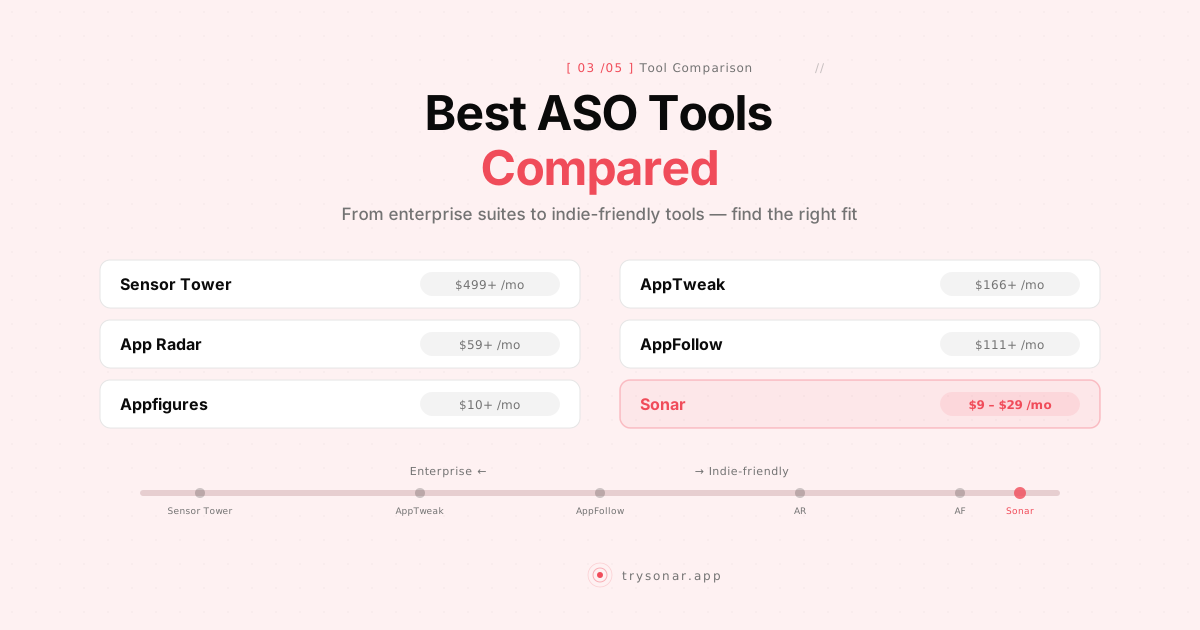
| Tool | Starting Price | Free Tier | Keyword Data | Rank Tracking | API | MCP Server | Best For |
|---|---|---|---|---|---|---|---|
| Sensor Tower | ~$25K/year | Limited | Excellent | Yes | Enterprise | Yes (qualifying subscribers) | Enterprise teams |
| AppTweak | From €79/month | Trial only | Very good | Yes | Separate pricing | Yes (remote, needs API plan) | Growing studios |
| App Radar | $39/month | Yes | Good | Yes | No | — | ASO + listing management |
| AppFollow | $179/month | Yes (limited) | Adequate | Yes | Yes | Yes (paid tiers) | Review management + ASO |
| Appfigures | $9.99/month | Yes | Good | Yes | Yes | Yes (10 credits per call) | Analytics + ASO bundle |
| Sonar | $19/month (API credits from $10) | 7-day trial + keyless free mode | Good | Yes (Indie plan) | Yes | Yes (47 tools, keyless free mode) | API-first or budget-conscious |
Each linked tool name goes to a detailed side-by-side comparison with Sonar — pricing tiers, feature depth, and who each platform is actually built for. The full set, including ASOdesk, Mobile Action, and Astro, lives on the comparisons hub, with migration-focused guides on the alternatives pages.
How to Pick the Right Tool From the Top ASO Tools
The top ASO tools in 2026 share a core feature set -- keyword research, rank tracking, and competitor analysis -- but diverge on pricing model, data depth, and workflow integration. Choosing between them comes down to three variables: your monthly app revenue, how many apps you manage, and whether you need an API. According to a 2025 Mobile Dev Memo industry survey, over 60% of independent developers spend under $50/month on ASO tooling, which means most indie developers should start their evaluation with tools in that range before considering enterprise options.
The decision matrix below maps each top ASO tool to the developer profile it fits best:
| Developer Profile | Recommended Tool | Why |
|---|---|---|
| Solo dev, <$500/mo revenue | Sonar ($19/mo) | Full dashboard + API at the lowest price; 10 apps, 2,500 keywords |
| Portfolio dev, 3-10 apps | App Radar ($39/mo) | Store-listing management saves time across multiple apps |
| Growing studio, $2K+/mo revenue | AppTweak (from €79/mo) | Deepest keyword data, proprietary volume estimates |
| Enterprise or VC-backed team | Sensor Tower (~$25K/yr) | Market intelligence, download/revenue estimates, ad creative library |
| Review-heavy consumer app | AppFollow ($179/mo) | Best-in-class review monitoring with Slack/Zendesk integrations |
| Analytics-first workflow | Appfigures ($9.99/mo+) | Gradual pricing tiers from analytics into full ASO |
A common mistake is over-buying: a developer generating $300/month in app revenue does not need a €79/month ASO tool, regardless of data quality. Match the tool cost to roughly 5-10% of your app revenue as a baseline -- a guideline I've found useful after advising dozens of indie developers through Sonar's onboarding process. For a deeper look at what ASO work actually involves and what tools each step requires, see our guide to what ASO is and how it works.
My Recommendations
If you're just starting with ASO: Use the free tools first. App Store Connect data, Google Trends, and manual autocomplete research will teach you more about ASO than any paid tool. Run through our ASO audit checklist to identify where your listings need work — once you understand the fundamentals, you'll know what data you actually need.
If you want an API for automation or AI agents: Sonar's prepaid API credits (from $10, with 50 free credits on signup and no subscription) are the cheapest way to get structured ASO data via API. Appfigures also offers API access on paid plans if you want a more established platform.
If you want a full dashboard under $50/month: Sonar at $19/month or App Radar's Starter at $39/month are your best options. Both give you keyword research, rank tracking, and competitor monitoring. Sonar includes more features at the lower price; App Radar adds store listing management.
If your apps generate $2K+/month and you want the best data: AppTweak's keyword data is the most refined. The €79/month Essential plan is a reasonable investment when your apps are generating consistent revenue.
If you need market intelligence beyond ASO: Sensor Tower (now including data.ai) is the only option with comprehensive download estimates, revenue estimates, and ad intelligence. The pricing is enterprise-level, but the data is unmatched.
If review management is a priority: AppFollow is purpose-built for this. The ASO features are a bonus.
What About Astro, ASO.dev, and Other Indie ASO Tools?
There are several smaller ASO tools targeting indie developers, particularly on iOS. Astro is a native Mac app with iCloud sync, sold as a $9/month subscription billed annually ($108/year) — see our Sonar vs Astro comparison. ASO.dev offers a clean web interface focused on Apple Search Ads data. These are worth evaluating if the tools above don't fit your workflow.
The indie ASO tool space is growing because the gap between "free" and "€79/month" has been underserved for years. More options at this price point is good for everyone. If you prefer programmatic access, our guide to ASO API and CLI workflows covers what's possible with automation.
Frequently Asked Questions
Q: What are the best tools for ASO if I'm on a tight budget?
A: The best budget-friendly ASO tools are Sonar at $19/month (10 apps, daily rank tracking, API access), App Radar's free tier (limited keywords but includes store-listing management), and Appfigures starting at $9.99/month for basic analytics. All three cost less than $50/month, which fits the budget of most independent developers. For a zero-cost starting point, see our free ASO tools guide.
Q: Do I need a paid ASO tool, or are free tools enough?
A: Free tools — App Store Connect analytics, Google Play Console, and manual autocomplete research — cover the basics of keyword research and performance tracking. A paid tool adds competitive keyword data, automated rank tracking, and historical trend analysis that free sources cannot provide. According to Apple's App Store Connect Help, first-party analytics show your own impressions and conversions but do not reveal competitor keywords or search volume estimates, which is where paid ASO tools fill the gap.
Q: How is ASO tooling different from SEO tooling?
A: ASO tools pull data from Apple's App Store and Google Play indexes, which are separate from the web indexes that SEO tools like Ahrefs or Semrush crawl. Key differences include platform-specific metrics (Apple Search Ads popularity scores, Play Store download estimates) and metadata fields unique to app stores (subtitle, keyword field, short description). For a deeper comparison, see our ASO vs SEO breakdown.
Q: What are the top ASO monitoring tools for tracking keyword rankings?
A: It depends on your setup time and use case. Sonar is the fastest to get started -- you can add your first app and begin tracking keyword ranks within five minutes of signing up, with no onboarding call or complex configuration required. App Radar is similarly quick and adds the convenience of built-in store-listing management, making it a strong pick if you want monitoring and metadata editing in one place. AppTweak offers deeper monitoring with proprietary visibility scores, but the dashboard has a steeper learning curve and requires 15-30 minutes of initial configuration to set up keyword lists and competitor benchmarks effectively. For teams that need review sentiment monitoring alongside keyword tracking, AppFollow is the best fit -- its Slack and Zendesk integrations take about 10 minutes to configure and deliver real-time alerts without requiring you to check a dashboard. Sensor Tower provides the most comprehensive monitoring but requires a sales conversation and enterprise onboarding, so it is not practical for quick setup.
Q: What are the top ASO tools for indie developers in 2026?
A: The top ASO tools for indie developers in 2026 are Sonar ($19/month, 10 apps, API access included), App Radar ($39/month, free tier available, direct store-listing management), and Appfigures ($9.99/month for basic analytics). All three cost under $50/month. For developers with higher revenue, AppTweak (from €79/month) offers the deepest keyword data, and Sensor Tower (~$25K/year) is the enterprise standard for market intelligence. Each tool is profiled with pricing tables and feature scoring in the comparison above.
Q: Which ASO tool has the best API for automation?
A: Sonar and Appfigures both offer documented REST APIs on paid plans. Sonar's API covers 10 stateless endpoints with a published OpenAPI spec at trysonar.app/openapi.json, and is available either bundled with the $19/month Indie plan (1,000 requests/day) or via prepaid credits starting at $10 with no subscription. Sonar also ships an official MCP server (@sonarapp/mcp, 47 tools, npx -y @sonarapp/mcp@latest) and a CLI (@sonarapp/cli), so the same endpoints are callable from Claude or Cursor — making it the most flexible option for developers building CLI or AI-agent workflows. AppFollow also provides API access (100 requests/day on the free tier), though its ASO endpoints are less comprehensive than its review-management endpoints.
Final Thoughts
The best ASO tool is the one you actually use consistently. No list of "best ASO tools" can tell you which workflow clicks for you — only trying them can. A $19/month tool you check daily will deliver more value than a $500/month tool you log into once a quarter. Start with free tools, understand what data matters for your specific apps, and upgrade when you hit a clear limitation — not before.
Keyword research and rank tracking compound over time. Start with our keyword difficulty pages to explore real competitive data for keywords like time tracker or invoice maker. The developers who win at ASO aren't the ones with the most expensive tools — they're the ones who update their metadata regularly, track their rankings, and systematically test keyword changes. Any tool on this list can support that workflow. Pick the one that fits your budget and actually use it. Once you have a tool, use it to spy on competitor keywords — that's the fastest way to find keywords you're missing.