What a Free ASO Keyword Tool Actually Gives You (and What It Doesn't)
Most developers start their keyword research with a free ASO keyword tool and assume the numbers they see are ground truth. They aren't. I've tested every major free option while building Sonar, and the gap between what these tools promise and what they deliver is wider than most people realize. Some show search volume scores that haven't updated in months. Others surface difficulty ratings based on formulas they never disclose. A few are genuinely useful — but only if you understand what you're looking at.
This article breaks down exactly what data each free tool provides, how reliable those numbers are, and which tools earn your trust for actual keyword decisions. If you want the broader landscape of free ASO tools beyond just keyword research, see our roundup of the best free ASO tools for indie developers. Here, we go deeper on keyword data specifically.
The Three Numbers Every Free ASO Keyword Tool Claims to Show
Every free ASO keyword tool surfaces some combination of three core metrics: search popularity (or "volume"), keyword difficulty (or "competition"), and related keyword suggestions. The terminology varies — Apple's own Search Ads interface calls it "popularity," while third-party tools invent their own scales — but these three data points are the foundation.
Search popularity is an estimate of how many people search for a given term inside the App Store or Google Play. Apple provides a 5–100 popularity score through its Search Ads API source: [Apple Search Ads documentation]. Google Play provides no equivalent public API, so every tool showing Google Play "volume" is running its own estimation model.
Keyword difficulty measures how hard it is to rank for a term. No app store publishes this natively — it's always a third-party calculation based on factors like how many apps target the keyword, the authority of top-ranking apps, and how entrenched the current results are. For a deeper look at what difficulty scores actually measure, see our breakdown of keyword difficulty.
Related suggestions come from autocomplete APIs, App Store search suggestion endpoints, or the tool's own combinatorial logic. This is where free tools vary most wildly in quality.
How Free Tools Get Their Data — And Where It Goes Wrong
The reliability of a free ASO keyword tool depends entirely on its data source. Here's where each major approach gets its numbers.
Apple Search Ads Popularity Score
Apple's Search Ads API provides a popularity score from 5 to 100 for any keyword in supported countries source: [Apple Search Ads]. This is the most trustworthy single signal for iOS keyword volume because it comes directly from Apple. The catch: it's a relative index, not an absolute search count. A popularity of 50 doesn't mean "50 searches per day" — it means the term is roughly at the median of all searched terms. If you want to understand how this maps to real search volume, we wrote an analysis of what App Store search volume actually means.
Free tools that relay this score accurately (and tell you that's what they're showing) deserve more trust than tools that apply undisclosed transformations to it.
Google Play: The Black Box
Google Play has no public equivalent to Apple's popularity score. Every tool showing Google Play keyword volume — free or paid — is running an estimation model. Common approaches include scraping Google Play autocomplete rankings, analyzing install counts of top results, and correlating with Google Trends data. None of these are validated against actual Play Store search query data, because Google doesn't release it.
This matters: when a free tool shows you a "search volume" number for a Google Play keyword, you're trusting their model, not Google's data. I've seen the same keyword show a volume of 15 in one tool and 80 in another, with no way to verify which is closer to reality.
Autocomplete and Suggestion Mining
App store autocomplete APIs are publicly accessible and free to query. When you start typing "tip calc" in the App Store, Apple returns a ranked list of suggestions. Mining these suggestions at scale produces genuinely useful long-tail keyword ideas.
Sonar's autocomplete suggestions reveal long-tail variants like "tip calculator free" (iOS difficulty 38) and "restaurant tip calculator" (iOS difficulty 31) — the kind of adjacent opportunities that manual research misses.
The limitation: autocomplete reflects what other users search for, but it doesn't tell you how many searches each suggestion gets. A term appearing in autocomplete confirms nonzero demand — it doesn't quantify it.
Comparing Free ASO Keyword Tools: What Each One Actually Provides
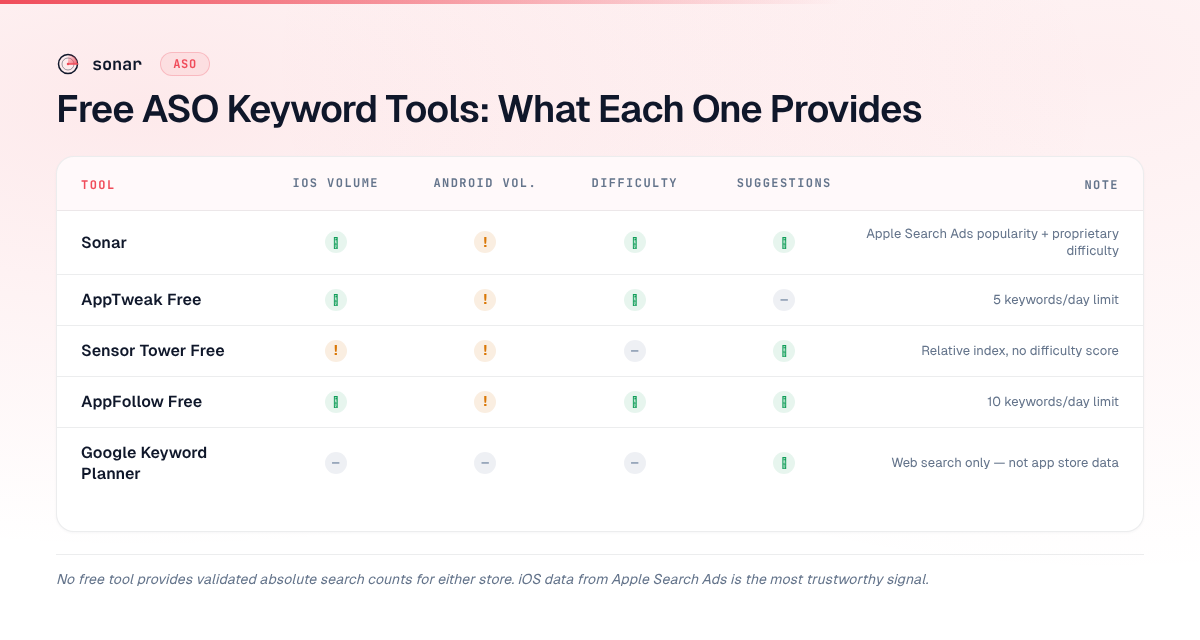
Here's a side-by-side look at what the most commonly used free ASO keyword tools give you. I've tested each one as of June 2026.
| Tool | iOS Volume | Android Volume | Difficulty Score | Suggestions | Limits on Free Tier |
|---|---|---|---|---|---|
| Sonar (trysonar.app) | Apple Search Ads popularity | Estimated | Yes (proprietary model) | Autocomplete-based | Free keyword tools; rate-limited manual rank checks; automatic tracking and history are paid |
| AppTweak Free | Apple Search Ads popularity | Estimated | Yes | Limited | 5 keywords/day |
| Sensor Tower Free | Relative index | Relative index | No | Yes | Very limited lookups |
| AppFollow Free | Apple-derived | Estimated | Yes | Yes | 10 keywords/day |
| Google Keyword Planner | N/A (web only) | N/A (web only) | N/A | Yes (web) | Unlimited but irrelevant to ASO |
Key takeaway: No free app store keyword tool gives you validated absolute search counts for either store. The tools that surface Apple's raw popularity score for iOS are more transparent than those that transform it into an opaque "volume" number. For Google Play, every tool is estimating — treat those numbers as directional signals, not facts. For a broader comparison of paid and free options, see our guide to the best ASO tools.
The Cross-Platform Trap: Why One Store's Data Misleads on the Other
A developer looks up a keyword in a free tool, sees a decent volume number, and assumes it applies to both iOS and Android. It doesn't. The two stores have different search behavior, different keyword indexing, and different competitive landscapes.
Sonar's keyword index puts "tip calculator" at iOS popularity 35 and difficulty 39, while Google Play shows popularity 41 and a much lower difficulty of 14 — a keyword a free tool should help you spot.
That's a 25-point difficulty gap for the same keyword. On iOS, "tip calculator" is moderately competitive. On Google Play, it's practically open territory. A tool that shows you only one store's numbers, or worse, averages them, hides this opportunity entirely.
Here's another example: for "subscription tracker," Sonar reports iOS difficulty 36 with popularity 25, compared to Android difficulty 26 with popularity 24 — near parity in demand but very different competitive landscapes.
| Keyword | iOS Popularity | iOS Difficulty | Android Popularity | Android Difficulty |
|---|---|---|---|---|
| tip calculator | 35 | 39 | 41 | 14 |
| subscription tracker | 25 | 36 | 24 | 26 |
The takeaway is concrete: any free ASO keyword tool worth trusting must let you toggle between stores and compare difficulty per platform. Tools that blend stores into a single number are hiding the most actionable signal in your data. For a full breakdown of how ASO diverges between platforms, see our iOS vs Google Play ASO comparison.
A Trust Framework for Evaluating Free ASO Keyword Tools
Not all free tools are equal, and "free" doesn't mean "unreliable" — it means you need to evaluate what you're getting. I use five criteria when deciding whether to trust a free ASO keyword tool's output.
- Data source transparency. Does the tool tell you where its numbers come from? "iOS popularity from Apple Search Ads" is verifiable. A generic "volume: 72" with no methodology is a black box.
- Store separation. Does it show iOS and Android independently? As the "tip calculator" example demonstrates (difficulty 39 vs. 14), platform-blended data hides critical differences.
- Index freshness. When was the data last refreshed? Some free tools update weekly. Others cache for months without disclosure.
- Suggestion quality. Autocomplete is a baseline. Better tools attach popularity scores to each suggestion and surface competitor keyword overlap — not just raw term lists.
- Honesty about limitations. A tool that says "we estimate Google Play volume — this isn't from Google" earns more trust than one presenting estimates as facts.
What Free Tools Miss: The Gaps That Matter
Even the best free ASO keyword tool has structural limitations. Knowing these gaps helps you decide when to upgrade and when free is genuinely sufficient.
Historical trend data. Most free tiers show you a snapshot — today's popularity, today's difficulty. They don't show you whether a keyword is trending up or down over the past 90 days. For seasonal keywords (like "tax calculator" peaking in March or "halloween costume" spiking in October), this gap is costly. You need a rank tracking tool to fill it.
Competitor keyword intelligence. Free tools rarely show you which keywords your competitors rank for. Competitor keyword analysis — finding the terms that drive installs for apps in your category — is one of the highest-value ASO activities, and it's almost always paywalled. We cover how to approach this in our competitor keyword analysis guide.
Localization data. Most free tools default to the US store. If your app serves users in Germany, Brazil, or Japan, you need per-country keyword data. This is occasionally available for free on iOS (since Apple's popularity score supports multiple storefronts), but Google Play localization data is scarce at any price point.
Integration with metadata workflows. A keyword list is step one. Step two is actually optimizing your app's title, subtitle, and keyword field around those terms. Free tools rarely connect keyword research to metadata optimization — you end up copy-pasting between tabs manually.
When Free Is Enough — And When It Isn't
For an indie developer with one app, a free tool that surfaces Apple Search Ads popularity and autocomplete suggestions covers most keyword research needs. You don't need a $200/month platform to find that "restaurant tip calculator" (iOS difficulty 31) is easier to rank for than "tip calculator" (iOS difficulty 39).
The breakpoint arrives when you manage multiple keywords, markets, or apps. At that scale, the gaps — no historical data, no competitor intelligence, no localization — compound. I built Sonar for developers who've outgrown free tiers but don't need enterprise pricing. Our pricing page shows what each level includes.
Common Mistakes When Using Free Keyword Tools
Free tools give you data. They don't give you judgment. Here are the mistakes I see most often when developers use a free ASO keyword tool without understanding its constraints.
Treating popularity as absolute volume. Apple's popularity score of 35 for "tip calculator" does not mean 35 searches per day, per week, or per anything. It's a relative index. A keyword at popularity 35 gets less search traffic than one at popularity 50, but you can't calculate the ratio. Free tools that relabel this as "search volume" without explaining the scale mislead users.
Ignoring difficulty entirely. Popularity without difficulty is half the picture. A keyword with popularity 45 and difficulty 80 is worse than a keyword with popularity 25 and difficulty 14 for a new app. The lower-difficulty keyword gives you a realistic shot at ranking on page one; the high-difficulty one doesn't, regardless of volume. Our guide to finding low-competition keywords covers this strategy in depth.
Optimizing for one keyword instead of a cluster. Free tools often encourage a single-keyword mindset — type one term, see one result. But App Store search indexing pulls from your title, subtitle, and keyword field together source: [Apple App Store metadata guidelines]. You should be targeting a cluster of related terms, not a single keyword. Sonar's suggestions data, for example, shows that "tip calculator" branches into variants like "tip calculator free," "restaurant tip calculator," and "free tip calculator and bill split" — each with its own difficulty profile.
Using Google Keyword Planner for ASO. Google Keyword Planner measures web search volume on Google.com, not app store search volume. The two are loosely correlated at best. Confusing web SEO data with ASO data is one of the most common errors I encounter. For ASO-specific keyword research, start with our keyword research guide.
FAQ
Is there a completely free ASO keyword tool with no daily limits?
Very few tools offer unlimited free lookups. Sonar's free, no-signup tools — the Keyword Generator and the Keyword Difficulty browser — have no daily lookup cap and cover both iOS and Google Play, with no account required. Most other tools — AppTweak, Sensor Tower, AppFollow — cap free usage at 5–10 lookups per day.
For a manual ranking check, use Sonar's free app rank tracker. It checks up to five keywords at a time without signup, with a limited number of checks per hour. Automatic daily tracking, ranking history, and competitor keyword analysis are part of the paid product, which starts with a 7-day free trial.
Can I trust the search volume numbers from free ASO tools?
For iOS, tools that surface Apple's Search Ads popularity score directly are reasonably trustworthy — you're seeing Apple's own relative index. For Google Play, no free tool has access to actual search query data from Google, so every "volume" number is an estimate based on indirect signals. Treat iOS numbers as directional and Android numbers as rough approximations.
What's the difference between keyword difficulty and competition?
"Difficulty" and "competition" are often used interchangeably in free ASO tools, but they sometimes measure different things. In Apple Search Ads, "competition" refers to how many advertisers bid on a term — an ad metric, not an organic ranking metric. "Difficulty" in tools like Sonar is a composite score based on how hard it is to rank organically, factoring in the strength of currently ranking apps. For a full explainer, see our keyword difficulty guide.
Do free tools work for Google Play keyword research?
They work, but with significant caveats. Google Play doesn't expose a popularity API like Apple does, so every free tool is estimating volume through indirect methods (autocomplete scraping, install count analysis, Google Trends correlation). The data is less reliable than iOS equivalents. Always cross-reference multiple tools for Google Play keywords, and weight difficulty scores lower in your confidence ranking.
Should I use Google Keyword Planner for app store keywords?
No. Google Keyword Planner measures web search volume on Google.com, which does not correlate reliably with App Store or Google Play search volume. A keyword with 50,000 monthly web searches might have minimal app store demand, and vice versa. Use ASO-specific tools that measure in-store search behavior instead. For app-specific keyword research, see our guide to choosing the right app store keywords.
Looking for keyword data you can actually trust? Try Sonar's free keyword tools — no signup, no daily limit, with search popularity and difficulty for every keyword across both iOS and Google Play.