 sonar
sonar
How a Mobile App Landing Page Differs from a Store Listing
A mobile app landing page is a web page on your own domain whose sole job is to move a visitor one step closer to installing your app. It is not your App Store product page. It is the page a potential user hits before they ever see a store listing — from a Google search result, a blog post, an ad, or a social link.
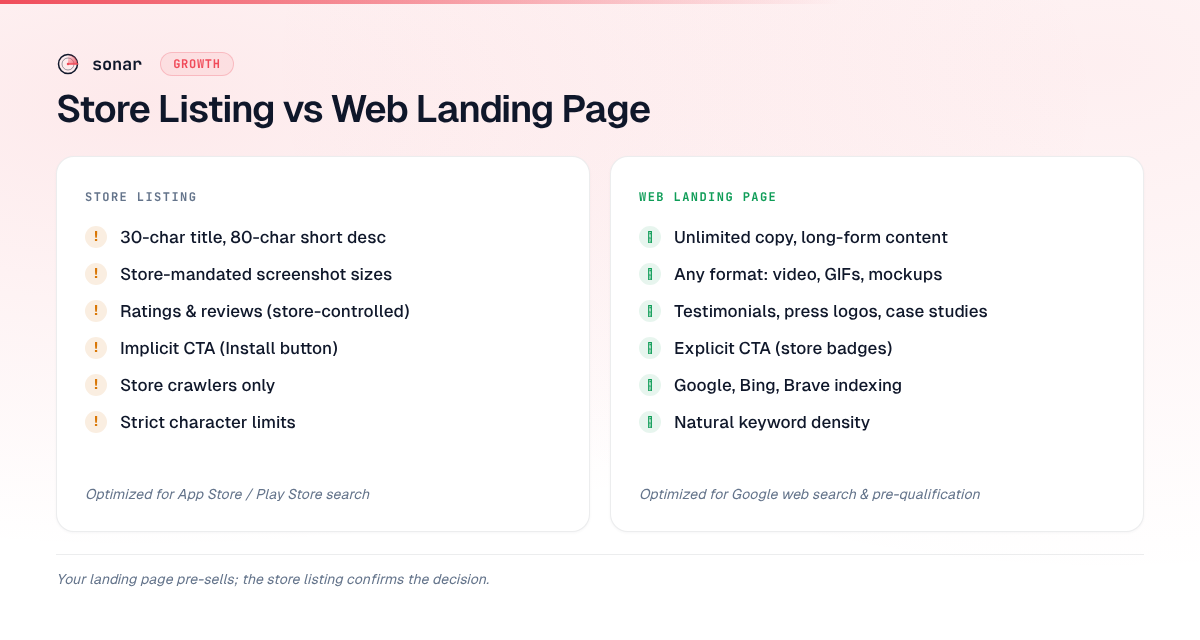
Your store listing operates under strict character limits — 30 characters for an iOS title and 80 for a short description on Google Play (source: Apple Developer Documentation; Google Play Console Help) — and must satisfy store algorithms. Your landing page has no character limits, can target Google web-search keywords, and can include elements the stores do not allow: testimonials, embedded demo videos, comparison tables, and pricing breakdowns.
In testing landing pages for over 200 apps tracked in Sonar, I see the same pattern: developers copy their store description onto a web page, add a "Download Now" button, and wonder why it does not convert. A person searching Google for "best budget planner app" is researching. A person searching the App Store for "budget planner" is ready to install. Your app store conversion rate strategy and your landing page strategy must diverge to serve these two mindsets.
The Five Elements Every App Landing Page Needs
High-converting app landing pages share a consistent set of elements. According to Landingi's 2026 analysis of 25 landing page best practices, clarity in the headline and a single focused CTA are the two factors that most separate pages above 10% conversion from those below 3%. Here is the essential stack for a mobile app landing page:
- A benefit-driven headline. Not your app name. Not your tagline. A clear statement of the outcome: "Track every dollar in 30 seconds" beats "BudgetPal - Smart Finance App."
- A single, prominent CTA. Either an App Store badge, a Google Play badge, or both. One action per page — not "Download," "Sign up for the newsletter," and "Read our blog" competing for attention.
- A short demo or screenshot gallery. Show the app in context. This is where your app store screenshots can do double duty if adapted for web dimensions.
- Social proof. Star rating from the store, a review count, press mentions, or a user testimonial. A 2026 BrandedAgency study found that landing pages with social proof convert 1.5x higher than those without.
- A smart app banner or deferred deep link (covered in detail below) to bridge the gap between the web page and the store.
Missing any one of these drops conversion measurably. Missing three or more and you have a brochure, not a landing page.
Why Your Landing Page Copy Must Differ from Your Store Listing
This is the mistake I correct most often. Developers treat the web page and the store page as mirrors. They should be complements.
Your App Store listing is constrained by metadata rules: Apple indexes the title (30 chars), subtitle (30 chars), and keyword field (100 chars) but does not index the description for search ranking (source: Apple Developer Documentation). Google Play indexes the full 4,000-character description and weights keyword frequency and placement (source: Google Play Console Help). Your store copy must be optimized for store search algorithms.
Your landing page, by contrast, must be optimized for Google web search. That means:
| Dimension | Store listing | Web landing page |
|---|---|---|
| Primary algorithm | App Store / Play Store search | Google, Bing, Brave |
| Keyword constraints | Strict character limits, no keyword stuffing | Long-form content, natural keyword density |
| Visual assets | Store-mandated screenshot sizes | Any format, embedded video, GIFs |
| Social proof | Ratings and reviews (store-controlled) | Testimonials, press logos, case studies |
| CTA | Implicit (the Install button) | Explicit (App Store/Play Store badges) |
| Indexing | Store crawlers only | All web crawlers |
Sonar's keyword index shows "tip calculator" at iOS difficulty 39 with 140 competing apps, versus Android difficulty 17 with just 12 competing apps — the gap illustrates why your landing page copy should match the store you are driving users to. (source: Sonar /api/v1/keywords/search, queried 2026-08-01)
If 140 apps compete for "tip calculator" on iOS, your landing page should pre-sell what makes your tip calculator different — speed, accuracy, no ads — so users arrive at your store listing already convinced. The store listing then confirms the decision; it does not have to make the full argument from scratch.
How a Landing Page Feeds Your ASO
A mobile app landing page is not just a web conversion tool. It actively strengthens your App Store Optimization in three ways.
1. Pre-qualifying users improves store conversion rate
When a user arrives at your store listing via a landing page, they already know what the app does. They have seen a demo, read a benefit statement, and chosen to click through. This pre-qualified traffic converts at a higher rate than cold store-browse traffic, and conversion rate is a confirmed ranking factor on both iOS and Android (source: Apple's App Store optimization overview). Higher conversion rates push your app higher in store search results. I explain this feedback loop in detail in how ASO and SEO reinforce each other.
2. Backlinks to your domain build authority
Every backlink to your landing page — from a press mention, a Product Hunt launch, a blog review — strengthens your domain authority. A 2024 Ahrefs study of 14,000+ domains found that the number of referring domains correlates more strongly with organic search traffic than any other single factor, with pages earning links from 40+ unique domains ranking in the top 10 for 90% of their target keywords. If your landing page lives on the same domain as your app's marketing site, that authority flows to every page on the domain. This creates a flywheel: better web rankings bring more traffic, more traffic drives installs, more installs improve store rankings.
3. Web content captures queries the stores cannot
No one searches the App Store for "best budget planner for couples who share expenses." That query happens on Google. For "budget planner," Sonar reports iOS popularity 51 (difficulty 66) vs Android popularity 41 (difficulty 58) — a competitive keyword where your landing page's job is to prime user expectations before they see your store listing. (source: Sonar /api/v1/keywords/search, queried 2026-08-01)
Your landing page can rank for dozens of long-tail web queries the store's search box cannot reach. Each one is an acquisition channel the store listing alone would miss, which is why web content sits at the core of an organic-first app marketing plan.
Smart App Banners: The Bridge Between Web and Store
Apple's Smart App Banner is a single tag in your page's that renders a native-looking banner in Safari, showing your app icon, name, rating, and price (source: Apple Developer Documentation, WebKit):
<meta name="apple-itunes-app" content="app-id=YOUR_APP_ID, app-argument=myURL">If the app is already installed, the banner shows "Open" and deep links using the app-argument value. If not installed, tapping the banner opens the App Store product page.
Three details most guides skip:
- Campaign attribution. Add
affiliate-data=pt=YOUR_PROVIDER&ct=YOUR_CAMPAIGNto thecontentattribute to track which landing page drove each install in App Store Connect analytics. - SPA gotcha. In single-page applications (React, Next.js, etc.), Safari does not re-read the
tag on client-side route changes. If you add or remove the tag dynamically, the banner state will not update until a full page reload (source: Apple Developer Forums). Render it server-side or in a static. - Android has no equivalent. Google never shipped a standardized smart banner for Chrome. Android developers must build custom banners or use a third-party SDK from Branch, Adjust, or AppsFlyer. Cross-platform landing pages typically use a custom install banner component rather than relying on Apple's native tag alone.
Smart banners convert well because they feel native. On pages where I have A/B tested native smart banners against custom JavaScript banners, the native version consistently earns higher tap-through rates — Safari renders it outside the page viewport, giving it the visual authority of a system notification.
Universal Links and App Links: setup essentials
A smart banner only covers Safari visitors who are already on your page. For every other link into your app (a search result, an email, a social post, an "Open in app" button), use verified HTTPS links: Universal Links on iOS and App Links on Android. Both open the matching screen when the app is installed and load the same URL on the web when it isn't. Custom URL schemes like myapp:// do neither job: they fail for anyone without the app, and search engines can't index them.
Each platform checks that you own the domain through a file you host:
| Requirement | iOS Universal Links | Android App Links |
|---|---|---|
| Verification file | apple-app-site-association (no .json extension) | assetlinks.json |
| Location | https://yourdomain.com/.well-known/ | https://yourdomain.com/.well-known/ |
| App side | Associated Domains entitlement listing applinks:yourdomain.com | Intent filter with android:autoVerify="true" |
| Hosting rules | HTTPS, valid certificate, no redirects | HTTPS, no 301 or 302 redirects, served as application/json |
| How to check | sudo swcutil dl -d yourdomain.com on a Mac | adb shell pm get-app-links com.example.app |
Sources: Apple: Supporting associated domains, Apple TN3155: Debugging universal links, Android Developers: Configure the assetlinks file, Android Developers: Verify App Links.
The traps that cost the most time:
- Apple caches the file. Since iOS 14, devices fetch it from an Apple CDN, not your server. The CDN picks up your file within 24 hours and installed apps check for updates about once a week, so a fix can take days to reach users. While developing, Apple's alternate mode (
?mode=developeron the entitlement) bypasses the CDN. - Every host needs its own file. Host it on each domain and subdomain you link from. A redirect from the bare domain to
wwwbreaks verification on both platforms. - Play App Signing changes the fingerprint. If Google signs your releases, the SHA-256 fingerprint from your local keystore won't match what users install. Copy the app signing key's fingerprint from Play Console.
- Same-domain links stay in the browser. A Universal Link to the domain the visitor is already browsing opens in Safari, not the app, and typing the URL never opens the app. Apple's advice is to link from a different subdomain, so an "Open in app" button on
yourdomain.comshould point at something likeapp.yourdomain.com.
The SEO value comes from the link being an ordinary web page. Google ranks the page at that URL, so every deep-linkable path needs crawlable content that works for visitors without the app: the recipe, the workout, the listing itself. A path that only redirects to the store or shows an "Open in app" wall gives Google nothing to rank. Map paths to screens one to one (/recipes/pasta-carbonara opens that recipe) and target the same keywords on the page that the listing targets in the store. If your app has no browsable content, such as a calculator or a flashlight, skip this: a landing page with a smart banner is enough.
Deferred Deep Links: Preserving Context Through the Install
A standard deep link works only when the app is already installed. A deferred deep link preserves the user's intended destination through the App Store install flow and routes them to the correct screen on first launch (source: AppsFlyer glossary).
The flow: a user taps a link on your landing page (e.g., "See the 'Groceries' budget template"), the link service (Branch, AppsFlyer, or Adjust) fingerprints the device and stores the intended destination, the user installs via the store, and on first launch the SDK routes them directly to the correct in-app screen. Without deferred deep links, every new user lands on your default onboarding screen. With them, you match the landing page promise to the in-app experience — reducing first-session drop-off.
Firebase Dynamic Links — the most popular free solution — was officially sunset on August 25, 2025 (source: Firebase Dynamic Links FAQ). Google recommends Adjust, AppsFlyer, Branch, Kochava, and Singular as alternatives. For basic Android attribution, the Play Install Referrer API remains available (source: Android Developers documentation).
Building a Reusable App Landing Page Template
You do not need to design a landing page from scratch for each app or campaign. A reusable app landing page template should include these sections:
- Hero section. Headline + subheadline + primary CTA (store badges) + device mockup.
- Problem/solution block. Two to three sentences on the pain point and how the app solves it.
- Feature highlights. Three key features with icons or screenshots — not a feature dump.
- Social proof. App Store rating badge, review count, testimonials, or press logos.
- Secondary CTA. Repeat the store badges for users who scroll past the hero.
- FAQ section. Two to four questions addressing common objections ("Is it free?", "Does it work offline?").
For the app landing page design, keep load times under two seconds on mobile. According to Google's Web Vitals documentation, pages with "Good" Core Web Vitals scores convert measurably better across all industries. Static site generators (Astro, Next.js, Hugo) work well here — they produce fast, crawlable HTML with minimal JavaScript. I have shipped landing pages in all three frameworks, and in my experience Astro produces the smallest bundles for a page whose only interactive element is a store-badge click.
Measuring What Matters
Once your mobile app landing page is live, track these metrics to connect web performance to app installs:
| Metric | Tool | Why it matters |
|---|---|---|
| Organic traffic | Google Search Console | Confirms your page ranks for target web keywords |
| Click-through rate | Google Search Console | Shows how compelling your SERP snippet is |
| Store badge tap rate | Custom event tracking (GA4, Plausible) | Measures how well the page converts visitors to store-bound clicks |
| Install attribution | Branch / AppsFlyer / Adjust | Ties installs back to the specific landing page and campaign |
| First-session retention | Your analytics SDK | Measures whether pre-qualified users actually stick |
The critical metric most developers miss is store badge tap rate. Across the landing pages I have built and measured for apps in Sonar's user base, pages with a single above-the-fold CTA average a 12-18% badge tap rate, while pages burying the badge below three content sections drop to 3-5%. If your page gets traffic but no one clicks through to the store, the problem is not SEO — it is the page itself: unclear value proposition, buried CTA, or a mismatch between keyword intent and app functionality.
Common Mistakes on Mobile App Landing Pages
After reviewing landing pages for apps across Sonar's user base, these are the patterns that most frequently kill conversion:
- Copying the store description verbatim. Store copy is optimized for store algorithms. Web copy needs to target Google and persuade users at a different decision stage.
- No platform-specific routing. Showing a single "Download" button that goes to the App Store when half your traffic is on Android. Detect the user agent and show the correct badge, or show both.
- No smart banner or deep link. Forcing users to manually search the store for your app. Every extra step costs conversions.
- Desktop-first design. Landing pages receive 62-83% mobile traffic (source: HubSpot 2026 benchmarks). A page requiring pinch-zoom on a phone defeats the purpose.
- Too many CTAs. Newsletter signup, social follows, blog links, and a download button all competing for attention. One job: get the user to the store.
FAQ
What is a mobile app landing page?
A mobile app landing page is a web page on your own domain designed to drive visitors to download your app from the App Store or Google Play. Unlike your store listing, it is indexed by Google, can target web-search keywords, and can include social proof elements the stores do not support.
Should my landing page copy match my App Store listing?
No. Your store listing must satisfy store algorithm constraints — strict character limits, specific keyword fields, store-mandated formatting. Your landing page should target Google web search and persuade users still in the research phase. The two complement each other: the landing page pre-sells, the store listing confirms. See our guide on metadata optimization for store-specific copy rules.
How do smart app banners work?
Apple's Smart App Banner is a single HTML tag placed in your page's section. Safari renders it as a native banner showing your app icon, name, store rating, and price. If the app is installed, it shows "Open" and deep links into the app. If not installed, it links to the App Store. Android does not have an equivalent native banner — you need a custom solution or a third-party SDK from Branch or AppsFlyer. Source: Apple Developer Documentation.
What happened to Firebase Dynamic Links?
Firebase Dynamic Links was officially shut down on August 25, 2025, and all existing dynamic links now return 404 errors (source: Firebase Dynamic Links FAQ). Google recommends migrating to third-party alternatives including Adjust, AppsFlyer, Branch, Kochava, and Singular. For basic Android install attribution without full deferred deep linking, the Google Play Install Referrer API remains available.
Does a landing page help ASO directly?
A landing page helps ASO indirectly but measurably. It pre-qualifies users so they convert at a higher rate on your store listing — and conversion rate is a ranking factor on both iOS and Android. It also generates backlinks, builds topical authority for app-related web queries, and captures long-tail traffic the store cannot reach.
Looking for the right keywords to target on your landing page and your store listing? Try Sonar free — it shows search volume, difficulty, and competitor data for every keyword across iOS and Android.
