What Is App Store Conversion Rate and Why It Matters
Your app store conversion rate is the percentage of people who visit your listing and actually download your app. It is the single most important metric most indie developers ignore — and the foundation of any serious app conversion rate optimization effort.
You can spend weeks optimizing app store keywords and climbing search rankings. But if your listing converts at 15% instead of 30%, you are leaving half your potential downloads on the table. Worse, both Apple and Google use download velocity as a ranking signal — a low conversion rate actively hurts your search rankings in a feedback loop.
Conversion Rate = Downloads / Product Page Views x 100
On iOS, find this in App Store Connect under Metrics > Product Page Views and First-Time Downloads. On Google Play, the Play Console shows store listing visitors and installers directly.
Conversion Rate Benchmarks by Category
Before you start optimizing, you need to know what "good" looks like. Conversion rates vary dramatically by category because user intent differs. Someone searching for a "QR code scanner" has high intent and will download quickly. Someone browsing "social networking" apps is comparison shopping.
Average conversion rates by category, based on aggregated data from StoreMaven, SplitMetrics, and Phiture:
| Category | iOS Avg | Google Play Avg |
|---|---|---|
| Games | 25-35% | 25-40% |
| Utilities | 30-40% | 35-50% |
| Photo & Video | 20-30% | 25-35% |
| Health & Fitness | 15-25% | 20-30% |
| Productivity | 20-30% | 25-35% |
| Social Networking | 10-20% | 15-25% |
| Finance | 15-25% | 20-30% |
| Education | 20-30% | 25-35% |
A few patterns worth noting:
- Google Play generally converts higher than iOS. The install button is more prominent, and users can install directly from search results without visiting the full listing.
- Utility apps convert best because users arrive with a specific problem to solve.
- Social apps convert worst because they require network effects — users need convincing that their friends are already there.
If your conversion rate sits below the low end of your category range, your listing has a problem. If you are above the high end, you are doing well and should focus on driving more traffic instead.
The Five Listing Elements That Control Your App Store Conversion Rate
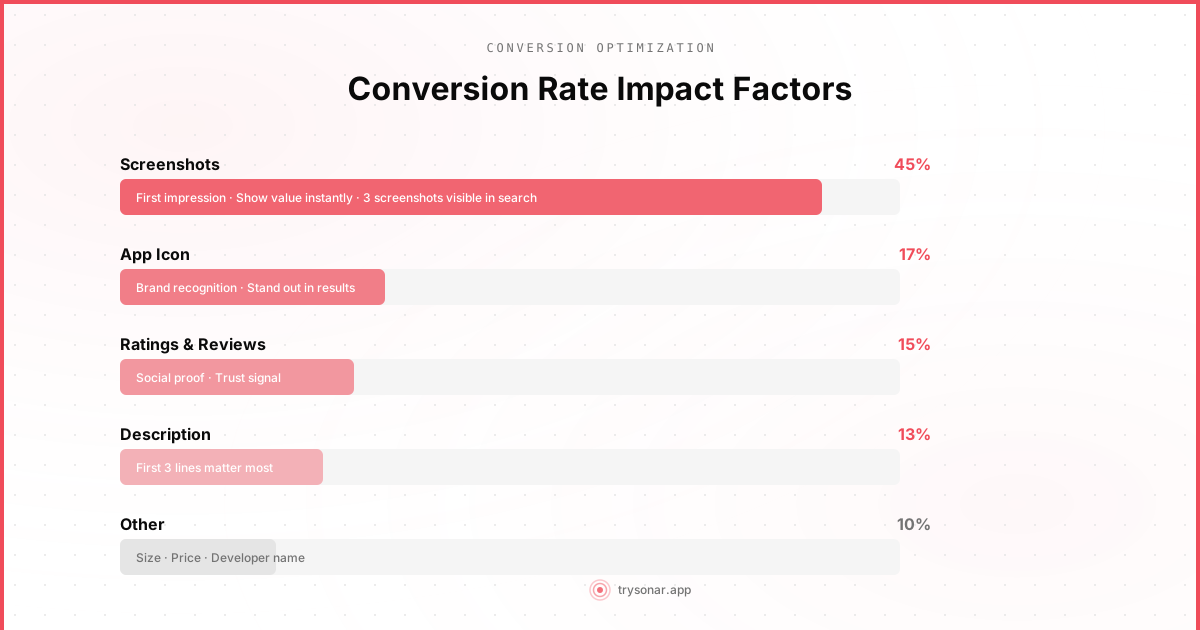
Users decide in seconds. StoreMaven's eye-tracking studies show that 60% of users never scroll past the first impression — they decide based on your icon, the first two to three screenshots, your app name, and your rating.
1. App Icon: The First Filter
Your icon is the first thing users see in search results, and it serves as a binary filter: does this look professional enough to tap on?
- StoreMaven found that the app icon influences the decision of up to 17% of users in search results.
- Apps with icons that clearly communicate their function convert 20-30% better than abstract icons (for non-branded apps).
- A single, recognizable symbol. Not two, not three. One.
- Bold colors that contrast with the white/dark App Store background. Blue and green are overrepresented — consider orange, yellow, or red to stand out in search results.
- No text in the icon. At 60x60 points on a phone screen, text is unreadable and looks cluttered.
- A design that communicates your app's core function instantly. A camera icon for a photo app. A timer icon for a focus app. Users should understand what your app does before reading the title.
- Gradients and effects that looked modern in 2020 but now feel dated.
- Too much detail. Icons are viewed at small sizes. Simplify ruthlessly.
- Mimicking a big brand's icon style (looking like a Google or Apple system app) — this creates confusion and erodes trust.
2. Screenshots: The Biggest Conversion Lever
Screenshots are the single most impactful element on your product page. StoreMaven's research across thousands of A/B tests found that screenshots influence conversion rate more than any other element, accounting for the decision of up to 45% of users.
- Adding captions to screenshots increased conversion by 25% on average in SplitMetrics tests.
- The first three screenshots account for nearly all of the impact — most users never swipe to see the rest.
- Landscape screenshots on iOS can increase conversion for games by up to 20%, but hurt conversion for non-game apps.
Best practices for indie developers:
Lead with your strongest feature. Your first screenshot must communicate your app's primary value proposition in under two seconds. Not your onboarding flow, not your settings screen — the core thing your app does.
Use captions, not just raw UI. Every screenshot should have a short headline at the top explaining what the user is looking at. "Track your daily habits" is better than just showing a habits screen. Users scan captions — they rarely study the actual UI in detail.
Show real content, not placeholder data. Screenshots filled with "Lorem ipsum" or obviously fake data undermine trust. Use realistic content that shows your app in its best light.
Design for the thumbnail view. On iOS, screenshots in search results are tiny. Your captions need to be readable at that size. Use large, bold text (minimum 40pt equivalent). If your caption is not readable in search results, it might as well not exist.
Use all available slots. Apple allows up to 10 screenshots. Use at least 5-6. Your screenshots should tell a story: what the app does, how it works, and why it is trustworthy.
3. Ratings and Reviews: The Trust Signal
Your star rating is the most visible trust signal on your listing. It appears in search results, and users use it as a quick heuristic for app quality.
- Apps rated below 4.0 stars see a significant drop in conversion rate. Apptentive's research found the threshold is steep — going from 3.5 to 4.0 stars can double conversion in some categories.
- The number of ratings matters too. An app with 4.8 stars from 12 ratings is less convincing than an app with 4.3 stars from 10,000 ratings.
- Responding to negative reviews can improve conversion. Apple and Google show developer responses, and users notice when developers actively engage.
How to improve ratings:
Time your review prompts. Ask for a review after a positive experience — after completing a task, hitting a milestone, or experiencing a satisfying result. Never prompt during onboarding, after an error, or mid-task. Our guide on how to get app reviews covers timing strategy in depth.
Use the native review prompt. Apple's SKStoreReviewController and Google's In-App Review API are mandatory for requesting reviews. They limit frequency automatically (iOS shows the prompt a maximum of three times per year per app). Custom prompts that link to the store are against guidelines on iOS.
Fix your one-star reviews. Read every negative review. If there is a recurring complaint, fix it. Then respond to those reviews explaining the issue has been resolved. Users who left a one-star review can update it — some will if you solve their problem.
Segment your happy users. Show an in-app dialog asking "Are you enjoying AppName?" If yes, trigger the native review prompt. If not, show a feedback form. This pre-filters unhappy users and results in higher average ratings.
4. App Description: Less Impact Than You Think
The description has the least direct impact on conversion. StoreMaven's eye-tracking research shows only about 2% of users read the full description — most never tap "more" to expand it.
But the first two to three visible lines do matter: roughly 170 characters on iOS and 80 on Google Play before truncation.
- Lead with a concrete benefit, not a feature list. "Save 2 hours every week on meal planning" beats "AI-powered meal planning app with 10,000 recipes."
- Include social proof if you have it. "Trusted by 50,000 cooks" or "Featured by Apple" — these build credibility fast.
- Do not waste the visible lines on generic filler like "Welcome to AppName, the best app for..."
For Google Play specifically: The description is indexed for search, so keyword optimization matters here even if users do not read it. Front-load your most important keywords naturally in the first paragraph.
5. Preview Videos: High Risk, High Reward
App preview videos auto-play in search results on iOS (muted, first three seconds). They help games and visually impressive apps but hurt conversion when the first three seconds are a logo animation, the production looks amateur, or the UI is confusing in motion.
For most indie developers building utility apps, good screenshots will outperform a mediocre video. Only invest in a preview video if you can make the first three seconds visually compelling with no audio.
A/B Testing Your Listing
Making changes based on intuition is guessing. A/B testing turns optimization into a process.
On Google Play, the Play Console's Store Listing Experiments let you test icons, screenshots, descriptions, and short descriptions. Google splits traffic and reports statistical significance. It is free — use it.
- Screenshots first (biggest impact on conversion)
- Icon second (biggest impact on tap-through from search)
- Short description / first line of description
- Feature graphic (Google Play only)
On iOS, native A/B testing is available through Product Page Optimization in App Store Connect. You can test up to three treatments against your original for icons, screenshots, and preview videos. Tests need roughly 7 days and a meaningful amount of traffic to reach significance.
- Test one element at a time. If you change your icon and screenshots simultaneously, you will not know which change drove the result.
- Run tests until they reach statistical significance — not until you see a result you like. Ending early leads to false positives.
- A "losing" test is still valuable — it told you what does not work.
- Keep a log of every test, the hypothesis, and the result. Optimization compounds over time.
Measuring and Iterating on App Conversion Rate Optimization
App conversion rate optimization is not a one-time project. It is an ongoing process. Here is a practical cadence for indie developers:
Monthly: Check your conversion rate trend in App Store Connect or Play Console. Has it changed? Investigate any drops — did a competitor launch? Did a bad review wave hit?
Quarterly: Run one A/B test per quarter. Focus on the element most likely to move the needle based on your current weak spot. Low tap-through from search? Test your icon. High impressions but low downloads? Test your screenshots.
With every update: Refresh your screenshots to reflect UI changes. Stale screenshots that do not match the current app experience lead to uninstalls and bad reviews — both of which hurt future conversion.
Localization as a conversion multiplier. Localizing your screenshots and metadata into the primary language of each market you target can increase conversion by 20-30%. At minimum, localize your screenshot captions and first description lines for your top non-English markets. Apple supports 37 localizations; Google Play supports even more.
Tools like Sonar can help you track how keyword rankings and visibility change over time, so you can separate traffic changes from conversion changes when analyzing your numbers.
The Bottom Line
App store conversion rate optimization is the highest-leverage ASO work you can do. A 10% improvement in conversion rate gives you 10% more downloads from the exact same traffic — no additional keyword work, no extra marketing spend.
Focus your effort where the data points: screenshots first, icon second, ratings third. Test your changes instead of guessing. And remember that most of your users will never scroll past the first impression — so make those first three seconds count.