
Reviews Are an ASO Ranking Factor
If you are wondering how to get app reviews that actually move the needle, start here: app store reviews affect your rankings more than most developers realize. Both Apple and Google use review volume, recency, and average rating as inputs to their search algorithms. Reviews are one of the key ASO KPIs every developer should track. An app with 500 ratings at 4.6 stars will consistently outrank a similar app with 30 ratings at 4.8 stars for the same keywords.
The math is straightforward: more reviews means better visibility, which means more downloads, which means more reviews. The hard part is getting that flywheel started — especially for indie apps that measure daily installs in the dozens, not thousands.
Most developers either never ask for reviews or ask too aggressively. Neither works. The goal is to ask the right users at the right time, using the platform APIs designed for exactly this purpose.
The Platform APIs
Both iOS and Android provide native review prompt APIs. Use them. They handle the UI, respect rate limits, and avoid dark patterns that get apps rejected.
iOS: SKStoreReviewController
Apple introduced SKStoreReviewController in iOS 10.3 and later added a SwiftUI equivalent. The system controls how and when the prompt appears — you request it, and Apple decides whether to actually show it. This means you cannot spam users, even if your code tries to.
import StoreKit

// UIKit
if let windowScene = UIApplication.shared.connectedScenes
    .first(where: { $0.activationState == .foregroundActive }) as? UIWindowScene {
    SKStoreReviewController.requestReview(in: windowScene)
}

// SwiftUI (iOS 16+)
@Environment(\.requestReview) private var requestReview

Button("Rate this app") {
    requestReview()
}
Key constraints:
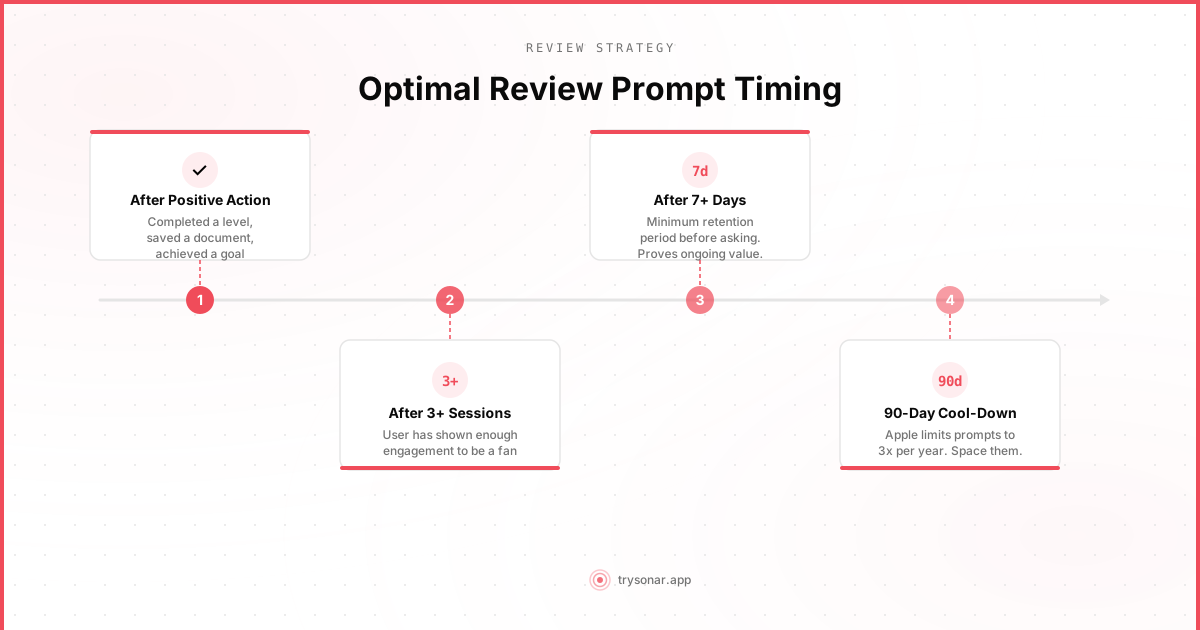
- Apple limits prompts to 3 per app per 365-day period. After that, the system silently ignores your request. You get three shots per year — make them count.
- The prompt will not appear during development. It only shows in production builds distributed through the App Store or TestFlight.
- You cannot customize the dialog. No custom text, no "please give us 5 stars" messaging. This is by design.
- App Review Guidelines (Section 1.1.7): Apps that use custom review prompts or gate users based on satisfaction ("Do you like our app? Yes/No" where "No" skips the review prompt) will be rejected. Apple actively enforces this.
Android: In-App Review API
Google's In-App Review API (part of the Play Core library) works similarly but with some differences.
import com.google.android.play.core.review.ReviewManagerFactory

val reviewManager = ReviewManagerFactory.create(context)
val requestFlow = reviewManager.requestReviewFlow()

requestFlow.addOnCompleteListener { task ->
    if (task.isSuccessful) {
        val reviewInfo = task.result
        val flow = reviewManager.launchReviewFlow(activity, reviewInfo)
        flow.addOnCompleteListener {
            // Flow finished — you cannot know if the user
            // actually left a review or dismissed the dialog
        }
    }
}
Key constraints:
- Google enforces a quota on how often the prompt can appear, but the exact limit is undocumented and varies by app. In practice, expect the prompt to appear no more than once every few months for a given user.
- The ReviewInfo object expires. Call
launchReviewFlowsoon afterrequestReviewFlowsucceeds. Do not cache it for later use. - You get no callback on whether the user submitted a review. The completion handler fires regardless. This is intentional — it prevents developers from retaliating against users who decline to review.
- Testing requires a published app. The API returns errors on debug builds. Use the
FakeReviewManagerfor testing.
When to Ask: Timing Is Everything
Knowing how to get app reviews is half the battle — the other half is knowing when to ask. The single biggest factor in getting positive reviews is timing. Ask at a moment when the user is most likely to feel positively about your app.
After a Success Moment
Trigger the review prompt after the user completes a meaningful action:
- Productivity app: After completing and checking off a task or project
- Fitness app: After finishing a workout or hitting a personal record
- Photo editor: After saving or sharing an edited photo
- Game: After completing a level or achieving a high score
- Utility app: After a successful scan, conversion, or calculation
The common thread: the user just accomplished something. They feel good. They associate that feeling with your app.
After Repeated Engagement, Not First Use
Never ask on the first session. The user barely knows your app. A reasonable baseline:
- At least 3 sessions — the user has come back multiple times
- At least 7 days since install — they have had time to form an opinion
- After a positive action in the current session — see above
Here is a simple gating strategy:
func shouldRequestReview() -> Bool {
    let sessionCount = UserDefaults.standard.integer(forKey: "sessionCount")
    let installDate = UserDefaults.standard.object(forKey: "installDate") as? Date ?? Date()
    let daysSinceInstall = Calendar.current.dateComponents([.day], from: installDate, to: Date()).day ?? 0
    let lastPromptDate = UserDefaults.standard.object(forKey: "lastReviewPrompt") as? Date

    // At least 3 sessions and 7 days since install
    guard sessionCount >= 3, daysSinceInstall >= 7 else { return false }

    // At least 90 days since last prompt (stay well under Apple's 3/year limit)
    if let lastPrompt = lastPromptDate {
        let daysSinceLastPrompt = Calendar.current.dateComponents([.day], from: lastPrompt, to: Date()).day ?? 0
        guard daysSinceLastPrompt >= 90 else { return false }
    }

    return true
}
The equivalent logic applies on Android — track session count and install date in SharedPreferences and gate before calling requestReviewFlow().
Moments to Avoid
Never ask for a review:
- During onboarding. The user is still figuring out how to use your app.
- After an error or crash. This should be obvious, but it happens.
- During a purchase flow. Asking for a review right after charging someone feels extractive.
- When the user is mid-task. Interrupting someone while they are actively doing something is the fastest way to get a 1-star review.
- Immediately after the app launches. Let the user settle in first.
Beyond the System Prompt
The native review APIs are your primary tool, but you can supplement them.
A Gentle Nudge in Settings
Add a "Rate This App" row in your settings screen that deep-links to your App Store or Play Store listing. This is always available for users who want to leave a review on their own terms. It does not count against your system prompt quota.
// iOS deep link to App Store review page
if let url = URL(string: "https://apps.apple.com/app/id\(appId)?action=write-review") {
    UIApplication.shared.open(url)
}
// Android deep link to Play Store
val intent = Intent(Intent.ACTION_VIEW).apply {
data = Uri.parse("market://details?id=${context.packageName}")
}
startActivity(intent)Respond to Support Requests
When a user emails you about a bug, fix it. Then follow up and mention they can update their review if they left one. Many users will revise a negative review upward once they see the developer is responsive.
Responding to Reviews
App store review management is not just about collecting reviews — it is about how you handle them after they arrive. Both stores let developers respond publicly to reviews, and you should be doing this consistently.
Why Responses Matter
- Users update their ratings. According to Apple, users who receive a developer response are more likely to update their review and increase their rating.
- Prospective users read responses. When someone is evaluating your app, they scroll through reviews. Seeing thoughtful developer responses signals that the app is actively maintained.
- Google factors response rate into search. While not officially documented as a ranking signal, apps with higher developer response rates tend to perform better in Play Store search.
How to Respond to Negative Reviews
Negative reviews sting, but they are an opportunity. A good response can convert a critic into an advocate.
Template for bug reports (1-2 stars):
> Thanks for reporting this — that is clearly not the experience we want you to have. We have identified the issue with [specific problem] and a fix is included in version [X.Y]. Please update and let us know if it resolves the issue. You can also reach us directly at [email].
Template for feature requests disguised as reviews:
> Appreciate the feedback. [Feature] is something we have been considering, and your input helps us prioritize. We have added it to our roadmap. In the meantime, you might find [alternative approach] helpful for what you are trying to do.
Template for vague negative reviews ("This app sucks"):
> Sorry to hear the app did not meet your expectations. We would love to understand what went wrong so we can improve. If you are willing to share more details, please reach out at [email] — we read and respond to every message.
Rules for responding:
- Never argue. Even if the user is wrong, arguing publicly makes you look bad.
- Be specific. Generic "thanks for your feedback" responses are worse than no response. Reference the actual issue.
- Respond within 24-48 hours. Speed matters. A fast response shows you care.
- Provide a direct contact channel. Move heated conversations to email where you can resolve them privately.
- Follow up after fixes. When you ship a fix for a reported issue, update your response to mention the version that includes it.
Monitoring Reviews at Scale
Effective app store review management breaks down when you manage multiple apps — manually checking reviews across stores becomes unsustainable. Automating review collection and alerting on negative reviews (say, anything below 3 stars) lets you respond quickly without spending your mornings scrolling through App Store Connect.
Tools like Sonar can monitor reviews across your portfolio and surface ones that need attention, so you can focus on responding rather than hunting.
The Numbers: How Reviews Affect Rankings
While neither Apple nor Google publishes their exact algorithms, the impact of reviews on rankings is well-documented through observation:
Volume matters more than perfection. An app with 200 reviews at 4.3 stars typically ranks higher than one with 20 reviews at 4.9 stars. The algorithm appears to weight review count heavily, treating it as a proxy for user engagement.
Recency matters. Both stores weight recent reviews more heavily than old ones. Apple explicitly shows "current version" ratings separately, and Google's algorithm favors apps with a steady stream of recent reviews. An app that received 50 reviews in the last 30 days will rank better than one that received 500 reviews two years ago and nothing since. This is why consistent review collection matters more than one-time campaigns.
Rating thresholds. There appear to be meaningful ranking thresholds around 4.0 and 4.5 stars. Dropping below 4.0 can cause a noticeable decline in search visibility. Staying above 4.5 provides the strongest signal.
Conversion rate impact. Beyond direct ranking effects, reviews influence app store conversion rate. Users scanning search results see your star rating before anything else. The difference in conversion between 3.8 stars and 4.5 stars is substantial — some studies estimate 2-3x higher install rates.
A Realistic Review Strategy for Indie Apps
If you are a solo developer or small team, here is a practical approach:
- Implement the native review API with the timing gates described above. This takes an hour and will generate the majority of your reviews.
- Add a "Rate This App" link in your settings screen. Low effort, catches motivated users.
- Respond to every review under 4 stars within 48 hours. Prioritize bug reports — fixing and responding to these has the highest ROI.
- Check your review trends monthly. Are you getting more or fewer reviews than last month? Is your average rating stable? Track these as leading indicators of app health. App Store Connect analytics shows your rating trends over time.
- After major updates, reset your timing gates. When you ship a significant new feature, allow the review prompt to trigger again for users who have not been prompted recently. They are experiencing something new and may have fresh opinions.
The goal is not to game the system. It is to make it easy for happy users to say so, and to take negative feedback seriously enough that your app keeps improving.