Why Indie Developers Should Care About Apple Search Ads
Seventy percent of App Store visitors use search to find apps. Apple Search Ads let you put your app at the top of those results, above the organic listings, for a keyword you choose. You pay per tap.
For indie developers, this matters for two reasons. First, it is the only official paid channel inside the App Store. There is no equivalent to Google Display Ads or Facebook install campaigns that places your app directly in search results. Second, Apple Search Ads rewards relevance. If your app metadata is well-optimized for a keyword, your cost-per-tap drops significantly. This means your existing ASO work is not wasted when you start paying for ads — it actively makes your campaigns cheaper.
This guide covers everything you need to set up and run profitable Apple Search Ads campaigns on a small budget — from $5/day to $50/day.
How Apple Search Ads Work
When a user searches the App Store, Apple runs an auction among advertisers targeting that keyword. The winner's app appears as the first result with a subtle "Ad" label. You are charged only when someone taps the ad.
App store search ads from Apple come in two forms:
Search Ads Basic
Basic is the simpler option. You set a monthly budget and a target cost-per-install (CPI), and Apple handles everything else — keyword selection, bidding, audience targeting. You have very little control.
Basic works for developers who want zero campaign management. But the lack of keyword-level control makes it hard to optimize, and Apple tends to spend your budget on broad, high-volume terms where your app may not convert well.
Search Ads Advanced
Advanced gives you full control: you pick exact keywords, set per-keyword bids, define audience segments, run A/B tests on ad creatives, and get detailed analytics. This is what the rest of this guide focuses on.
The minimum daily budget is $1. There is no minimum spend commitment, and you can pause campaigns instantly.
Key Metrics You Need to Understand
Before setting up your first campaign, know these numbers:
| Metric | What It Means | Typical Range (Indie Apps) |
|---|---|---|
| CPT (Cost Per Tap) | What you pay when someone taps your ad | $0.30 - $2.00 |
| CPI (Cost Per Install) | What you pay per actual install | $0.80 - $4.00 |
| TTR (Tap-Through Rate) | Percentage of impressions that become taps | 5% - 12% |
| CR (Conversion Rate) | Percentage of taps that become installs | 30% - 60% |
| Search Popularity | Apple's 5-100 score for keyword demand | Varies |
The relationship between these matters more than any individual number. A keyword with a $0.50 CPT but 70% conversion rate gives you a $0.71 CPI. A keyword with a $0.30 CPT but 20% conversion rate gives you a $1.50 CPI. Cheaper taps do not always mean cheaper installs.
Setting Up Your First Campaign
Step 1: Create Your Account
Go to searchads.apple.com and sign in with your Apple ID. If you have an Apple Developer account, use that same ID. Apple will give you a $100 credit for new accounts — enough for roughly 50-100 installs to test with.
Step 2: Campaign Structure
Apple Search Ads uses a hierarchy: Account > Campaign > Ad Group > Keywords. The structure you choose determines how easily you can optimize later. Here is what works well for indie developers:
One campaign per app. If you have multiple apps, give each its own campaign with its own daily budget.
Three ad groups per campaign:
- Brand keywords — your app name, common misspellings, your developer name
- Exact match keywords — your top 10-15 target keywords, each added as exact match
- Discovery — a broad match or Search Match ad group to find new keywords
This structure lets you allocate budget precisely. Brand keywords will have the cheapest CPT (often under $0.20) and highest conversion. Exact match gives you control over your core terms. Discovery finds keywords you had not considered — some of the best-performing app store search ads come from keywords surfaced through Discovery that you would never have guessed.
Step 3: Picking Keywords
This is where most indie developers either overspend or give up. The mistake is targeting obvious, high-volume keywords like "photo editor" or "weather app" where you are bidding against companies with six-figure monthly budgets.
Instead, focus on keywords where:
- Search popularity is 20-55 — enough volume to generate installs, not enough to attract enterprise bidders
- Your app is genuinely relevant — Apple uses your metadata to calculate a relevance score that affects both ad placement and cost
- Keyword difficulty is low to moderate — if the organic top 10 is dominated by major apps, the ad auction will be expensive too. Check beat maker keyword difficulty or drum machine keyword difficulty to see examples of niche keywords with manageable competition
A practical example: suppose you built a meditation timer app. Instead of bidding on "meditation" (search popularity 72, dominated by Calm and Headspace), target "meditation timer" (SP 38), "mindfulness bell" (SP 22), or "zen timer" (SP 18). Your CPT on these longer-tail keywords might be $0.25 versus $2.50+ on the head term.
If you are already doing keyword research for organic ASO, you have this data. The same keywords you are optimizing your metadata for are the ones you should target in your ads. Tools like Sonar show you search popularity and difficulty together, so you can filter for keywords that are both affordable to bid on and achievable to rank for organically.
Step 4: Setting Bids
Apple uses a second-price auction. You set a maximum CPT bid, but you typically pay less than your max — often 30-50% less. Start with these guidelines:
Brand keywords: Bid aggressively — $1.00 to $2.00 max CPT. You should win nearly every auction for your own brand name, and the actual CPT will be very low (often $0.05-$0.15). If a competitor is bidding on your brand name, you need to outbid them.
Exact match keywords: Start at $0.50 max CPT for keywords with search popularity under 40. For SP 40-60, start at $0.80-$1.00. You can always raise bids later if you are not getting impressions.
Discovery ad group: Set a lower default max CPT ($0.30-$0.50) since you do not know which keywords will appear, and some will be irrelevant.
Step 5: Budget Allocation
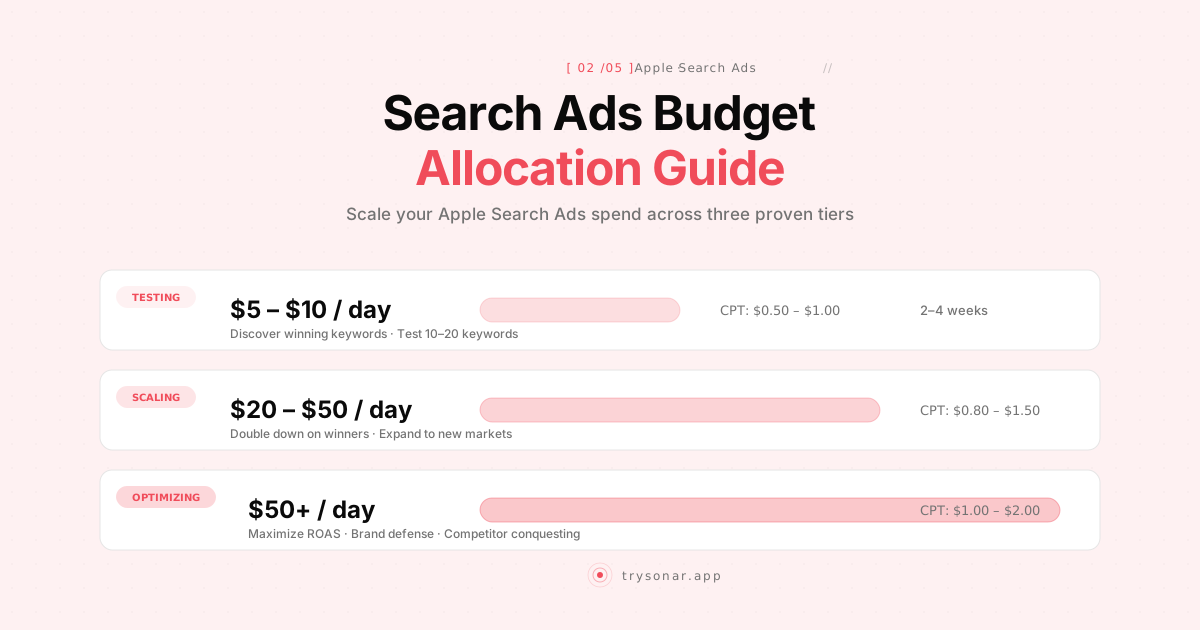
For a $10/day total budget, a reasonable split:
| Ad Group | Daily Budget | Purpose |
|---|---|---|
| Brand | $2/day | Defend your name, cheapest installs |
| Exact Match | $6/day | Core growth driver |
| Discovery | $2/day | Find new keyword opportunities |
Scale up proportionally. At $30/day, you might do $5 brand, $20 exact match, $5 discovery. The exact match group drives most of your volume, so it gets the majority of spend.
Bidding Strategies That Actually Work for Small Budgets
Strategy 1: The Keyword Ladder
Start with your cheapest, most relevant keywords. Run them for two weeks to establish baseline CPI. Then gradually add higher-volume (and higher-cost) keywords, using your CPI baseline to evaluate whether the new keywords are worth the premium.
- Week 1-2: Five long-tail keywords, SP 15-30, max CPT $0.40
- Week 3-4: Add five mid-tail keywords, SP 30-50, max CPT $0.70
- Week 5+: Selectively add high-volume keywords only if CPI stays under your target
This prevents the common mistake of blowing your entire monthly budget in the first week on expensive keywords before you know your conversion rates.
Strategy 2: Custom Product Pages for Ad Variations
Apple lets you create up to 35 custom product pages, each with different screenshots and promotional text. You can assign these to specific ad groups so users see a landing page tailored to their search intent.
For a fitness app, you might show workout-focused screenshots for the keyword "home workouts" and nutrition-focused screenshots for "calorie counter." Same app, different first impression. This directly improves your conversion rate, which lowers your effective CPI without changing your bids.
Create 2-3 custom product pages aligned with your main keyword clusters and assign one to each ad group. Even small conversion rate improvements compound significantly over time — a 5% CR lift on $20/day spend saves you roughly $50-80/month.
Strategy 3: The Discovery-to-Exact Pipeline
Your Discovery ad group will surface keywords you never thought of. Check it weekly:
- Go to your Discovery ad group
- Look at the Search Terms report
- Any keyword with a good conversion rate (above 40%) and meaningful impressions: add it to your Exact Match ad group with its own bid
- Add that same keyword as a negative exact match in your Discovery group to avoid duplicate bidding
This is the single most valuable optimization habit. Over time, your exact match keyword list grows with proven converters, and your Discovery group keeps finding new ones.
The ASO-Search Ads Feedback Loop
Here is something most guides do not explain well: Apple Search Ads and organic ASO are not separate strategies. They form a reinforcing loop.
Your organic ASO lowers your ad costs. Apple calculates a relevance score for every keyword-app pair. If your app title, subtitle, and keyword field include the term you are bidding on, Apple considers your ad more relevant. (For a step-by-step approach to metadata optimization, see our dedicated guide.) Higher relevance means you pay less per tap and win auctions with lower bids. An app with strong metadata optimization can pay 40-60% less CPT than a competitor with poor metadata targeting the same keyword.
Your ad performance boosts your organic ranking. When users install your app through a search ad, Apple still counts that as a signal of relevance for that keyword. High install velocity on a keyword — even from paid installs — can improve your organic ranking for that same keyword. This means a well-targeted ad campaign can permanently improve your organic position after you stop paying.
Your ad data reveals organic opportunities. The Search Terms report in Apple Search Ads shows you exactly which keywords users are searching and how well your app converts for each one. This data is more granular than anything available through organic ASO tools alone. Use it to update your App Store metadata — if a keyword converts at 60% in ads, it should absolutely be in your keyword field. Feed those high-converting keywords back into your ASO tool to track their organic rankings over time.
This is the core argument for doing both ASO and Search Ads simultaneously: each makes the other more effective. Spending $10/day on ads without optimizing your metadata first is like running Google Ads to a landing page you did not bother to write copy for.
What Happens When You Stop Spending
This is the question every indie developer asks. The answer is encouraging: if you ran targeted campaigns on keywords where your app is genuinely relevant, you keep much of the benefit.
The installs you paid for are real installs. Those users leave reviews, generate usage data, and contribute to your app's overall authority signals. If those paid installs helped you climb from position 15 to position 5 for a keyword, you will not drop back to 15 overnight when you pause your ads. You may drift down gradually, but the organic momentum persists.
The best approach is cyclical: spend for 4-6 weeks to build velocity on a set of keywords, pause for 2-4 weeks, monitor your organic rankings, then run another cycle targeting new keywords. This stretches a limited annual budget much further than continuous low spending.
Budget Recommendations by App Stage
Pre-Launch or Just Launched (0-100 reviews)
Budget: $5-10/day for 30 days, then reassess Focus: Brand keywords + 5-8 long-tail exact match keywords Goal: Get your first 50-100 installs to establish early conversion data and keyword relevance signals
At this stage, your conversion rate from tap to install will be lower because you have few reviews and ratings. That is normal. Focus on learning which keywords convert, not on scaling volume.
Expected results at $10/day: 5-15 installs/day, 150-450 installs/month, $150-300/month spend.
Growing (100-1,000 reviews)
Budget: $15-30/day Focus: Expand exact match keywords to 15-25, start testing mid-tail terms Goal: Find your top 10 converting keywords and double down on them
Your conversion rate should improve as you accumulate reviews. A jump from 35% to 50% CR effectively gives you a 30% CPI reduction without changing your bids.
Expected results at $20/day: 10-30 installs/day, 300-900 installs/month, $450-600/month spend.
Established (1,000+ reviews)
Budget: $30-50/day Focus: Compete on higher-volume keywords, run competitor campaigns Goal: Maximize install volume while maintaining target CPI
At this stage, you have enough data and social proof that higher-volume keywords become viable. Your relevance scores are strong, your conversion rates are solid, and you can start bidding on competitor brand names (which Apple allows).
Expected results at $40/day: 25-60 installs/day, 750-1,800 installs/month, $900-1,200/month spend.
Common Mistakes to Avoid
Bidding on keywords your app is not relevant for. If your weather app bids on "fitness tracker," Apple will either not show your ad at all or charge you a premium CPT. Even if you get taps, the conversion rate will be terrible. Every keyword you bid on should be something a user might reasonably expect to find your app for.
Ignoring negative keywords. Your Discovery and broad match ad groups will match on keywords that are irrelevant. A recipe app might match on "recipe book" (physical product searches) or "recipe creator" (a different category). Add these as negative keywords immediately — otherwise you are paying for taps that will never convert.
Setting it and forgetting it. Check your campaigns at least weekly. Pause keywords with high spend and zero conversions after 50+ taps. Raise bids on keywords that convert well but have low impression share. The difference between a neglected campaign and an actively managed one is often 2-3x in CPI.
Not tracking downstream metrics. A $1.00 CPI means nothing if those users uninstall after one day. Connect your analytics (Firebase, Mixpanel, or even Apple's built-in App Analytics) to see whether paid users actually use your app, make purchases, or subscribe. Some keywords attract tire-kickers. Others attract committed users. The CPI alone does not tell you which is which — and this applies equally to organic and Apple Search Ads traffic.
Scaling too fast. If you find a keyword converting at $0.60 CPI and try to scale from $10/day to $100/day overnight, your CPT will spike as you try to win a larger share of a finite auction pool. Scale in 20-30% increments, giving each increase a week to stabilize.
Measuring Success
For indie developers, the most important metric is whether your paid installs lead to revenue that exceeds your ad spend. Work backwards from your app's monetization:
Paid apps: If your app costs $2.99 and Apple takes 15% (small business program), you net $2.54 per install. Your target CPI needs to be under $2.54 to be profitable on first purchase. Realistically, aim for $1.50 or less to account for refunds and leave margin.
Subscription apps: Calculate your average revenue per install, factoring in trial conversion rates. If 20% of installs start a trial and 50% of those convert to a $4.99/month subscription, your average revenue per install is $0.50/month. Over 6 months average lifetime, that is $3.00 per install — so a $2.00 CPI is profitable.
Free with IAP: Similar math. If your average revenue per install is $0.30, a $0.80 CPI only makes sense if you value organic ranking boosts and user base growth beyond direct revenue.
These calculations are app-specific. Run your own numbers before setting CPI targets.
Quick Reference: Getting Started Checklist
- Sign up at searchads.apple.com and claim your $100 credit
- Optimize your App Store metadata first (title, subtitle, keywords, screenshots)
- Create one campaign for your app with three ad groups (brand, exact match, discovery)
- Research 5-8 long-tail keywords with search popularity 20-50 — Sonar can filter by popularity and difficulty to find affordable targets — and add them to your exact match group
- Set daily budget at $5-10 and max CPT at $0.40-$0.70 per keyword
- Run for 14 days before making any major changes
- Check Search Terms report weekly and move converting keywords to exact match
- Add negative keywords for irrelevant search terms
- After 30 days, evaluate CPI against your revenue-per-install target
- Scale budget on winning keywords by 20-30% per week
Apple Search Ads is one of the rare paid channels where indie developers have a structural advantage. Large companies spray budget across thousands of keywords. You can focus your $10/day on the exact keywords where your app is most relevant, achieve better conversion rates, and pay less per tap than competitors spending 100x more. The prerequisite is solid ASO — your metadata, screenshots, and keyword strategy need to be in place first. Get that right, and Apple Search Ads becomes the highest-ROI growth lever available to you on the App Store.