Stop Chasing Keywords You Can't Win
Ranking #1 for a keyword with difficulty 20 and Search Popularity 40 gives you roughly 3,800 daily impressions — and most of those taps go to the top 3 results. Ranking #50 for a difficulty-80 keyword gives you exactly zero. The math is simple: low-competition keywords you can actually rank for will always outperform competitive keywords where you're invisible.
Most indie developers waste their keyword metadata on aspirational terms like "photo editor" or "fitness tracker." (Our keyword research guide covers the full process from seed keywords to optimized metadata.) These are dominated by apps with millions of reviews and billion-dollar companies behind them. The smarter play is finding keywords where the competition is beatable and the volume is real.
What Makes a Keyword "Low Competition"
Keyword difficulty scores condense competitive analysis into a single number, but understanding what drives that number helps you spot opportunities the score alone might miss.
Few title matches in the top 10. When you search a keyword and only 2-3 of the top 10 results have that keyword in their title, it means most apps are ranking incidentally — through description matches or download velocity — rather than intentionally targeting it. This is a gap you can exploit with a deliberate title match.
Top apps have low review and install counts. If the top results for a keyword have 50-500 reviews instead of 50,000-500,000, you're looking at a beatable field. Review count is the single strongest predictor of ranking durability. Low review counts in the top 10 mean the door is open.
Mixed quality in top results. Check when the top-ranking apps were last updated. If you see apps that haven't been updated in 18+ months, apps with ratings below 4.0, or apps that don't even clearly serve the search intent — the keyword is ripe for a well-made app to enter and climb.
Low title match ratio + low average reviews = the clearest signal that a keyword is genuinely low competition, regardless of what any difficulty score says. For a deeper look at how difficulty is calculated, see our keyword difficulty breakdown.
Five Strategies to Find Low-Competition Keywords
1. Autocomplete Mining
Open the App Store or Google Play and start typing partial phrases related to your app. The autocomplete suggestions are real queries with real search volume — Apple and Google don't suggest terms nobody searches for.
The technique is to go beyond the obvious. Don't just type "budget." Type "budget t," "budget f," "budget for," "budget pl." Each additional character surfaces different long-tail variations:
- "budget" gives you "budget app" (difficulty 55, good luck)
- "budget tracker f" gives you "budget tracker for couples" (difficulty 18, very doable)
- "budget s" gives you "budget spreadsheet" (difficulty 22, interesting angle)
- "budget pl" gives you "budget planner simple" (difficulty 15, wide open)
Long-tail keywords have lower volume individually, but they also have dramatically lower competition. And users searching for specific phrases like "budget tracker for couples" have clearer intent — they know what they want, which means higher conversion rates from impression to install.
Sonar's keyword generator automates this by running hundreds of prefix combinations and returning results with difficulty and popularity scores already attached. It surfaces long-tail variations you'd never think to type manually.
2. Competitor Keyword Gaps
Your competitors are already doing keyword research for you — they just don't know it. Look at keywords where competing apps rank in positions 5-20. These are keywords where the competitor has some relevance but hasn't fully optimized for them. If their app is ranking at position 12 without the keyword in their title, you can likely outrank them by targeting it directly.
The process:
- Identify 3-5 competitor apps in your niche
- Look at what keywords they rank for outside the top 5
- Check difficulty on those keywords — many will be under 30
- Ask: is this keyword relevant to my app? If yes, it's a candidate
This works especially well with competitors who have large, unfocused apps. A do-everything productivity app might rank #15 for "pomodoro timer for studying" without targeting it. Your focused pomodoro app can take the top spot.
3. Category + Modifier Combinations
Take your core keyword and append modifiers that narrow the audience. This is the simplest way to find low-competition variations of competitive terms.
Audience modifiers: "for students," "for freelancers," "for couples," "for seniors," "for kids"
Style modifiers: "simple," "minimal," "aesthetic," "fast," "offline," "private"
Use-case modifiers: "with reminders," "with widgets," "with sync," "no login," "no ads"
Examples of how this plays out:
| Base keyword | Difficulty | Modified keyword | Difficulty |
|---|---|---|---|
| habit tracker | 58 | habit tracker minimal | 14 |
| meditation app | 62 | meditation for sleep | 28 |
| calorie counter | 55 | calorie counter simple | 19 |
| note taking app | 52 | note taking offline | 21 |
| gym workout planner | 48 | workout planner for beginners | 16 |
The modifier doesn't just lower competition — it also improves conversion. Someone searching "calorie counter simple" is actively rejecting the bloated, feature-heavy apps dominating the "calorie counter" results. They want exactly what you're probably building.
4. Localized Keywords
The US App Store is the most competitive market. The same keyword that's difficulty 55 in the US might be difficulty 25 in the UK, 20 in Australia, or 15 in Canada. English-speaking markets outside the US are dramatically less competitive because fewer developers actively optimize for them.
This isn't about translating keywords into other languages (though that works too). It's about recognizing that the competitive landscape varies by country even for the same language:
- "meal prep planner" in US: difficulty 42
- "meal prep planner" in GB: difficulty 24
- "meal prep planner" in AU: difficulty 18
- "meal prep planner" in CA: difficulty 21
If your app is available globally (and it should be), you can target different keywords in different countries. Your US metadata might focus on your most competitive viable keywords, while your Australian metadata targets terms you'd never crack in the US market.
On iOS, you can set per-country keywords using App Store Connect localizations. On Google Play, you can create separate store listings per language/country.
5. Adjacent Category Keywords
Don't limit yourself to keywords within your app's exact category. Look at how users describe the problem your app solves, even if they'd categorize it differently than you would.
- "wellness journal" (Health & Fitness adjacent, difficulty 17)
- "self care tracker" (Lifestyle crossover, difficulty 22) — see weight loss app keyword difficulty for a competitive example in this space
- "morning routine app" (Productivity crossover, difficulty 19)
- "writing app" (Books/Reference crossover, difficulty 20)
- "meeting notes" (Business crossover, difficulty 25)
- "recipe organizer" (Food & Drink crossover, difficulty 16)
These keywords work because user intent overlaps even when app categories don't. Someone searching "morning routine app" might be perfectly happy with a fitness app that includes routine tracking. The competition on these keywords is lower because most fitness apps aren't thinking outside their category.
The Sweet Spot Framework
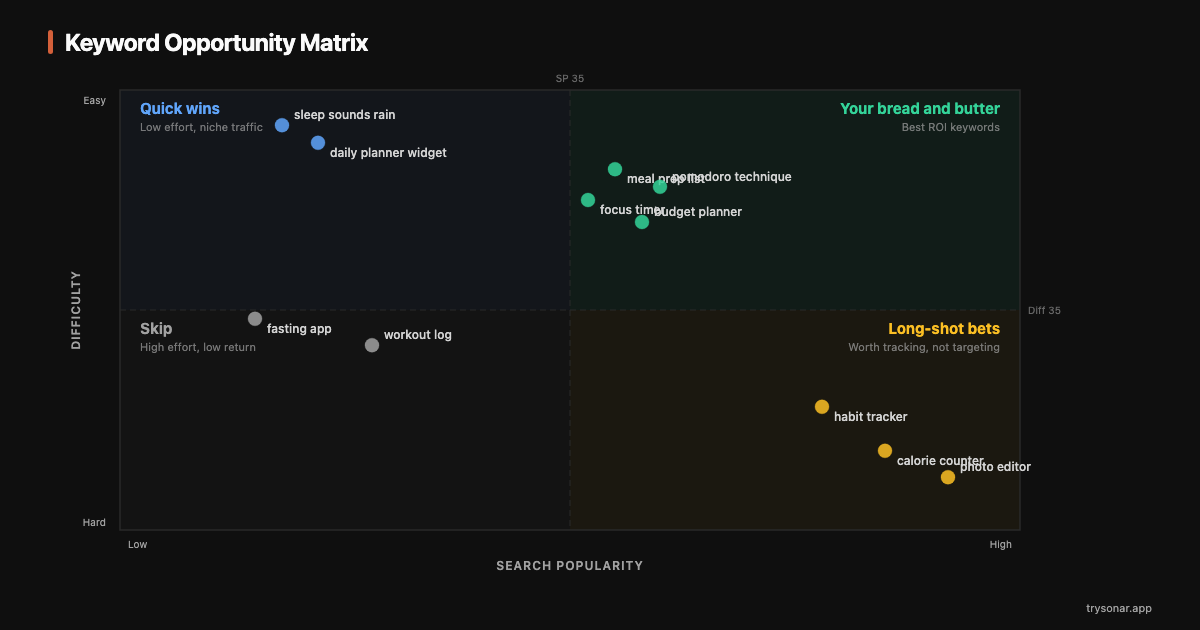
Not all low-difficulty keywords are worth targeting. A keyword with difficulty 5 and Search Popularity 10 is easy to rank for because nobody searches for it. You need both low difficulty and meaningful volume.
Think of it as a two-axis framework:
High difficulty + High popularity = keywords like "photo editor" and "weather app." You won't rank. Move on.
High difficulty + Low popularity = the worst combination. Hard to rank AND low reward. Avoid.
Low difficulty + Low popularity = easy wins with minimal impact. Use these to fill your keyword field after your primary terms, not as your main targets.
Low difficulty + High popularity = the sweet spot. These are rare, but they exist — especially in emerging niches and for long-tail queries that established apps haven't targeted yet.
Your target zone: difficulty under 35, Search Popularity 35-55. This translates to roughly 2,200-8,200 daily impressions on iOS with competition you can realistically beat. Keywords in this zone represent genuine ranking opportunities where the effort-to-download ratio is highest.
You can check any keyword against these thresholds on Sonar's keyword difficulty page — it shows difficulty, popularity, and the full top-10 competitive breakdown so you can verify the opportunity yourself.
Practical Walkthrough: Finding Keywords for a Meal Planner App
Let's say you're building a meal planning app. Here's the process from scratch.
Step 1: Start with the obvious keywords and check difficulty.
| Keyword | Search Popularity | Difficulty | Verdict |
|---|---|---|---|
| meal planner | 58 | 65 | Too competitive |
| meal prep | 52 | 58 | Too competitive |
| recipe app | 55 | 62 | Too competitive |
| grocery list | 50 | 55 | Borderline, skip for now |
None of these are viable primary targets for a new app. That's normal.
Step 2: Run autocomplete mining.
Type "meal p," "meal pl," "weekly m," "food pl," "recipe" plus modifiers. This surfaces:
- "meal planner for family" (SP 38, difficulty 24)
- "weekly meal prep simple" (SP 30, difficulty 15)
- "food planner budget" (SP 28, difficulty 19)
- "meal plan grocery list" (SP 35, difficulty 28)
Now we're getting somewhere.
Step 3: Check competitor gaps.
Look at the top 5 meal planning apps and find keywords where they rank 8-20:
- "healthy eating schedule" (SP 26, difficulty 18)
- "recipe calendar" (SP 32, difficulty 22)
- "dinner planner" (SP 34, difficulty 26)
Step 4: Apply modifiers and adjacent categories.
- "meal planner no subscription" (SP 27, difficulty 12)
- "simple recipe organizer" (SP 29, difficulty 17)
- "family dinner ideas" (SP 36, difficulty 23)
Step 5: Select and place your keywords.
From the candidates above, pick based on the sweet spot criteria (difficulty under 35, SP 35-55):
| Keyword | SP | Difficulty | Placement |
|---|---|---|---|
| meal planner for family | 38 | 24 | Title: "AppName - Meal Planner for Family" |
| dinner planner | 34 | 26 | Subtitle: "Weekly Dinner Planner & Grocery List" |
| recipe calendar | 32 | 22 | Keyword field |
| food planner budget | 28 | 19 | Keyword field |
| weekly meal prep simple | 30 | 15 | Keyword field (use "weekly,simple,prep") |
| healthy eating schedule | 26 | 18 | Keyword field (use "healthy,eating,schedule") |
| meal planner no subscription | 27 | 12 | Keyword field (use "subscription" — other words already covered) |
Remember, on iOS you have 160 indexed characters total across title, subtitle, and keyword field. Don't repeat words across fields. "Meal" and "planner" in your title means you never put them in your keyword field — Apple combines words automatically. See our metadata optimization guide for the full field-by-field breakdown.
Tracking Results
After updating your metadata, Apple and Google need time to re-index your app and settle your rankings. Here's what to expect:
Days 1-3: Your app gets re-indexed. You may start appearing for new keywords, usually at low positions (30-80).
Days 4-14: Rankings begin to stabilize. For low-difficulty keywords, you might reach the top 20 within the first two weeks if your app has decent quality signals (50+ reviews, 4.0+ rating).
Weeks 3-6: This is where quality signals matter. If users are tapping your result and installing (good conversion), your ranking climbs. If they're scrolling past, it stalls.
The 6-week rule: Give any keyword strategy at least 6 weeks before deciding it's not working. Changing your metadata every week resets the indexing cycle and prevents you from getting accurate data on what's actually performing.
When to iterate: if a keyword hasn't cracked the top 30 after 6 weeks, it's either too competitive for your current app signals or not relevant enough in Apple's/Google's assessment. Swap it out. If a keyword is sitting at positions 5-10 and not climbing, focus on improving your app's quality signals (ratings, reviews, update frequency) rather than changing keywords.
The Takeaway
Finding low-competition keywords isn't about finding obscure terms nobody searches for. It's about finding the gap between what users are searching and what existing apps are targeting. The strategies above — autocomplete mining, competitor gaps, modifier combinations, localization, and adjacent categories — consistently surface keywords where a well-optimized indie app can reach the top 10 within weeks rather than months.
Start with 8-12 keywords in the sweet spot (difficulty under 35, SP 35-55), fill your metadata strategically, and track rankings weekly. After 6 weeks, cut what isn't working and add new candidates. This cycle, repeated every 4-6 weeks, is how indie apps build sustainable organic traffic without spending a dollar on ads.