 sonar
sonar
> Disclosure: We build Sonar (trysonar.app) and its MCP server, so weigh this accordingly. This is not a ranking: each server is matched to the workflow it fits, and the section on Sonar lists where it falls short. Tool counts, plans and prices were checked against each project's docs, README or pricing page on October 19, 2026.
Which ASO MCP server should you use in 2026?
It depends mostly on what you already pay for and where your agent runs:
- You already pay for Appfigures, AppTweak, Sensor Tower, AppFollow or Mobile Action: use your vendor's official server. You're not adding a vendor, just a new interface to data you already have.
- You want both stores, computed difficulty and popularity, and a free tier to start: Sonar. Hosted, 63 tools, keyless free mode.
- You run Apple Ads and want an agent to manage campaigns from a Mac: AppSprint. The only server here with Apple Ads write tools.
- You already track your iOS keywords in Astro: turn on Astro's built-in local server.
- You want free and open source: KenanAtmaca/aso-mcp (iOS, App Store Connect writes), appreply-co/mcp-appstore (both stores, raw data) or RankoR/aso-mcp (Google Play, prototype).
The category changed fast in 2026. At least nine ASO platforms now ship an MCP server, and most of the established ones host theirs, so "hosted vs local" no longer separates indie tools from incumbents. What still separates them is the data behind the tools, what it costs per call, and whether there's a way to try it free.
What is an ASO MCP server?
An ASO MCP server exposes App Store Optimization data — keyword difficulty, search popularity, competitor metadata, reviews — as tools your AI agent can call. Instead of switching between an ASO dashboard and your editor, you ask Claude Code or Cursor "What's the difficulty for 'budget planner' on iOS?" and the answer comes back inline.
The difference that matters is the data source. Scraper-based servers fetch store pages and return what Apple or Google show publicly: search results, metadata, reviews. Platform-backed servers query an ASO vendor's index and return computed metrics such as difficulty and popularity that don't exist in raw store data. That's the gap between "here are the top 10 results" and "this keyword has difficulty 63 and Apple popularity 51" — the numbers an ASO keyword research workflow actually needs.
How we evaluated
We read each server's documentation or README and its pricing page on October 19, 2026, and compared them on:
- Data — computed metrics from a maintained index, or raw store data
- Stores — App Store, Google Play or both
- Hosting — a remote server you connect to, or a local process (and whether a desktop app has to stay open)
- Cost to start — free tier, trial, or a paid plan underneath
- Write tools — whether the agent can change anything (track keywords, reply to reviews, edit metadata, manage ads)
Tool counts are listed for reference only. A higher count doesn't mean a better fit.
The comparison table
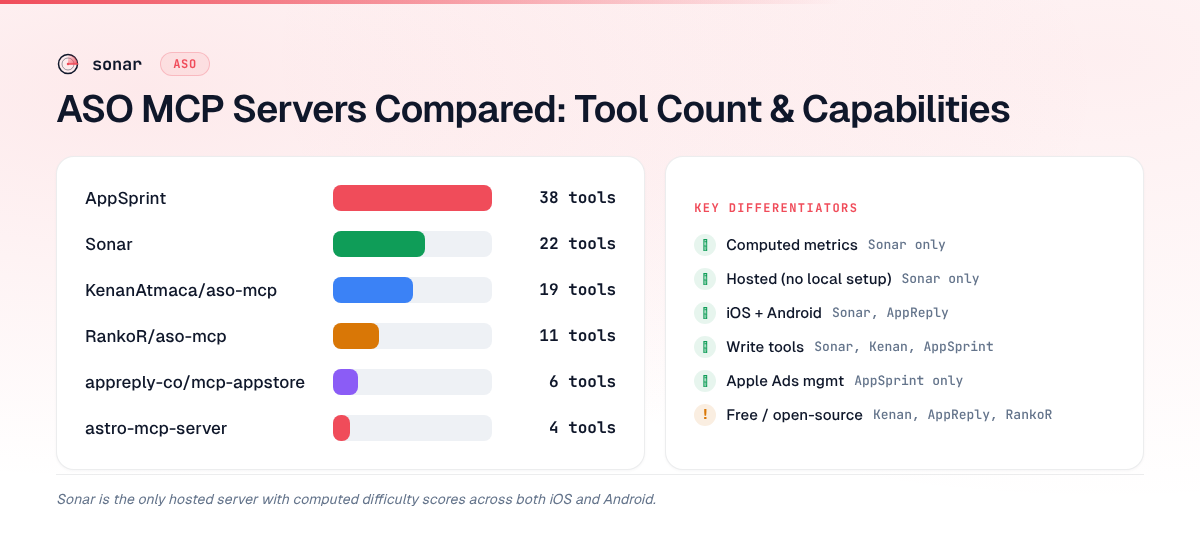
| Server | Stores | Data | Hosting | Cost to start | Write tools | Tools |
|---|---|---|---|---|---|---|
| Appfigures (official) | iOS + Android | Appfigures platform | Hosted (OAuth); local CLI mode deprecated | Free plan; other apps' data costs public-data credits | Yes (keyword tracking, review replies) | Not published |
| AppTweak (official) | iOS + Android | AppTweak platform | Hosted | Docs tools free; data calls need an API plan (from $166/mo) | Not documented | 9 |
| Sensor Tower (official) | iOS + Android | Sensor Tower and Pathmatics | Not stated | Add-on for API subscribers, price not published | Not documented | Not published |
| AppFollow (official) | iOS + Android | AppFollow platform | Hosted (OAuth) | Owner/admin on any plan, including free; uses API credits | Where your plan permits | Not published |
| Mobile Action (official) | iOS + Android | Mobile Action platform | Hosted | Needs the API Solutions plan (sales-priced) | Not documented | Not published |
| Sonar (@sonarapp/mcp) | iOS + Android | Computed index (difficulty, Apple popularity, true iOS ranks) | Hosted (OAuth), or local via npm | Keyless free mode; 50 free credits; packs from $10 | Yes (tracking, competitors, alerts, review replies) | 63 |
| Lite ASO | Not checked | Lite ASO platform | Hosted (OAuth or agent key) | 14-day trial with a payment method; Indie $19/mo | Not checked | Not published |
| AppSprint | iOS | Your AppSprint Mac app | Local; app must stay open | Pro $108/yr | Yes (metadata, Apple Ads campaigns, bids, budgets) | 38 |
| Astro (official, beta) | iOS | Your Astro Mac app | Local (127.0.0.1); app must stay open | Astro $108/yr; free version 10 keywords | Yes (apps, keywords, notes, tags) | 12 |
| KenanAtmaca/aso-mcp | iOS | Scraper (app-store-scraper + aso) | Local | Free, MIT | Yes (App Store Connect metadata) | 20 |
| appreply-co/mcp-appstore | iOS + Android | Scraper | Local, or self-hosted HTTP | Free, MIT | No | 11 |
| RankoR/aso-mcp | Android | Scraper (play-store-scraper-ng) | Local | Free, MIT | No | 16 |
Appbot, a review-analytics tool, also shipped an MCP server in June 2026 on its Large and Premium plans. We found no MCP server from ASOdesk, ASOMobile or FoxData.
Trends MCP is a different kind of server: a hosted MCP endpoint for live App Store Top Free, App Store Top Paid and Google Play charts, plus trend data from 30+ other sources such as Google Trends. It doesn't score keyword difficulty or popularity, so it complements a keyword tool rather than replacing one. Free for 100 requests a month; paid plans from $19/month (source: Trends MCP pricing).
The official vendor servers
If you already pay for one of these platforms, its server is almost certainly your fastest path to agent access. The trade-off is that none of them is a cheap way into the vendor: each rides on a plan or an API subscription.
Appfigures runs a hosted server at mcp.appfigures.com/mcp with OAuth, alongside an official CLI (@appfigures/cli, whose local af mcp mode is now deprecated). It covers app metrics, reviews, store data and keyword rankings, and it can write: track and untrack keywords and reply to reviews. Every account gets 1,000 API requests a day and your own apps' data costs nothing extra; data about other apps uses public-data credits priced by type — keywords cost 10 per request, metadata 2 (source: Appfigures help center). It's the strongest vendor option if you also want your sales data in the conversation.
AppTweak hosts its server at developers.apptweak.com/mcp with nine tools. The documentation tools work without a key, which helps when you're writing integration code; the data tool spends API credits, and API plans start at $166/month billed annually with a 7-day trial (source: AppTweak MCP docs).
Sensor Tower announced its server in July 2026 as "an additional product for qualifying Sensor Tower users", translating agent requests to the Sensor Tower and Pathmatics API (source: Sensor Tower blog). Its demo page says you need an active API subscription. There's no public price, which fits the rest of Sensor Tower's sales-led model.
AppFollow hosts its server at mcp.appfollow.io/mcp with Google OAuth, and it's listed in Claude's connector directory. Its help center says an owner or admin can connect on any plan; the tools you get depend on your plan, and calls use API credits. An open-source AI toolkit adds ready-made analyst workflows on top. It's the one to reach for when your agent's job is reviews rather than keywords.
Mobile Action runs a hosted server at mcp.mobileaction.co/mcp. It needs an active API Solutions plan and spends the same credits as the API (source: Mobile Action docs).
Choose a vendor server if you already pay for the platform. Watch for per-call credits (Appfigures for other apps' data, AppTweak, AppFollow, Mobile Action) and, for Sensor Tower, an unpublished price.
Sonar (@sonarapp/mcp)
I built this one, so take this section with that in mind.
Sonar's server returns computed keyword metrics — difficulty with a breakdown, Apple's own Search Popularity where Apple reports it, and result counts — for both stores, plus rank history and competitor data from your workspace. On October 19, 2026 it returned "budget planner" at iOS difficulty 63 with Apple popularity 51, and Google Play difficulty 63 with an estimated popularity of 42; "tip calculator" read iOS difficulty 40 (Apple popularity 47) against Google Play difficulty 18. iOS ranks follow Apple's true search order.
Connect: hosted at https://trysonar.app/mcp (OAuth sign-in), or run it locally:
npx -y @sonarapp/mcp@latestOr in an MCP client config:
{ "command": "npx", "args": ["-y", "@sonarapp/mcp@latest"] }With no SONAR_API_KEY set, the npm server runs in keyless free mode against the anonymous API tier: seven stateless endpoints, 30 requests a day per IP, plus difficulty and popularity for 5 keywords a day. Setup guides for Claude Code, Codex, Cursor and Claude are on Connect AI.
Tools (63): full parity with Sonar's REST API. Stateless research tools — keyword metrics and suggestions, app search and lookup, ASO audit, keyword extraction, reviews, revenue estimates — run keyless or on credits. Workspace reads (rankings, competitor landscape, discovered keywords, alerts) need a subscription, and write tools (tracking apps and keywords, competitors, alerts, review replies) need a subscription plus write access.
Pricing: keyless free mode; 50 free API credits on signup; prepaid packs from $10 for 1,000 credits with no subscription. The Indie plan ($29/month or $290/year, 7-day trial) adds the workspace: 10 apps, 2,500 keywords, 1,000 API requests a day.
Where it falls short:
- No Apple Ads tools. AppSprint can create campaigns and change bids from your agent; Sonar can't.
- No market data. No download estimates or audience data, and its revenue figures are rough per-app estimates — the Sensor Tower and Appfigures servers sit on far deeper market datasets.
- Popularity below Apple's floor is Sonar's estimate. Apple reports 5 for most long-tail iOS searches; below that, and for all of Google Play, Sonar's number is calibrated, not Apple's.
- Short history. Sonar started tracking in 2026, so rank and keyword history is young next to the incumbents.
Choose it if you want computed metrics for both stores in your agent, a free way to try it, and no second subscription for API access. More on Sonar's MCP server.
Lite ASO
Lite ASO is a newer ASO platform built around a remote MCP server at mcp.liteaso.com/mcp (OAuth or an agent key). Plans are Indie at $19/month ($190/year) and Pro at $39/month, currently in early access, with a 14-day trial that needs a payment method — there's no free tier (source: Lite ASO pricing). We haven't checked its data coverage in depth, so look at a trial before committing.
AppSprint MCP — Apple Ads and App Store Connect, local on a Mac
AppSprint's server runs inside its macOS app (macOS 14.6+) at localhost:9001, and the app has to stay open (source: AppSprint docs). Its 38 tools fall into five groups: ASO and App Store Connect (15 — keyword management, metadata, screenshot uploads), analytics reads (4), Apple Ads reads (5), Apple Ads planning (8 — bid suggestions, playbooks, diagnostics) and Apple Ads writes (6 — campaign creation, bid and budget changes, keyword additions). Writes default to dry-run and return a diff first, and budget increases need explicit approval — the most cautious write model in this roundup. AppSprint Pro is $108/year.
Limitations: iOS only, macOS only, and local, so a teammate or a cloud-hosted agent can't share the connection.
Choose it if you're a solo iOS developer on a Mac who wants an agent to help run Apple Ads alongside ASO. Nothing else here can do that.
Astro MCP server — official, local inside the Mac app
Astro, the native Mac ASO app, has an official MCP server, labelled beta, built into the app (source: tryastro.app/docs/mcp).
Astro ASO MCP data and tools
The server exposes 12 tools over the data Astro keeps locally:
list_apps,get_app_keywords,search_rankings(with optional history) andget_app_ratings— read your tracked apps, keywords, rankings and ratings by store and country.add_app,add_keywords(up to 100 per call),set_keyword_note,set_keyword_tagandmanage_tag— change what Astro tracks and how it's organized.search_app_store,extract_competitors_keywordsandget_keyword_suggestions— research beyond what you already track.
Rankings come from Astro's own tracking inside the Mac app. In our October 2026 test, ranks were only recorded on days the app was open, so the server returns whatever Astro collected.
Setup and requirements
Enable it in Astro → Settings → MCP Server; it then listens over Streamable HTTP at http://127.0.0.1:8089/mcp and starts and stops with the app. Cursor, VS Code, Claude Code and Antigravity connect directly; Claude Desktop only accepts remote connectors, so Astro's docs show how to expose the port with a Cloudflare quick tunnel. Connections are accepted from the same Mac only, and each client is limited to 60 requests a minute. Astro itself is $108/year (source: tryastro.app). For step-by-step setup in Claude, see our Claude MCP setup guide.
Separately, Tim Broddin's community astro-mcp-server reads the same local database with four read-only tools. It isn't an Astro product, and the built-in server does more.
Limitations: iOS only, macOS only, localhost only, and the app must be open. No public REST API or CLI behind it. If you're weighing Astro itself, see our Astro alternatives comparison.
Choose it if you already pay for Astro and want your tracked iOS keywords, ranks and Apple popularity in Claude Code or Cursor on the same Mac.
Open-source servers
KenanAtmaca/aso-mcp — a TypeScript server for the App Store, built on the app-store-scraper and aso npm packages, with 20 tools: keyword search and suggestions, app details, competitor analysis, metadata validation, review sentiment, rank snapshots, localized keyword checks and an ASO report. It can read and update App Store Connect metadata if you add your API key. Scores come from live scraping, and the README documents a fallback when Apple returns 503s, so numbers can vary between sessions. iOS only, Node 22+, MIT licensed. Choose it if you want a free iOS server with App Store Connect writes and can live with scraper-grade data.
appreply-co/mcp-appstore — a scraper for both stores with 11 registered tools (the README documents 17) for app search, details, reviews and similar apps, now with a self-hostable HTTP mode. Its get_keyword_scores tool returns placeholder scores, and the README says not to rely on them, so treat it as a raw-data tool. MIT licensed, actively maintained. Choose it if you want free metadata and review pulls from both stores in a conversation.
RankoR/aso-mcp — the Google Play-only option, in Python 3.14+ on play-store-scraper-ng, with 16 tools: search, app details, reviews, collections, autocomplete suggestions and metadata validation against Play's character limits. The README calls it "a very early feature-limited prototype and is not yet ready for production use." MIT licensed. Choose it if you're Android-focused and comfortable with prototype software. For what to do with the data, see our Android ASO guide.
How to choose the right ASO MCP server
Three questions settle it:
- Do you already pay for an ASO platform? Use its server — Appfigures, AppTweak, Sensor Tower, AppFollow and Mobile Action all have one.
- Which stores, and do you need computed metrics? For difficulty and popularity on both stores without a platform subscription, Sonar; for free raw data, appreply-co/mcp-appstore (both stores), KenanAtmaca/aso-mcp (iOS) or RankoR/aso-mcp (Android).
- Where does your agent run? Hosted servers (the vendors, Sonar, Lite ASO) work from any machine, CI job or cloud agent. AppSprint and Astro only answer on the Mac running their app.
For automated marketing workflows with AI agents, reliability matters more than tool count: a local scraper that breaks when Apple throttles is a pipeline blocker, while a hosted server with a maintained index returns the same answer every time.
Frequently asked questions
What is an ASO MCP server?
An ASO MCP server exposes App Store Optimization data — keyword metrics, app metadata, reviews — as tools that AI agents like Claude Code, Codex or Cursor can call, so you query it from your editor instead of copying numbers out of a dashboard. MCP (Model Context Protocol) was open-sourced by Anthropic in late 2024 and is now supported by most AI coding tools.
Do ASO MCP servers return keyword difficulty scores?
Not all of them. Scraper servers like appreply-co/mcp-appstore and RankoR/aso-mcp return raw store data without real difficulty or popularity scores. The vendor servers (Appfigures, AppTweak, Sensor Tower, AppFollow, Mobile Action) return their platforms' metrics to paying customers. Sonar returns computed difficulty and Apple's popularity for both stores, with a keyless free tier — for example, "tip calculator" read iOS difficulty 40 and Apple popularity 47 on October 19, 2026. AppSprint and Astro surface their own metrics for keywords you track in their Mac apps.
Can I use an ASO MCP server without an API key?
Yes. KenanAtmaca/aso-mcp, appreply-co/mcp-appstore and RankoR/aso-mcp are open source and need no key. Sonar's npm server runs keyless too: with SONAR_API_KEY unset, npx -y @sonarapp/mcp@latest works against the anonymous tier (seven endpoints, 30 requests a day per IP, plus 5 keyword-metric lookups a day). AppTweak's documentation tools also work without a key, though its data tool doesn't. AppFollow's server works on its free plan once you sign in. Astro and AppSprint need no key but do need their paid Mac apps running.
Which ASO MCP server covers both iOS and Android?
The vendor servers (Appfigures, AppTweak, Sensor Tower, AppFollow, Mobile Action), Sonar and appreply-co/mcp-appstore. Sonar is the one of these with computed metrics on a free tier; appreply-co/mcp-appstore is free but returns raw data. KenanAtmaca/aso-mcp, AppSprint and Astro are iOS-only; RankoR/aso-mcp is Android-only.
How do I use Astro ASO data through MCP?
Turn on the server built into the Astro Mac app (Astro → Settings → MCP Server, currently beta) and point your client at http://127.0.0.1:8089/mcp (source: tryastro.app/docs/mcp). It exposes 12 tools — reading tracked apps, keywords, rankings and ratings; adding apps and keywords; notes and tags; live App Store search; competitor keyword extraction and suggestions. It answers only on the same Mac and only while the app is open, and covers iOS only; Claude Desktop needs a Cloudflare quick tunnel. If you need Android or an agent that works when your Mac is closed, a hosted server fills that gap.
Is a hosted ASO MCP server better than a local one?
For automation, usually. A hosted server works the same from every client and machine, and it returns data from a maintained index instead of scraping on demand, so Apple throttling or a closed laptop doesn't break it. Local servers are free or tied to an app you already own, and they keep everything on your machine — fine for occasional manual research, or when your data should stay local.
Want to try computed keyword data in your agent? Start free trial — or run npx -y @sonarapp/mcp@latest with no key for the free tier.
