 sonar
sonar
How to do app store keyword research (6 steps)
Across 500+ apps tracked in Sonar's database over the past 12 months, the median indie app targets just 8 keywords — and 3 of those are too competitive to ever rank for. The result is wasted metadata characters and missed installs. A structured app store keyword research workflow fixes this by replacing guesswork with a repeatable, data-driven process that surfaces the keywords you can actually win.
Below is the six-step workflow I have used across dozens of ASO audits, with real numbers from Sonar's keyword index at every step. New to ASO? Start with what each store reads; otherwise skip to Step 1.
What each store indexes
The App Store reads three fields you write: the app name (30 characters), the subtitle (30 characters), and a hidden keyword field (100 characters). Apple says search results draw on text relevance — matches in your title, subtitle, keywords and primary category — plus user behavior such as downloads, ratings and reviews (Apple Developer: App Store search). The description is not indexed on iOS, so stuffing it with keywords does nothing for search. Apple also combines words across fields: "focus" in your title plus "music" in your keyword field can rank you for "focus music" without that phrase appearing anywhere as a unit.
Google Play works more like web search. It indexes the title (30 characters), the short description (80 characters) and the full description (4,000 characters), and it reads the description for meaning, not just exact matches (Play Console Help: Get discovered on Google Play search).
On both stores, metadata only gets you into the results. Where you land depends on download velocity, ratings and reviews, retention, and how often searchers who see your listing install it.
Step 1: Build a seed keyword list
A strong seed list contains 30-50 candidate keywords: fewer than 20 leaves too little after filtering, and more than 100 adds work without better picks. Aim for breadth across user intent, not exhaustive coverage. Three sources do most of the work — your own vocabulary, competitor metadata, and autocomplete — and four more fill the gaps.
Your own vocabulary covers the obvious terms users would type to find your app's core function. If you built a restaurant tip calculator, your seeds include "tip calculator," "tip calculator free," and "bill splitter." Write them in search language, not marketing language.
Competitor metadata is where the list gets interesting. Pull the titles and subtitles of the top 5-10 competitors in your category (on Google Play, add the short and full descriptions). Step 4 turns this into a full gap analysis.
Autocomplete suggestions reveal what real users type: if the store suggests the exact phrase, people search it. Among Sonar's autocomplete suggestions for "tip calculator" on iOS, long-tail variants like "tip calculator free," "restaurant tip calculator," and "tip calculator no ads" all appear (source: Sonar /api/v1/keywords/suggestions, queried 2026-07-11). These modifiers signal user intent more precisely than the head term alone. To go wider, type each seed followed by a single letter ("tip calculator a," "tip calculator b") and note every completion, including angles you hadn't considered.
Four more seed sources
- Apple Ads keyword recommendations. A free Apple Ads account (no ad spend required) suggests related keywords when you add terms to a campaign, with a coarse 1-to-5 popularity rating drawn from App Store searches (Apple Ads Help: Review recommendations).
- Reviews and forums. Your reviews, competitors' 1-star and 5-star reviews, and Reddit threads show the words people actually use. "I needed something simple for my panic attacks" points to a keyword data tools would miss.
- Category charts and related apps. Read the titles and subtitles of the top 50 apps in your category, and the "You might also like" row on competitor pages. Related apps often target adjacent terms that fit yours too.
- Google Trends. Web search is not app store search, so use it for direction and seasonality only — whether a term is gaining interest, and which months it peaks — never for volume.
Step 2: Pull popularity and difficulty scores
Raw keywords mean nothing without quantitative signals. The two that matter most are popularity (how often users search for the term) and difficulty (how hard it is to rank in the top results).
On iOS, popularity is Apple's Search Popularity score on a 5-100 scale. It reveals relative demand rather than absolute search volume — in my testing across multiple keyword sets, each 10-point increase roughly corresponds to a doubling of the underlying search count. A 5 is Apple's floor, not a measurement: Apple doesn't report values below about 35, so most long-tail terms read exactly 5 (how the floor works). Google publishes no popularity number for Play. Play Console shows the search terms that brought visitors to your own listing (reading those reports), and ASO tools estimate popularity for every other term.
ASO tools layer their own difficulty scores on top of these platform signals. In building Sonar's difficulty metric, I found that combining competitor review counts, ratings, and title-match ratios into a geometric mean produces scores that correlate most reliably with real ranking outcomes. As a rough guide, 0-30 is low competition, 30-60 moderate, and 60-100 highly competitive (how Sonar's scores work).
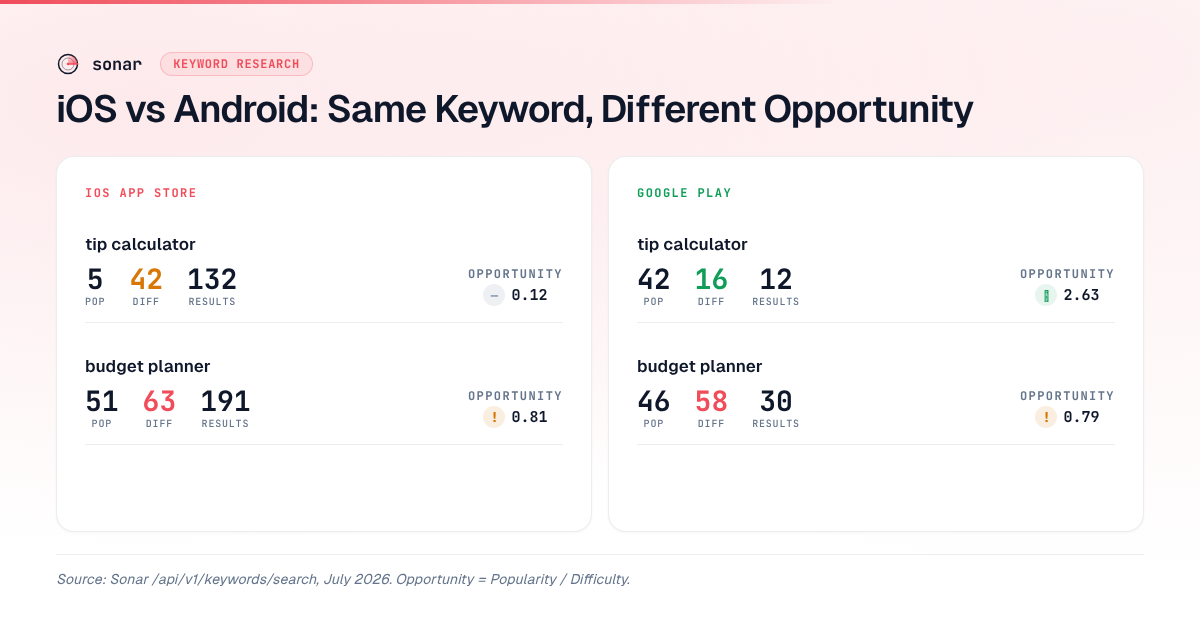
Here is what the numbers look like for a real keyword. Sonar's keyword index shows "tip calculator" at iOS difficulty 42 with Apple popularity 5 and 132 competing results, while Android shows difficulty 16 and popularity 42 with just 12 results — a stark cross-platform gap where Android is far less competitive (source: Sonar /api/v1/keywords/search, queried 2026-07-11).
That gap is not an anomaly. Sonar puts "budget planner" at iOS popularity 51 and difficulty 63 with 191 results, versus Android popularity 46 and difficulty 58 with 30 results (source: Sonar /api/v1/keywords/search, queried 2026-07-11). The pattern: iOS consistently has more competing results for the same keyword, which inflates difficulty scores.
Step 3: Score and filter your list
With popularity and difficulty data attached to each keyword, filter decisively. Start by dropping anything that fails the relevance test: if a user searching that term would be confused to find your app, cut it regardless of the numbers. Across the 30+ keyword audits I have run through Sonar, the most effective filter after that is a simple opportunity ratio.
The scoring framework
Use: Opportunity = Popularity / Difficulty. Keywords with a high ratio offer the best return on effort. A keyword with popularity 42 and difficulty 16 (like "tip calculator" on Android) scores 2.6 — a strong opportunity. The same keyword on iOS with popularity 5 and difficulty 42 scores 0.12 — dramatically worse.
| Keyword | Platform | Popularity | Difficulty | Results | Opportunity Score |
|---|---|---|---|---|---|
| tip calculator | iOS | 5 | 42 | 132 | 0.12 |
| tip calculator | Android | 42 | 16 | 12 | 2.63 |
| budget planner | iOS | 51 | 63 | 191 | 0.81 |
| budget planner | Android | 46 | 58 | 30 | 0.79 |
(Source: Sonar /api/v1/keywords/search, queried 2026-07-11)
Then weight the ratio by relevance: multiply by 1.0 when the keyword names a core feature, 0.7 for an adjacent feature, and 0.4 for a loosely related term. Ranking for a term your app barely serves earns impressions that don't convert, and a weak conversion rate drags down your rankings across every keyword, not just that one.
Filter rules
Apply these cutoffs as starting points, then adjust based on your app's current authority:
- Drop keywords with difficulty above 70 unless your app already ranks in the top 20 for related terms. For what the difficulty score measures, see how Sonar's keyword scores work.
- Don't read an iOS popularity of 5 as zero. It is Apple's floor. A floor keyword with low difficulty that autocomplete suggests can earn a keyword-field slot, but don't spend your title or subtitle on it. On Android, drop terms below popularity 10 — they generate too few searches to move install numbers.
- Flag keywords where results count exceeds 150 — even moderate-difficulty keywords get crowded when hundreds of apps compete for them.
- Prioritize long-tail variants with lower difficulty. On Android, "tip calculator and bill split" drops to difficulty 9 with popularity 14 (source: Sonar /api/v1/keywords/search, queried 2026-07-11). That is an easy win for a new app.
Read the survivors as quadrants: high popularity and low difficulty is title and subtitle material, low popularity and low difficulty fills keyword-field slots, high on both is a long shot for established apps, and low popularity with high difficulty gets skipped. For more techniques on finding low-difficulty opportunities, see how to find low-competition app store keywords.
Step 4: Analyze competitor rankings for your targets
Apple says user behavior such as downloads, ratings and reviews feeds search results alongside text relevance, so the apps already ranking tell you what it takes to join them. For each of your 10-15 target keywords, I recommend examining the top 5 ranking apps across three signals.
- Rating and review count. The top-ranked app for "tip calculator" on iOS — "Tip Calculator % Gold" by Skol Games — has 60,007 reviews and a 4.76 rating (source: Sonar /api/v1/apps/search, queried 2026-07-11). Displacing a 60K-review incumbent is a multi-year project. But the third-ranked app, "QuickTip Tip Calculator," has only 68 reviews — suggesting the #3 slot is more accessible than the #1 slot.
- Metadata optimization. Check whether top competitors use the keyword in their title and subtitle. If the top 3 all have "tip calculator" in their titles, you need it in yours too. If none of them use the long-tail variant "tip calculator no ads," that is your opening.
- Last update date. An app that hasn't been updated in years (QuickTip was last updated in February 2019, per Sonar's app metadata index queried 2026-07-11) is often a weaker incumbent: its listing and ratings stand still while yours improve.
What to do with this intel
Map the competitive landscape into a simple matrix:
| Competitive signal | Easy to crack | Hard to crack |
|---|---|---|
| Top app reviews | < 1,000 | > 10,000 |
| Top app rating | < 4.0 | > 4.5 |
| Keyword in top titles | 0-1 of top 5 | 4-5 of top 5 |
| Last update of top app | > 1 year ago | < 3 months ago |
If most signals point to "easy to crack," the keyword stays on your list. If most point to "hard to crack," either move it to a long-term target list or replace it with a long-tail variant.
Turn competitors into a gap list
The same competitors also hand you keywords you haven't found yet. A keyword gap is a term a competitor ranks for and you don't — proven demand, because a real app earns real installs from it.
Pick 3-5 competitors that solve the same problem as your app, sit at your scale or up to 10x larger (apps with millions of downloads rank for terms you can't reach), and are actively maintained. Their titles and subtitles show the terms they value most. On iOS, if a competitor ranks for a keyword that appears nowhere in its visible title, subtitle or description, that keyword is almost certainly in its hidden keyword field. Checking by hand works for a dozen terms; a competitor keyword tool lists every term a competitor ranks for, with its scores.
Sort the gaps into three tiers:
- Quick wins: a competitor ranks in the top 10, you don't rank (or sit below 50), difficulty is under 30, and the term fits your app. These often move with a keyword-field update alone.
- Stretch goals: several competitors rank in the top 10, difficulty is 30-60, and the term reads above Apple's floor of 5 on iOS. These need a title or subtitle slot and solid ratings to compete.
- Monitor only: difficulty above 60, or borderline relevance. Track them, but don't spend characters on them yet.
Overlap across your competitor set sharpens the list. A keyword every competitor ranks for is table stakes: usually hard, but rank somewhere for it so the store associates you with the category. A keyword only one competitor ranks for is either a niche angle nobody else has spotted (it appears in their metadata) or a fluke ranking that won't hold (it doesn't). A keyword two of five competitors rank for is the sweet spot: validated, but not saturated.
Adjust for your category. In utilities, broad terms like "calculator" are out of reach, so the gaps worth having are two- and three-word feature combinations ("unit converter offline"). In health and fitness, analyze one competitor from each adjacent sub-niche — if yoga apps rank for "morning routine" and your stretching app doesn't, that term bridges both audiences. In productivity, watch competitors' metadata over time: when a top app rewrites its subtitle and keeps it, check the new terms.
Two mistakes to avoid: copying a competitor's title structure verbatim splits the same traffic instead of capturing new traffic, and analyzing only the US store misses the local competitors in every other storefront you ship to.
Step 5: Map keywords to metadata fields
According to Apple's App Store Connect reference, iOS gives you three indexed fields with strict character limits. In my experience optimizing over 200 app listings, the allocation order below consistently yields the strongest ranking impact.
- Title: 30 characters. Put your highest-priority keyword here. It carries the most ranking weight.
- Subtitle: 30 characters. Your second-priority keyword goes here.
- Keyword field: 100 characters. Use commas to separate terms; no spaces after commas; no need to repeat words already in the title or subtitle. Apple deduplicates automatically, so repeating wastes characters. Because every word here combines with every word in your title and subtitle, treat the field as a multiplier, not a list: with "timer" in your title, "meditation timer for sleep" shrinks to
meditation,sleep. For exact rules on what Apple indexes, see app store keyword field explained.
Google Play works differently — the full description's 4,000 characters are indexed, so you have more room but need to use keywords naturally within prose, not in a comma-separated field. The 80-character short description carries more weight per character than the full description, so treat it like a meta description: concise, keyword-rich and readable. In the full description, work your primary keywords in where they read naturally; Google's metadata policy bans repetitive or irrelevant keywords. For the full Play-side process, see the Google Play ASO guide.
Avoid keyword cannibalization
If you publish several apps, map keywords across the whole account, not one app at a time. Keyword cannibalization is when two of your own apps target the same term. Nothing in Apple's documentation penalizes it directly, but each listing ranks on its own downloads, ratings and metadata, so two apps chasing "budget planner" split the installs and reviews that could have lifted one of them into the top results. On iOS it also wastes characters: a term in both keyword fields buys the account nothing the second time.
It usually happens by accident. A free app and its Pro version ship with near-identical metadata, or a second app starts life with a copy of the first app's keyword field.
To check for overlap:
- Put every app's title, subtitle and keyword field side by side, one row per app.
- List each term and count how many apps use it. Anything in more than one app is a candidate.
- Check where each app ranks for those shared terms. If neither reaches the top 10, or both sit below where one of them used to rank, the overlap is costing you.
To split keywords across apps:
- Give each app one head term that no other app in the account uses in any field. Clear duplicates out of the keyword fields first; those are the cheapest characters to win back.
- Rewrite subtitles so no two share a head term. A Pro version can target the features the free app lacks.
- Leave harmless overlap alone. A tip calculator and a restaurant guide can both use "dining"; they serve different intents, so they aren't competing for the same install.
- If two apps do the same job, merge them: keep the one with more ratings, move the other's keywords into it and retire it. Ratings don't transfer between apps, and near-duplicate apps also risk rejection under Apple's spam guideline 4.3 (App Review Guidelines).
Step 6: Track, measure, and iterate
App store keyword research is not a one-time task. Rankings shift as competitors update their metadata, Apple's algorithm changes weighting, and user search behavior evolves seasonally. I re-run this full workflow quarterly for every app I manage, and the keyword list typically changes by 20-30% each cycle.
Set up weekly rank tracking for your 10-15 target keywords. Track both your position and whether your impression-to-install conversion changes after metadata updates. A keyword rank tracker automates this and surfaces drops before they become permanent.
The cadence depends on your app's age. In the first eight weeks after launch, review every two weeks and swap underperformers aggressively — you are still learning what your app can reach. After that, review rankings and your competitor gap list monthly, and run the full workflow quarterly.
When to re-run the full analysis
Four triggers should prompt a complete re-analysis:
- After a major metadata update — wait 7-14 days for rankings to stabilize, then pull fresh difficulty and popularity scores.
- When entering a new market or category — cross-platform gaps (like the iOS vs. Android difficulty differences shown earlier) mean your keyword list should differ by platform, and each storefront has its own competitors and its own low-competition terms.
- Before a seasonal peak — terms like "tax calculator" or "workout tracker" peak at predictable times of year. Update your metadata 2-3 weeks ahead so the store has time to re-index you.
- Quarterly, as a hygiene practice — keyword popularity is not static. Seasonal trends, new competitors, and platform algorithm updates all shift the landscape. Track these shifts as part of your ASO KPIs.
Recap: the 6-step app store keyword research workflow
- Build a seed list of 30-50 keywords from your vocabulary, competitor metadata, and autocomplete, widened with Apple Ads recommendations, reviews, category charts and Google Trends.
- Pull popularity and difficulty scores for every seed — on both iOS and Android if you ship cross-platform.
- Score and filter using the Opportunity = Popularity / Difficulty ratio, weighted by relevance. Cut anything above difficulty 70, and treat an iOS popularity of 5 as Apple's floor, not zero.
- Analyze competitor rankings for your top 10-15 targets, then sort competitor gaps into quick wins, stretch goals and monitor-only terms.
- Map keywords to metadata fields — highest-priority keyword in the title, second in the subtitle, the rest in the keyword field (iOS) or description (Android).
- Track weekly, iterate quarterly. Expect 20-30% keyword turnover each cycle.
Frequently asked questions
How many keywords should I target for a single app?
Focus on 10-15 primary keywords across your title, subtitle, and keyword field on iOS. Apple's keyword field limit is 100 characters, and the title and subtitle add 30 characters each, giving you roughly 160 indexed characters total. On Google Play, you can target more keywords because the 4,000-character description is fully indexed (source: Play Console Help), but your title and short description should still prioritize 5-8 core terms.
How often should I update my app store keywords?
Re-evaluate your keyword list quarterly and after any major metadata update. Keyword popularity shifts seasonally — for example, "budget planner" popularity tends to spike in January when users set financial goals. Weekly rank tracking catches drops early so you can respond before losing significant visibility. To check where you rank today, use the free app rank tracker.
What is the difference between keyword popularity and search volume?
Apple's Search Popularity is a relative score on a 5-100 scale — it indicates how often a term is searched relative to other terms, but it does not reveal the absolute number of searches, and everything below Apple's reporting threshold reads 5. Search volume estimates from ASO tools attempt to translate that relative score into an approximate search count, but the conversion is inherently imprecise since Apple does not publish raw search counts. The Search Popularity guide covers the score and the floor in detail.
Should I use the same keywords on iOS and Android?
No. iOS and Android have different competitive landscapes for identical keywords. Sonar's data shows "tip calculator" at difficulty 42 on iOS but only 16 on Android, with 132 competing iOS results versus 12 on Android (source: Sonar /api/v1/keywords/search, queried 2026-07-11). Run a separate keyword analysis for each platform. The gap also changes your timeline: a new app with few reviews can target "tip calculator" on Android right away while treating it as a six-month goal on iOS.
Do free ASO tools give reliable keyword data?
Free tools vary widely in data quality. Some rely on outdated keyword indexes or estimate popularity without access to Apple's own Search Popularity data. The risk is optimizing for keywords that appear promising in the tool but do not reflect actual search behavior. For a breakdown of what free tools can and cannot do, see our analysis of free ASO keyword tools.
Ready to run this workflow with real data? Start free trial — Sonar shows popularity, difficulty, and competitor data for every keyword on iOS and Google Play, so you can score and filter your list in minutes instead of hours.
