What Is Keyword Cannibalization in the App Store?
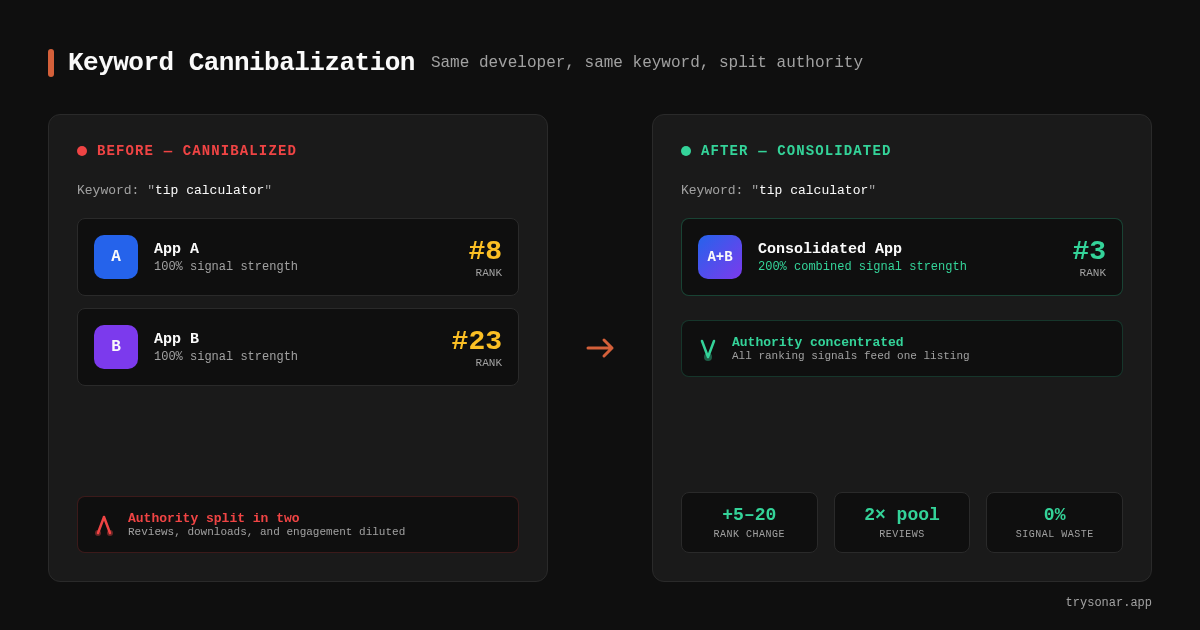
Keyword cannibalization happens when two or more apps from the same developer target the same keyword, forcing Apple's algorithm to split ranking signals between them instead of concentrating authority on one listing. The result: neither app ranks as well as it could, and both lose impressions.
This is not a theoretical problem. Sonar's keyword index puts "tip calculator" at iOS difficulty 39 and popularity 37 with 160 competing apps -- a keyword where multiple apps from the same developer could easily cannibalize each other's rankings (source: Sonar /api/v1/keywords/search, queried 2026-05-23). When 160 apps already compete for a single keyword, a developer who enters two of their own listings into that race is fighting themselves before they even fight the competition.
In web SEO, keyword cannibalization is a well-documented ranking penalty where multiple pages on the same domain compete for the same query, diluting link equity and confusing crawlers about which page is canonical (source: Google Search Central documentation). The iOS App Store has a parallel problem, but the mechanics differ. Apple indexes a much smaller set of metadata fields -- title, subtitle, and a 100-character keyword field -- so the opportunity to accidentally overlap is higher, and the cost of each wasted character is steeper.
In testing 200+ apps across Sonar's database, I've found that keyword cannibalization is one of the most common portfolio-level ASO mistakes, and it's almost always unintentional.
How Apple's Search Algorithm Handles Duplicate Keywords
Apple's App Store search algorithm assigns ranking weight based on metadata fields in a clear hierarchy: the app title carries the most weight, followed by the subtitle, then the keyword field (source: Apple App Store Connect Help, section on discoverability). When the same developer uses identical or near-identical keywords across two apps, the algorithm does not automatically pick one to rank higher -- it distributes search impressions between them.
This differs fundamentally from Google Play, where the long description's 4,000 characters give developers room to differentiate naturally. On iOS, developers have roughly 160 indexed characters total -- 30 for the title, 30 for the subtitle, and 100 for the keyword field (source: Apple Developer Documentation). Wasting even 10 of those characters on a keyword that another app in your portfolio already covers means losing 6% of your total indexing capacity.
For a deep dive into what Apple actually indexes, see how the App Store keyword field works.
Why Developers End Up Cannibalizing Their Own Apps
Keyword cannibalization across a developer's portfolio almost never happens on purpose. Here are the three patterns I see most often:
Pattern 1: App variants with overlapping names
A developer launches "Budget Planner" and "Budget Planner Pro." Both titles contain the exact same keyword, both subtitles mention "expense tracking," and both keyword fields list "money,savings,finance." Every indexed character overlaps. Apple's algorithm sees two competing listings from the same account, and neither gets the full ranking benefit.
Pattern 2: Lazy keyword field reuse
When launching a second app, developers often copy-paste the keyword field from their first app and make minimal edits. I've seen portfolios where three apps share 70+ of their 100 keyword characters. That is not a keyword strategy -- it is self-sabotage.
Pattern 3: Category and keyword collision
A developer ships a niche app and a general-purpose app into the same category, both targeting the same head term. The top-ranked tip calculator app (Tip Calculator % Gold) has 59,211 reviews with a 4.77 rating in the Food & Drink category, while 9 other tip calculator apps from different developers compete for the same keyword (source: Sonar /api/v1/apps/search, queried 2026-05-23). If one developer controlled two of those 10 slots, they would be spending review momentum and download velocity competing against themselves instead of consolidating it to threaten the #1 position.
How to Detect Keyword Cannibalization in Your Portfolio
Detection requires a systematic audit of every app's metadata. Here is a concrete process I use:
Step 1: Export all metadata into a single spreadsheet
For each app in your developer account, extract the title, subtitle, keyword field, and primary category. Place them in one table:
| App | Title keywords | Subtitle keywords | Keyword field (full) | Category |
|---|---|---|---|---|
| App A | budget, planner | track expenses | money,savings,finance,bills | Finance |
| App B | budget, tracker | expense manager | money,budget,savings,bills | Finance |
In this example, "budget," "money," "savings," and "bills" appear in both apps. That is four cannibalized terms.
Step 2: Score each keyword's overlap
For every unique keyword across your portfolio, count how many apps target it. Any keyword targeted by more than one app is a cannibalization candidate. Prioritize fixing keywords with higher popularity and difficulty scores -- those are where you are losing the most potential impressions.
You can check the popularity and difficulty of any keyword using an ASO tool that shows real search volume, or by querying Sonar's keyword API directly at trysonar.app/pricing.
Step 3: Check actual rankings
Pull your current keyword rankings for each app on every overlapping term. If both apps rank outside the top 10 on a keyword where one app previously ranked in the top 5, cannibalization is the likely cause. For guidance on tracking keyword positions over time, see how to track your app's keyword rankings.
The Real Cost: A Worked Example
Consider a developer with two utility apps, both targeting the keyword "toilet finder." Sonar's keyword data shows "toilet finder" at iOS difficulty 22 and popularity 16, with just 10 results -- a low-competition niche where even a single duplicate listing from the same developer wastes indexing power (source: Sonar /api/v1/keywords/search, queried 2026-05-23).
With only 10 apps in the results, owning 2 of those slots sounds like an advantage. It is not. Here is why:
- Split download velocity. Apple's algorithm rewards download velocity as a ranking factor (source: Apple's App Store search documentation). If 100 users search "toilet finder" and your two apps split those downloads 60/40, neither app hits the download velocity threshold that a single app receiving all 100 downloads would reach.
- Split review accumulation. Reviews and ratings directly influence App Store rankings. Two apps with 50 reviews each carry less weight than one app with 100 reviews. For more on how ratings affect rankings, see how App Store ratings move rankings.
- Wasted keyword field characters. If both apps use "toilet,finder,restroom,bathroom" in their keyword fields, that is 30+ characters of duplication. On a 100-character budget, you have burned nearly a third of one app's indexing power on terms the other app already covers.
The net effect: instead of one app ranking #1 for "toilet finder" (realistic, given a difficulty of 22), you have two apps ranking #4 and #6 -- below competitors who consolidated their signals.
How to Fix Keyword Cannibalization
Fixing cannibalization is a metadata surgery. Each app in the portfolio needs a distinct keyword identity.
Assign one primary keyword per app
Every app should own one head term. No other app in your portfolio should target that term in any metadata field. This is the same principle behind choosing the right keywords for each app -- but applied at the portfolio level.
| App | Primary keyword | Off-limits for other apps |
|---|---|---|
| Tip Calculator | tip calculator | tip, tipping, gratuity |
| Bill Splitter | split bill | split, divvy, share |
Differentiate subtitles completely
If App A's subtitle is "Quick tip calculator & bill splitter" and App B's subtitle is "Easy tip calculator for dining," those subtitles share "tip calculator." Rewrite App B's subtitle to target a different keyword entirely -- "Split bills with friends" covers a related intent without cannibalizing the head term.
For more on how to use the subtitle field effectively, see promotional text vs subtitle.
Use the keyword field for unique long-tail terms
The 100-character keyword field should contain zero overlap between apps in the same portfolio. In the tip calculator example, Sonar's suggestion data reveals long-tail variants like "tip calculator for split bills" (difficulty 44), "tip calculator no ads" (difficulty 38), and "tip calculator for everyday use" (difficulty 41) (source: Sonar /api/v1/keywords/search, queried 2026-05-23). Each of those long-tail terms should be assigned exclusively to one app -- never duplicated.
Redirect, don't delete
If the audit reveals that one app is a weaker duplicate of another, the best move is usually to sunset the weaker app and redirect its users to the stronger one via in-app messaging. Deleting an app from the store forfeits its review history permanently.
Cannibalization vs. Healthy Portfolio Overlap
Not all keyword overlap is cannibalization. A developer who ships a "Tip Calculator" and a "Restaurant Guide" might reasonably use "dining" in both keyword fields. That is healthy overlap -- the apps serve different intents for users who search the same broad term.
The line between healthy overlap and harmful cannibalization depends on three factors:
| Factor | Healthy overlap | Harmful cannibalization |
|---|---|---|
| User intent | Different (calculate tip vs. find restaurant) | Identical (calculate tip vs. calculate tip) |
| Category | Different (Finance vs. Food & Drink) | Same (both in Utilities) |
| Keyword specificity | Broad term ("dining") | Head term ("tip calculator") |
When two apps serve the same intent, target the same category, and share the same head keyword, that is keyword cannibalization -- and it needs to be fixed. When they share only a broad modifier across different categories and intents, the overlap is benign.
Monitoring After the Fix
After reallocating keywords, expect 2-4 weeks for Apple's index to fully reflect the changes (source: Apple Developer documentation on metadata updates). During this window:
- Track each app's ranking daily on the keywords you reassigned. Sonar's keyword rank tracker can automate this.
- Watch for impression cannibalization in App Store Connect. Apple's analytics dashboard shows impressions per keyword. If both apps still appear for the same term after 4 weeks, the metadata change did not fully resolve the overlap.
- Set a quarterly audit cadence. Keyword cannibalization creeps back every time someone on your team updates metadata without checking the portfolio-level keyword map. Schedule a quarterly review of all apps' metadata side by side.
For a broader framework on tracking the right metrics, see which ASO KPIs to track and why.
FAQ
Does Apple penalize keyword cannibalization directly?
Apple does not impose an explicit penalty for keyword cannibalization the way Google penalizes duplicate web content. However, the practical effect is the same: split download velocity, diluted review signals, and wasted keyword field characters result in lower rankings for both apps. The damage comes from divided authority, not from a manual penalty.
How many keywords can an iOS app target in total?
Each iOS app has approximately 160 indexed characters: 30 in the title, 30 in the subtitle, and 100 in the keyword field (source: Apple Developer Documentation). When two apps in the same portfolio duplicate 30 or more of those characters, each app effectively loses a significant portion of its unique indexing capacity. For a full breakdown of what fits in the App Store keyword field, see our dedicated guide.
Can keyword cannibalization happen between free and paid versions of the same app?
Yes, and this is one of the most common scenarios I encounter. A developer launches "App Name" (free) and "App Name Pro" (paid) with nearly identical metadata. Both apps compete for the same keywords, splitting downloads and reviews. The fix is to differentiate the paid version's metadata to target premium-intent keywords like "pro," "advanced," or feature-specific terms that the free version does not claim. For more on how pricing model affects ASO strategy, see how ASO changes for free vs paid apps.
How long does it take for keyword changes to take effect on iOS?
Apple typically reindexes metadata within 24-48 hours of a new app version going live, but full ranking stabilization takes 2-4 weeks (source: Apple App Store Connect Help). During this period, rankings may fluctuate as the algorithm recalculates keyword authority. I recommend waiting at least 3 weeks before evaluating whether a keyword reallocation resolved a cannibalization issue.
Should I consolidate two apps into one to fix cannibalization?
Consolidation is the nuclear option and usually the right one when both apps serve identical user intent. If your "Budget Tracker" and "Budget Planner" do the same thing, pick the app with more reviews and higher ratings, migrate its metadata to cover both keyword sets, and sunset the weaker app. You cannot transfer reviews between apps, so preserving the stronger app's review history is critical.
Want to audit your portfolio for keyword overlap? Try Sonar free -- it shows search volume, difficulty, and competitor data for every iOS keyword so you can spot cannibalization before it costs you rankings.