App Store Promotional Text vs Subtitle: Which Metadata Field Deserves Your Attention First?
Most ASO guides treat the subtitle and promotional text as interchangeable lines of copy. They are not. One gets indexed for search. The other does not. That single distinction should end the debate -- but the question keeps coming up because the two fields sit next to each other in App Store Connect and serve overlapping visual purposes on the listing page.
Below: how Apple and Google handle each field, what the keyword data says, and which one you should optimize first.
How Apple Defines Each Field
Apple's App Store Connect gives developers two fields that often get confused:
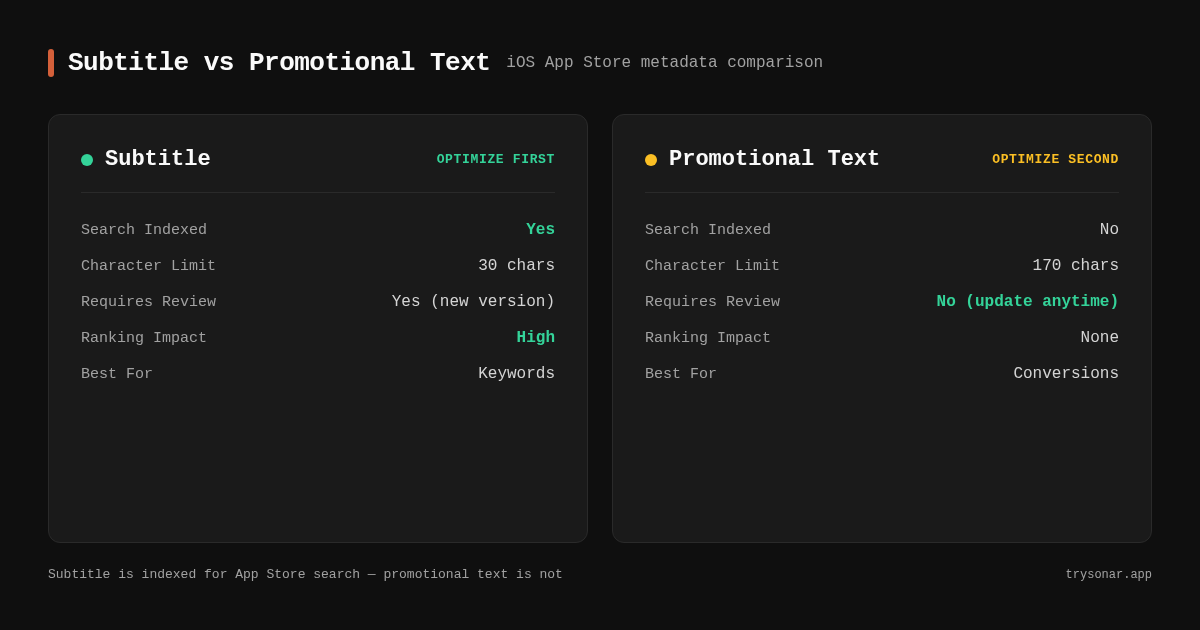
Subtitle -- 30 characters. Appears directly below your app name in search results and on your product page. Apple indexes every word in the subtitle for search ranking. It is the second most important ranking signal after the app name itself [source: developer.apple.com/app-store/search/].
Promotional Text -- 170 characters. Appears at the top of your app description on the product page. Apple explicitly states that promotional text is not indexed for search [source: developer.apple.com/help/app-store-connect/reference/app-store-connect-field-length-requirements/]. You can update it anytime without submitting a new app version, which makes it useful for time-sensitive messaging -- but it has zero direct impact on which search queries your app ranks for.
That distinction matters more than the character count difference. The subtitle influences discoverability. The promotional text influences conversion. They solve different problems.
How Google Play Maps to These Concepts
Google Play does not have a direct equivalent to Apple's promotional text, but it has analogous fields:
Short Description -- 80 characters. Visible on the listing page and in some search result formats. Google indexes keywords in the short description for ranking [source: support.google.com/googleplay/android-developer/answer/9898842]. This is functionally closer to Apple's subtitle than to its promotional text.
Long Description -- 4,000 characters. Google indexes the full long description for search ranking. There is no hidden keyword field like on iOS. For a complete breakdown of Android-specific optimization, see the Android ASO guide.
On Google Play, both visible text fields contribute to search rankings. On iOS, only the subtitle does. This means the "subtitle vs promotional text" dilemma is primarily an iOS question. Android developers should treat the short description as a keyword-bearing field -- our Google Play short description guide covers the 80-character formula in detail.
What Subtitle Keyword Research Looks Like
Since the subtitle is the field where keyword research matters most, here is what the data actually looks like when you are picking keywords for that 30-character slot. These are real keywords from Sonar's iOS index -- the kind of terms a utility or productivity app might realistically compete for:
| Keyword | iOS Popularity | iOS Difficulty | Why it might fit a subtitle |
|---|---|---|---|
| tip calculator | 53 | 42 | Strong demand, moderate competition |
| subscription tracker | 31 | 45 | Active buyer intent, beatable difficulty |
| packing list | 23 | 40 | Long-tail, low competition for indie apps |
| debt tracker | 28 | 46 | Specific intent that maps to install |
These are the kind of keywords that earn a spot in the 30-character subtitle: real App Store search demand, difficulty that an indie app can actually overcome, and intent that converts to installs. Compare that to picking subtitle keywords by guesswork -- most apps end up either targeting dead terms (Apple stopped indexing keywords below an SP score of 35 in late 2025) or chasing saturated head terms they have no realistic shot at ranking for. For a deeper look at what these numbers mean, see our keyword difficulty explainer.
The promotional text does not need any of this analysis. It is not indexed, so keyword popularity is irrelevant to it. Spend your keyword research budget on the subtitle and the hidden keyword field -- not on copy that cannot move rankings.
Why You Should Optimize the Subtitle First
If you have limited time and need to choose one field, optimize the subtitle. Here is the reasoning.
The Subtitle Is Indexed for Search
Every word in your 30-character subtitle contributes to your search ranking on iOS. The promotional text contributes nothing to search. If your goal is discoverability -- getting found by users who do not already know your app exists -- the subtitle is the only field in this comparison that moves the needle.
Apple combines words from your title, subtitle, and the hidden keyword field to form multi-word search queries [source: developer.apple.com/app-store/search/]. A subtitle containing "Budget Tracker & Bill Reminder" combines with your title keywords to create dozens of potential match combinations. For a full walkthrough of how these fields interact, see the metadata optimization guide.
30 Characters Is a Tight Constraint
The subtitle's 30-character limit forces hard tradeoffs. Every word has to earn its place. Getting this right requires keyword research, competitor analysis, and deliberate word selection. Getting it wrong means ranking for the wrong terms -- or wasting characters on words that are already indexed elsewhere.
The promotional text, by comparison, gives you 170 characters. That is enough space to write a complete sentence. The creative constraint is lower, and mistakes are less costly because the text is not indexed anyway.
Subtitle Changes Require a New Version
You can only update your subtitle when you submit a new app version through App Store Connect [source: developer.apple.com/help/app-store-connect/update-your-app/update-your-app-store-information/]. That means subtitle changes are slower to test and more expensive to iterate on. Promotional text can be changed anytime without a new build. This asymmetry makes it even more important to get the subtitle right the first time -- you will have fewer opportunities to revise it.
The Subtitle Appears in Search Results
Users see the subtitle in search results before they ever tap through to your listing. It functions as both a keyword signal and a conversion micro-copy. A well-written subtitle does double duty: it ranks you for the right terms and persuades users to tap. The promotional text only appears after someone has already navigated to your full product page.
When to Prioritize Promotional Text Instead
The subtitle-first rule has exceptions. Here are the scenarios where app store promotional text optimization should take priority.
Your Subtitle Is Already Optimized
If you have already done keyword research, placed your best secondary keywords in the subtitle, and confirmed they are indexing correctly, the marginal return on further subtitle tweaks diminishes. At that point, the promotional text becomes the next lever to pull -- not for search ranking, but for conversion rate.
Your Conversion Rate Is the Bottleneck
Some apps rank well for relevant keywords but convert poorly. In that case, the problem is not discoverability -- it is persuasion. The promotional text sits at the top of your description and is the first block of text a user reads on your product page. A compelling promotional text can meaningfully lift your install rate.
According to Apple's documentation, the promotional text is designed for "timely messaging" including feature announcements, seasonal content, and limited-time offers [source: developer.apple.com/help/app-store-connect/reference/app-store-connect-field-length-requirements/]. If your app store conversion rate is below your category benchmark, start testing different promotional text angles.
You Are Running a Time-Sensitive Campaign
Because promotional text updates do not require a new app version, they are ideal for time-bound messaging. Holiday promotions, event tie-ins, or feature launches can go live within minutes. The subtitle cannot respond this quickly.
A Step-by-Step Optimization Workflow
Here is the order of operations for optimizing both fields from scratch.
Step 1: Research Your Keywords
Build a list of 20-30 candidate keywords using autocomplete, competitor analysis, and a keyword research tool. For each keyword, gather popularity and difficulty scores. Prioritize terms with high volume and low competition. Our keyword research guide covers this process in depth.
Step 2: Allocate Keywords Across Fields
Follow this hierarchy for iOS:
- App name (30 chars) -- your single best keyword, combined with your brand name
- Subtitle (30 chars) -- your second and third best keywords
- Keyword field (100 chars) -- all remaining keywords, comma-separated, no spaces
- Promotional text (170 chars) -- no keywords needed; focus on conversion copy
Never repeat a word across the title, subtitle, and keyword field. Apple deduplicates, so repetition wastes characters without any ranking benefit [source: developer.apple.com/app-store/search/].
Step 3: Write the Subtitle
Write a subtitle that includes your target keywords while reading naturally. Users see this text, so it needs to make sense as a phrase. Avoid keyword-stuffing patterns like "Timer Clock Alarm Reminder" -- Apple's review team flags these.
Good subtitle examples:
Budget Tracker & Bill Reminder(targets "budget tracker" and "bill reminder")Meditation & Sleep Sounds(targets "meditation" and "sleep sounds")Photo Editor with AI Filters(targets "photo editor" and "AI filters")
Each targets 2-3 keyword phrases while reading like a normal description.
Step 4: Write the Promotional Text
With the subtitle locked in, turn to the promotional text. Here, your goal shifts from keyword placement to user persuasion. Effective promotional text follows this pattern:
- Lead with a concrete benefit or proof point -- "Join 2M+ runners tracking their miles" or "Featured in Best of 2025"
- Mention a recent update or feature -- "Now with offline mode and Apple Watch sync"
- Include a soft call to action -- "Start your free 7-day trial"
Do not waste the promotional text on keywords. It is not indexed. Use it to convince users who have already found your app to actually install it.
Step 5: Monitor and Iterate
After your update goes live, allow a few days for Apple's index to reflect the changes -- the exact timing varies and Apple does not publish a guaranteed refresh window. Then check your subtitle keyword rankings. If they did not move after two update cycles, revisit your keyword selection -- the terms may be too competitive or not relevant enough.
Track promotional text impact by monitoring conversion rate in App Store Connect Analytics. Change one variable at a time so you can attribute shifts to specific copy changes.
Platform Comparison: What Each Field Does
This table summarizes how the subtitle and promotional text (or their equivalents) behave on each platform.
| Feature | iOS Subtitle | iOS Promotional Text | Google Play Short Description |
|---|---|---|---|
| Character limit | 30 | 170 | 80 |
| Indexed for search | Yes | No | Yes |
| Visible in search results | Yes | No | Varies by placement |
| Visible on product page | Yes | Yes | Yes |
| Requires new version to update | Yes | No | No |
| Primary purpose | Keywords + micro-copy | Conversion + messaging | Keywords + micro-copy |
For Android developers, the "subtitle vs promotional text" question does not apply in the same way. Google Play's short description combines the functions of both -- it is indexed for search, visible on the listing, and updatable without a new release. Treat it as a hybrid of Apple's subtitle and promotional text.
Common Mistakes
Stuffing keywords into the promotional text. This wastes effort. Apple does not index the promotional text for search. Every minute you spend A/B testing keywords in the promotional text is a minute you could have spent refining your subtitle or keyword field.
Leaving the promotional text blank. While it does not affect search, it does affect conversion. An empty promotional text means the first thing users see in your description section is the long description -- which often starts with generic copy. A strong promotional text sets the tone.
Duplicating subtitle words in the keyword field. Apple deduplicates across the title, subtitle, and keyword field. If "tracker" is in your subtitle, putting it in the keyword field burns characters for zero benefit.
Treating both fields as static. The subtitle should change when you identify better keyword opportunities -- based on our experience, revising every 4-8 weeks is a reasonable starting cadence. The promotional text should change more frequently -- whenever you have a new feature, seasonal hook, or social proof milestone to highlight.
Ignoring localization. Both fields can be localized. On iOS, localized subtitles add keyword coverage in additional languages. Localized promotional text improves conversion for non-English-speaking users. Even if your app only supports English, adding subtitle keywords in Spanish (Mexico) can boost U.S. visibility [source: developer.apple.com/help/app-store-connect/manage-app-information/localize-app-store-information/]. For a deeper dive, see our guide on app localization without harming home rankings.
FAQ
Does the promotional text affect App Store search rankings?
No. Apple has explicitly stated that the promotional text is not indexed for search [source: developer.apple.com/help/app-store-connect/reference/app-store-connect-field-length-requirements/]. It appears on your product page and can influence whether a user installs your app, but it has no direct effect on which search queries surface your listing. If your goal is improving search visibility, focus on the subtitle and the hidden keyword field instead.
Can I update my subtitle without submitting a new app version?
No. Subtitle changes on iOS require a new version submission through App Store Connect [source: developer.apple.com/help/app-store-connect/update-your-app/update-your-app-store-information/]. This is different from the promotional text, which you can edit at any time without a new build. On Google Play, the short description (the closest equivalent) can be updated independently of your app binary, giving Android developers more flexibility for testing.
What is the ideal length for app store promotional text?
Apple allows 170 characters. Use most of them. In our experience, a promotional text in the range of 140-170 characters gives you enough space for a benefit statement, a feature highlight, and a call to action. Short promotional text (under 80 characters) wastes an opportunity to persuade users. However, do not pad it with filler -- every sentence should communicate something specific. Lead with your strongest hook since users may not read to the end.
How often should I change my promotional text?
Update your promotional text whenever you have something new to say: a major feature release, a seasonal promotion, an award or editorial feature, or a milestone (e.g., "Now trusted by 1M+ users"). Based on our experience, that means roughly every 4-8 weeks for most apps. Apps with active marketing campaigns may update it weekly. The key advantage of the promotional text is its flexibility -- use it.
Should Android developers worry about promotional text?
Google Play does not have a field called "promotional text" in the same way iOS does. The closest equivalent is the short description (80 characters), which is indexed for search ranking -- making it functionally more similar to Apple's subtitle. Android developers should optimize the short description for keywords actual Play Store users search for (e.g., "subscription tracker", "packing list") and use the long description's opening sentences for conversion-focused messaging.
Want to see which keywords belong in your subtitle vs your keyword field? Try Sonar free -- it shows difficulty, popularity, and competitor rankings for every keyword so you can allocate your 30 characters where they matter most.