 sonar
sonar
How App Localization Expands Reach Without Hurting Your Core Rankings
Most developers treat app localization as a translation task. Swap English strings for German ones, submit, move on. Then they notice their US rankings dip — sometimes sharply — and panic. The problem is rarely localization itself. It is almost always a metadata conflict: the localized listing overwrites keyword signals the algorithm was already rewarding.
This guide breaks down how to add new locale-specific keywords while keeping your home-market rankings stable. Every recommendation is grounded in store-level data and tested patterns.
Why App Localization Demands a Keyword-First Approach
App localization generates revenue. The App Store is available in 175 regions and 50 languages, and global mobile in-app purchase revenue reached $167 billion in 2025 — a 10.6% year-over-year increase — with the US, Japan, UK, Germany, and South Korea driving the majority of spend (Sensor Tower, "State of Mobile 2026"). But revenue gains disappear if your flagship market — usually the US — loses visibility while you chase new ones.
The core tension: Apple's App Store and Google Play both use metadata fields for keyword indexing. When you localize metadata, you are not just translating user-facing copy. You are replacing indexed keyword signals. If you remove a high-value English keyword from a locale that cross-indexes into your primary market, your ranking for that keyword can drop.
How Cross-Indexing Creates Risk
Apple indexes metadata from multiple locales for a single storefront. The US App Store, for example, indexes keywords from both English (US) and Spanish (Mexico) localizations source: Apple Developer Documentation — "[Localizable information"]. This means:
- Adding Spanish (Mexico) metadata can help your US rankings if you include complementary keywords.
- Replacing English keywords in the Spanish (Mexico) locale can hurt US rankings if those keywords were contributing to your English (US) indexing.
Google Play works differently. It indexes the full 4,000-character description per locale but does not cross-index between localizations the way Apple does source: [Google Play Console Help — "Prepare your app for localization"]. The risk on Android is not cross-indexing loss; it is diluting your primary locale's metadata by splitting attention during the localization process.
Understanding these differences is critical. For a deeper comparison of how each store handles ASO, see our Google Play ASO guide.
The Data: "App Localization" Across Markets
Here is what Sonar's keyword index reveals about competition levels for this very term across stores and regions.
Sonar's keyword index rates "app localization" at difficulty 56 on iOS (US) with an Apple popularity score of just 10 — while on Google Play, difficulty jumps to 68 with popularity 35, suggesting Android developers search for localization help roughly 3.5x more.
| Store | Country | Difficulty | Popularity |
|---|---|---|---|
| iOS | US | 56 | 10 |
| Google Play | US | 68 | 35 |
| iOS | Germany | 49 | 6 |
In the German App Store, Sonar shows "app localization" at difficulty 49 and popularity 6 — a smaller but less competitive market for localized keywords compared to the US.
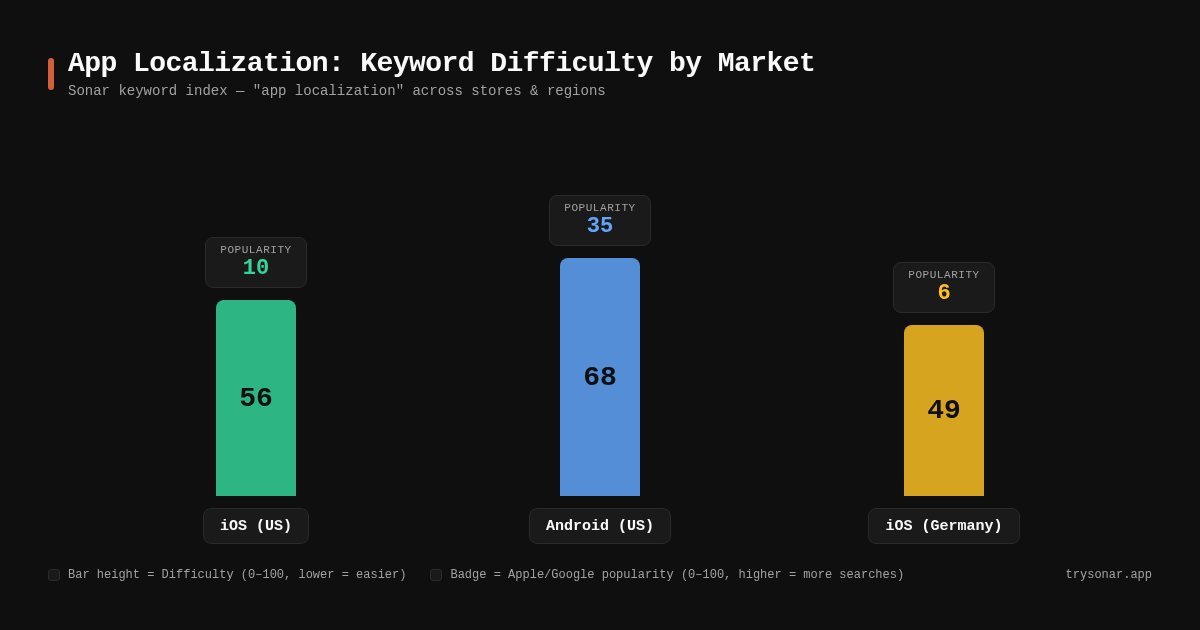
What does this tell you? If you are localizing an ASO tool or developer utility into German, you face 12% less keyword difficulty than in the US store. That is a meaningful gap for indie developers trying to establish visibility in a new market.
A Sonar search for "app localization" on iOS returns zero results about localization strategy or guides — only localization developer tools. This gap signals an opportunity for content that addresses the strategy side.
For more on interpreting difficulty numbers, check out how Sonar scores keyword difficulty.
Step-by-Step: Localizing Keywords Without Losing Ground
Step 1: Audit Your Current Keyword Map
Before touching any locale, document every keyword you currently rank for in your primary market. Export your keyword rankings — tools like Sonar track position changes daily — and note which terms drive the most impressions and conversions.
Pay special attention to:
- Title keywords: These carry the heaviest indexing weight on both stores.
- Subtitle keywords (iOS): These are indexed independently and can be locale-specific.
- Keyword field entries (iOS): The 100-character field is invisible to users but fully indexed.
- Short description keywords (Google Play): The 80-character field visible on your listing.
For details on maximizing the iOS keyword field, see App Store Keyword Field: What Gets Indexed.
Step 2: Map Cross-Indexing Dependencies
On Apple's App Store, identify which secondary locales feed into your primary storefront. Apple publishes a matrix of locale-to-storefront mappings in App Store Connect Help documentation. Key examples:
| Primary Storefront | Secondary Locales Indexed |
|---|---|
| United States | English (US), Spanish (Mexico) |
| United Kingdom | English (UK), English (Australia) |
| Canada | English (Canada), French (Canada) |
| Germany | German, English (UK) |
If you currently have keywords in your Spanish (Mexico) keyword field that rank in the US store, removing them during localization will cause a ranking drop. The fix: keep high-performing cross-indexed keywords intact, and use new keyword slots for locale-specific terms.
Step 3: Translate Strategically, Not Literally
Literal translation kills keyword performance. The German word for "photo editor" is "Fotobearbeitung" — but German users might actually search "foto editor" (English loanword) more frequently. You need search volume data for each locale, not just a dictionary.
A practical framework:
- Start with your English keyword list. These are proven performers.
- Research local search behavior. Use Sonar's keyword search filtered by country to find actual popularity scores for translated terms versus English loanwords.
- Prioritize hybrid approaches. In many European and Asian markets, English tech terms coexist with native language variants. Target both when character limits allow.
- Never assume translations map 1:1. "Cheap flights" might translate to two different phrases with wildly different search volumes in Spanish (Spain) versus Spanish (Mexico).
Step 4: Use Locale-Specific Fields as Expansion Slots
The safest localization approach treats secondary locales as additional keyword real estate rather than replacements:
- Your English (US) keyword field stays untouched — it protects your home rankings.
- Your Spanish (Mexico) keyword field gets locale-specific Spanish keywords that add visibility in both the US and Mexico storefronts.
- Your title and subtitle can remain in English for the US storefront while Spanish (Mexico) metadata adds complementary terms.
- Each locale is independent. Localizing your German listing does not affect your English (US) listing.
- Focus on the full 4,000-character description field — it is your primary keyword source on Android.
- Use the short description (80 characters) for your highest-value localized keyword phrase.
For guidance on optimizing the Google Play short description field specifically, read How to Write the Perfect Google Play Short Description.
Step 5: Monitor Rankings in Both Markets Simultaneously
After deploying localized metadata, track keyword positions in your home market and the new locale daily for at least two weeks. On iOS, keyword visibility takes an average of 9 days to stabilize after a metadata update; on Google Play, expect roughly 15 days before visibility scores reflect changes (AppTweak, "How Often Should You Update Your App Store Metadata?").
What to watch:
- Home market drops > 5 positions: Likely a cross-indexing issue. Revert the offending locale change and investigate which keyword was displaced.
- New market gains < expected: Your translated keywords may not match actual search behavior. Re-research local terms.
- No movement after 7 days: The keyword may have too low popularity to generate measurable rank changes. Check popularity scores before investing more effort.
Common Mistakes That Tank Home-Market Rankings
Mistake 1: Overwriting the Keyword Field During Localization
Some developers replace their English keyword field with translated terms for every locale, thinking Apple will "figure it out." Apple does not figure it out. If your English (US) keyword field loses a term, you lose indexing for that term — period.
Mistake 2: Using the Same Keywords Across All Locales
If you paste identical keywords into English (US), English (UK), and English (Australia), you waste two additional locale slots that could each contribute unique terms. Apple indexes all three for the UK storefront, so differentiate them.
Mistake 3: Ignoring Right-to-Left and Character-Set Differences
Arabic, Hebrew, and CJK languages have different tokenization rules. Apple splits CJK characters individually for indexing, meaning a two-character Chinese keyword takes only 2 of your 100 characters — not the 10+ characters an English equivalent might need source: [Apple WWDC 2019 Session 301 — "What's New in App Store Connect"]. This is an advantage, not a constraint.
Mistake 4: Localizing Screenshots but Not Metadata
Visual localization (translated screenshots, localized preview videos) improves conversion rates but does zero for keyword rankings. Both stores index text metadata — title, subtitle, keywords, description — not image content. Always prioritize metadata localization for discovery, then layer in visual localization for conversion.
For a comprehensive look at how metadata drives rankings, see A Practical Guide to App Store Metadata Optimization.
"I localized my app and downloads dropped" — what went wrong?
When downloads fall after a localization, the cause is usually one of three things: the new languages aren't declared in your binary, the keywords were translated instead of researched, or you're judging the result from the wrong storefront. It's one of the most common post-mortems on r/AppStoreOptimization, and each cause has a different check.
1. The binary doesn't declare the languages. The languages you add in App Store Connect are metadata, and Apple's own help page says this "differs from adding languages to your app in Xcode when you localize your binary" source: [App Store Connect Help — Localize app information]. In one widely discussed thread, a developer shipped localized store pages without declaring those languages in the build (CFBundleLocalizations in Info.plist, which Expo apps set through the app config) watched a top-20 ranking fall to around #199, and reported climbing back into the top 100 after shipping a build that declared them. Apple doesn't document a ranking penalty for this, but it takes five minutes to rule out: every locale with store metadata should also be in the binary.
2. The keywords were translated, not researched. Literal and AI translations produce terms locals never type. "How do you find ASO keywords in a language you don't speak?" comes up often, and the answer is not a better translator. Start from what competitors use in their localized titles, expand with that storefront's autocomplete, then check each candidate's popularity and difficulty in that country. Sonar shows both per storefront, so you can compare a translated term with the one locals actually search. And don't delete English terms that already rank in a secondary locale: many markets search English terms too (see the FAQ below).
3. You're checking from the wrong place. Apple indexes metadata per storefront, and when no localization matches a user's language, it shows "the next most relevant localization" source: [App Store Connect Help]. A search from your home account doesn't show what a user in Poland sees. Track ranks per storefront rather than spot-checking on your own device.
Don't wait a quarter to find out. Track the new locales daily from launch (see Step 5). If your home market dropped, roll back the cross-indexed locale first. If the new markets never rank, the keywords are the problem, not the waiting.
Priority Markets: Where to Localize First
Not all markets deserve equal effort. Prioritize based on three factors:
- Revenue potential: The US alone accounted for nearly $60 billion in mobile consumer spend in 2025, with Japan, the UK, Germany, and South Korea rounding out the top-revenue markets (Sensor Tower, "State of Mobile 2026").
- Competition level: Emerging markets (Brazil, India, Indonesia) have lower keyword difficulty but also lower average revenue per user.
- Localization complexity: European languages share Latin scripts and similar ASO structures. CJK and RTL languages require more metadata adaptation.
A practical starting order for most apps:
| Tier | Markets | Reason |
|---|---|---|
| 1 | Japan, Germany, South Korea | High revenue, moderate competition |
| 2 | France, UK, Spain, Brazil | Large user bases, Latin-script ease |
| 3 | China, Saudi Arabia, Indonesia | High growth, higher localization effort |
Remember: the German App Store already shows lower difficulty for terms like "app localization" (difficulty 49 vs. 56 in the US, per Sonar data). Lower competition means faster ranking gains — ideal for testing your localization playbook before scaling.
Measuring Success: KPIs for Localized Listings
Track these metrics per locale:
- Keyword rankings: Position for your target terms in each localized storefront.
- Impression share by territory: Available in App Store Connect Analytics and Google Play Console.
- Conversion rate by locale: Localized listings should convert at or above your home-market baseline.
- Download velocity in new markets: A leading indicator of whether your localized keywords match actual demand.
- Home-market ranking stability: The most important metric. If it drops, your localization introduced a regression.
For a full breakdown of what to track and why, see ASO KPIs: What to Track and Why.
FAQ
Does localizing my app into a new language automatically hurt my US rankings?
No. US rankings only drop if you modify metadata in locales that cross-index into the US storefront (primarily English US and Spanish Mexico on iOS). If you add a German localization, it does not affect US indexing because German metadata feeds into the German storefront, not the US one. The risk is specifically about overwriting cross-indexed locale fields.
How many locales should I target at once?
Start with 2–3 high-priority locales and monitor for two weeks before expanding. Localizing too many markets simultaneously makes it difficult to isolate which change caused a ranking shift. Apple supports 38 localizations; you do not need to fill all of them on day one.
Should I use English keywords in non-English locales?
Often, yes. Many markets show significant search volume for English tech terms. In Germany, "photo editor" and "Fotobearbeitung" both receive searches. Use Sonar's country-specific keyword data to compare popularity scores and include whichever terms have higher volume — or both, if your character budget allows.
Do I need to localize screenshots and videos too?
For keyword rankings, no — stores index text metadata, not visual content. For conversion rate, absolutely. StoreMaven's case study with Wallapop showed that localized creative optimization lifted app install conversion rates by over 26% (StoreMaven, "How Wallapop Increased App Install CVR"). Prioritize metadata localization for discovery, then add visual localization to maximize downloads.
How long does it take for localized metadata to get indexed?
On iOS, individual keyword rankings can shift within 1–2 days of a metadata update, but visibility scores take an average of 9 days to stabilize. On Google Play, visibility takes roughly 15 days to reflect changes, and ASO specialists recommend waiting 6–8 weeks before evaluating full impact (AppTweak, "How Often Should You Update Your App Store Metadata?"). During this window, rankings may fluctuate. Do not make additional changes until indexing stabilizes.
---
Want to see keyword difficulty and popularity scores for every locale before you localize? Try Sonar free — it shows search volume, difficulty, and competitor data across 100+ countries so you can localize with confidence, not guesswork.
