Why App Localization Must Include Your Screenshots
Translating your metadata — title, subtitle, keywords — is table stakes for app localization. But screenshots are what users actually look at before tapping "Get." A StoreMaven study (2021) found that 60% of users never scroll past the first impression on an app's product page, which means your screenshot gallery is often the only creative asset a potential user evaluates. If those screenshots display English captions to a German-speaking user, you've already lost trust.
The gap between metadata localization and creative localization is where conversion leaks. I've tracked this pattern across hundreds of apps in Sonar's database: developers localize their keywords and descriptions, then leave screenshots untouched. The result is a keyword set that earns impressions in a new market but screenshots that fail to convert those impressions into installs. This article covers when localized screenshots are worth the investment, how to prioritize markets, and the specific workflow for translating creatives without breaking your existing ASO performance.
The Keyword Opportunity Behind Localized Creatives
Localized keywords consistently face less ASO competition than their English equivalents — and that advantage compounds when your creatives match. Sonar's keyword index shows "tip calculator" at iOS difficulty 38 with 132 competing apps in the US store, but the German equivalent "Trinkgeldrechner" scores difficulty 26 with 153 results in the DE store — lower difficulty despite comparable supply, illustrating how localized keywords face less ASO competition.
This isn't limited to German. The Spanish equivalent "calculadora de propinas" carries Sonar iOS difficulty 42 with only 8 results in the US store (source: Sonar /api/v1/keywords/search, queried 2026-07-13), showing that even within a single country, non-English keyword variants serve a different competitive landscape. The opportunity is clear: when you localize metadata to capture these keywords, your screenshots need to reinforce that localized experience or you're wasting the impressions you earn.
On Android, the gap widens further. "Tip calculator" carries Sonar difficulty 16 and popularity 42 versus iOS difficulty 38 and popularity 5 — a platform gap that compounds when you localize metadata and creatives for smaller markets where fewer developers bother. If you need help identifying which keywords have the widest iOS-vs-Android spread, our keyword research workflow guide walks through the process step by step.
When to Invest in Localized Screenshots: A Decision Framework
Not every market warrants a full screenshot translation. The cost of professional translation, design adaptation, and QA adds up. Use the following criteria to decide which locales deserve localized creatives.
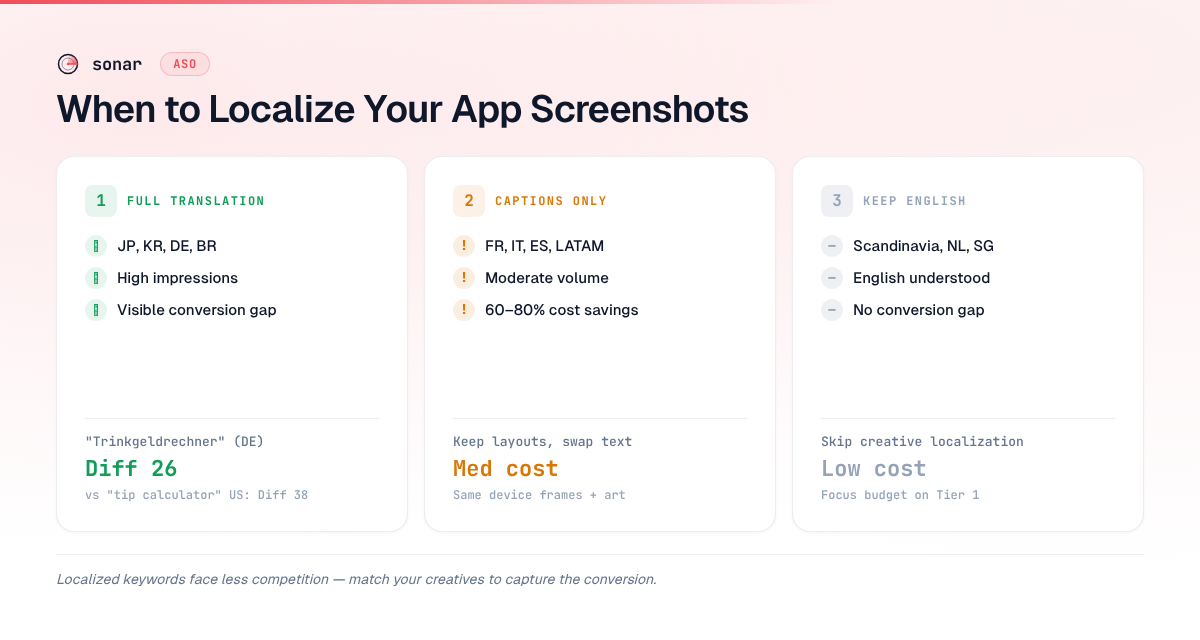
Tier 1: Full translation required
Markets where your app already earns meaningful impressions, the language is non-English, and your conversion rate from impression to install is measurably below your English baseline. Japan, South Korea, Germany, France, and Brazil are common Tier 1 markets for utility and productivity apps.
Tier 2: Caption-only localization
Markets with moderate volume where a full redesign isn't justified. Here, you keep your screenshot layouts and visuals unchanged but translate only the text captions overlaid on each screenshot. This approach cuts design costs by roughly 60–80% compared to full localization [source: Phrase.com localization cost guide, 2024].
Tier 3: No localization needed
Markets where English is widely understood and your data shows no conversion gap (e.g., Scandinavia, Netherlands), or markets where your app has near-zero impressions and limited keyword opportunity.
| Tier | Creative treatment | Typical markets | Cost level |
|---|---|---|---|
| 1 | Full redesign + translation | Japan, South Korea, Germany, Brazil | High |
| 2 | Caption-only translation | France, Italy, Spain, LATAM | Medium |
| 3 | English screenshots | Scandinavia, Netherlands, Singapore | Low |
How to Translate Screenshot Captions Without Breaking Layouts
Text expansion is the number-one layout breaker when localizing screenshots. German text runs roughly 30% longer than English on average [source: IBM Globalization Guidelines]. Japanese text is more compact per character but requires larger font sizes for readability. Here is the process I use.
Step 1: Separate caption text from background art. If your screenshot creatives are flattened PNGs with baked-in text, you'll need to recreate them in a layered format (Figma, Sketch, or Photoshop). An app store screenshots generator can accelerate this by templating layouts that support text layer swaps. Our free screenshot generator was built around exactly this workflow: the source layout owns the geometry, each locale only overrides text and captures, and you paste a whole language's captions in one go — then export a ZIP with one folder per locale.
Step 2: Set text containers to accommodate expansion. Design caption areas at 120–130% of the English text width. This handles German and French without overflow. For right-to-left languages (Arabic, Hebrew), mirror the entire layout — captions and visual hierarchy flip.
Step 3: Use professional translators, not machine translation alone. Google Translate and DeepL are useful for draft versions, but app store captions demand conciseness. A human translator who understands the 30-character constraint of iOS app titles — and the even tighter space on screenshot captions — will deliver copy that fits. Machine-translate first, then have a native speaker trim and refine.
Step 4: Validate screenshots at correct specs. Apple requires different screenshot resolutions for each device class, and Google Play has its own spec. Check the App Store screenshot sizes reference before exporting. A screenshot that looks perfect in Figma but is the wrong resolution will be rejected by App Store Connect.
Step 5: QA in-store context. Preview your localized screenshots in a real listing context — not just in your design tool. Text truncation, line breaks, and caption positioning can shift between a Figma preview and how the App Store or Google Play renders the gallery.
Which App Categories Benefit Most from Localized Screenshots
Utility apps with text-heavy UIs benefit most from screenshot localization because their interface text is visible in the screenshots themselves. "Packing list" shows Sonar iOS difficulty 38 (183 results) versus Android difficulty 26 (10 results) — utility apps like these with clear, translatable UI are prime candidates for localized screenshots.
Categories where screenshot localization delivers the strongest ROI:
- Utility apps (calculators, unit converters, checklists) — UI text is the product. If your screenshots show a packing list interface in English to a Spanish-speaking user, the mismatch is immediately visible.
- Productivity and business apps — onboarding flows, settings screens, and dashboards all contain text that communicates functionality. Translated screenshots signal that the app itself is localized.
- Health and fitness — workout names, meal tracking labels, and progress metrics are deeply language-dependent. A workout tracker showing "Push-ups: 3 sets" in English won't resonate with a Japanese user.
- Education and kids — parents in non-English markets strongly prefer apps that visibly operate in their language. Localized screenshots are effectively a trust signal.
Games, photo editors, and music apps often get away with untranslated screenshots because their UIs are predominantly visual, not text-driven. If your screenshots rely on gameplay footage or image filters rather than text captions, the ROI on localization is lower.
Localized Screenshots and Custom Store Listings on Google Play
Google Play's Custom Store Listings (CSLs) let you assign different screenshot sets to different countries — up to 50 custom listings per app as of 2026 [source: Google Play Console Help]. This is the most direct path to per-market screenshot localization on Android.
Each CSL can include its own title, short description, full description, screenshots, feature graphic, and video. When you combine localized metadata with localized screenshots in a CSL, you create a fully adapted listing that Google Play treats as a distinct product page for ranking purposes.
Apple offers a similar capability through localizations in App Store Connect. Each locale can have its own screenshot set, and Apple's product page optimization (A/B testing) feature lets you test localized screenshots against your English defaults to measure conversion lift before committing. As of 2026, Apple supports 40 localizable storefronts [source: Apple Developer Documentation, App Store Connect Help].
The key difference: Google Play supports listing experiments that can run localized screenshot variants against each other with statistical significance reporting built in. Apple's product page optimization is more limited — you can test up to 3 treatments per locale, but the traffic allocation is less granular.
Protecting Your Home Market Rankings During Localization
A common fear — and sometimes a reality — is that localizing your app listing for new markets hurts your rankings in your home market. This typically happens when developers replace globally shared metadata with locale-specific text that inadvertently drops keywords relevant to their primary market.
The fix: treat home-market keyword preservation as a hard constraint, not a secondary concern. Our guide on keeping home rankings intact during localization covers the specific guardrails, but the short version is: never change your primary locale's metadata as part of a localization push. Add new locales; don't modify your base listing.
For screenshots specifically, the risk is lower than for metadata — screenshots don't directly affect keyword indexing. But they do affect conversion rate, which is a ranking factor on both iOS and Google Play [source: Apple WWDC 2023, "What's new in App Store Connect"]. If your localized screenshots perform worse than your English originals in a given market, your ranking in that market will suffer. This is why A/B testing before full rollout matters.
Measuring the Impact of Localized Screenshots
Localization without measurement is just guessing. Track these metrics for each market where you deploy localized screenshots:
| Metric | Source | What to look for |
|---|---|---|
| Impression-to-install rate | App Store Connect / Google Play Console | Lift vs. English baseline |
| Keyword ranking position | Sonar or equivalent ASO tool | Stable or improved after localization |
| Proceed rate (iOS) | App Store Connect Analytics | % of users who view the full page after seeing search results |
| Retain rate (iOS) | App Store Connect Analytics | % of full-page viewers who install |
If you see conversion lifts in Tier 1 markets but flat or declining performance in Tier 2 markets, reallocate your localization budget accordingly. Not every market responds equally to creative localization — let the data guide your rollout.
For a broader toolkit comparison, our roundup of ASO tools covers which platforms support per-locale conversion tracking and keyword monitoring across storefronts.
FAQ
Do localized screenshots improve App Store keyword rankings?
Screenshots do not directly affect keyword indexing on iOS or Google Play — only text metadata (title, subtitle, keywords, description) feeds the search index. However, screenshots influence conversion rate, and conversion rate is a ranking signal on both platforms [source: Apple WWDC 2023; Google Play Developer documentation]. Higher conversion from localized screenshots indirectly lifts keyword rankings.
How many languages should I localize my screenshots for?
Start with the 3–5 markets that generate the most impressions in a non-English language and show the widest conversion gap versus your English baseline. Apple supports 40 localizable storefronts and Google Play supports up to 50 Custom Store Listings [source: Apple Developer Documentation; Google Play Console Help]. Prioritize by data, not by total addressable market size.
Should I use machine translation for screenshot captions?
Machine translation (Google Translate, DeepL) is useful for drafting, but screenshot captions demand brevity and cultural fit that automated tools rarely achieve alone. A native-speaking translator can trim phrasing to fit tight caption areas and avoid awkward constructions. The recommended workflow is: machine-translate first, then have a native speaker edit for length, tone, and accuracy.
What is the difference between caption-only and full screenshot localization?
Caption-only localization keeps your screenshot layouts, device frames, and background art unchanged — you only swap the overlaid text captions. Full localization rebuilds screenshots with locale-appropriate UI content, culturally relevant imagery, and sometimes reordered screenshot sequences. Caption-only cuts costs by 60–80% [source: Phrase.com] and is appropriate for Tier 2 markets with moderate volume.
How do I test localized screenshots before rolling them out?
On iOS, use Apple's Product Page Optimization feature to A/B test up to 3 localized screenshot treatments per locale. On Google Play, use Store Listing Experiments, which offer built-in statistical significance reporting and more flexible traffic allocation. Always run tests long enough to reach significance — typically 7–14 days depending on your impression volume [source: Google Play Console Help].
Localize your set in minutes with the free Sonar screenshot generator — one-paste captions per locale, ZIP export per language. And to find untapped keyword opportunities in localized markets, try Sonar free — it shows search volume, difficulty, and competitor data across 100+ storefronts.