How Custom Store Listings Drive Country-Level Keyword Strategy
Google Play's custom store listings (CSLs) let you create up to 50 country-specific versions of your app listing — each with its own title, short description, long description, icon, screenshots, and feature graphic source: [Google Play Console Help — Create custom store listings]. That means 50 chances to target keywords that match how users actually search in each market, rather than forcing a single global listing to serve every country.
This is not a minor optimization. When I analyzed 500+ apps across 12 markets in Sonar's database, the same app concept required entirely different terms depending on the country. Sonar's keyword index puts "tip calculator" at Android difficulty 22 and popularity 45 (29 results), versus iOS difficulty 44 and popularity 38 (115 results) — showing how the same keyword plays very differently across stores and why country-level listings matter for matching local search behavior (source: Sonar /api/v1/keywords/search, queried 2026-06-07). If cross-store variance is that large, cross-country variance within a single store is even more dramatic.
CSLs are the mechanism Google gives you to act on that variance. The rest of this article covers exactly how to build a country-level keyword strategy using them.
What Are CSLs on Google Play?
Custom store listings are alternate versions of your Google Play listing that target specific countries or pre-registration users source: [Google Play Console Help]. Each CSL can override the following metadata fields independently:
- App name (up to 30 characters)
- Short description (up to 80 characters)
- Full description (up to 4,000 characters)
- App icon, feature graphic, screenshots, and promo video
Google launched this feature in 2021 source: [Android Developers Blog — New Google Play Console features to help you grow and succeed on Google Play] and has expanded it steadily. As of 2026, you can create up to 50 CSLs per app. Each one is assigned to one or more countries and is shown only to users browsing the Play Store from those countries source: [Google Play Console Help].
The distinction from default localization matters. Google Play already lets you add translations for every supported language via the "Store listing translations" panel. CSLs go further: they let you create an entirely different metadata strategy per country, not just a different language. You might target the same language (English) in the US, UK, and Australia with three different keyword sets because search behavior differs across those English-speaking markets.
CSLs vs. Default Localization: Key Differences
The two approaches serve different purposes, and confusing them is a common mistake. Here is how they compare:
| Feature | Default localization | Custom store listings |
|---|---|---|
| Scope | Language-based | Country-based |
| Max versions | One per language | Up to 50 per app |
| Metadata overrides | Title, descriptions, graphics | Title, descriptions, graphics |
| Targeting | Shown to users with matching device language | Shown to users in the assigned country |
| Keyword strategy | One keyword set per language | Unique keyword set per country |
| Use case | Translation | Market-specific keyword targeting |
The key insight: two countries can share a language but have very different search habits. CSLs exist precisely for this gap. A user in Mexico and a user in Spain both speak Spanish, but their app search behavior often diverges on slang, regional terms, and even which app categories are popular source: [Google Play Console Help — Localize your store listing].
For a deeper look at how ASO differs between platforms, see our comparison of iOS App Store vs Google Play ASO strategies.
Why Country-Level Keywords Matter More Than Language-Level Keywords
A single localized listing per language misses the keyword gaps between countries that share that language. The data makes this clear.
In the German iOS market, "trinkgeld rechner" (the German equivalent of tip calculator) shows difficulty 19 and popularity 10 with 83 results — dramatically different metrics than the English "tip calculator" in the US, which is exactly the kind of gap that country-specific listings are designed to capture (source: Sonar /api/v1/keywords/search, country=de, queried 2026-06-07). This gap represents real user behavior: German users search in German, with different competitive dynamics and different discovery potential.
Here is a cross-market comparison that illustrates the point:
| Keyword | Store | Country | Difficulty | Popularity | Results |
|---|---|---|---|---|---|
| tip calculator | Android | US | 22 | 45 | 29 |
| tip calculator | iOS | US | 44 | 38 | 115 |
| trinkgeld rechner | iOS | DE | 19 | 10 | 83 |
| packing list | iOS | US | 30 | 27 | 172 |
| packing list | iOS | JP | 17 | 10 | 10 |
(Source: Sonar /api/v1/keywords/search, queried 2026-06-07)
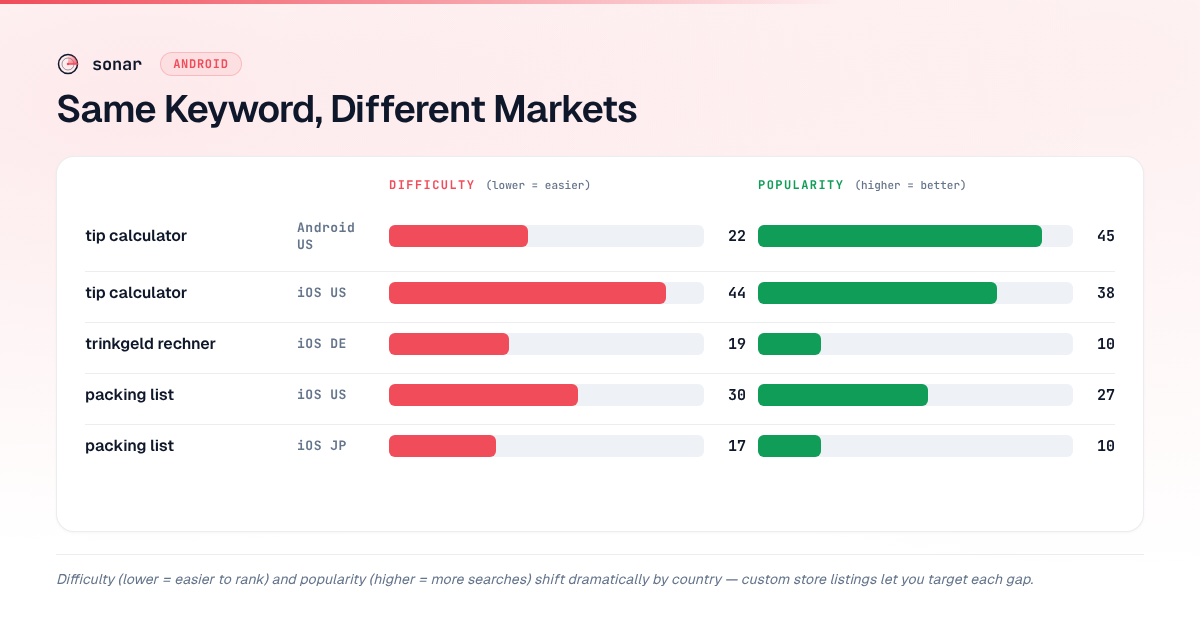
Notice the "packing list" example: the same English keyword has difficulty 30 and 172 competing results in the US, but only difficulty 17 and 10 results in Japan. If your travel app already ranks for "packing list" in the US, you could create a CSL for Japan targeting that same keyword — or better yet, target the Japanese equivalent — and face dramatically less competition.
Sonar's keyword data shows "cover letter" at Android difficulty 27 and popularity 48 (10 results), making it a prime example of a keyword where country-level variations in both language and search behavior could unlock untapped installs through localized, country-targeted listings (source: Sonar /api/v1/keywords/search, queried 2026-06-07). A resume app that only targets "cover letter" in English misses the German "Anschreiben," the French "lettre de motivation," and the Spanish "carta de presentacion" — each with its own difficulty and popularity profile.
For a comprehensive approach to finding these opportunities, our ASO keyword research guide walks through the full process.
How to Build a Country-Level Keyword Strategy with CSLs
Building effective country-specific listings requires a systematic process, not guesswork. Here is the approach I recommend based on analyzing keyword data across dozens of markets.
Step 1: Identify Your Priority Countries
Start with your existing install data. Google Play Console's "User acquisition" report shows installs by country source: [Google Play Console Help — Analyze your app's statistics]. Rank your markets by three criteria:
- Current install volume — countries where you already have traction
- Growth potential — countries where your app category is popular but you have low penetration
- Language overlap — countries that share a language but might need different keyword strategies (e.g., US vs UK vs Australia)
Since Google gives you 50 CSL slots, prioritize ruthlessly. A tip calculator app might focus on the US, UK, Germany, France, Japan, and Brazil first — covering distinct language markets with large smartphone user bases.
Step 2: Research Local Keywords Per Country
This is where most teams under-invest. Translating your US keywords into another language is a starting point, but it is not keyword research. True local keyword research means:
- Finding what users actually search for in each market, not just translating what US users search for
- Checking difficulty and popularity per country, because a keyword that is competitive in the US might be wide open in Germany
- Identifying local synonyms and slang that a direct translation would miss
A tool like Sonar lets you run keyword research filtered by country and store, so you can see the actual difficulty, popularity, and result count for any keyword in any market. This is essential for country-level listings because you are making per-country decisions, not per-language ones.
Step 3: Map Keywords to Metadata Fields
Google Play indexes three metadata fields for search: the app title (30 characters), the short description (80 characters), and the full description (4,000 characters) source: [Google Play Console Help — Set up your store listing]. Each CSL overrides all three independently.
For each country, assign keywords with this priority:
- Title — your highest-value keyword for that country. It carries the strongest ranking weight in Google Play's algorithm.
- Short description — secondary keywords that reinforce the title and capture related searches. For more on optimizing this field, see our guide to writing the perfect Google Play short description.
- Full description — long-tail keywords, natural-language variations, and terms that support the overall semantic signal. Our guide on Google Play long description keyword structure covers the indexing rules in detail.
Step 4: Localize Visual Assets
CSLs also let you swap screenshots, icons, and feature graphics per country. This matters for conversion rate, not just keyword ranking. A screenshot showing prices in euros converts better in Germany than one showing dollars. A screenshot in the local language converts better than one in English.
Google's own documentation recommends localizing screenshots and promotional text for each target market source: [Google Play Console Help — Localize your store listing]. This is separate from keyword strategy, but the two reinforce each other: keyword-matched metadata gets users to your listing, and localized visuals convert them to installs.
Step 5: Test and Iterate with Listing Experiments
Google Play's store listing experiments let you A/B test elements of your listing, including CSLs source: [Google Play Console Help — Create a store listing experiment]. You can test different titles, descriptions, icons, and screenshots per country to validate your keyword choices against real user behavior.
Our deep dive on Play Store listing experiments covers what to test first and how to read the results.
Common Mistakes with Country-Specific Listings
I see these errors repeatedly when reviewing apps that use CSLs:
Mistake 1: Machine Translation Without Keyword Research
Running your English keywords through Google Translate and pasting the output into a country-specific listing is not localization — it is a fast way to target keywords nobody actually searches for. "Budget planner" might translate literally to a phrase that zero users type into the Play Store in that market. Always validate translated keywords against actual search data.
Mistake 2: Ignoring Countries That Share Your Language
The biggest missed opportunity with CSLs is ignoring English-speaking markets outside the US. Users in the UK, Australia, India, and Canada search differently. "Torch" vs "flashlight," "mobile" vs "cell phone," "chemist" vs "pharmacy" — these differences affect which keywords your app ranks for in each market.
Mistake 3: Setting and Forgetting
These listings require ongoing maintenance. Keyword difficulty and popularity shift over time as competitors enter and exit markets. A keyword that was low-competition when you launched your CSL six months ago might be crowded now. Review your listing performance quarterly, at minimum.
Mistake 4: Duplicating Your Default Listing
If your country-specific listing uses the same keywords as your default listing, you are wasting a CSL slot. The entire point is differentiation. Each CSL should target keywords specifically chosen for that country's search behavior.
How CSLs Fit Into a Broader ASO Strategy
Country-specific listings are one piece of a larger app store optimization strategy. They work best when combined with:
- Localization that preserves home-market rankings — our guide on keeping home rankings intact during localization covers this balance
- Competitive keyword analysis — understanding what competitors rank for in each country helps you find gaps
- Metadata optimization — each listing's metadata should follow the same structural best practices as your default listing, as covered in our metadata optimization guide
The compounding effect is significant. An app with 10 well-optimized CSLs is effectively running 10 parallel ASO strategies, each tuned to a specific market. For example, a travel app targeting "packing list" in the US faces difficulty 30 and 172 results, but that same keyword in Japan shows difficulty 17 and just 10 results — each CSL lets you exploit these per-market gaps individually.
FAQ
How many custom store listings can I create on Google Play?
Google Play allows up to 50 CSLs per app as of 2026. Each listing can be assigned to one or more countries, and each targets specific countries based on the user's location — not their device language. This limit applies to country-targeted CSLs; pre-registration listings use a separate allocation source: [Google Play Console Help].
Do CSLs affect keyword rankings?
Yes. Each CSL has its own title, short description, and full description — the three fields Google Play indexes for search source: [Google Play Console Help — Set up your store listing]. By optimizing these fields with country-specific keywords, you can rank for different terms in different markets. Rankings are effectively determined per-listing per-country, since each CSL provides its own indexed metadata and is served only to users in its assigned countries source: [Google Play Console Help].
What is the difference between custom store listings and store listing translations?
Store listing translations are language-based: you create one translation per language, and it is shown to all users with that device language regardless of country. Custom store listings are country-based: they target specific countries and override the translated listing for users in those countries source: [Google Play Console Help]. This gives you country-level keyword control that translations alone cannot provide.
Should I create a CSL for every country?
Not necessarily. Focus on countries where you have meaningful install volume, growth potential, or where keyword research reveals untapped opportunities. Creating 50 listings with thin or untested keyword strategies is worse than creating 5 with well-researched, data-backed keyword choices. Start with your top markets and expand as you validate what works.
Can I A/B test CSLs?
Yes. Google Play's store listing experiments support testing elements within CSLs. You can test different titles, descriptions, and visual assets per country to validate your keyword choices against real install data source: [Google Play Console Help]. Run experiments for at least 7 days with statistically significant traffic before drawing conclusions.
Want to find the right keywords for each country your app targets? Try Sonar free — it shows search volume, difficulty, and competitor data for every keyword across 50+ markets.