Why the Short Description Matters More Than You Think
The Google Play short description is 80 characters of prime real estate. It appears directly below your app title on your store listing, in search results, and in featured placements. Most developers treat it as an afterthought — a throwaway tagline they write in 30 seconds. That's a mistake.
Here's what makes the short description valuable:
- Google indexes it for search ranking. Keywords in the short description directly influence which searches your app appears in. It's the second most important text field after the app title.
- Users read it before deciding to tap. In search results, users see your icon, title, rating, and short description. That's it. The short description is your pitch.
- It's the easiest metadata to update. You can change it anytime without submitting a new build. Test different versions and see how rankings shift within days.
If you're optimizing your Google Play listing and you haven't put serious thought into your short description, you're leaving rankings on the table. For the full picture of Android ASO, the short description is just one piece of the puzzle.
Is the Google Play Short Description 80-Character Limit Official?
Yes. Google's Play Console Help Center officially caps the short description at 80 characters, including spaces and punctuation. The store listing best-practices page repeats the same limit: "Explain your app's core purpose in 80 characters or less." The Play Console enforces this at submission — you physically cannot type a 81st character.
This constraint is both a limitation and a forcing function. You can't ramble. Every word needs to earn its place. For reference, this line uses 78 of the 80 available characters:
Photo editor with filters, background remover & AI enhancement. Collage maker.That's two short sentences. You need to write like a copywriter, not a product manager. Cut every word that isn't pulling its weight.
What Google Actually Indexes
Google Play indexes three text fields for search ranking:
- App title (30 characters) — highest weight
- Short description (80 characters) — second highest weight
- Long description (4,000 characters) — lowest weight per keyword, but most total space
The short description sits in a sweet spot: it carries more ranking weight than the long description, and you have nearly three times more space than the title. This makes it the best place to target your second and third priority keywords — the ones that didn't fit in your 30-character title.
Unlike iOS, there's no hidden keyword field on Google Play. Your short description and long description are the only places to add keywords beyond the title. Don't waste them. For a deeper look at the differences between iOS and Google Play ASO, see our comparison guide, and for structuring the 4,000-character field see our Google Play long description keyword guide. For a quick reference of every character limit across both stores, see the app store description character limits cheat sheet.
7 Before/After Examples
The best way to learn is by seeing what good and bad look like side by side. These examples use realistic apps to show common mistakes and how to fix them.
1. The Generic App Description
Before (bad):
The best weather app for your daily needs and activities!Accurate hourly weather forecast with rain alerts & severe storm warningsWhy it's better: "Best," "your," and "daily needs" are filler — no one types those into the Play Store. The revision targets three real search terms ("weather forecast," "rain alerts," "storm warnings") while communicating concrete value.
2. The Brand-Only Description
Before (bad):
SkyCast - Your Personal Weather CompanionLocal weather radar & 14-day forecast. Minute-by-minute rain predictions.Why it's better: Your brand name is already in the title — repeating it here wastes characters and adds zero ranking benefit. The revision uses those characters for five distinct keyword opportunities instead.
3. The Feature List Without Keywords
Before (bad):
Track your tasks, set reminders, and stay organized every dayTo-do list & task manager with reminders, recurring tasks & widgetsWhy it's better: "Stay organized every day" is marketing fluff that targets zero searches. The revision names five specific features that are also search terms, turning a vague pitch into a keyword-rich description.
4. The Emoji Overload
Before (bad):
🏋️ Track workouts 💪 Build muscle 🔥 Get fit 🎯 Reach your goals!Workout tracker & exercise log. Gym routines, strength training plans.Why it's better: Each emoji consumes 2-4 characters and contributes nothing to search indexing. Google doesn't treat emojis as keywords. The revision reclaims those characters for four high-intent search terms that users actually type.
5. The Vague Tagline
Before (bad):
Make your photos look amazingPhoto editor with filters, background remover & AI enhancement toolsWhy it's better: "Make your photos look amazing" could describe any of 10,000 apps. It contains no specific feature names that someone would search for. The revision names exact features — and each one doubles as a keyword.
6. The Keyword-Stuffed Mess
Before (bad):
budget app money tracker expense tracker savings planner finance managerBudget planner & expense tracker. Track spending, save money, reach goals.Why it's better: Keyword stuffing reads like spam and can trigger Google Play policy violations. It also signals low quality to users browsing results. The revised version uses natural language while still targeting "budget planner," "expense tracker," and "track spending." Readability matters because a human has to decide whether to tap.
7. The Too-Short Description
Before (bad):
Simple meditation appGuided meditation & sleep sounds. Breathing exercises, daily mindfulness.Why it's better: Four keywords in 24 characters vs. seven keywords in 72 characters. The original wastes 56 characters of indexed search space. Every unused character is a missed keyword opportunity.
The Short Description Formula
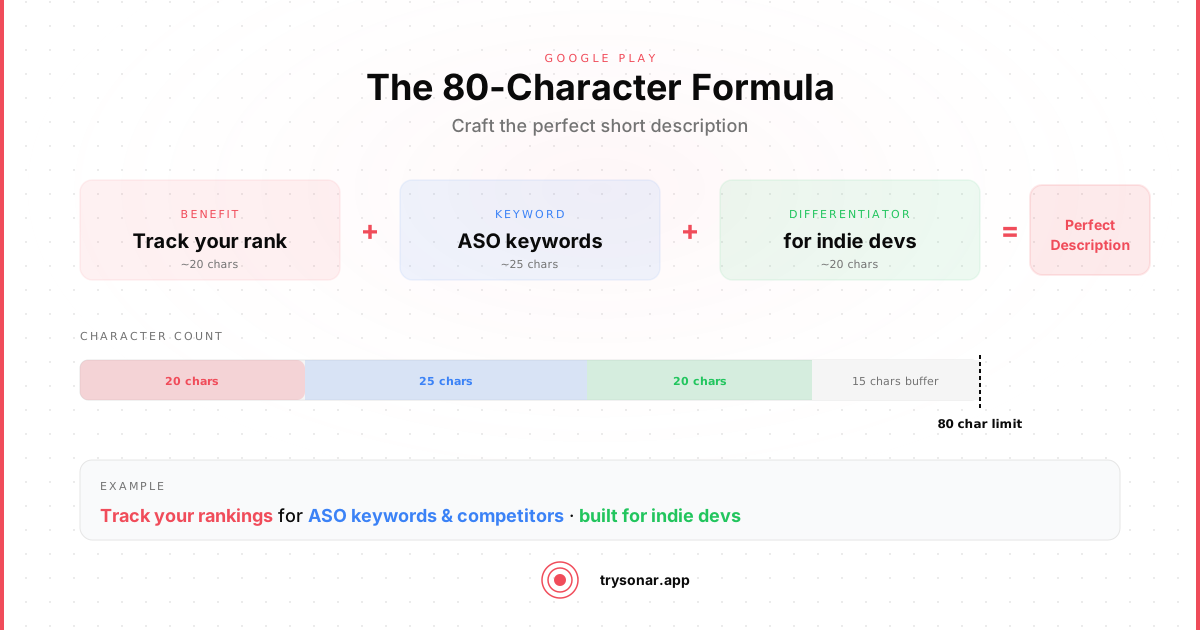
After reviewing hundreds of high-ranking Play Store listings, a clear pattern emerges. The strongest short descriptions follow this structure:
[Primary keyword phrase] & [secondary keyword]. [Feature/benefit with third keyword].This formula works because:
- The primary keyword sits at the beginning, where Google gives it the most weight
- The ampersand connects two keyword phrases efficiently (1 character vs. 4 for "and ")
- The period creates a natural reading break
- The second sentence adds a third keyword context without feeling stuffed
More examples of this formula in action:
Podcast player & audio downloader. Offline listening with smart playlists.QR code scanner & barcode reader. Instant scan, create, and share codes.Calorie counter & food diary. Barcode scanner with nutrition tracker.Each one reads like a natural description while targeting 3-5 distinct keyword phrases.
Keyword Placement Strategy
Where you place keywords within the 80 characters matters. Google Play applies a basic position weighting:
Front-load your primary keyword. The first few words of the short description carry the most weight. If you're targeting "recipe organizer," start with it:
- Good:
Recipe organizer & meal planner with grocery list and cooking timer - Weak:
Plan your meals, organize recipes, and build your grocery list easily
Both contain similar keywords, but the first version leads with the exact match phrase. In practice, this means better ranking for the primary term.
Don't repeat keywords from your title. This is a core principle of metadata optimization. If your app title is "MealMate - Recipe Organizer," don't put "recipe organizer" in the short description again. Google deduplicates — the repetition wastes characters without any ranking benefit. Use the short description to target different keywords:
- Title:
MealMate - Recipe Organizer - Short description:
Meal planner with grocery list, cooking timer & nutrition tracker
Now you're ranking for both "recipe organizer" (from the title) and "meal planner," "grocery list," "cooking timer," and "nutrition tracker" (from the short description).
Common Mistakes to Avoid
Writing for investors, not users. Descriptions like "AI-powered next-generation productivity solution" mean nothing to someone searching the Play Store. Write for the person typing "to-do list app" into the search bar.
Including your price or promotional offers. "Free" or "$2.99/month" wastes characters on non-keyword text. Users can see the price on your listing. Use the promotional description field for offers instead.
Using sentence fragments that don't include keywords. "Fast. Simple. Beautiful." — three words, zero search value. Every word in your short description should either be a keyword or connect keywords into readable language.
Ignoring localization. If your app is available in multiple countries, translate and localize the short description. German users search in German. Japanese users search in Japanese. The short description is indexed per-locale. A single English description limits your visibility everywhere else.
Testing and Iteration
The short description is one of the fastest metadata fields to test. You can change it in the Google Play Console without submitting a new release, and Google typically re-indexes within 24-48 hours.
A practical testing approach:
- Research keywords for your category using autocomplete suggestions and competitor analysis. ASO tools like Sonar can surface keyword difficulty and search volume to help prioritize which terms are worth targeting (see Sonar pricing plans for available tiers) — check the net worth tracker keyword difficulty or mortgage calculator keyword difficulty pages for examples.
- Write 3-4 variations using the formula above, each targeting slightly different keyword combinations.
- Run each version for 2 weeks. Monitor your ranking position for the target keywords.
- Keep the winner and test a new challenger against it.
Track which keywords you're targeting with each variation so you can measure whether ranking improved. Without tracking, you're guessing.
Quick Reference Checklist
Before you publish your next short description, run through this list:
- Uses 70-80 of the available 80 characters (don't waste space)
- Primary keyword appears in the first few words
- Contains 3-5 distinct keyword phrases
- No keywords repeated from the app title
- Reads naturally — a human would understand what the app does
- No emojis eating up character budget
- No filler words ("best," "amazing," "great," "your")
- Includes at least one feature-specific keyword (not just category terms)
- Localized for each target market
The short description is 80 characters. That's one sentence. Make it count.
Frequently Asked Questions
Is the Google Play short description 80 characters an official limit?
Yes. Google's Play Console metadata documentation sets the short description limit at exactly 80 characters, including spaces and punctuation. The Play Console input field enforces this — it will not accept a single character beyond 80. This limit remains unchanged as of June 2026.
Does the short description affect Google Play search ranking?
The short description is the second most important indexed text field on Google Play, after the app title (30 characters). Keywords placed in the short description directly influence which search queries your app appears for. Unlike iOS, Google Play has no hidden keyword field, so the short description and long description are your only keyword slots beyond the title.
Should I repeat title keywords in the short description?
No. Google Play deduplicates keywords across metadata fields. If a keyword already appears in your app title, repeating it in the short description wastes characters without additional ranking benefit. Use the short description to target your second and third priority keywords instead.
How often can I update the Google Play short description?
You can change the short description anytime through the Play Console without submitting a new app build. Google typically re-indexes the updated text within 24-48 hours, making it one of the fastest metadata fields to test and iterate on.