
Google Play ASO Is Not iOS ASO
Most ASO guides focus on iOS. Apple provides better keyword data and the optimization mechanics are more contained. But Google Play has 2.5 billion monthly active users and its own set of rules.
App store optimization for Android requires a different approach. Google Play indexes different fields, weights different ranking signals, and exposes data that Apple keeps hidden. This guide covers everything specific to play store optimization — what Google indexes, how to structure your metadata, and what ranking factors matter most.
What Google Play Indexes (and Why It Matters)
The single most important difference between iOS and Android ASO: Google Play indexes your long description for search.
On iOS, Apple indexes only the title (30 chars), subtitle (30 chars), and a hidden keyword field (100 chars) — 160 characters total. Your iOS description is invisible to search. For a side-by-side comparison, see our iOS vs Google Play ASO breakdown.
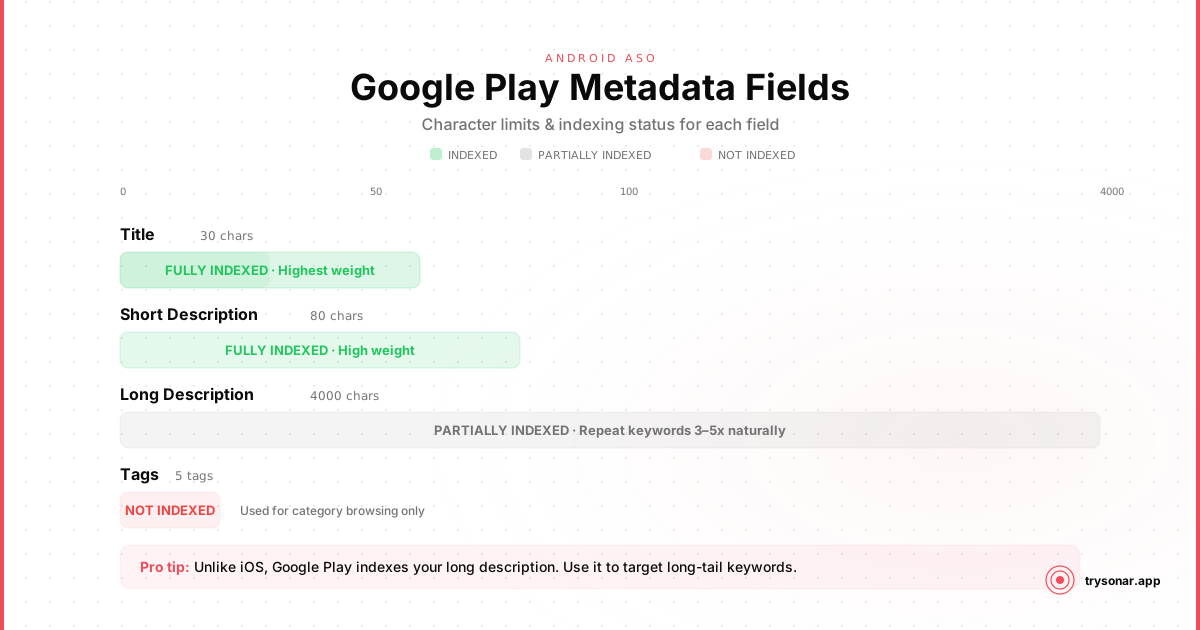
On Google Play, your indexed fields include:
| Field | Character Limit | Indexed for Search |
|---|---|---|
| App Title | 30 characters | Yes (highest weight) |
| Short Description | 80 characters | Yes (high weight) |
| Long Description | 4,000 characters | Yes (moderate weight) |
| Developer Name | 64 characters | Yes |
| Tags (categories) | Up to 5 tags | Yes |
That gives you over 4,000 characters of searchable space. This fundamentally changes the optimization strategy. Instead of the surgical keyword packing that iOS requires, Google Play ASO is closer to web SEO — you write real content and weave keywords into it naturally.
Google's Play Store algorithm also considers backlinks to your listing page. If blogs, forums, or websites link to your Play Store URL with keyword-rich anchor text, it can influence your ranking. This is unique to Google Play and completely absent on iOS.
The Five Metadata Fields, Optimized
1. App Title (30 Characters)
The title carries the most ranking weight on Google Play, same as iOS. But unlike iOS, the title limit was reduced from 50 to 30 characters in 2021, so every character matters.
Structure: Brand - Primary Keyword
- Lead with your app name for brand recognition
- Include your single highest-value keyword after the separator
- Avoid all-caps, excessive punctuation, or promotional language (Google will reject these)
- Do not include "free," "best," "#1," or any performance claims — Google's metadata policy bans these
Example: FocusFlow - Pomodoro Timer
The title is the one field where iOS and Google Play strategy converges. Put your strongest keyword here and move on.
2. Short Description (80 Characters)
This is your biggest advantage over iOS developers. While iOS gives you a 30-character subtitle, Google Play gives you 80 characters of highly indexed space. We have a dedicated guide on writing the perfect Google Play short description if you want to go deeper. For choosing which keywords to put here, see our app store keywords guide.
The short description appears directly below your app title on the listing page and in search results. It is both a ranking factor and a conversion element.
- Include 2-3 target keywords
- Write a complete, compelling sentence — not a keyword list
- Front-load the most important keyword in the first few words
- Mention the core user benefit
Example: Simple focus timer and task planner to boost your daily productivity.
That single sentence targets "focus timer," "task planner," and "productivity" while reading naturally. On iOS, you would need to split these across the subtitle and keyword field.
3. Long Description (4,000 Characters)
This is the field that makes Google Play optimization fundamentally different from iOS. Apple ignores your long description entirely for ranking purposes. Google treats it like a web page.
- Mention your primary keyword 3-5 times throughout the description
- Mention secondary keywords 2-3 times each
- Front-load the first paragraph with your most important keywords — Google gives more weight to text near the top
- Use natural language. Google's algorithms detect and penalize keyword stuffing
- Never repeat a keyword in consecutive sentences
Structure the description in sections:
- Opening paragraph (2-3 sentences): What the app does, hitting primary and secondary keywords
- Feature list: Bullet points describing core features, each incorporating a keyword where natural
- Use cases: Who the app is for and what problems it solves
- Closing paragraph: Summarize the value proposition with one more mention of the primary keyword
Example opening: > FocusFlow is a pomodoro timer and focus app designed for people who need to get deep work done. Track your daily focus sessions, plan tasks, and build better work habits with a simple, distraction-free interface.
That opening hits "pomodoro timer," "focus app," "focus sessions," "plan tasks," and "work habits" — five keyword targets in two sentences, all reading naturally.
- Keyword lists disguised as prose ("Focus timer focus app focus tracker focus pomodoro...")
- Mentioning competitor names (policy violation)
- Including URLs, email addresses, or prices (Google's metadata policy restricts these)
4. Developer Name (64 Characters)
Most developers overlook this: Google indexes your developer name for search.
If your developer account name includes a relevant keyword, it contributes to your ranking for that keyword across all your apps. An account named "FocusFlow Productivity Tools" will have a slight ranking advantage for "productivity" across every app published under it.
This is a one-time decision — changing your developer name later requires a Google review. If you are setting up a new developer account, consider including a category-relevant keyword. But keep it professional. "Productivity Tools by John" reads better than "Productivity Timer Focus Tools Studio."
5. Tags
Google Play allows you to select tags (formerly "content categories") for your app. You can choose up to 5 tags from a predefined list relevant to your app type.
Tags influence browse placement (the "Similar apps" and category-based recommendations) and contribute to Google's understanding of your app's purpose. You cannot enter custom tags — they are selected from Google's list.
Strategy: Pick the most specific tags that match your app. If your app is a habit tracker, choose "Habit Tracking" over "Health & Fitness" when a more specific option exists. Specific tags mean less competition and more relevant browse traffic.
Google Play Ranking Factors
Google Play's algorithm weighs several signals beyond metadata relevance. Understanding these helps you prioritize what to work on after your metadata is set.
Install Count (Visible and Influential)
This is the ranking factor where Google Play differs most from iOS. Total install count is a significant ranking signal on Google Play, and unlike iOS, install counts are public.
On iOS, Apple weights recent download velocity — how many installs you got this week relative to last week. This gives newer apps a chance to climb quickly with a launch spike.
On Google Play, cumulative installs create a compounding advantage for established apps. An app with 10 million installs will generally outrank one with 10,000 installs for the same keyword, even if the smaller app has better ratings and more keyword-optimized metadata.
What this means for indie developers: Breaking into competitive keywords on Google Play is harder than on iOS. Focus on long-tail, low-competition keywords where established apps have not built an insurmountable install count advantage. For example, currency converter or image resizer may have much more accessible competition than broad terms.
Uninstall Rate
Google Play tracks and penalizes high uninstall rates. If users install your app and quickly remove it, Google interprets this as a signal that your app does not match the search query or deliver on its listing promise.
Keep your listing honest. If your screenshots and description set accurate expectations, users are less likely to uninstall out of disappointment.
Ratings and Reviews
Higher ratings and more reviews improve ranking. Unlike iOS, Google Play has no rating reset mechanism — your cumulative rating matters from day one.
Request reviews after positive user moments: completing an onboarding flow, finishing a task, achieving a streak. The in-app review API (com.google.android.play.core) integrates the review prompt directly into your app without redirecting to the Play Store.
Android Vitals
Google monitors your app's technical performance through Android Vitals: crash rate, ANR (Application Not Responding) rate, wake locks, and stuck partial wake locks. Apps with poor vitals get penalized in search rankings and may receive a warning badge on their listing.
Keep your crash rate below 1.09% and your ANR rate below 0.47% — these are Google's "bad behavior" thresholds.
Backlinks and Web Presence
Because Google indexes Play Store listings as web pages, your listing benefits from external links. Blog posts, landing pages, press coverage, and forum discussions that link to your Play Store URL contribute to its authority.
If you are writing about your app on your website, link to the Play Store listing with descriptive anchor text. Blog reviews and forum discussions that link to your listing help your ranking — both in Google web search and within the Play Store itself.
Google Play Keyword Research
Keyword research for Google Play is harder than iOS because Google provides no official keyword volume data for Play Store searches.
On iOS, Apple Search Ads gives you a Search Popularity score (5-100) for any keyword. Google has no equivalent.
Here is what you can use instead:
Autocomplete suggestions. Open Google Play and start typing. The suggestions that appear are real search queries with meaningful volume. This is free, immediate, and directly reflects Play Store behavior.
Google Ads Keyword Planner. While this shows web search volume (not Play Store search volume), there is a correlation. Keywords with high Google web search volume tend to have meaningful Play Store search volume too. Use it as a directional signal, not an exact measurement.
Competitor analysis. Look at the titles, short descriptions, and long descriptions of the top-ranked apps in your category. The keywords they target are likely the ones with volume worth chasing. Tools like Sonar can automate this — pulling competitor metadata and extracting the keywords they rank for.
Public install counts. This is data you cannot get on iOS. If a niche keyword leads you to a set of apps with install counts between 10K and 100K, that tells you the keyword has moderate volume and beatable competition. If the top results have 50M+ installs, the keyword is probably too competitive for a new app.
Google Play vs. iOS: Quick Reference
| Factor | Google Play | iOS App Store |
|---|---|---|
| Indexed text limit | ~4,100 characters | 160 characters |
| Long description indexed | Yes | No |
| Developer name indexed | Yes | No |
| Hidden keyword field | No | Yes (100 chars) |
| Install counts visible | Yes | No |
| Keyword volume data | None (use proxies) | Search Popularity (5-100) |
| Primary ranking signal | Install count + relevance | Download velocity + relevance |
| Backlinks matter | Yes | No |
| Rating reset available | No | Yes (per major version) |
| Re-indexing speed | 3-7 days | 24-48 hours |
Metadata Optimization Checklist
Use this checklist every time you update your Google Play listing:
- Includes your single highest-value keyword
- App name is present for brand recognition
- No policy-violating language (no "best," "free," "#1")
- All 30 characters used or close to it
- Contains 2-3 target keywords
- Reads as a natural sentence, not a keyword list
- Front-loads the most important keyword
- Communicates the core benefit to users
- Primary keyword appears 3-5 times
- Secondary keywords appear 2-3 times each
- First paragraph contains the most important keywords
- Structured with features, use cases, and a closing summary
- No keyword stuffing or unnatural repetition
- No competitor names, URLs, or price references
- Uses most of the 4,000 character allowance
- Includes a relevant keyword (if setting up a new account)
- Reads professionally, not spammy
- All 5 tag slots used
- Most specific available tags selected
- Android Vitals clean (crash rate < 1.09%, ANR rate < 0.47%)
- Screenshots and description accurately reflect the app
- In-app review prompt implemented at positive moments
Common Google Play ASO Mistakes
Ignoring the long description. Many developers copy their iOS description verbatim without optimizing for keywords. On iOS, the description does not affect search. On Google Play, it is one of your most powerful ranking tools.
Keyword stuffing. 4,000 characters of indexed space does not mean you should repeat "pomodoro timer" 30 times. Google's NLP is sophisticated. Write for humans first, then ensure your keywords appear at the right frequency.
Neglecting the short description. 80 characters of high-weight indexed text. Some developers leave this as a throwaway tagline. Treat it more seriously than your iOS subtitle — you have more than twice the character count.
Not using all 5 tags. Free ranking signal. Use every slot.
Setting and forgetting. Google Play re-indexing takes 3-7 days, and competitive landscapes shift constantly. Revisit your metadata monthly.
A Monthly Play Store SEO Process
Google Play optimization is not a one-time setup. Here is a monthly cycle:
- Track current rankings. Know where you rank for your target keywords today. Without baseline data, you cannot measure improvement.
- Audit keyword performance. Which keywords are you gaining ground on? Which have stalled? Are any new competitors appearing?
- Refresh the long description. Test new keyword placements. Add new secondary keywords. Adjust frequency of existing ones.
- Monitor Android Vitals. A spike in crash rate can silently tank your rankings before you notice the traffic drop.
- Review competitor changes. Check if top competitors have updated their metadata. New keywords in their titles or descriptions signal market shifts.
This cycle does not require hours of work each month. With a tool like Sonar, you can track keyword rankings, monitor competitor metadata changes, and identify new keyword opportunities in minutes.
Start With What Google Gives You
Google Play ASO rewards a different skillset than iOS. You are not packing 160 characters with surgical precision. You are writing persuasive, keyword-aware content across 4,000+ characters. You are thinking about backlinks, install velocity, and technical quality signals.
The advantage for indie Android developers: all of this is free. You do not need to pay for Apple Search Ads data. You do not need a keyword field optimizer. You need to write a good description, pick the right keywords, and track your results over time.
Start with the checklist above. Optimize your five metadata fields. Then measure, iterate, and keep going.