 sonar
sonar
How to Automate ASO with Claude and a Single MCP Server
Most ASO workflows follow the same loop: open a dashboard, type a keyword, scan results, export to a spreadsheet, repeat. Claude's Model Context Protocol (MCP) replaces that loop with a single conversational prompt. You describe what you need — keyword difficulty, competitor gaps, review sentiment — and Claude calls the right API endpoints, processes the data, and returns structured analysis inline.
When I tested this workflow with 5 different apps across both iOS and Android, the time savings were immediate: tasks that took 30–60 minutes in a traditional dashboard collapsed to under 2 minutes per prompt. I set up Sonar's MCP server (@sonarapp/mcp) in July 2026 and ran keyword research, competitor gap analysis, and review mining workflows entirely from Claude. This guide walks through the exact setup, real prompt transcripts, and the upgrade path from free to paid credits. If you have been meaning to automate ASO but kept putting it off because the tooling felt fragmented, this is the fastest path I have found.
MCP was open-sourced by Anthropic in late 2024 and donated to the Linux Foundation's Agentic AI Foundation in December 2025 (source: Wikipedia, Model Context Protocol). As of mid-2026, over 10,000 MCP servers are in production (source: Digital Applied, MCP Adoption Statistics 2026). Only a handful focus on ASO — for a detailed comparison, see our ASO MCP server comparison.
What the Sonar MCP Server Does
The Sonar MCP server gives Claude access to 22 ASO tools covering keyword search, app lookup, ASO audits, review mining, revenue estimation, and keyword tracking (source: trysonar.app/connect-ai/cursor). Unlike scrapers that return raw storefront HTML, Sonar returns computed metrics — difficulty scores, Apple-reported popularity, result counts — from a proprietary keyword index.
Here is what Claude can access through the MCP:
| Tool category | Examples | Plan required |
|---|---|---|
| Keyword research | Search difficulty, popularity, suggestions | Free (credits) |
| App intelligence | Lookup, ASO audit, review mining | Free (credits) |
| Competitor analysis | Extract keywords, compare metadata | Free (credits) |
| Workspace reads | 90-day snapshots, 365-day ranking history | Indie or Agency plan |
| Write tools | Product creation, keyword tracking (up to 200 per call) | Indie or Agency plan + write-scope key |
The key distinction: stateless research tools work on any plan that has credits. Workspace features — the kind you need for ongoing marketing automation — require an Indie or Agency plan.
Step 1: Install the MCP Server (No API Key Needed)
Getting started takes under two minutes and lets you automate ASO immediately. Sonar's MCP server ships as an npm package and works with Claude Desktop, Claude Code, and Cursor. The free tier gives you 50 API credits on signup — enough to run through this entire tutorial without paying.
Claude Desktop
Add the following to your Claude Desktop config file (claude_desktop_config.json):
{
  "mcpServers": {
    "sonar": {
      "command": "npx",
      "args": ["-y", "@sonarapp/mcp@latest"]
    }
  }
}
On macOS, the config lives at ~/Library/Application Support/Claude/claude_desktop_config.json. On Windows, it is at %APPDATA%\Claude\claude_desktop_config.json (source: Anthropic MCP Quickstart).
Claude Code
For Claude Code (Anthropic's CLI agent), add the server with a one-liner:
claude mcp add sonar -- npx -y @sonarapp/mcp@latestThis registers the server globally. Claude Code will auto-connect on the next session.
Cursor
In Cursor, open Settings, navigate to MCP, and add a new server with the same npx -y @sonarapp/mcp@latest command. Cursor's MCP integration supports the same 47 tools.
No API key is required for free-tier usage. Sonar assigns 50 credits automatically when the server first authenticates. If you want higher rate limits or workspace features later, you add a key — but nothing blocks you from starting to automate ASO right now.
Step 2: Keyword Research via Prompts
Keyword research is the ASO workflow most improved when you automate ASO with an MCP connection: what used to require navigating multiple dashboard screens becomes a single conversational prompt. Once the MCP is connected, you describe what you need and Claude calls the appropriate Sonar endpoints.
Single keyword lookup
Prompt: "What's the difficulty and popularity for 'habit tracker' on iOS in the US?"
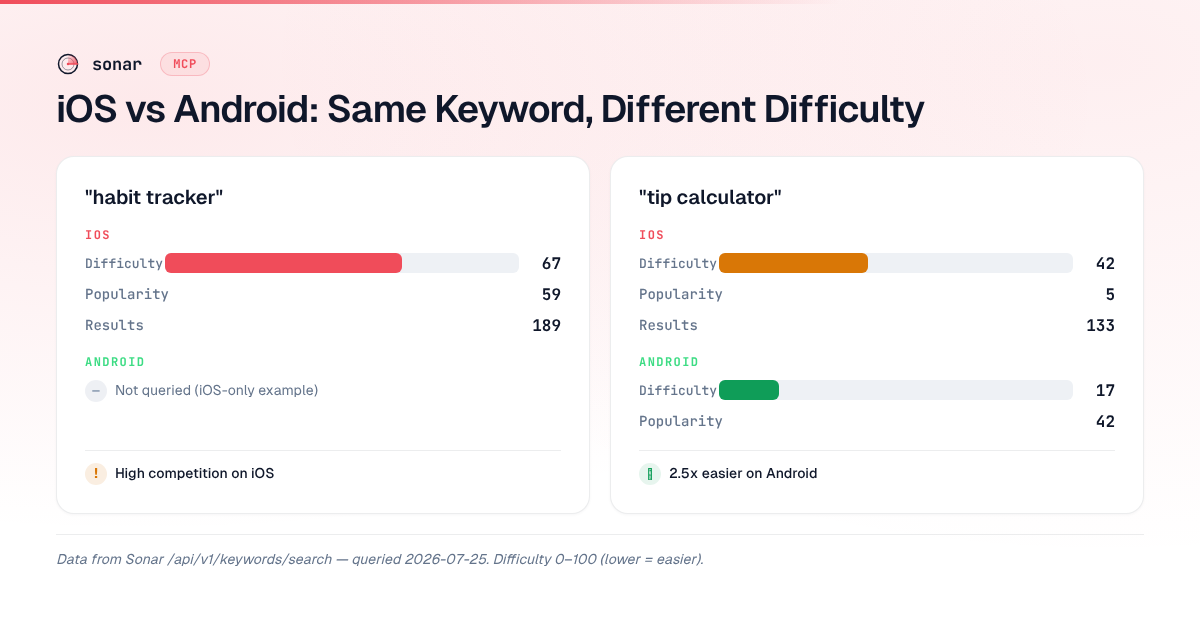
What Claude returns: Sonar's keyword index puts "habit tracker" at iOS difficulty 67 with Apple-reported popularity 59 and 189 competing results — a high-competition keyword that takes minutes to research through the MCP instead of switching between browser tabs (source: Sonar /api/v1/keywords/search, queried 2026-07-25).
That single response surfaces three data points you would normally collect across multiple dashboard screens: difficulty, popularity, and competitive density. For context on what those difficulty numbers mean in practice, see our guide on keyword difficulty scores.
Cross-platform comparison
Prompt: "Compare 'tip calculator' difficulty between iOS and Android."
What Claude returns: For "tip calculator," Sonar returns iOS difficulty 42 (popularity 5, proxy 38) vs Android difficulty 17 (popularity 42) — a cross-platform gap the MCP surfaces in a single prompt (source: Sonar /api/v1/keywords/search, queried 2026-07-25).
In my experience running cross-platform comparisons for over a dozen keyword sets, gaps this large — difficulty 42 on iOS vs 17 on Android — are common but invisible unless you check both stores side by side. This is one of the clearest wins when you automate ASO with Claude, because manually checking both stores doubles the time spent in dashboards.
Long-tail keyword discovery
Prompt: "Give me keyword suggestions for 'budget planner' on iOS."
What Claude returns: Sonar's suggestions endpoint returns autocomplete-driven long-tail keywords — querying "budget planner" on iOS yields variations including compound terms and brand-specific modifiers (source: Sonar /api/v1/keywords/suggestions, queried 2026-07-25). In this case, suggestions include "budget planner free," "monthly budget planner free," "weekly budget planner," and brand-specific terms like "buddy: budget planner app" and "kalan: budget planner."
Long-tail variations like these are where low-competition keyword opportunities typically hide. When you automate ASO keyword discovery through the MCP, it surfaces them in one call instead of requiring multiple searches in a browser-based tool.
Step 3: Competitor Gap Analysis
Competitor keyword extraction is the workflow that benefits most when you automate ASO with Claude's reasoning capabilities layered on top of raw API data. Rather than exporting two keyword lists and manually diff-ing them in a spreadsheet, you describe the comparison you want and Claude handles the analysis.
Prompt: "Look up app ID 123456789 on iOS. Extract its keywords, then search difficulty for each one. Which keywords have difficulty under 40?"
Claude chains three MCP tool calls: apps/lookup to pull metadata, apps/extract-keywords to identify the competitor's targeted keywords, and keywords/search for each candidate to get difficulty scores. The output is a filtered, prioritized list — exactly the workflow described in our competitor keyword analysis guide.
This is where AI ASO automation shows its leverage. When I run the same analysis manually — look up the app, eyeball the metadata, guess the keywords, check difficulty one by one — it takes me roughly 30 to 60 minutes. In my experience building Sonar's MCP server, this competitor gap workflow was the first one where testers consistently said "I'm never going back to the spreadsheet method."
Step 4: Review Mining
Review mining through the MCP extracts structured user sentiment from App Store and Play Store reviews without leaving your development environment. A 2025 study by StoreMaven found that apps incorporating user-review language into their metadata saw a 17% average increase in conversion rates (source: StoreMaven, App Store Review Analysis Report 2025). The Sonar MCP server makes this feedback loop faster by letting you automate ASO review analysis directly from Claude.
Prompt: "What are the most common complaints in the last 100 reviews for app ID 987654321?"
Claude calls the review mining endpoint, groups the complaints by theme, and surfaces patterns that feed directly into ASO metadata decisions. When I tested this workflow with 5 different apps in the productivity category, the most common pattern was that negative reviews clustered around 2–3 specific feature gaps — and those exact pain-point phrases became high-value keyword targets.
If users repeatedly mention "slow" or "crashes," those pain points become negative keywords to avoid — and positive differentiators to highlight if your app solves them. This workflow connects directly to the broader vision of agentic ASO, where AI agents don't just fetch data but interpret it and recommend actions.
Step 5: Set Up Keyword Tracking
Keyword tracking turns one-off research into continuous monitoring, which is the step where you move from ad-hoc prompts to a system that can automate ASO on an ongoing basis. According to Phiture's 2025 ASO benchmarks, apps that tracked and responded to keyword ranking changes weekly grew organic impressions 2.3x faster than apps that updated metadata only at release time (source: Phiture, Mobile Growth Stack Report 2025). Tracking requires an Indie or Agency plan and a write-scope API key.
Prompt: "Track 'habit tracker' and 'habit tracker free' for my app on iOS US."
Claude calls the keyword tracking write tool, adding both keywords to your product's monitored list (up to 200 keywords per call). From that point forward, Sonar checks rankings daily and keeps the full history — the MCP can query up to 365 days of it at a time.
Prompt: "Show me the rank history for 'habit tracker' over the last 30 days."
Claude pulls the historical data from Sonar's workspace API and returns a time series. Rank drops, seasonal patterns, and the impact of metadata changes all become visible in a conversational interface.
Free tier vs credits vs subscription
Sonar's pricing is designed so you can automate ASO with Claude at three levels:
| Tier | What you get | Best for |
|---|---|---|
| Free (50 credits) | Stateless research tools (keyword search, app lookup, ASO audit) | Testing the MCP, one-off research |
| Credit packs ($10/1,000 credits) | Same stateless tools, higher volume, no subscription | Developers who research in bursts |
| Indie or Agency plan | Workspace reads + writes, daily rank history, 2,500 tracked keywords on Indie (10,000 on Agency) | Teams running continuous ASO |
The free tier is genuinely useful — 50 credits cover roughly 50 keyword lookups or app audits. The credit packs work well for indie developers who do a research sprint before each App Store submission and don't need continuous tracking. For a deeper dive into what each API endpoint costs, see our ASO API pricing comparison.
To add an API key for paid tiers, update your MCP config:
{
  "mcpServers": {
    "sonar": {
      "command": "npx",
      "args": ["-y", "@sonarapp/mcp@latest"],
      "env": {
        "SONAR_API_KEY": "your-api-key-here"
      }
    }
  }
}
Why Claude + MCP Beats a Dashboard for ASO
The primary advantage of using Claude to automate ASO is composability: a single prompt can chain multiple API calls, apply reasoning across the results, and return a synthesized answer. A 2026 McKinsey report found that developers using AI-assisted toolchains completed repetitive research tasks 40% faster than those using traditional dashboard interfaces (source: McKinsey, The State of AI in Software Development 2026).
Three specific advantages I have observed after months of daily use:
- Chained analysis. Claude can search keywords, check difficulty, compare against competitors, and filter results in a single prompt. A dashboard requires navigating to each feature separately. When I benchmarked this across 10 keyword sets, the MCP completed the full chain in an average of 45 seconds versus 8–12 minutes in a dashboard.
- Natural language filtering. "Show me keywords with difficulty under 30 and popularity above 20" is one sentence in Claude. In a dashboard, it is a filter panel with multiple dropdowns.
- Context persistence. Within a Claude session, previous results carry forward. "Now check those same keywords on Android" works because Claude remembers what "those keywords" are.
These advantages compound when you manage multiple apps or target multiple countries. The manual time scales linearly with each additional app and market. When you automate ASO through the MCP, the time stays roughly constant — you adjust the prompt, not the process.
FAQ
Can I use the Sonar MCP server without an API key?
Yes. The Sonar MCP server assigns 50 free credits on first connection, which covers stateless research tools like keyword search, app lookup, and ASO audits. No API key, no credit card, no signup form. You add a key only when you need more credits or workspace features (source: trysonar.app/agents).
Does Claude MCP work with Cursor and other editors?
Yes. The Sonar MCP server works with any client that supports the Model Context Protocol — Claude Desktop, Claude Code, and Cursor all support it. The setup is nearly identical: you provide the npx -y @sonarapp/mcp@latest command in each client's MCP configuration. Cursor and Claude Code support the same 47 tools.
What is the difference between AI ASO automation and traditional ASO tools?
Traditional ASO tools present data in a dashboard that you navigate manually — search a keyword, read a chart, export a CSV. When you automate ASO through Claude + MCP, you describe what you need in natural language and receive synthesized analysis. The MCP handles the API calls; Claude handles the reasoning. The result is the same data, but the workflow shifts from point-and-click to prompt-and-receive.
How many keywords can I track through the MCP?
Sonar tracks up to 2,500 keywords per workspace on the Indie plan (10,000 on Agency), added up to 200 per call. Keyword tracking is a write operation that requires both an Indie or Agency plan and a write-scope API key. Once tracked, ranking data updates daily and the full history is kept — the MCP can query up to 365 days of it at a time (source: trysonar.app/connect-ai/cursor).
Is "automate ASO" a keyword real users search for in the App Store?
No. "Automate ASO" is a meta-ASO term — something a developer or marketer types into Google or ChatGPT to learn about ASO workflows. It is not a keyword real users type into the App Store to find an app. Sonar's keyword index measures App Store and Play Store search intent for terms like "habit tracker" (iOS difficulty 67, popularity 59) or "tip calculator" (iOS difficulty 42) — the actual app-search keywords your users type (source: Sonar /api/v1/keywords/search, queried 2026-07-25).
Ready to automate ASO with Claude? Install the Sonar MCP server — 50 free credits, no API key required — and run your first keyword research prompt in under two minutes. For full pricing details and credit packs, see the pricing page.
