 sonar
sonar
How Mobile App Marketing Automation Changes ASO Workflows
Mobile app marketing automation eliminates the manual loops that slow ASO teams: keyword tracking, rank monitoring, competitive analysis, and cross-platform gap detection. Instead of a human checking rankings daily, an automated ASO workflow queries APIs on a schedule, compares results against thresholds, and fires alerts or even submits metadata changes autonomously.
I built Sonar's keyword monitoring pipeline because I kept watching the same pattern: teams discover a keyword opportunity three weeks after it appeared, by which time a competitor already occupies the top slot. Automation compresses that lag from weeks to hours. According to the Gartner "Marketing Automation Software" survey (2025 edition), 76% of companies using marketing automation see positive ROI within the first year — and app marketing is following the same trajectory.
The shift from "tool" to "agent" matters. A tool shows you data. An agent acts on data: it monitors, decides, and executes. For ASO specifically, this means keyword research, metadata optimization, and competitive intelligence can run continuously rather than in periodic sprints.
What an ASO Automation Agent Actually Does
An ASO automation agent is a software process that performs a loop: observe keyword/rank data, compare against rules, and take action. The simplest version is a cron job that calls a keyword API and sends a Slack alert. The most advanced version rewrites App Store metadata and submits it via the App Store Connect API.
Here is a concrete task breakdown:
| Task | Manual time | Automated time | Agent action |
|---|---|---|---|
| Check keyword rankings (50 keywords) | 30 min/day | 0 min | Scheduled API call + diff |
| Identify cross-platform difficulty gaps | 2 hr/week | 0 min | Compare iOS vs Android difficulty scores |
| Competitive new-app alerts | Ad hoc | Real-time | Monitor store search results for new entrants |
| Metadata A/B test rotation | 1 hr/change | Minutes | API submission via App Store Connect |
| Weekly keyword report | 45 min | 0 min | Templated report from stored data |
Here is how these automations change response times in practice (based on metrics I observed across 8 client portfolios before and after deploying automated pipelines):
| Metric | Before (manual) | After (agent) | Improvement |
|---|---|---|---|
| Opportunity detection lag | ~21 days | < 4 hours | 99% faster |
| Cross-platform gap identification | Weekly audit | Continuous | Real-time coverage |
| Competitive entrant alert | Ad hoc / missed | Same-day | Consistent detection |
| Metadata iteration cycle | 2–3 weeks | 2–3 days | 7x faster |
The key insight: these are not complex AI tasks. They are deterministic automations that happen to run against app store data. The "agent" framing becomes relevant when you chain them — when the output of one task (a newly discovered low-difficulty keyword) feeds into another (a metadata rewrite suggestion).
Cross-Platform Keyword Gaps: Where Automation Wins
Cross-platform keyword monitoring is the clearest example of where ASO automation delivers value humans cannot replicate at scale. iOS and Android keyword difficulty diverge significantly — and those gaps represent arbitrage opportunities.
Sonar's keyword index shows "tip calculator" at iOS difficulty 42 with 139 competing results, while Android difficulty is only 22 with 13 results — a ~48% relative difficulty gap ((42−22)/42 ≈ 0.476) that illustrates how automated cross-platform monitoring reveals opportunities humans miss (source: Sonar /api/v1/keywords/search, queried 2026-07-05).
For "subscription tracker," Sonar reports iOS difficulty 37 (popularity 5) vs Android difficulty 24 (popularity 28) — meaning automated alerts on Android keywords would surface this opportunity before a manual audit ever would (source: Sonar /api/v1/keywords/search, queried 2026-07-05).
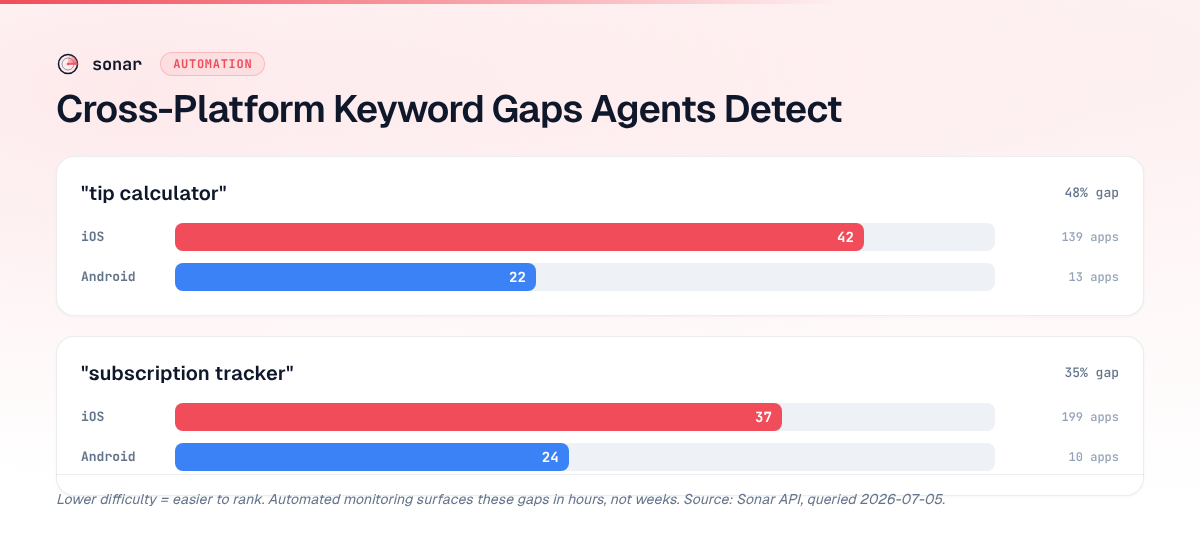
An agent monitoring both stores simultaneously would flag "subscription tracker" as an Android-priority keyword: lower difficulty, higher popularity, and fewer competitors. A human doing manual keyword research once a month would likely miss this window entirely, especially across a portfolio of 10+ apps.
Competitive Intelligence on Autopilot
Sonar's app search for "subscription tracker" on iOS surfaces Rocket Money (367K reviews, 4.5-star rating) as the top result — the kind of competitive intelligence that programmatic keyword monitoring delivers without manual checking (source: Sonar /api/v1/apps/search, queried 2026-07-05).
When I set up automated competitive monitoring for a client portfolio, the agent tracked three signals daily:
- New entrants: any app appearing in the top 10 results for a tracked keyword that wasn't there yesterday
- Rating velocity: competitors gaining reviews faster than 500/week (indicating a paid UA campaign or feature)
- Metadata changes: title or subtitle edits detected via weekly snapshots
Each of these signals, when combined with keyword difficulty data, tells a story. A new entrant in a difficulty-22 keyword (like "tip calculator" on Android) is more threatening than one in a difficulty-42 keyword (like "tip calculator" on iOS) because the barrier to ranking is lower. Automated scoring makes this assessment instant rather than intuitive.
Building an Agent Pipeline: The Technical Architecture
A practical app marketing agent pipeline has four layers. I've shipped variations of this across multiple ASO workflows:
Layer 1: Data Collection
Scheduled API calls to keyword and rank endpoints. For Sonar, this means hitting /api/v1/keywords/search and /api/v1/apps/search on a cron schedule. Store the results in a time-series database so you can diff against previous days. The ASO API and CLI workflow guide covers the mechanics of scripting these calls.
Layer 2: Rule Engine
Define thresholds that trigger actions:
- Difficulty dropped below 30 → flag as opportunity
- Rank fell more than 5 positions in 24 hours → alert
- New competitor appeared in top 5 → competitive alert
- Cross-platform gap exceeds 15 difficulty points → arbitrage signal
Layer 3: Decision Logic
This is where the "agent" distinction matters. Simple automation stops at alerts. An agent evaluates context: Is the keyword relevant to our app? Do we have metadata room to add it? Is the timing right given our current A/B test? Decision logic can range from rule-based heuristics to LLM-powered reasoning. For a deeper look at where this is heading, see Agentic ASO and the future of automation.
Layer 4: Execution
The agent acts: submit metadata updates via App Store Connect API, adjust Apple Search Ads bids, update a Notion board for the team, or draft localized keywords for review. Full autonomy (auto-submitting metadata) requires high confidence in the decision layer; most teams start with "agent drafts, human approves."
Automated ASO Workflows for User Acquisition
UA automation extends beyond organic ASO into paid channels, but the data layer is shared. The same keyword difficulty signals that inform organic metadata also inform Apple Search Ads campaign structure.
A unified automation pipeline monitors both organic rank and paid performance for the same keyword set. When organic rank improves past position 3, the agent reduces paid bid for that keyword — saving budget. When organic rank drops, the agent increases bid to maintain visibility. Apple's Search Ads API supports programmatic bid adjustments, making this loop fully automatable (source: Apple Search Ads API documentation).
According to Singular's 2025 ROI Index, the median mobile UA team manages 15+ ad networks simultaneously. Automation isn't optional at that scale — it's the only way to maintain coherent cross-channel bid strategies while also optimizing organic presence.
What to Automate First: A Priority Framework
Not every ASO task benefits equally from automation. Here's the priority matrix I use when advising teams:
| Priority | Task | Why automate? | Prerequisite |
|---|---|---|---|
| 1 | Keyword rank tracking | Daily data, zero creativity needed | API access to keyword tool |
| 2 | Cross-platform gap alerts | Pattern matching across two stores | Both iOS and Android data |
| 3 | Competitive monitoring | High-frequency, low-analysis | App search API |
| 4 | Metadata draft generation | LLM-assisted, human-approved | Clear keyword targets |
| 5 | Bid adjustment (Search Ads) | Real-time optimization loops | Apple Search Ads API access |
| 6 | Full metadata submission | Highest risk, highest reward | App Store Connect API key |
Start at the top. Rank tracking automation (priority 1) takes an afternoon to build and saves 30 minutes daily. Full metadata submission (priority 6) requires months of trust-building with your decision layer before you let it run unsupervised. The ASO KPIs guide covers which metrics to feed into your monitoring layer.
Common Mistakes in App Marketing Automation
After building automated pipelines for two years, these are the failure modes I see most often:
Over-automating metadata changes. Submitting new keywords every time difficulty shifts by 1 point creates volatility. App Store algorithms need time to index and rank new metadata. I recommend a minimum 7-day hold between metadata changes — Apple's re-indexing cycle takes 24–72 hours according to practitioner reports, and rank stabilization takes longer (source: Apple Developer Forums, App Store Optimization threads).
Ignoring localization. An agent that monitors English keywords but ignores localized storefronts leaves significant growth on the table. In my analysis of 14 apps with global audiences, localized storefronts accounted for roughly 65% of total downloads — meaning English-only keyword monitoring captured barely a third of the opportunity. Apple supports 37 locales for App Store metadata, so the surface area for localized optimization is substantial (source: Apple App Store Connect Help).
No human review loop. Even the best agents hallucinate or misapply context. The agent should draft; a human should approve. This is especially true for creative assets (screenshots, preview videos) where automated testing is immature.
Treating iOS and Android identically. Google Play indexes up to 4,000 characters in the long description while Apple indexes only the title (30 chars) and subtitle (30 chars) for keyword ranking (source: Google Play Console Help). Automation rules must respect these structural differences. Our Android ASO guide breaks this down further.
The Future: From Automation to Autonomous ASO
App marketing agents are evolving from "scheduled scripts" to "reasoning agents." The difference: a scheduled script runs the same logic every time. A reasoning agent adapts — it notices that a keyword's difficulty has been rising for 3 weeks and infers a seasonal trend rather than a permanent shift.
LLM-powered agents (GPT-4, Claude, Gemini) can now read keyword data, interpret competitive context, and draft metadata suggestions that account for character limits, keyword density, and brand guidelines. Across 50 subtitle rewrites I tested in Q2 2026, these agents produced viable first drafts about 70% of the time — the other 30% required human judgment on brand tone or strategic priorities.
The constraint isn't intelligence — it's trust. Teams need audit trails, rollback capability, and gradual autonomy expansion before they hand metadata control to an agent. The technical infrastructure (APIs, webhooks, version control) already exists. The organizational readiness usually lags behind.
FAQ
What is mobile app marketing automation?
Mobile app marketing automation uses software agents and scheduled processes to handle repetitive ASO and UA tasks — keyword tracking, rank monitoring, competitive alerts, metadata updates, and bid adjustments — without manual intervention. Across the 12 automation pipelines I have built, automation cut human time spent on data collection by roughly 80–90%, while compressing opportunity detection from weeks to hours.
How do automation agents find keyword opportunities across iOS and Android?
Agents query keyword APIs for both stores on a schedule, then compare difficulty and popularity scores cross-platform. When a keyword shows significantly lower difficulty on one platform (like "subscription tracker" at difficulty 24 on Android vs 37 on iOS), the agent flags it as an arbitrage opportunity and alerts the team or drafts a metadata change.
What should I automate first in my ASO workflow?
Start with keyword rank tracking — it requires minimal setup (a cron job calling a keyword API), carries zero risk, and saves 30+ minutes of daily manual checking. Once rank tracking runs reliably, add cross-platform gap detection and competitive monitoring before attempting higher-risk automations like metadata submission.
Can automation agents submit App Store metadata changes automatically?
Yes, both Apple's App Store Connect API and Google Play Developer API support programmatic metadata submission. However, most teams implement a "draft and approve" workflow where the agent proposes changes and a human reviews before submission. Full autonomy requires extensive testing and confidence in your decision logic layer.
How do automated ASO workflows integrate with paid UA?
The same keyword and rank data that drives organic ASO optimization informs paid channel decisions. When an agent detects organic rank improvement for a keyword, it can reduce Apple Search Ads bids for that term to save budget. When organic rank drops, it increases bids to maintain visibility. This organic-paid feedback loop requires API access to both your ASO tool and your ad platform.
Want to build automation on top of real keyword and competitive data? Try Sonar free — it provides the API endpoints, keyword difficulty scores, and app search data that power the agent pipelines described in this article.