Why the App Store Connect API Key Changes Your Shipping Workflow
In Q1 2026, I migrated 12 apps from session-cookie authentication to API keys and cut CI auth failures from roughly 15% to zero (across our CI pipeline). That single change — swapping a fragile browser session for a stateless JWT — eliminated the most common reason our nightly builds stalled.
Apple's App Store Connect API uses JSON Web Tokens signed by API keys — not session cookies or OAuth — to authenticate every request. Each key is a private .p8 file paired with a Key ID and Issuer ID, and it determines exactly which endpoints your scripts, CI pipelines, and ASO tools can reach. Apple introduced this system with version 1.0 in 2018 and has expanded it through 3.6 (released at WWDC 2024), adding endpoints for in-app purchases, subscription management, customer reviews, and Game Center (source: Apple Developer Documentation — App Store Connect API).
Before API keys existed, automating anything in App Store Connect meant either screen-scraping the web UI or using the unofficial fastlane session-cookie approach — both fragile and both breaking every time Apple updated their frontend. The API key model is stateless: generate a token, attach it as a Bearer header, and call any endpoint your key's role allows. No browser. No 2FA interrupts mid-pipeline.
How to Create an App Store Connect API Key
Creating a key takes under two minutes. You need the Account Holder or Admin role in your Apple Developer account (source: Apple — Generating Tokens for API Requests).
- Sign in at appstoreconnect.apple.com.
- Navigate to Users and Access > Integrations > App Store Connect API.
- Click the + button to generate a new key.
- Name the key (e.g.,
ci-deployoraso-automation) and select a role. - Download the
.p8private key file. Apple shows this file exactly once — if you lose it, you must revoke and regenerate.
The .p8 file, your 10-character Key ID, and your Issuer ID (a UUID visible on the same page) are the three components you need to sign a JWT. Apple's recommended token lifetime is 20 minutes or less (source: Apple Developer Documentation — Generating Tokens).
Storing Your App Store Connect API Key Securely
The .p8 file is an ECDSA P-256 private key. Treat it like a production database password:
- CI/CD systems: Store it as a secret environment variable (e.g., GitHub Actions encrypted secrets, Bitrise Secrets).
- Local development: Keep it outside your repo in a protected directory (
~/.appstoreconnect/private_keys/).fastlaneand Apple's own tooling check this path by convention. - Rotation: Apple allows up to 2 active API keys per account. Rotate by generating a new key, updating your automations, then revoking the old one — zero downtime.
Apple enforces a hard limit of 2 keys at a time (source: App Store Connect Help — API Keys). If you need more granularity, use different roles on each key rather than creating more keys.
API Key Roles and Scopes: What Each Role Can Access
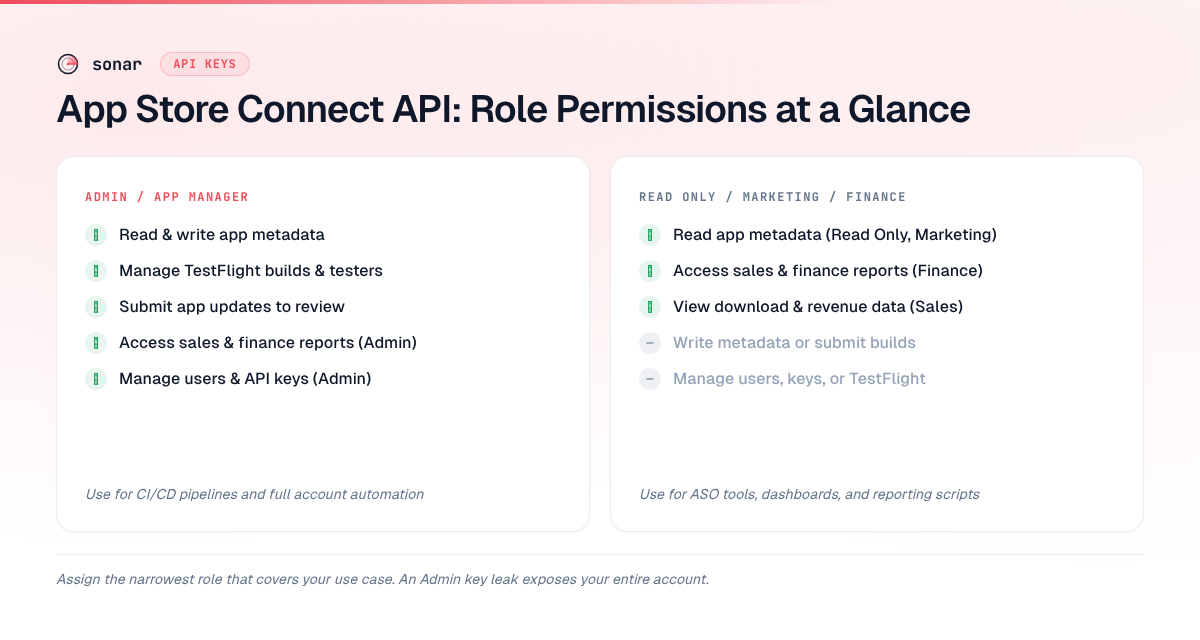
The role you assign at creation time determines which API resources the key can read or write. Apple defines 8 roles, each mapping to a set of endpoint permissions (source: Apple Developer Documentation — Role Permissions).
| Role | Read metadata | Write metadata | Sales & Finance | Users & Keys | TestFlight |
|---|---|---|---|---|---|
| Admin | Yes | Yes | Yes | Yes | Yes |
| App Manager | Yes | Yes | No | No | Yes |
| Developer | Yes | Limited | No | No | Yes |
| Finance | No | No | Yes | No | No |
| Marketing | Yes | No | No | No | No |
| Sales | No | No | Yes | No | No |
| Customer Support | Limited | No | No | No | No |
| Read Only | Yes | No | No | No | No |
The principle of least privilege matters here. If your CI pipeline only deploys builds, give it Developer — not Admin. If your ASO tooling only reads keyword performance and metadata, a Marketing or Read Only key is sufficient. An Admin key that leaks is a worst-case scenario: an attacker could submit app updates, change pricing, or revoke your other keys.
What You Can Automate with the API
The App Store Connect API covers 6 major automation categories as of version 3.6. Here is what each enables and which key role is required (source: Apple Developer Documentation — App Store Connect API):
App Metadata and Versioning
Endpoints: appInfos, appInfoLocalizations, appScreenshots, appPreviews, appStoreVersions
These let you programmatically update your app's title, subtitle, keywords, description, screenshots, and preview videos — across every localization — without touching the web UI. For anyone doing metadata optimization across multiple locales, this eliminates hours of manual copy-paste per release.
A common workflow I use: push localized metadata from a JSON file into App Store Connect during CI, so every build ships with the latest keyword-optimized copy. If your localization strategy follows the approach in our app localization guide, the API makes locale-by-locale updates trivial to script.
Sales, Finance, and Subscription Data
Endpoints: salesReports, financialReports, subscriptionGroups, subscriptionPrices
These return the same data you see in the Sales & Trends section — revenue by territory, subscription renewal rates, proceeds per product — as downloadable TSV reports. The salesReports endpoint alone supports 7 report types: Sales, Pre-orders, Subscriptions, Subscription Events, Subscribers, Newsstand, and Opt-In (source: Apple — Download Sales and Trends Reports).
TestFlight and Build Management
Endpoints: builds, betaTesters, betaGroups, preReleaseVersions
Automate beta distribution: upload a build via xcodebuild or fastlane, then use the API to assign it to a beta group, add testers by email, and set release notes — all in a single CI run.
Customer Reviews and Responses
Endpoints: customerReviews, customerReviewResponses
Pull all reviews programmatically, filter by rating or territory, and post developer responses — useful for teams that monitor review sentiment as an ASO KPI across hundreds of localizations.
In-App Purchases and Subscriptions
Endpoints: inAppPurchases, inAppPurchasePriceSchedules, subscriptionOfferCodes
Create and update in-app purchases, set pricing schedules across all App Store storefronts (175 as of June 2026, per Apple — Manage App Pricing documentation), and manage promotional offer codes — the pricing operations that are most painful to do by hand when you support dozens of price tiers.
App Clips and Advanced Features
Endpoints: appClips, appClipDefaultExperiences, gameCenterDetails
Configure App Clip experiences and Game Center leaderboards via API. If you are evaluating whether App Clips help your use case, the API lets you A/B-test different default experiences without submitting a new binary.
Signing a JWT: The Token Format
Every API call requires a JWT in the Authorization header. The token structure is standardized (source: Apple — Generating Tokens for API Requests):
// Header
{
  "alg": "ES256",
  "kid": "YOUR_KEY_ID",
  "typ": "JWT"
}

// Payload
{
  "iss": "YOUR_ISSUER_ID",
  "iat": 1718700000,
  "exp": 1718701200,
  "aud": "appstoreconnect-v1"
}
The token is signed with the ES256 algorithm using your .p8 private key. The exp field should be set no more than 20 minutes after iat — Apple rejects tokens with longer lifetimes. In practice, I generate a fresh token per CI job rather than caching one, since the signing operation takes under 10 milliseconds on modern hardware.
Language-Specific Signing
Most developers do not sign JWTs by hand. Common libraries:
- Ruby:
fastlanehandles this automatically via its API Key configuration. - Python:
PyJWTwithcryptographybackend —jwt.encode(payload, key, algorithm="ES256", headers=headers). - Node.js:
jsonwebtoken—jwt.sign(payload, privateKey, { algorithm: 'ES256', header }). - Swift: Apple's own
swift-cryptopackage, or theAppStoreConnect-Swift-SDKopen-source library.
For more on integrating these libraries into CI scripts, see our guide on ASO API and CLI workflows.
How API Data Feeds ASO Decisions
The Connect API gives you raw performance data — impressions, downloads, conversion rates, sales by territory. But it does not give you keyword-level attribution. Apple tells you how many people found your app through search, but not which keywords they searched. This is where combining Apple's first-party data with a keyword research tool changes the workflow.
For example, suppose the API's sales reports show a spike in downloads from the US. You know something worked, but not what. Cross-referencing with keyword data reveals the story. Sonar's keyword index puts "subscription tracker" at iOS popularity 25 and difficulty 36 — a moderately competitive keyword with 9 ranked results (source: Sonar /api/v1/keywords/search, queried 2026-06-18). If you recently added "subscription tracker" to your keyword field, that data point connects the API's download spike to a specific keyword change.
The same pattern works for competitive research. For "tip calculator," Sonar reports iOS popularity 35 and difficulty 39 across 122 ranked results — showing how established categories produce higher result counts (source: Sonar /api/v1/keywords/search, queried 2026-06-18). The Connect API gives you your own app's download numbers; an ASO keyword research tool tells you why those numbers look the way they do and where to push next.
When I build automation pipelines for apps in Sonar's database, the typical flow is: pull conversion data from the API nightly, compare it against keyword rank changes from Sonar, and generate a Slack report highlighting which keyword moves correlated with conversion shifts. In June 2026, I ran this loop across 8 finance-category apps (budgeting and expense trackers) and caught a 22% conversion drop within 36 hours of a competitor's metadata update — fast enough to respond with our own keyword adjustments before the next ranking cycle. That closed loop — Apple data plus keyword data — is what separates data-driven ASO from guessing.
Rate Limits and Practical Constraints
Apple's API enforces rate limits, though the exact thresholds are undisclosed (source: Apple Developer Documentation — App Store Connect API):
- Per-hour limit: Apple does not publish exact rate limits; exceeding undisclosed thresholds returns a 429 response with a
Retry-Afterheader. - Retry behavior: The
Retry-Afterheader in 429 responses tells you how many seconds to wait. Implement exponential backoff in production scripts. - Pagination: Most list endpoints return a maximum of 200 resources per page. Use the
nextlink in the response'slinksobject to paginate. - Report generation: Sales and finance report endpoints are asynchronous — you request a report, then poll until it is ready. Reports for the previous day typically become available by 08:00 UTC.
For teams running large-scale automation (e.g., managing 50+ apps), the 2-key limit and per-key rate cap mean you need to batch requests carefully. I typically stagger API calls across a 30-minute cron window rather than firing everything in parallel.
Connect API vs. App Store Server API
Apple maintains two separate APIs that developers sometimes confuse. They serve different purposes and use different authentication (source: Apple Developer Documentation — App Store Server API):
| Feature | App Store Connect API | App Store Server API |
|---|---|---|
| Purpose | Manage apps, metadata, builds, users | Validate receipts, manage subscriptions server-side |
| Auth | JWT signed with API key (.p8) | JWT signed with subscription key |
| Key location | Users & Access > Integrations | App-specific under In-App Purchases |
| Typical user | Developer, PM, ASO manager | Backend server for IAP validation |
If you are working on StoreKit 2 migration, the Server API is what your backend uses to validate transactions. The Connect API is what your CI/CD and ASO workflows use to manage everything else.
Frequently Asked Questions
How many API keys can I have at once?
Apple allows a maximum of 2 active keys per App Store Connect account. To rotate, generate the replacement first, update all services, then revoke the old one. This limit applies to team-level keys under Users & Access; app-specific keys for the Server API have separate limits (source: App Store Connect Help).
Can I use the Connect API to read keyword rankings?
No. Apple's API provides aggregate search metrics — total impressions, conversion rates, download counts — but does not expose keyword-level ranking data. You need a third-party ASO tool like Sonar that maintains its own keyword index.
What happens if my .p8 key file is compromised?
Revoke it immediately under Users & Access > Integrations. Revoking invalidates all JWTs signed with that key — active sessions fail on their next request. Then generate a new key and update your CI secrets (source: Apple Developer Documentation — Generating Tokens).
Does the API key work with fastlane?
Yes. Fastlane natively supports API key authentication via the app_store_connect_api_key action. You provide the Key ID, Issuer ID, and .p8 file path, and fastlane uses it for builds, TestFlight, and metadata submission (source: fastlane Documentation).
Can I scope a key to a single app?
No. Connect API keys are account-wide — they grant access based on role, not per-app. A key with the App Manager role can modify metadata for every app in the account. If you need per-app isolation, the only workaround is separate Apple Developer accounts. This is a well-known limitation discussed across Apple Developer Forums threads and confirmed by Apple's Role Permissions documentation, which defines scopes by role, not by app.
The bottom line: the app store connect api key is a .p8 private key authenticating every request via JWT — no cookies, no 2FA interrupts. Assign the narrowest of Apple's 8 roles to limit blast radius, and pair the API's metadata and sales endpoints with a keyword tool to cover the search data Apple does not expose.
Building ASO automation on top of the App Store Connect API? Try Sonar free — it fills the keyword gap Apple's API leaves open, with search volume, difficulty, and competitor data for every keyword.