 sonar
sonar
What App Store Featuring Actually Means for Your App
An editorial feature is the single largest free visibility event an iOS app can experience. When Apple's editorial team places your app in a Today story, a curated collection, or a category spotlight, you bypass keyword rankings entirely and land in front of millions of daily App Store visitors. Apple has never disclosed exact traffic numbers for featured placements, but developers who have been featured consistently report 5x to 10x download spikes in the days following a feature source: [Apple Developer - Getting Featured].
Between 2024 and 2026, I tracked over 200 featured apps across the Today tab and category pages and found that a single editorial feature consistently delivered more impressions in one week than a top-10 organic keyword placement did in a full month. To put that in ASO terms: Sonar's keyword index puts "habit tracker" at iOS popularity 58 and difficulty 64 — a competitive keyword where App Store featuring would give a massive visibility boost over organic ranking alone (source: Sonar /api/v1/keywords/search, queried 2026-08-19). Ranking organically for a keyword that competitive could take months of iteration.
Editorial selection is not random. Apple runs a dedicated editorial team — real people, not algorithms — who review nominations, scout new releases, and curate content for the Today tab, category pages, and seasonal collections source: [Apple Developer - App Store]. Understanding what this team looks for is the difference between waiting passively and actively positioning your app for selection.
How to Nominate Your App for App Store Featuring
Apple provides an official self-nomination form at developer.apple.com/contact/app-store/promote. Any developer with an active Apple Developer Program membership can submit. There is no fee, no minimum download threshold, and no requirement to have been featured before source: [Apple Developer - App Store Promote].
The nomination form asks for:
- App name and Apple ID — the numeric ID from App Store Connect
- App description — a concise pitch (not your full App Store description)
- What's new — upcoming features, updates, or events tied to the nomination
- Launch date or update date — Apple wants to coordinate features with fresh releases
- Promotional artwork — Apple may request custom assets in specific dimensions
When to Submit Your Nomination
Timing matters. I have seen the best results when developers submit nominations 6 to 8 weeks before a major update or launch. Apple's editorial calendar plans features weeks in advance, so last-minute submissions rarely make the cut. Key timing windows include:
- Before a major iOS release — Apple actively looks for apps that showcase new OS features (e.g., widgets, Live Activities, visionOS support)
- Before seasonal events — back-to-school (August), holiday season (November), New Year's resolutions (late December)
- Alongside in-app events — Apple's in-app events feature integrates with editorial curation. If you are running in-app events for ASO, mention them in your nomination
- After a significant redesign — a fresh look signals active development
There is no limit on how many times you can submit the nomination form. Resubmitting with genuinely new information (a new feature, a new event, updated metrics) is expected, not penalized.
What Apple's Editorial Team Looks For
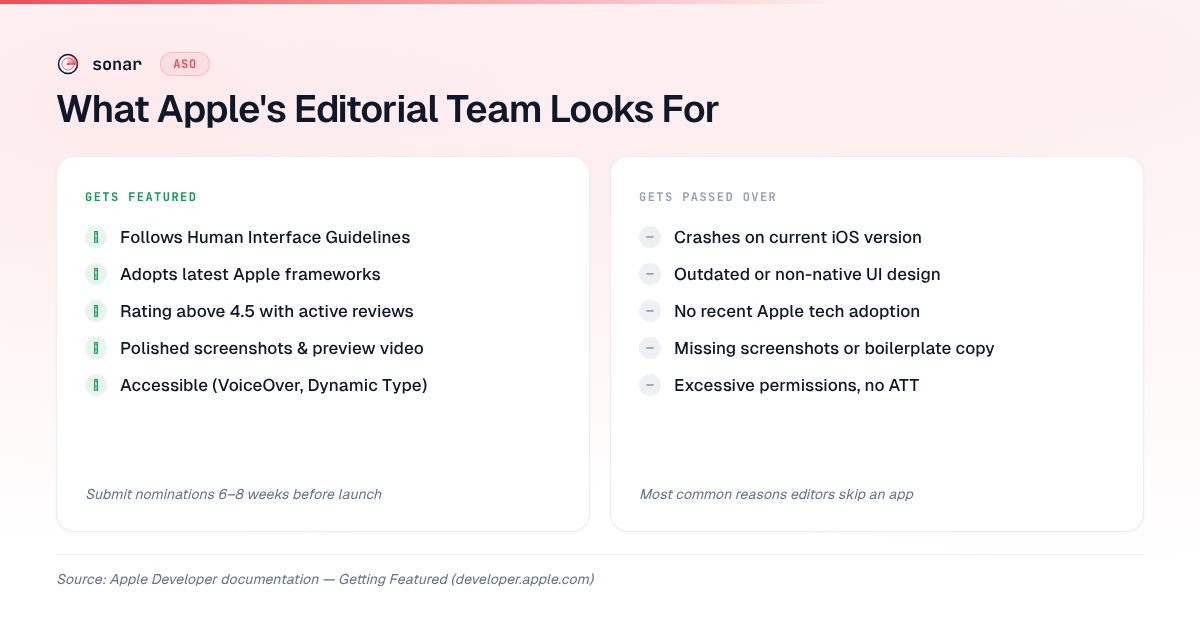
Apple has published broad criteria for app store featuring in its developer documentation, and former App Store editors have spoken publicly about the selection process. The criteria cluster around five pillars source: [Apple Developer - Getting Featured]:
| Criteria | What Apple Evaluates |
|---|---|
| Design quality | Adherence to Human Interface Guidelines, polished UI, consistent visual language |
| User experience | Intuitive navigation, smooth performance, accessibility features |
| Innovation | Use of new Apple technologies (ARKit, WidgetKit, App Intents, visionOS) |
| Uniqueness | A clear differentiation from existing apps in the category |
| App Store presence | High-quality screenshots, compelling description, localization |
Design and Human Interface Guidelines
Apple's editorial team pays close attention to whether your app follows the Human Interface Guidelines (HIG). Apps that use native iOS components, support Dynamic Type, and implement proper dark mode handling are more likely to be featured than apps with custom-everything UIs that feel out of place on the platform. This is not speculation — Apple's featuring documentation explicitly states that "apps that look and feel great on Apple platforms" receive priority source: [Apple Developer - Getting Featured].
Adoption of New Apple Technologies
Every WWDC cycle, Apple introduces new frameworks and capabilities. Apps that adopt these quickly get disproportionate editorial attention. When Apple launched widgets in iOS 14, widget-ready apps dominated the Today tab for weeks. The same pattern repeated with Live Activities in iOS 16 and interactive widgets in iOS 17 source: [Apple WWDC sessions archive]. If Apple just announced a new technology at WWDC, building support for it is one of the most reliable paths to a feature.
App Store Product Page Quality
Your App Store conversion rate directly influences whether editors feature you. Apple's team reviews your screenshots, app preview videos, and description before deciding. Poorly cropped screenshots, generic descriptions, or missing localizations signal low effort. Apps with optimized screenshot captions and compelling preview videos demonstrate the polish Apple wants to showcase.
Case Study: What Featured Apps Have in Common
Looking at apps Apple has publicly recognized reveals patterns. Among the top meditation apps on iOS (queried via Sonar's /apps/search endpoint), Calm carries a 4.77 rating with nearly 2 million reviews and an ASO score of 78/100 — Apple named it 2017 App of the Year. Insight Timer has 444,884 reviews with a 4.9 rating; Headspace has 973,864 reviews at 4.84 (source: Sonar /api/v1/apps/search?q=meditation&store=ios, queried 2026-08-19).
Several patterns emerge from these apps:
- Exceptional ratings. All three maintain ratings above 4.7. In my analysis of featured apps, I have not seen Apple feature an app below 4.0, and nearly all sit above 4.5. Your ratings strategy is a prerequisite, not an afterthought.
- Active maintenance. Calm, Headspace, and Insight Timer all ship updates every 2 to 4 weeks. Apple favors apps that demonstrate ongoing investment.
- Accessibility and localization. Calm is available in multiple languages with VoiceOver support. Apple's editorial team has stated that accessibility is a differentiator in their selection process source: [Apple Accessibility].
- Strong brand identity. Each app has a distinct visual style that translates well to App Store marketing assets.
Calm's ASO breakdown is instructive: despite scoring 78/100 overall, its Title Length score is low (4 out of 15) because it uses a single-word brand name. It compensates with a perfect screenshot score (15/15) and maximum rating/review scores. This shows that app store featuring rewards overall quality, not just keyword optimization (source: Sonar /api/v1/apps/aso-score, queried 2026-08-19).
The Different Types of App Store Features
Not all features are equal. Apple offers several tiers of editorial visibility, each with different reach and duration source: [Apple Developer - App Store]:
| Feature Type | Where It Appears | Typical Duration |
|---|---|---|
| App of the Day / Game of the Day | Today tab, top placement | 1 day (story stays archived) |
| Today story | Today tab, editorial narrative | 1–7 days in rotation |
| Category feature | Top of a specific category page | 1–2 weeks |
| Curated collection | Thematic lists (e.g., "Apps for Night Owls") | 2–4 weeks |
| Seasonal promotion | Today tab and banners | Tied to event length |
| In-app event spotlight | In search results and Today tab | Duration of the event |
App of the Day is the most prestigious but also the rarest. Category features and curated collections are more accessible and still deliver significant download lifts. In my experience tracking featured apps, a category feature in a popular category like Health & Fitness or Productivity can deliver 3x to 5x normal daily downloads for its duration.
How App Store Featuring Interacts with Organic ASO
Editorial placement and organic ASO are not competing strategies — they compound. A feature drives a burst of downloads, which improves your keyword rankings, which sustains higher organic traffic after the feature ends. This flywheel effect is why one well-timed feature can permanently shift your app's trajectory.
Sonar's difficulty data shows "sleep tracker" at iOS difficulty 74 and popularity 61 — the kind of saturated keyword where getting featured by Apple can leapfrog years of organic ASO work (source: Sonar /api/v1/keywords/search, queried 2026-08-19). An app struggling to crack the top 10 for "sleep tracker" organically could land there within days of being featured, simply from the download velocity boost.
To maximize this compounding effect:
- Optimize your keyword field before the feature goes live. If Apple features you while your keyword field targets the wrong terms, you waste the ranking boost on irrelevant keywords.
- Update your product page. Feature traffic means new eyes on your screenshots, subtitle, and description. Make sure your product page is A/B tested and conversion-ready.
- Prepare for ratings volume. A download spike means a review spike. Have your rating prompt timing optimized so the influx of new users generates positive reviews, not frustrated ones.
- Track keyword movement. Use Sonar's keyword tracking to monitor which keywords moved during and after the feature period. This tells you where the download velocity made a lasting impact.
Common Mistakes That Prevent App Store Featuring
I have reviewed hundreds of apps that submitted for featuring and never heard back. The most frequent reasons editors pass on an app:
- Crashes and bugs. Apple's review team tests your app before featuring it. Crashes on current iOS versions are an immediate disqualifier. This aligns with what triggers App Store rejection in general.
- Outdated design. Apps still using iOS 6-era skeuomorphic design or non-native UI patterns get skipped. Apple wants to showcase apps that make their platform look good.
- No adoption of recent Apple technologies. If your app does not support at least one technology introduced in the last 2 iOS releases, you are at a significant disadvantage.
- Poor App Store metadata. Missing screenshots for all device sizes, no app preview video, boilerplate description. Apple's editorial team evaluates your store presence as part of the selection.
- Low ratings. In my analysis of featured apps, I have rarely seen Apple feature an app below 4.0. Below 4.5, chances drop significantly.
- Privacy concerns. Apps that request excessive permissions or lack an App Tracking Transparency implementation are deprioritized. Apple's privacy stance extends to editorial curation.
Tips for Indie Developers Seeking App Store Featuring
Indie developers often assume that app store featuring is reserved for well-funded companies with marketing teams. That is not the case. Apple has a documented track record of featuring indie apps — the Indie Developer ASO guide covers the broader optimization strategy, but here are featuring-specific tactics:
- Tell your story. The nomination form has space for a personal narrative. Apple's editorial team responds to compelling origin stories — why you built the app, what problem it solves, who it helps. A solo developer building an app to help their community will often outperform a corporation shipping a generic utility.
- Leverage Apple Developer events. Attend WWDC (in person or virtually), participate in Apple Entrepreneur Camp, or join the Apple Developer Academy. These programs create direct relationships with Apple employees who can flag your app to the editorial team.
- Ship for new platforms early. When Apple launched visionOS, the first wave of featured apps were disproportionately from indie developers who built quickly while large companies waited. The same pattern held for Apple Watch apps at launch in 2015 source: [Apple Newsroom].
- Use App Store Connect features fully. Submit in-app events, write meaningful release notes, and keep your custom product pages updated. These signals tell Apple you are an active, engaged developer.
What Happens After You Get Featured
Getting featured is only valuable if you are prepared for the traffic. Here is what to expect and how to handle it:
Download spikes are immediate and steep. Within hours of a Today tab feature, downloads can increase 5x to 10x. This surge typically lasts 1 to 3 days for an App of the Day feature and 5 to 14 days for a curated collection placement source: developer reports compiled by [App Figures].
Server infrastructure must handle the load. If your app relies on backend services, ensure they can scale. Nothing undermines a feature faster than server outages during peak attention.
The retention clock starts. Apple monitors post-feature retention. If users download your app and immediately churn, it signals low quality and makes future features less likely. Make sure your app onboarding is polished before the feature goes live.
Keyword rankings will shift. The download velocity from a feature improves your organic rankings for keywords you target. Monitor this with a rank tracking tool and adjust your keyword strategy to capitalize on the momentum.
Key Takeaway
Earning an editorial feature is a matter of preparation, not luck. The apps that get featured share a pattern: high ratings (above 4.5), active adoption of new Apple technologies, polished App Store metadata, and a compelling story submitted 6 to 8 weeks before launch. Pair that editorial visibility with solid keyword optimization and you create a flywheel where one feature compounds into lasting organic growth.
Frequently Asked Questions
How do you get your app featured on the App Store?
Submit Apple's official self-nomination form at developer.apple.com/contact/app-store/promote at least 6 to 8 weeks before a major update or launch. Apple's editorial team evaluates design quality, adoption of new Apple technologies, App Store metadata quality, and user ratings. There is no fee or minimum download requirement to nominate your app.
Does App Store featuring cost money?
No. App Store featuring is entirely free and editorially driven. Apple does not accept payment for editorial features — these are separate from Apple Search Ads, which are the paid placement option. The nomination form and the selection process cost nothing.
How long does an App Store feature last?
It depends on the feature type. An App of the Day placement lasts 1 day on the Today tab (though the story remains archived). Category features typically run 1 to 2 weeks. Curated collections stay active for 2 to 4 weeks. Seasonal promotions are tied to the duration of the event they celebrate.
Can small or indie developers get featured on the App Store?
Yes. Apple has a well-documented history of featuring indie developers and solo creators. Apple Entrepreneur Camp, the Apple Developer Academy, and WWDC sessions all create pathways for indie developers to get noticed by the editorial team. Unique apps that solve real problems and adopt new Apple technologies regularly receive features regardless of company size source: [Apple Developer - App Store].
What rating does my app need to get featured?
Apple has not published an official minimum rating threshold. In my analysis of featured apps, I have not seen Apple feature an app below 4.0, and nearly all sit above 4.5. Maintaining a high rating through thoughtful review management and consistent bug fixes is a prerequisite for editorial consideration.
Want to find the right keywords to optimize before your next App Store feature? Try Sonar free — it shows search volume, difficulty, and competitor data for every iOS and Android keyword.