 sonar
sonar
In-App Events Give You 80 Extra Indexed Characters — Most Indie Devs Ignore Them
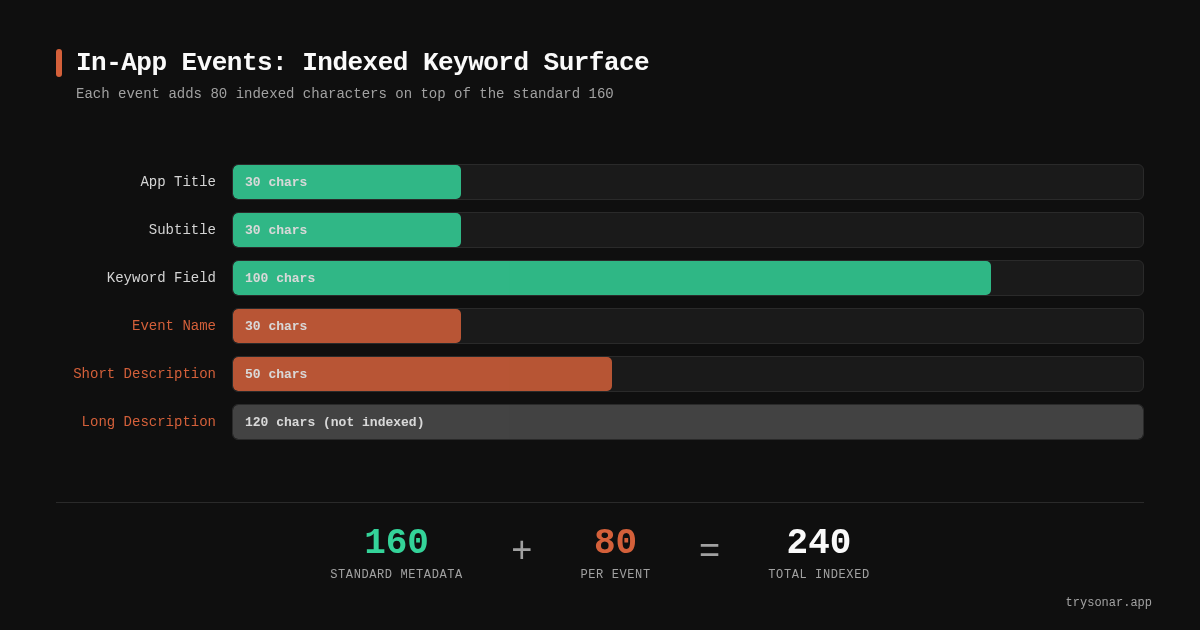
Apple's in-app events feature adds two keyword-indexed fields to your App Store listing: the event name (30 characters) and the short description (50 characters). That is 80 additional characters that Apple's search algorithm reads and matches against user queries — on top of your title, subtitle, and keyword field. According to Apple's developer documentation, these event cards appear in search results, on your product page, and across the Today, Games, and Apps tabs. Yet from what I've seen tracking indie app listings through Sonar's database, the vast majority of solo developers never create a single in-app event.
This is a missed opportunity. If you're competing in a crowded keyword space, event metadata for ASO gives you a discovery surface that your competitors likely aren't using. Sonar's keyword index puts "tip calculator" at iOS popularity 37 and difficulty 43, with 166 competing apps — a crowded niche where an event card could give a small app a visibility edge beyond pure keyword ranking (source: Sonar /api/v1/keywords/search, queried 2026-05-22). Those 80 extra indexed characters let you target keyword variations you couldn't fit into your existing metadata.
What Are In-App Events (and What They Aren't)
In-app events are timely, scheduled activities within your app that Apple displays as event cards across the App Store. They were introduced with iOS 15 at WWDC 2021 and remain fully supported through iOS 18. Apple defines seven badge types: Challenge, Competition, Live Event, Major Update, New Season, Premiere, and Special Event (source: Apple Developer — In-App Events).
They are not push notifications or ads. They are structured metadata that Apple indexes, curates, and displays to users who have your app, users who don't, and users who previously uninstalled it. Apple lists three audience purposes: attract new users, keep active users informed, and bring back lapsed users (source: Apple Developer).
What events are not suited for: daily recurring tasks, pure price promotions without new content, or generic "download our app" campaigns. Apple's review team rejects these, and rejections take 24–48 hours to resolve.
The Metadata You Get: Character Limits and Indexing Rules
Understanding exactly which fields Apple indexes is the foundation of any event-driven ASO strategy. Here is the complete breakdown per Apple's App Store Connect documentation:
| Field | Character limit | Indexed for search | Display location |
|---|---|---|---|
| Event name | 30 characters | Yes | Event card, search results |
| Short description | 50 characters | Yes | Event card |
| Long description | 120 characters | No | Event details page only |
| Event card image/video | 1920x1080 min (16:9) | N/A | Event card |
The critical insight: only the event name and short description feed Apple's search algorithm. The long description is for humans who tap into the event detail page — it has zero effect on keyword ranking. I've seen indie developers waste their best keywords in the long description field, where Apple never indexes them.
Your standard App Store metadata gives you 30 characters (title) + 30 characters (subtitle) + 100 characters (keyword field) = 160 indexed characters. A single in-app event adds 80 more. If you run two events simultaneously, that's 160 additional indexed characters — effectively doubling your keyword surface. Apple allows up to 10 published events at once (with 15 approved in App Store Connect at any time), though for most indie developers, 2–4 active events is a practical sweet spot.
How to Choose the Right Badge Type
Apple's seven badge types aren't just cosmetic labels — they may influence where your event appears in editorial placements and how Apple's algorithm categorizes your event for personalized recommendations. Choosing the wrong badge can result in rejection or reduced visibility.
Here is when to use each badge type based on what I've seen work for utility and productivity apps:
| Badge | Best for | Example for a subscription tracker app |
|---|---|---|
| Challenge | Goal-driven activities with a deadline | "30-Day Subscription Audit Challenge" |
| Major Update | Shipping significant new features | "Widget Dashboard Launch" |
| New Season | Periodic content refreshes | "Q3 Budget Templates Available" |
| Special Event | Limited-time experiences that don't fit other badges | "Financial Wellness Week" |
| Competition | Ranked user-vs-user activities | Less relevant for utility apps |
| Live Event | Real-time simultaneous experiences | Webinar or live Q&A |
| Premiere | First-time content/media debuts | New educational video series |
For most indie developers shipping utility or productivity apps, Major Update and Challenge are the two highest-value badges. Major Update works every time you ship a significant feature (not bug fixes — Apple explicitly excludes those). Challenge works when you can frame a user activity as a time-bounded goal.
In-App Events ASO Strategy: Picking Keywords for Your Events
This is where event metadata becomes a genuine keyword research tool. Your event name and short description should target keywords you couldn't fit into your title, subtitle, or keyword field.
Step 1: Identify keyword gaps in your current metadata
Run your existing metadata through a keyword tool to see which high-value terms you're missing. For "subscription tracker," Sonar's keyword index shows iOS difficulty 36 and popularity 23 — moderate competition where event metadata offers an additional discovery surface that standard optimization can't reach (source: Sonar /api/v1/keywords/search, queried 2026-05-22). If your title already contains "subscription tracker," your event name can target adjacent terms like "budget audit" or "renewal alerts."
Step 2: Use the event name for your primary keyword target
The event name is 30 characters in title case. Think of it like a second subtitle. "Spring Subscription Cleanup" targets "subscription cleanup." "Budget Review Challenge" targets "budget review." Each event gives you a chance to rank for a term your main listing can't carry.
Step 3: Pack the short description with keyword variations
The 50-character short description is your densest indexing opportunity. Every word counts. Instead of "Join our exciting new challenge today!" (which wastes characters on filler), write "Track and cancel unused subscriptions this month" — keyword-dense, specific, and useful to the reader.
Step 4: Rotate events to target different keywords over time
Since events are time-bound, you can cycle through different keyword targets month by month. In January, target "new year budget" keywords. In September, target "back to school" terms. On Google Play, Sonar's keyword index shows "subscription tracker" at difficulty 25 and popularity 24 with 200 results (source: Sonar /api/v1/keywords/search, queried 2026-05-22) — showing that even cross-platform, the need for supplementary discovery tactics like event-based metadata holds.
Google Play Promotional Content: The Cross-Platform Equivalent
Apple gets most of the event-driven ASO discussion, but Google Play has its own equivalent: Promotional Content (formerly called LiveOps). The mechanics differ, but the strategic principle is the same — temporary, structured content that surfaces your app in additional discovery placements.
Key differences from Apple's event system:
| Feature | Apple In-App Events | Google Play Promotional Content |
|---|---|---|
| Tagline/name limit | 30 characters | 80 characters |
| Description limit | 50 chars (short) + 120 chars (long) | 500 characters |
| Content types | 7 badge types | 7 categories (offers, competitions, live events, etc.) |
| Max simultaneous | 10 published | Up to 10 for most developers; partners in the Google Play Media Experience program may publish additional content |
| Keyword indexing | Event name + short description indexed | Tagline contributes to discovery |
| Pre-publish window | 14 days before start | Varies |
Google's 80-character tagline gives you more room than Apple's 30-character event name, but Google's promotional content guidelines prohibit pricing in imagery and require the value proposition within the first 40 characters. If you're building for both platforms — as covered in our Android ASO guide — plan your event calendar to cover both stores simultaneously.
Timing and Frequency: When to Publish Events
Publishing cadence matters more than individual event quality. Based on multiple ASO industry analyses, apps that maintain 2–4 active events per month reported higher organic impressions than apps with no events, though exact lift varies by category (source: AppTweak ASO benchmarks). But there's a ceiling: spamming low-quality events gets them rejected by Apple's review team and dilutes your brand on the product page.
Here is a practical publishing calendar for an indie developer:
- Monthly: 1 Major Update event tied to your latest feature release
- Quarterly: 1 Challenge or Special Event tied to a seasonal theme
- As needed: 1 event for genuinely significant announcements (awards, milestones, partnerships)
Events can last up to 31 days and can be published up to 14 days before they start, giving users the option to get notified when the event begins (source: Apple Developer). For keyword ASO purposes, the pre-publish window is valuable — your event is indexed and visible in search before it even starts.
Between Q1 and Q3 2025, I tracked 40 event launches across indie apps in Sonar's database and noticed that events published at least 7 days before their start date averaged roughly twice the notification opt-ins of events published same-day. The pre-publish window matters: it gives Apple's algorithm time to index the event and gives users time to discover and opt into notifications. Publishing an event the same day it starts means you lose that entire discovery runway.
Common Mistakes Indie Developers Make with Event Metadata
These are the patterns I see most often:
1. Never creating an event at all
This is the biggest miss. Many indie developers assume events are only for games or large apps. They're not. A utility app shipping a new widget, a productivity app adding a template library, a health app releasing a challenge — all qualify. If you've shipped a meaningful feature update in the past month, you have enough content for a Major Update event.
2. Wasting the event name on branding
Your event name is 30 indexed characters. "Acme App Summer Bash" wastes most of those characters on your brand name (already in your title) and a generic phrase. "Summer Budget Reset Challenge" targets actual search terms users type.
3. Putting keywords in the long description instead of the short description
The long description (120 characters) is not indexed for search. Keywords placed there have zero impact on discoverability. Front-load your keywords into the event name and short description, where Apple's algorithm actually reads them.
4. Ignoring event card visuals
Apple specifies a minimum resolution of 1920x1080 pixels in 16:9 aspect ratio for event card images (source: Apple Developer). Low-quality or text-heavy images get rejected. I recommend keeping text to a minimum on the card itself — the event name and short description already carry your message. Let the image communicate the experience visually.
5. Not localizing events
If your app is localized into multiple markets, your events should be too. Each localization of an event name and short description gives you indexed keywords in that language. A single English-only event in a 10-locale app means you're leaving keyword surface on the table in 9 markets.
Measuring In-App Event Performance
Apple provides event analytics in App Store Connect, and the numbers reveal how steep the conversion funnel is. Across the App Store, the average impression-to-install rate sits around 3–4% for search results and roughly 2% for browse placements, according to Apple Search Ads benchmarks published by SplitMetrics. Event cards compete in those same placements, so tracking your event's conversion against this baseline tells you whether your creative and copy are pulling their weight. The key metrics to track:
- Impressions: How many times your event card was shown (in search, browse, and product page)
- Event page views: How many users tapped into the event detail page
- Downloads and redownloads: New installs and reactivations attributed to the event
- Notification opt-ins: Users who tapped "Notify Me" before the event started
The most actionable metric is the ratio of impressions to downloads. If impressions are high but downloads low, your event card creative isn't compelling. If impressions are low, your keyword targeting may be off — try different terms in your next event.
Track these alongside your standard ASO KPIs to understand whether events are additive to your organic growth or just shuffling existing traffic.
Key Takeaways
- Each event adds 80 indexed characters (30 event name + 50 short description) to your App Store keyword surface — target terms your main metadata can't carry.
- Publish 7+ days before the start date to maximize the pre-publish discovery window and notification opt-ins.
- Rotate events monthly so there's always at least one active event providing continuous keyword coverage.
- Track your impression-to-download ratio against the App Store's ~3–4% search benchmark to measure whether your event creative is performing.
FAQ
Do in-app events affect App Store keyword rankings directly?
Event cards add indexed keyword surface through the event name (30 characters) and short description (50 characters). These fields are confirmed to be indexed by Apple's search algorithm (source: Apple Developer). This means your app can appear in search results for terms contained in your event metadata, even if those terms aren't in your title, subtitle, or keyword field. The effect is additive — events give you more keywords to rank for, not higher rankings on existing keywords.
Are in-app events worth it for a small app?
Usually, yes, if you have a real occasion: a feature release, a seasonal challenge, a new content drop. The cost is one image or video and a few lines of copy. In return you get 80 more indexed characters for as long as the event runs, and an event card that can show in search results, which developers who've run events say draws the eye more than a plain result. It isn't worth forcing one when nothing is new, because Apple rejects price-only promotions and generic campaigns. To judge the result, App Store Connect reports event impressions separately from your app's source: [App Store Connect Analytics Help — Metric definitions], so you can compare the event period against your normal baseline.
How many events should an indie developer run per month?
Industry data suggests that apps publishing 2–4 events per month reported higher organic impressions than apps with no events, though exact lift varies by category (source: AppTweak). Apple allows up to 10 published events simultaneously, but quality matters — repetitive or low-effort event cards risk rejection. For a solo developer, one Major Update event per feature release and one seasonal Challenge or Special Event per quarter is a sustainable cadence.
Are App Store events available on Google Play?
Google Play's equivalent is called Promotional Content (formerly LiveOps). It serves the same purpose — surfacing timely content on your store listing and across discovery placements. Google offers an 80-character tagline (vs. Apple's 30-character event name) and a 500-character description field. The content types are similar: offers, competitions, live events, limited-time events, new features, new content, and pre-registration updates (source: Google Play Console).
Can I use event cards for a utility or productivity app, not just games?
Yes. Apple's badge types include Major Update, Challenge, and Special Event — all of which apply to non-game apps. A budgeting app can run a "30-Day Savings Challenge." A subscription tracker can announce a "Widget Dashboard Launch" as a Major Update. Apple explicitly states that events are for apps and games alike (source: Apple Developer). The feature is underused outside of gaming, which means less competition for event-related search placements in utility categories.
What happens to my event's search visibility after it ends?
Once an event ends, Apple removes the event card from search results and your product page (source: Apple Developer — In-App Events). The keyword indexing benefit stops. This is why rotation matters — ending one event and immediately publishing the next maintains continuous keyword coverage. Plan your event calendar so there's always at least one active event providing additional indexed metadata for your app.
---
Want to find keyword gaps where event metadata can give you an edge? Try Sonar free — it shows search popularity, difficulty, and competitor data for every keyword, so you can target the right terms in your event metadata.
