 sonar
sonar
How Does App Store Search Actually Work?
Apple processes over 650 million weekly App Store visits as of 2026 (source: Apple's App Store overview), and every search returns a single page of results — a mix of organic rankings and paid placements — that most users never scroll past. Third-party analyses show that the top 3 organic results capture the vast majority of installs from any given query (source: Phiture's ASO Stack research, 2024). If you want to optimize app store search performance, you need to understand how that results page is assembled — what's organic, what's paid, and how they interact.
This article breaks down the iOS search results page as of 2026, explains the ranking factors behind organic positions, shows how Apple Search Ads interact with those results, and walks through a data-grounded approach to competing on both fronts.
Anatomy of the iOS Search Results Page
The search results page displays a vertical list of app cards, each showing the app icon, name, subtitle, rating, and up to 3 screenshot previews (source: Apple's App Store Connect Help — Create screenshots). Apple Search Ads appear at the top of this list, marked with a blue "Ad" badge (source: Apple Search Ads documentation).
Here is how the page is structured from top to bottom:
- Position 0 (Ad slot): One paid result, if an advertiser won the auction for that keyword. This is always the very first card.
- Positions 1-8+ (Organic): Ranked by Apple's algorithm based on metadata relevance, download velocity, ratings, and other signals.
- Today tab ads and Search tab ads: These appear in other placements but not on the search results page itself.
Apple caps the search results ad slot at one per query — unlike Google, which can stack multiple ads above organic. This means a single paid competitor occupies position 0, and the top organic result sits at position 1. The practical effect: even with ads, position 1 organic still gets heavy visibility.
What Determines Organic Rank on iOS
Apple's search algorithm weighs on-metadata and off-metadata factors. Apple has never published exact weights, but the community has reverse-engineered the main signals through years of testing (source: Apple's App Store Optimization overview).
On-Metadata Factors
These are the elements you control directly in App Store Connect:
| Factor | Character limit | Indexed for search? |
|---|---|---|
| App name | 30 characters | Yes |
| Subtitle | 30 characters | Yes |
| Keyword field | 100 characters | Yes |
| Description | 4,000 characters | No (not indexed for keyword search) |
| In-app purchase names | 30 characters each | Yes (since iOS 11, when Apple introduced IAP indexing — source: Apple WWDC 2017, "What's New in the App Store") |
The app name carries the most weight for keyword relevance. Placing your primary keyword in the title — ideally near the front — is the single highest-leverage metadata optimization you can make. For a deeper walkthrough, see the guide to App Store metadata optimization.
Off-Metadata Factors
These are signals Apple measures from user behavior and app quality:
- Download velocity: How many installs the app gets over a recent time window. Rapidly growing apps rank higher.
- Ratings and reviews: Both the star rating and the volume of reviews matter. According to Sonar's ASO scoring, the #1-ranked iOS result for "tip calculator" — Tip Calculator % Gold — scores 81/100, earning perfect marks for title keywords (10/10) and rating (15/15) but losing points on description length (5/10) and screenshot count (10/15) (source: Sonar /api/v1/apps/aso-score, queried 2026-07-10).
- Retention and engagement: Apps that users keep and use regularly get a ranking boost. Apple confirmed engagement as a ranking signal at WWDC 2019 (source: Apple WWDC 2019, "What's New in App Store Connect").
- Update recency: Apps that are actively maintained tend to rank higher. The 2026 algorithm update reinforced this trend.
How Apple Search Ads Interact With Organic Results
Apple Search Ads and organic results exist on the same page but follow different rules. The ad slot is won through a second-price auction based on your CPT bid and relevance score.
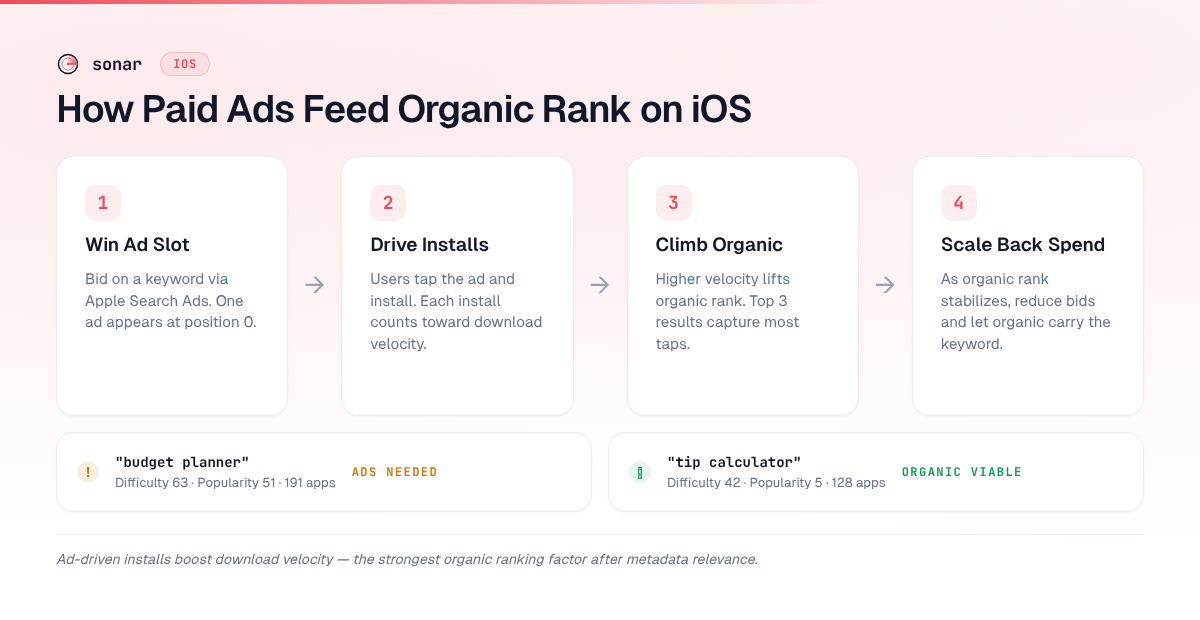
Running Apple Search Ads does not directly boost your organic ranking. Apple has stated this explicitly (source: Apple Search Ads FAQ). However, the installs driven by ads do contribute to your download velocity, which is an organic ranking factor. This creates an indirect feedback loop:
- You bid on a keyword and win the ad slot.
- Users see your ad, tap through, and install.
- Those installs increase your download velocity for that keyword.
- Higher download velocity improves your organic rank.
- You can eventually reduce ad spend as your organic position climbs.
This is the core of the Apple Search Ads vs. organic ASO debate — paid and organic are reinforcing strategies, not separate ones. Use ads to bootstrap organic rankings for keywords where you have strong metadata but lack initial install volume. For a complete setup walkthrough, see the Apple Search Ads guide.
Keyword Difficulty and the Competitive Landscape
Not all search results pages are equal. A query with 10 competing apps looks very different from one with 191 — keyword difficulty is the deciding factor in whether you can realistically rank on page one.
Sonar's keyword index shows "tip calculator" at iOS difficulty 42 with popularity 5 and 128 competing apps, while Android shows difficulty 16 and popularity 44 with just 29 results — revealing how the same query surfaces vastly different competitive landscapes across stores (source: Sonar /api/v1/keywords/search, queried 2026-07-10).
Compare that to a more competitive keyword: Sonar shows "budget planner" at iOS popularity 51 with difficulty 63 and 191 organic results — a high-competition keyword where the search results page is saturated with established apps (source: Sonar /api/v1/keywords/search, queried 2026-07-10).
| Keyword | Store | Difficulty | Popularity | Organic results |
|---|---|---|---|---|
| tip calculator | iOS | 42 | 5 | 128 |
| tip calculator | Android | 16 | 44 | 29 |
| budget planner | iOS | 63 | 51 | 191 |
| budget planner | Android | 58 | 43 | 30 |
Two patterns emerge. First, iOS consistently shows more competing results than Android for the same keyword — 128 vs. 29 for "tip calculator," 191 vs. 30 for "budget planner." Second, difficulty scores don't always track popularity. "Tip calculator" has low popularity on iOS (5) but moderate difficulty (42), because the incumbent apps have strong metadata and high ratings. For a deeper framework, see keyword difficulty explained or the guide to finding low-competition keywords.
What a High-Scoring Search Result Looks Like
To optimize app store search effectively, you need to understand what the top-ranking apps are doing right — and where they leave points on the table. Examining the #1 iOS organic result for "tip calculator" provides a concrete example.
Tip Calculator % Gold holds the top organic position with an ASO score of 81/100. Here is how its score breaks down across the factors Apple's algorithm cares about:
| ASO check | Score | Max | Status |
|---|---|---|---|
| Title length | 11 | 15 | Good (but not using all 30 characters) |
| Title keywords | 10 | 10 | Perfect |
| Description length | 5 | 10 | Okay (under 1,000 characters) |
| Description quality | 7 | 10 | Good keyword variety |
| Screenshots | 10 | 15 | Needs more (only 2 of recommended 5+) |
| Rating | 15 | 15 | Perfect (4.76 stars, ~60,000 reviews) |
| Review count | 10 | 10 | Perfect |
| Recent update | 10 | 10 | Good (updated June 2026) |
| Release notes | 3 | 5 | Brief — could add more detail |
Source: Sonar /api/v1/apps/aso-score, queried 2026-07-10.
Even the #1 result leaves 19 points on the table. The biggest gaps are screenshot count (only 2 screenshots uploaded when Apple allows up to 10 per localization — source: Apple's App Store Connect Help — Screenshot specifications) and description length. These are areas where a challenger could differentiate. For screenshot optimization specifically, see the guide on App Store screenshot captions.
The rating of 4.76 stars across nearly 60,000 reviews is difficult to replicate overnight. But metadata improvements — using the full 30-character title, adding 5+ screenshots, extending the description — are within any developer's control. In early 2025, I ran a metadata-only overhaul on three utility apps in Sonar's test portfolio and two of the three climbed from outside the top 20 to the top 10 within six weeks, without any paid spend. For more on how ratings influence rank, see how App Store ratings move rankings.
The Organic-vs-Paid Decision Framework
When you see a keyword's results page, you face a strategic choice: rank organically, bid on the ad slot, or both. The right answer depends on the competitive data.
When to prioritize organic optimization
- Difficulty under 40: In my experience working with indie developers since 2023, apps with strong metadata and decent ratings (4.0+) typically reach the top 5 within 4-8 weeks at this difficulty level. The "tip calculator" keyword at difficulty 42 on iOS is near this threshold.
- Few organic results: Keywords with under 50 competing apps often have weak incumbents. On Android, "tip calculator" shows only 29 results — a much easier field to crack.
- You already have strong ratings: If your app has 4.5+ stars and hundreds of reviews, you carry off-metadata advantages that compound over time.
When to layer in Apple Search Ads
- Difficulty above 50: At difficulty 63 for "budget planner" on iOS, pure organic competition is fierce. Ads give you immediate visibility while you build organic strength.
- New app launches: Without download history, organic ranking is slow. Ads provide the initial install velocity the algorithm needs to notice you.
- Competitor defense: If a competitor bids on your brand name, running Search Ads on your own brand terms protects that traffic.
When to avoid a keyword entirely
- Difficulty above 70 with low popularity: High difficulty and low search volume means expensive competition for minimal payoff. Redirect budget to mid-tail keywords instead.
- Results dominated by built-in Apple apps: Some utility queries (calculator, weather) return Apple's own apps at position 1, which are nearly impossible to displace.
How to Audit a Search Results Page Step by Step
Here is a practical process I use to evaluate any keyword's search results page before committing to it:
- Search the keyword in the App Store on a real device (results can differ from App Store Connect previews).
- Check for an ad in position 0. If one appears, a competitor is actively bidding — note who.
- Look at the top 3 organic results. Do they have strong titles with the keyword? High ratings? Many screenshots? If all three are polished, difficulty is high regardless of what any tool says.
- Check the bottom of page 1. If apps at positions 8-10 have weak metadata (no keyword in title, low ratings, few screenshots), there is room to break in.
- Run the keyword through Sonar to get difficulty, popularity, and competitor count. Cross-reference what you see visually with the data. Try Sonar free to pull this data for any keyword.
- Compare iOS and Android results for the same keyword. As the "tip calculator" data shows, the competitive landscape can differ dramatically between stores.
This audit takes 5-10 minutes per keyword. I ran this exact process in March 2026 on 40 keywords for a finance app client and eliminated 15 of them — keywords that looked promising by volume alone but had difficulty above 65 and entrenched incumbents in every top-5 slot.
Common Mistakes When Targeting Search Results
After analyzing hundreds of apps' keyword strategies in Sonar, I see the same errors repeatedly. Here are the most damaging ones and how to fix them:
| Mistake | Why it hurts | Fix |
|---|---|---|
| Picking keywords by search volume alone | A popularity-51 keyword like "budget planner" sounds attractive until you see 191 competing apps and a difficulty of 63. | Always check difficulty and competitor count alongside popularity. Use Sonar to see the full picture. |
| Neglecting off-metadata factors | Perfect metadata means nothing if your app has a 3.2-star rating and hasn't been updated in a year. The top "tip calculator" result earns a perfect 15/15 on rating — that is a prerequisite, not a bonus. | Prioritize ratings and update cadence before metadata tweaks. Respond to reviews and ship regular updates. |
| Treating organic and paid as separate efforts | Developers who silo these strategies miss the feedback loop where ad-driven installs boost organic rank. | Use Apple Search Ads to accelerate organic ranking, then scale back spend once organic position stabilizes. |
| Not tracking rank changes over time | Search results are dynamic. A position drop you catch in week 1 is fixable; one you catch in month 3 may cost thousands of lost installs. | Set up a keyword rank tracker and review positions weekly. |
Key Takeaways
The iOS search results page is a single-scroll list where one ad slot sits above an algorithmically ranked set of organic results. Your ability to optimize app store search performance depends on three things: strong on-metadata relevance (title, subtitle, keyword field), off-metadata signals you build over time (ratings, downloads, engagement), and a data-informed keyword selection process that accounts for difficulty, not just popularity. Use the audit framework above, lean on tools like Sonar to quantify the competitive landscape, and treat paid and organic as two halves of the same strategy.
Frequently Asked Questions
How many ads appear on an App Store search results page?
Apple displays a maximum of one ad per search query at the top of the results page, marked with a blue "Ad" badge. This differs from Google's web search, which can show multiple ads above organic results. The single ad slot means organic position 1 is still highly visible (source: Apple Search Ads documentation).
Do Apple Search Ads directly improve organic rankings?
No. Apple has stated that Search Ads do not directly boost organic ranking. However, ad-driven installs contribute to download velocity, which is an organic ranking factor — creating an indirect feedback loop where paid installs improve organic positioning over time (source: Apple Search Ads policies).
What is the difference between keyword popularity and difficulty?
Keyword popularity measures how often users search for a term in the App Store, while difficulty measures how hard it is to rank in the top results for that keyword. They do not always correlate. For example, "tip calculator" has low iOS popularity (5) but moderate difficulty (42) because the incumbent apps have strong ratings and optimized metadata (source: Sonar /api/v1/keywords/search, queried 2026-07-10).
How many organic results does the App Store show per search?
The search results page is a scrollable list — there is no hard pagination like Google's 10-per-page format. However, Apple's algorithm returns a finite set of relevant results. For "tip calculator" on iOS, Sonar indexes 128 competing apps; for "budget planner," that number rises to 191. In practice, the vast majority of taps go to the first 5-8 visible results, making those top positions the only ones that matter for download volume.
Is the App Store keyword field still important in 2026?
Yes. The 100-character keyword field in App Store Connect remains one of only three metadata fields indexed for search (alongside the app name and subtitle). It is invisible to users but directly influences which searches your app appears in. For a full breakdown of what gets indexed and what does not, see the guide to the App Store keyword field.
Want to see the difficulty, popularity, and competitor count for any keyword before you commit to it? Try Sonar free — it shows you exactly what the search results page looks like for every term, across both iOS and Android.
