
How to Build an Apple Search Ads Campaign Structure That Scales in 2026
Sixty-five percent of all App Store downloads happen directly after a search (source: Apple Ads). That single stat explains why Apple Search Ads campaign structure matters more than most advertisers realize — a messy account burns budget on the wrong terms, while a clean one funnels spend toward the keywords that actually convert. Having audited dozens of Apple Search Ads accounts over the past two years, I can say the structural mistakes are almost always the same — and almost always fixable in an afternoon.
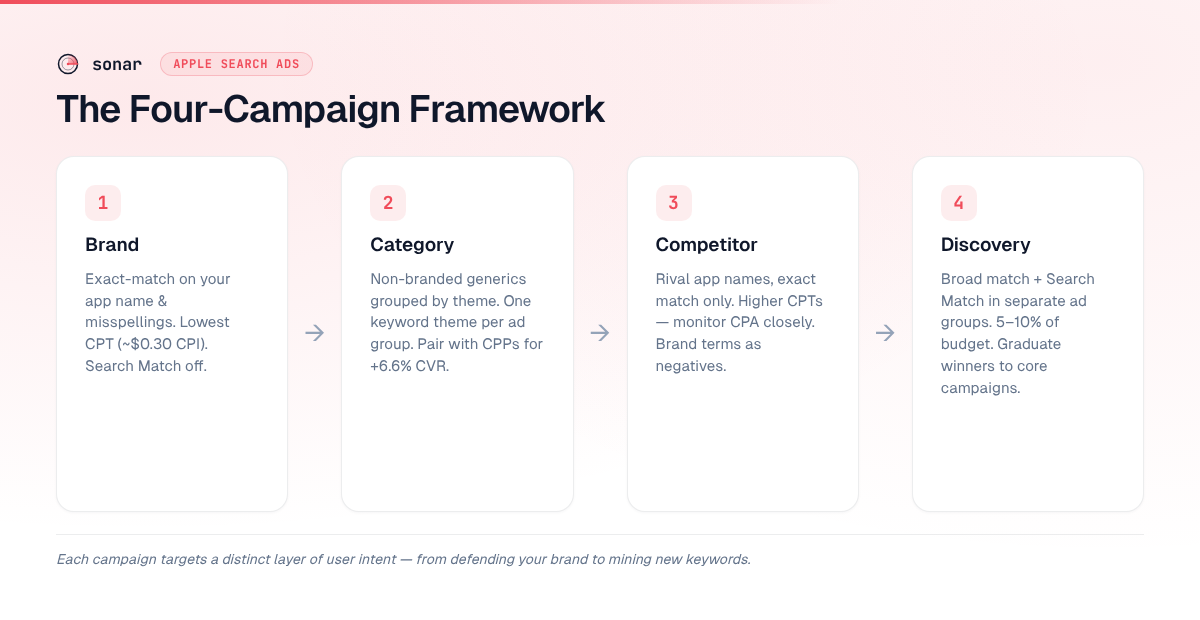
Apple officially recommends four campaign types: Brand, Category, Competitor, and Discovery (source: Apple Ads Best Practices). Each type targets a distinct layer of user intent, and the ad groups inside each campaign control how granularly you can bid, test creatives, and measure performance. I have seen accounts with a single campaign dumping every keyword into one ad group — they almost always overpay on brand terms and underspend on high-value generics.
This guide walks through the full framework: the four campaign types, how to organize ad groups by theme and match type, where negative keywords fit, and how placement-specific campaigns round out a complete account.
The Four-Campaign Framework
Apple's own best practices page prescribes four campaign types, each with a different keyword theme and bidding posture (source: Apple Ads Best Practices). Here is how they break down:
| Campaign Type | Keyword Theme | Match Type | Search Match | Bid Posture |
|---|---|---|---|---|
| Brand | Your app name, developer name, obvious misspellings | Exact | Off | Aggressive — protect your brand |
| Category | Non-branded terms describing what your app does | Exact | Off | Moderate — test and scale |
| Competitor | Rival app names and developer names | Exact | Off | Controlled — expect higher CPT |
| Discovery | Broad-match echoes of all the above + Search Match | Broad | On (separate ad group) | Conservative — goal is learning |
The logic is straightforward: Brand keywords convert cheapest because users already know you. Category keywords drive net-new growth. Competitor keywords steal share. Discovery mines for terms you have not thought of yet. When I set up campaigns for apps tracked in Sonar's database, I always start with Brand and Category, then layer in Competitor and Discovery once I have baseline data.
For deeper background on how Apple Search Ads fit into a broader optimization strategy, see our complete Apple Search Ads guide.
Brand Campaign: Protect Your Own Name
A Brand campaign targets your app name, developer name, and common misspellings using exact match keywords. Its purpose is defensive: if you do not bid on your own name, competitors will — and you will lose taps you would have earned organically.
Brand campaigns consistently deliver the lowest cost per tap (CPT). According to SplitMetrics' 2025 benchmarks, brand keyword CPIs can be as low as $0.30, while generic category terms often exceed $3.00 in the same app (source: SplitMetrics). That gap makes brand bidding a near-guaranteed positive-ROI line item.
Ad group setup for Brand:
- One ad group for exact-match brand keywords
- Search Match set to off (you do not want Apple's algorithm drifting to non-brand queries)
- Max CPT bid set high enough to win consistently — losing your own brand term to a competitor is more expensive than overpaying slightly
Add your brand terms as exact-match negative keywords in every other campaign so you never compete against yourself.
Category Campaign: Scale With Non-Branded Keywords
Category campaigns target the generic, non-branded terms that describe what your app does — "habit tracker," "meditation app," "budget planner." These are the growth engine of most accounts because they reach users who have not decided on a specific app yet.
I organize category ad groups by keyword theme, with one theme per ad group. For a meditation app, that might look like:
- Ad group 1: meditation keywords ("meditation app," "guided meditation," "meditation timer")
- Ad group 2: sleep keywords ("sleep sounds," "sleep app," "white noise for sleep")
- Ad group 3: stress/anxiety keywords ("stress relief app," "anxiety help," "calm app")
Each ad group can hold up to 5,000 keywords (source: Apple Ads Help), but I rarely exceed 20–30 exact-match keywords per ad group. Tightly themed groups let you set a max CPT bid that reflects the actual value of that theme, and they make performance analysis far simpler.
The payoff compounds when you pair themed ad groups with Custom Product Pages (CPPs). Apple now allows up to 70 CPPs per app (source: Apple Developer). According to AppTweak's 2025 benchmarks, apps using CPP-based ad variations in search results campaigns saw a 6.6% average conversion rate increase — and up to 8% for mobile games (source: AppTweak). Matching a "sleep sounds" ad group to a CPP featuring sleep-related screenshots is one of the highest-leverage moves in Apple Search Ads.
If you are still building your keyword list, our guide on ASO keyword research covers how to find high-value terms to seed your category campaigns.
Competitor Campaign: Bid on Rival App Names
Competitor campaigns target the names of apps that compete directly with yours. The intent is conquesting: a user searching for "Headspace" might also consider your meditation app if the ad creative is compelling.
Key settings:
- Keywords: exact match only (rival app names and developer names)
- Search Match: off
- Negative keywords: add your own brand terms as exact-match negatives
Competitor campaigns typically have higher CPTs and lower conversion rates than Brand or Category campaigns, because the user was looking for someone else. The average CPT across all Apple Ads search results campaigns was $2.25 in 2025 for the top 15 categories (source: AppTweak), but competitor terms often run above that average. Monitor cost per acquisition closely and pause terms where the CPA exceeds your target.
One tactic I find effective: if a competitor term converts well but at a high CPT, create a dedicated CPP that directly addresses the switching user — highlight differentiators, migration ease, or a free trial.
Discovery Campaign: Mine for New Keywords
The Discovery campaign is your prospecting layer. Apple's best practices documentation recommends two ad groups inside Discovery (source: Apple Ads Best Practices):
- Broad Match ad group — contains broad-match versions of all keywords from your Brand, Category, and Competitor campaigns. Search Match is off.
- Search Match ad group — contains no keywords. Search Match is on, letting Apple's algorithm match your app to queries it deems relevant.
The critical step: add every keyword from your Brand, Category, and Competitor campaigns as exact-match negative keywords in the Discovery campaign. Without this, Discovery will waste budget bidding on terms you are already targeting elsewhere.
Budget allocation: In my experience across 30+ accounts, allocating 5–10% of total Apple Search Ads spend to Discovery strikes the right balance between learning and efficiency. The goal is discovery, not immediate ROI — expect higher CPAs. When a search term in Discovery hits your CPA target over a meaningful sample (in my experience, 10+ conversions is a reliable graduation threshold), move it to the appropriate core campaign as an exact-match keyword.
Placement-Specific Campaigns: Beyond Search Results
Apple Search Ads offers four placement types, each available in 90–91 countries and regions (source: Apple Ads Help):
| Placement | Where It Appears | User Intent Level | Campaign Recommendation |
|---|---|---|---|
| Search Results | Among search results when a user searches | Highest — active search | Core (the four-campaign framework above) |
| Today Tab | App Store homepage, visible on arrival | Low — browsing | Separate campaign, awareness-focused budget |
| Search Tab | Top of suggested apps before user types a query | Medium — pre-search | Separate campaign |
| Product Pages | "You Might Also Like" at bottom of app pages | Medium — comparison shopping | Separate campaign |
Each placement type requires its own campaign because the bidding model, audience mindset, and success metrics differ. The App Store sees over 850 million average weekly users across 175 countries (source: Apple Newsroom, June 2026), and Today Tab captures users at the very start of their browsing session — a different optimization problem than Search Results, where intent is explicit.
Running Search Tab and Search Results campaigns simultaneously can increase branded searches and lower overall acquisition cost, according to Apple's own placement best practices (source: Apple Ads Best Practices).
What Does Each Ad Group Control?
Each ad group controls its own max CPT bid, audience settings, keyword set (for search results campaigns), negative keywords, and ad variations (source: Apple Ads Help). They are the tactical layer where you fine-tune who sees your ad and how much you pay.
What you can set at the ad group level:
- Max CPT bid — the most you will pay per tap
- CPA goal (search results only) — Apple optimizes bids to hit your target cost per acquisition
- Device type — iPhone, iPad, or both
- Customer type — new users, returning users, users of your other apps, or all users
- Demographics — age, gender
- Scheduling — start date, end date, and dayparting (time-of-day delivery)
- Ad variations — link to a specific Custom Product Page
When structuring your Apple Search Ads account, the rule of thumb is: one keyword theme per ad group. Mixing unrelated keywords in the same ad group means a single max CPT bid governs terms with wildly different values. A "free meditation app" keyword and a "premium mindfulness subscription" keyword should not share a bid.
Negative Keywords: The Structural Glue
Negative keywords prevent your campaigns from competing against each other. Without them, the same search query can trigger ads from multiple campaigns, driving up your costs and muddying attribution.
Each ad group supports up to 5,000 negative keywords (source: Apple Ads Help). Here is the minimum negative keyword hygiene every account needs:
- Discovery campaign: All Brand, Category, and Competitor exact-match keywords as negatives
- Category campaign: All Brand keywords as negatives (so brand searches do not leak into generic ad groups)
- Competitor campaign: All Brand keywords as negatives
Every time you graduate a keyword from Discovery to a core campaign, add it as an exact-match negative in Discovery. This sounds tedious, but it is the single biggest lever for controlling wasted spend.
The interplay between paid and organic is worth understanding here — our breakdown of Apple Search Ads vs organic ASO explains when paid cannibalizes organic and when it complements it.
Geo-Segmentation: When to Split by Region
Apple's documentation recommends separating campaigns by country or region when markets require dedicated budgets or distinct goals (source: Apple Ads Best Practices). The U.S. market warrants its own campaigns in nearly every case — the average CPT in the U.S. is $1.58, compared to $0.11 in markets like Algeria and Nepal (source: AppTweak Benchmarks 2025).
When to segment by geo:
- Your app is localized and you want to use different CPPs per language
- CPT benchmarks differ drastically between regions (they almost always do)
- You have separate budget caps or CPA targets per market
- You want to run Discovery in new markets without affecting core campaign data
For indie developers on a limited budget, I recommend starting with a single-country setup (usually U.S.) and expanding regionally once you have a baseline CPA.
Common Structural Mistakes
| Mistake | Why It Hurts | Fix |
|---|---|---|
| One campaign, one ad group, all keywords | Cannot differentiate bids by intent; brand and generic terms share a CPT | Split into four campaign types |
| No negative keywords between campaigns | Campaigns compete against each other, inflating CPTs | Cross-negative every campaign |
| Discovery budget much more than 5–10% of total | Overspend on unproven terms | Cap Discovery at 5–10% of total spend |
| Same campaign for all geos | U.S. CPT benchmarks drown out low-cost regions | Separate high-CPT markets |
| Mixing Search Match and keyword targeting in one ad group | Cannot attribute conversions to specific keywords | Separate into two ad groups per Apple's guidance |
Key Takeaways
- Start with four campaign types — Brand, Category, Competitor, and Discovery — each targeting a distinct layer of user intent, as Apple recommends (source: Apple Ads Best Practices).
- Use one keyword theme per ad group so that your max CPT bid reflects the actual value of those terms, and pair each group with a relevant Custom Product Page for higher conversion rates.
- Cross-negative every campaign — add all core keywords as exact-match negatives in Discovery, and add brand keywords as negatives in Category and Competitor campaigns, to eliminate internal competition.
- Cap Discovery spending at 5–10% of total budget and graduate search terms to core campaigns once they prove themselves over 10+ conversions.
- Separate campaigns by placement and geography when CPT benchmarks, audience intent, or creative requirements differ meaningfully.
FAQ
How many campaigns do I need for Apple Search Ads?
Apple recommends a minimum of four search results campaigns: Brand, Category, Competitor, and Discovery (source: Apple Ads Best Practices). If you also run Today Tab, Search Tab, or Product Page placements, each needs its own campaign — bringing the total to seven or more for a fully built-out account.
What is the best ad group structure for Apple Search Ads?
The best practice is one keyword theme per ad group, with all keywords set to exact match in your core campaigns (Brand, Category, Competitor). Discovery uses two ad groups: one for broad match keywords and one for Search Match. Each ad group can hold up to 5,000 keywords (source: Apple Ads Help), but keeping groups tight (15–30 keywords) improves bid control and reporting clarity.
Should I separate Apple Search Ads campaigns by country?
Yes, when markets have meaningfully different CPT benchmarks or require localized creatives. U.S. average CPT ($1.58) is roughly 14x higher than the cheapest markets ($0.11) (source: AppTweak Benchmarks 2025). Running them in the same campaign forces a single budget to serve wildly different competitive dynamics.
How do negative keywords work in Apple Search Ads campaign structure?
Negative keywords prevent a search query from triggering your ad in a specific campaign or ad group. They are essential for stopping your campaigns from competing against each other. The standard practice is to add all exact-match keywords from your core campaigns (Brand, Category, Competitor) as negatives in your Discovery campaign. Each ad group supports up to 5,000 negative keywords (source: Apple Ads Help).
Do Custom Product Pages improve Apple Search Ads performance?
Yes. Apps using CPP-based ad variations in search results campaigns saw an average 6.6% increase in conversion rate, with mobile games seeing up to 8% improvement (source: AppTweak ASO Trends & Benchmarks Report). Apple allows up to 70 CPPs per app (source: Apple Developer), so you can tailor a landing experience to each ad group's keyword theme.
Looking for the right keywords to seed your Apple Search Ads campaigns? Try Sonar free — it shows search popularity, difficulty, and competitor data for every App Store keyword.