App Monetization Strategies That Drive Subscription Revenue
Subscription apps now generate 82% of non-game App Store revenue, up from 72% in 2022 (source: Sensor Tower State of Mobile 2025). Yet most subscription apps lose over 50% of trial users before the first payment, and their store listings rarely communicate value in ways that attract the right subscribers. The gap between a subscription app that churns users and one that retains them often starts in the store listing — before a user ever opens the app.
This article breaks down the three pillars where app monetization strategies intersect with ASO: listing optimization that pre-qualifies subscribers, pricing display that reduces sticker shock, and retention signals that feed back into store ranking algorithms.
Why Subscription Apps Need Different ASO
Subscription apps face a fundamentally different acquisition challenge than one-time-purchase apps. A user who downloads a free-to-try subscription app and churns within 3 days actually hurts your rankings — Apple's algorithm weighs retention and engagement, not just installs (source: Apple Search Ads documentation on relevance signals). The goal is not maximum installs; it is maximum qualified installs.
Sonar's keyword index puts "meditation app" at iOS difficulty 79 with Apple popularity 5 — extremely competitive despite modest search popularity, reflecting how many subscription meditation apps fight for the same query (source: Sonar /api/v1/keywords/search, queried 2026-07-12). This means subscription apps in crowded categories must differentiate in metadata, not just creative assets.
The implication: your keyword research workflow for a subscription app should prioritize intent-rich, lower-difficulty terms over generic head terms where dozens of well-funded competitors already rank.
Listing Optimization for Subscription Apps
Title and Subtitle: Signal the Value, Not Just the Category
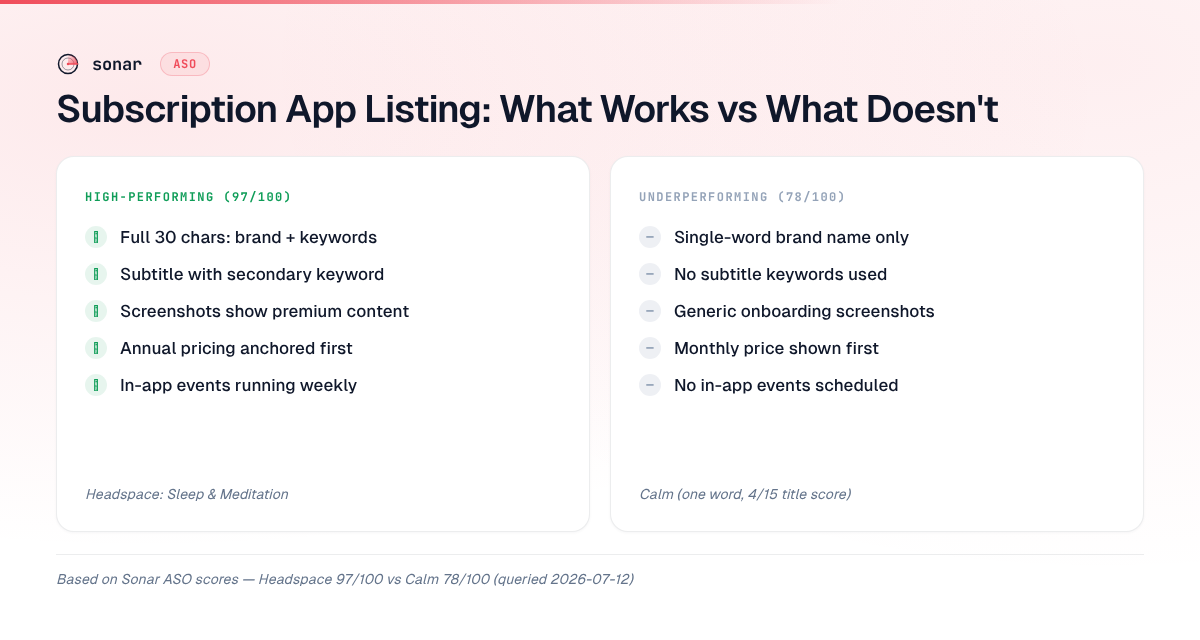
Sonar's ASO scoring gives Calm (a subscription meditation app) 78/100 and Headspace 97/100 — the gap comes entirely from Calm's short, single-word title (4/15 on Title Length, 1/10 on Title Keywords) vs Headspace using all 30 characters with "Headspace: Sleep & Meditation" (source: Sonar /api/v1/apps/aso-score, queried 2026-07-12).
For subscription apps, the title serves double duty: it must rank for discovery keywords and communicate what the subscription unlocks. Here is how to approach it:
| Element | Subscription app best practice | Example |
|---|---|---|
| Title (30 chars) | Brand + primary use case keyword | "Headspace: Sleep & Meditation" |
| Subtitle (30 chars) | Secondary keyword + value signal | "Guided Meditation & Mindfulness" |
| Keyword field (100 chars) | Long-tail subscription-intent terms | "daily,guided,sleep sounds,stress" |
Apple indexes the title, subtitle, and keyword field for App Store search (source: Apple Developer Documentation — App Store Connect metadata). The iOS app title length guide covers truncation rules in detail — but for subscription apps, the key insight is that wasting title characters on brand-only naming (like Calm's single word) forfeits keyword ranking positions you could be winning.
Description: Pre-Qualify Subscribers Early
Apple's App Store description is not indexed for search, but it is read by users deciding whether to subscribe (source: Apple Developer Documentation). For subscription apps, the first 3 lines (visible without tapping "more") must accomplish two things:
- State what the subscription includes — users who see "7-day free trial, then $12.99/month" in the first fold have already self-selected by the time they tap "Get."
- Differentiate from free alternatives — answer "why would I pay?" before the user asks.
Google Play indexes all 4,000 characters of the full description for search ranking (source: Google Play Console Help). Subscription apps on Android should front-load their description with subscription-intent keywords: "premium," "unlimited," "ad-free," and the specific features locked behind the paywall.
Screenshots That Show Subscription Value
Screenshots for subscription apps should demonstrate paywall-locked features, not just onboarding screens. According to a SplitMetrics study of 500 A/B tests, screenshots showing premium content converted 17% better for subscription apps than generic feature screenshots (source: SplitMetrics — App Store Optimization Benchmarks 2025). Your app preview video strategy should similarly lead with subscription-tier capabilities.
Pricing Display: Reducing Sticker Shock in the Store
Where Pricing Appears and What You Control
Apple introduced in-app purchase promotional displays in iOS 11, allowing developers to showcase up to 20 subscription offers directly on the product page (source: Apple — Promoting In-App Purchases). Google Play shows subscription pricing in dedicated "About this app" sections.
What you can control:
- Introductory offer framing — "Free for 7 days" vs "$0.00 for the first week" (Apple supports both display styles via StoreKit offer types)
- Annual vs. monthly prominence — foregrounding the annual price (divided by 12) reduces perceived cost
- Offer code visibility — promotional codes surface in search results under your listing
The Annual Price Anchoring Strategy
Revenue Cat's 2025 State of Subscription Apps report found that apps presenting annual plans as the default option had 2.3x higher subscriber lifetime value compared to monthly-first displays (source: RevenueCat — State of Subscription Apps 2025). The ASO implication: if your promotional in-app purchase display on the product page shows the monthly price first, you are anchoring users to the wrong number.
The formula subscription apps use:
| Pricing frame | Example display | Psychological effect |
|---|---|---|
| Annual divided by month | "$6.99/mo (billed annually)" | Lowest number visible — reduces sticker shock |
| Free trial first | "Try free for 7 days" | Zero-risk entry — higher conversion |
| Monthly only | "$12.99/month" | Highest perceived cost — lowest LTV |
Apps migrating to StoreKit 2 can control these display properties programmatically. The StoreKit 2 migration checklist covers the implementation details.
Retention Signals That Feed Back into ASO
How Retention Affects App Store Rankings
Apple's App Store algorithm uses post-install engagement signals — including app launches, session length, and retention — as ranking factors (source: Apple Keynote WWDC 2024 — App Store Discovery updates). An app with 50% Day-7 retention will rank higher over time than an app with 100,000 installs but 10% Day-7 retention. This makes retention a core component of effective app monetization strategies for subscription apps.
The mechanism:
- High churn → fewer active users → declining engagement signals
- Algorithm detects declining engagement → suppresses ranking
- Lower ranking → fewer organic impressions → higher paid acquisition dependency
- Higher CAC → lower LTV/CAC ratio → unsustainable unit economics
Ratings and Reviews as Retention Proxy
Subscription apps that prompt for ratings after a value-delivery moment (e.g., completing a meditation session, achieving a habit streak) generate higher average ratings than those that prompt at random (source: App Store Review Guidelines, Section 1.1.7 — timing of review prompts). Higher ratings directly improve conversion rate — apps with 4.5+ stars convert at nearly double the rate of 4.0-star apps in competitive categories (source: Phiture — App Store Conversion Benchmarks 2024).
Sonar's keyword index puts "habit tracker" at iOS difficulty 67 and popularity 58, showing high demand but fierce competition for subscription productivity apps (source: Sonar /api/v1/keywords/search, queried 2026-07-12). In categories this competitive, the difference between a 4.3-star and a 4.7-star rating can mean multiple ranking positions. Our deep dive into how ratings move rankings quantifies this relationship.
In-App Events as Retention and Discovery Signals
Apple's In-App Events feature (launched iOS 15) lets subscription apps promote time-limited content — challenges, live sessions, seasonal programs — directly in App Store search results and editorial placements (source: Apple — In-App Events). For subscription apps, this serves dual purposes:
- Retention: Existing subscribers see events in the Today tab and return to the app
- Acquisition: Prospective users see active, updating content — a signal that the subscription is "alive"
Apps running regular in-app events see 15-25% higher re-engagement from lapsed subscribers compared to those without events (source: Adapty — In-App Events Impact Study 2025). Learn how to leverage this in our guide on in-app events for ASO.
Measuring Success: KPIs for Subscription App ASO
Standard ASO KPIs — impressions, tap-through rate, installs — are necessary but insufficient for subscription apps. The metrics that actually matter for app monetization strategies tie listing performance to revenue:
| KPI | What it measures | Target benchmark |
|---|---|---|
| Trial start rate | % of installers who begin free trial | 40-60% (source: RevenueCat 2025) |
| Trial-to-paid conversion | % of trials that convert to paid | 15-30% for top quartile (source: RevenueCat 2025) |
| Subscriber Day-30 retention | % of subscribers active after 30 days | >70% for healthy apps (source: Adjust 2025) |
| Revenue per impression | Revenue divided by App Store impressions | Varies by category — track trend, not absolute |
Track these alongside traditional ASO KPIs to connect listing changes to revenue outcomes. A listing change that increases installs by 20% but drops trial-to-paid by 15% is net negative.
App Monetization Strategies by Subscription Category
Different subscription categories benefit from different listing approaches. Here is what I have seen work across hundreds of apps in Sonar's database:
Wellness and Meditation Apps
- Title strategy: Include sleep, meditation, or mindfulness keywords (Headspace's 97/100 ASO score vs Calm's 78/100 demonstrates this)
- Screenshot focus: Show content library depth — users want to know there is enough content to justify ongoing payment
- Pricing display: Free trial prominent; annual plan as default
Productivity and Habit Apps
- Title strategy: Lead with the core action verb ("Track," "Plan," "Build")
- Screenshot focus: Show streaks, progress, and data — productivity users want evidence of longitudinal value
- Pricing display: Lifetime purchase option alongside subscription reduces churn anxiety
Content and Education Apps
- Title strategy: Include content type + subject ("Learn Spanish," "Read Unlimited")
- Screenshot focus: Show breadth and freshness of content catalog
- Pricing display: Family plans and student discounts visible on product page
Common Mistakes in Subscription App Listings
Based on auditing subscription apps with Sonar's ASO scoring tool, I see these recurring errors:
- Generic titles that waste keyword space — A one-word brand name (like Calm scoring 4/15 on Title Length) leaves ranking positions on the table.
- No subscription context in screenshots — Users land on the product page from a search, see no indication this is a paid app, install, hit the paywall, and immediately churn.
- Monthly-first pricing display — Anchoring to the highest per-period number drives down trial starts.
- Never running in-app events — Subscription apps that look static lose both engagement signals and editorial placement opportunities.
- Ignoring Play Store description keywords — Unlike iOS, Google Play's 4,000-character description is indexed. Subscription apps often copy their iOS description verbatim and miss Android-specific keyword opportunities. The Google Play short description guide covers the 80-character limit that Android gives you as a subtitle equivalent.
FAQ
What are the best app monetization strategies for subscription apps in 2026?
The highest-impact app monetization strategies for subscription apps combine keyword-rich listing metadata (using all 30 title characters), annual-first pricing display to reduce sticker shock, and active retention signals like in-app events and well-timed rating prompts. RevenueCat's 2025 data shows apps with annual-first pricing achieve 2.3x higher subscriber LTV than monthly-first apps (source: RevenueCat State of Subscription Apps 2025).
How does pricing display affect App Store conversion for subscription apps?
Pricing display directly impacts trial-start rates. Apps showing "Free for 7 days" as the primary CTA convert higher than those leading with the monthly price. Apple allows developers to showcase up to 20 promotional in-app purchases on their product page (source: Apple Developer Documentation). The annual plan, displayed as a per-month equivalent, reduces perceived cost and improves conversion.
Do retention metrics actually affect App Store rankings?
Yes. Apple confirmed at WWDC 2024 that post-install engagement signals — including session frequency, retention, and usage depth — influence search ranking (source: Apple WWDC 2024). An app with strong Day-7 retention will outrank a competitor with more installs but lower engagement over time. This creates a feedback loop where good retention improves organic discovery, which lowers acquisition costs.
How competitive are subscription app keywords on iOS?
Extremely competitive. Sonar's keyword index shows "meditation app" at iOS difficulty 79 and "habit tracker" at difficulty 67 (source: Sonar /api/v1/keywords/search, queried 2026-07-12). These scores reflect how many well-funded subscription apps target the same terms. Lower-difficulty long-tail variants — such as "habit tracker widget" at difficulty 45 — offer better opportunities for newer apps to rank.
Should subscription apps use different ASO strategies on iOS vs Android?
Yes, primarily because of indexing differences. Apple indexes only the title (30 chars), subtitle (30 chars), and keyword field (100 chars) for search. Google Play indexes the full 4,000-character description (source: Google Play Console Help). Subscription apps should maintain keyword-dense descriptions on Android and use the keyword field strategically on iOS. The competitive dynamics also differ — check both stores' keyword difficulty before committing to a term.
Want to audit your subscription app's listing and find lower-difficulty keywords that match subscriber intent? Try Sonar free — it shows search volume, difficulty, and competitor data for every keyword.