sonar
sonar
How to Make App Store Screenshots: The Visual Design Decisions That Drive Downloads
Most screenshot guides focus on captions. Captions matter, and this guide covers them in Layer 4, but the text overlay is only one layer of a multi-layer design problem. The screenshot itself — its layout, color, composition, device framing, and sequencing — does the heavy lifting before a user even reads a single word. StoreMaven's eye-tracking research found that users spend an average of 3 seconds on a product page's first impression, with visual scanning preceding text comprehension [source: StoreMaven, "Mobile A/B Testing Benchmarks," 2023].
This guide covers how to make app store screenshots that convert by getting the visual design right — background color, device framing, caption copy, visual hierarchy, and screenshot sequencing — plus when to localize the set for other markets, with specific examples from real App Store listings.
Why Screenshots Are Your Highest-Leverage Visual Asset
Screenshots are the only listing element that shows your product in action. Apple allows up to 10 per localization, and the first 3 appear in search results — making them the most visible creative asset in the App Store source: [Apple Developer Documentation].
Sonar's ASO score for Fleur (Budget Planner App) gives screenshots a perfect 15/15, confirming Apple rewards apps that use the full screenshot allocation with clear feature messaging (source: Sonar /api/v1/apps/aso-score?id=1621020173&store=ios, queried 2026-07-03). Yet when I audit app listings in competitive categories, most developers upload 4 or 5 screenshots and stop. They leave half their real estate empty.
The impact is measurable. App store conversion rate benchmarks show that Finance apps convert at 15-25% on iOS (based on aggregated data from StoreMaven, SplitMetrics, and Phiture). In a category where Sonar's keyword index puts "budget planner" at iOS difficulty 65 and popularity 51 (source: Sonar /api/v1/keywords/search, queried 2026-07-03), screenshot quality can be the deciding factor between a tap and a scroll-past.
The 5 Visual Design Layers of High-Converting Screenshots
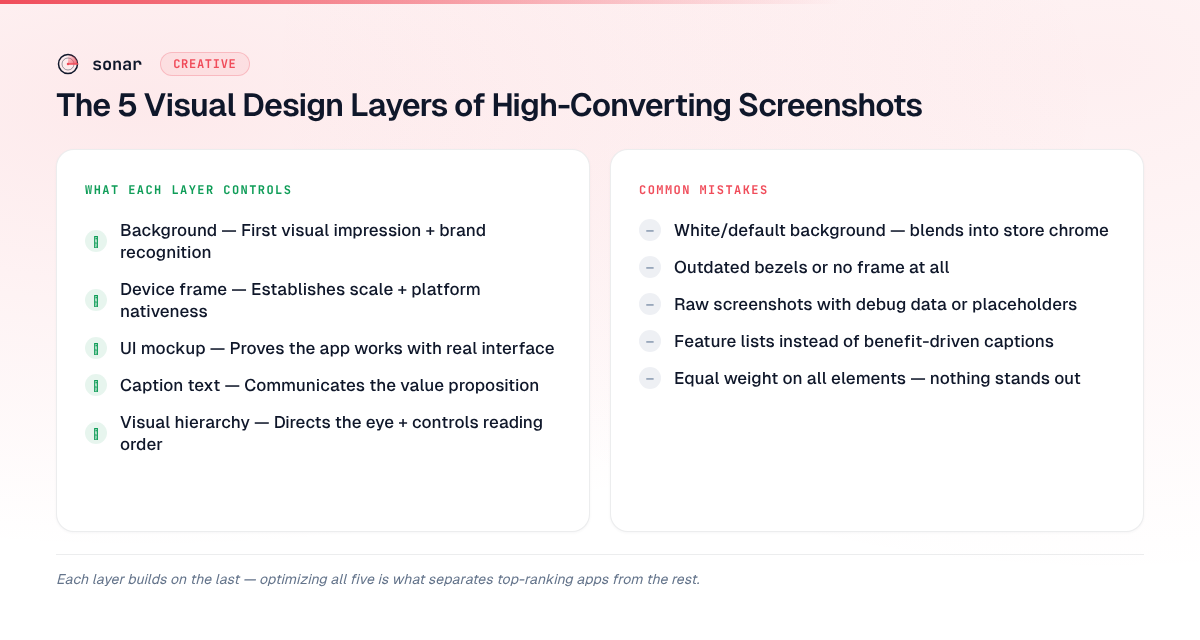
Every effective screenshot is built from five design layers stacked on top of each other. Most developers optimize only one or two. Getting all five right is how top apps separate themselves in crowded categories.
| Layer | What it controls | Common mistake |
|---|---|---|
| Background | First visual impression, brand recognition | Using white/default — blends into App Store chrome |
| Device frame | Establishes scale, signals platform nativeness | Using outdated device bezels or no frame at all |
| UI mockup | Proves the app works, shows real interface | Raw screenshots with debug data or placeholder text |
| Caption text | Communicates the value proposition | Feature names instead of benefits |
| Visual hierarchy | Directs the eye, controls reading order | Equal weight on all elements — nothing stands out |
Layer 1: Background Color and Gradients
The background is the first thing the human eye processes. Apple's App Store uses a white/light gray background in light mode and a dark background in dark mode. If your screenshot background is also white, it visually bleeds into the store chrome and loses its edges source: [Apple Human Interface Guidelines — App Store Product Pages].
Three rules for effective backgrounds:
- Use a saturated, brand-consistent color. Fleur (Budget Planner App), which earns a 15/15 screenshot score in Sonar's ASO analysis, uses a consistent soft gradient across all 10 screenshots. That consistency builds brand memory across the scroll.
- Test dark vs. light backgrounds. Apple's product page optimization lets you A/B test screenshot variants with actual App Store traffic. Background color is one of the fastest variables to test because it requires no layout changes.
- Avoid pure white (#FFFFFF) and pure black (#000000). Both blend into system chrome in one display mode. Off-white (#F5F5F5 or warmer) and dark gray (#1A1A1A) maintain visible edges in both modes.
Gradient direction matters too. A top-to-bottom gradient draws the eye toward the device mockup. I have seen top-to-bottom gradients outperform flat colors in A/B tests because they add depth without adding clutter.
Layer 2: Device Framing Decisions
Device frames anchor the screenshot in a physical context. They signal "this is a real app" rather than a concept mockup. But the wrong frame can hurt more than it helps.
When to use a device frame
Use a device frame when your app has a conventional interface — lists, forms, dashboards, maps. The frame signals familiarity and makes the UI legible by giving it a defined boundary. Most Utility, Finance, and Productivity apps benefit from frames. If you don't want to draw frames yourself, our free screenshot generator ships realistic vector iPhone and Android mockups — flat or 3D-tilted — at every store size.
When to skip the frame
Full-bleed screenshots (no device frame) work better for apps where the content IS the interface — games, photo editors, creative tools. The frame takes up space that those apps need for immersion.
Frame style matters
If you use a frame, use the current-generation device. In 2026, that means iPhone 16 Pro Max or iPhone 17 Pro bezels — the thin-border, Dynamic Island form factor. An iPhone X-era frame with thick bezels signals "this app hasn't been updated." You can check the latest screenshot sizes and device specs for the exact pixel dimensions to use.
| Approach | Best for | Avoid when |
|---|---|---|
| Current-gen device frame | Utility, Finance, Productivity, Health apps | The frame obscures important content |
| No frame (full-bleed) | Games, Photo/Video, AR apps | The raw UI has no visual polish |
| Floating device (angled) | Showing multiple screens at once | It adds confusion or hides UI details |
Layer 3: UI Mockup Quality
The UI shown inside your screenshot must look real, polished, and populated. Three mistakes I see repeatedly when auditing listings:
- Empty states. Showing a blank dashboard or an empty task list. Users want to see what the app looks like with data in it. Populate your mockups with realistic sample data.
- Developer-mode artifacts. Debug overlays, Xcode simulators, status bars showing "Carrier" — they signal "this is a screenshot, not a product."
- Illegible text. Text that is readable on a 6.7-inch phone becomes unreadable in the App Store search result card, which renders screenshots at roughly 40% of full size source: [Apple Developer Documentation — Screenshot Specifications]. If your UI has small text, zoom in on the relevant section rather than showing the full screen.
A practical test: view your screenshot at roughly 40% of full resolution — the approximate scale at which the App Store renders search-result thumbnails. If the core value proposition is not visible at that size, crop tighter or increase the UI scale.
Layer 4: Caption copy that sells the benefit
A screenshot without a caption is a puzzle the user has to solve. People scan a listing rather than study it, so the caption has three jobs: say what screen they are looking at, say why it matters to them, and connect it to the frames before and after. "Track expenses in 3 taps" does all three in under a second. A bare screenshot of a budgeting UI makes the user work out what they are looking at.
Three caption formulas that hold up
Benefit plus a specific detail. Most weak captions are feature names. "Push notifications" names a feature; "Get reminded before every meeting" names the reason someone downloads the app. Add a concrete number or outcome where you can:
| Feature-name caption | Benefit caption |
|---|---|
| "Dashboard view" | "See all your stats at a glance" |
| "Calendar feature" | "Plan your week in under 60 seconds" |
| "Dark mode" | "Easy on your eyes, day and night" |
| "Analytics" | "Track 12 key metrics in real time" |
Problem, then solution. Lead with the pain point and let the UI show the fix: "Never miss a deadline again", "No more spreadsheet chaos". This framing suits the first screenshot, which works as the headline of the whole set.
Social proof. If you have real numbers, use them: a rating, a review count, a chart position, a user count. Use one social-proof caption per set (the sequence below gives it position 4, right after the three frames that appear in search). More than one reads as padding, and every number has to be true today, not at your last peak.
Caption length and placement
Aim for 3 to 8 words per caption, and treat 3 to 5 as the sweet spot. If a caption needs a second line at thumbnail size, it is too long. Put captions in their own band above the device (the top third of the canvas, sized per the table in Layer 5) or below it, never on top of the UI you are trying to show. Keep text clear of the canvas edges as well, because search-result cards crop and scale the image.
iOS vs Google Play captions
On iOS, the first three screenshots appear in the search result card, so their captions do double duty: they are the ad that earns the tap and the opening of the pitch on the product page. Write frames 1–3 to stand alone, and save secondary features for frames 4–10, which are seen mostly by high-intent visitors.
Google Play allows up to 8 screenshots per device type and shows the first three or four in search results only for some queries and screen widths. On the listing itself they sit in a horizontal strip of small thumbnails, so Play captions need larger type and fewer words than their iOS counterparts. The two stores also use different canvas sizes (full specs here), which is one more reason to design each set for its store instead of reusing one unchanged.
Layer 5: Visual Hierarchy and Composition
Visual hierarchy determines what the user sees first, second, and third within a single screenshot. Without deliberate hierarchy, every element competes for attention and nothing wins.
Font sizing for legibility
Text on screenshots must be readable at both full size (on the product page) and thumbnail size (in search results). Place captions in the top third of the canvas, keeping the UI mockup in the center and bottom. Based on testing across multiple listings, these are the minimum effective sizes:
| Element | Minimum size (at 1290px width) | Purpose |
|---|---|---|
| Headline caption | 72px | Readable in search result cards |
| Subheading | 48px | Readable on product page, barely visible in cards |
| Body/detail text | 36px | Only readable at full size — use sparingly |
Color contrast ratios
Use a contrast ratio of at least 4.5:1 between caption text and background, matching WCAG AA standards source: [W3C Web Content Accessibility Guidelines 2.2]. Low contrast may look sophisticated in a design tool but becomes unreadable in the App Store, where brightness and ambient lighting vary.
Screenshot sequencing: the narrative arc
Screenshots are not isolated images. They form a scrollable narrative that should guide the user from awareness to conviction. The order matters as much as the content.
The proven 10-screenshot sequence
After analyzing listings of apps ranking in the top 5 for competitive keywords, I see a consistent pattern in how top-performing apps sequence their screenshots:
- Hero shot — Your single best screen showing the core value. This is the screenshot most users will see (it appears in search results). Lead with outcome, not onboarding.
- Key differentiator — What makes you different from the 189 other apps competing for the same keyword? For context, Sonar's keyword index puts "habit tracker" at iOS difficulty 67 and popularity 58, with 189 competing apps where visual differentiation in screenshots becomes essential (source: Sonar /api/v1/keywords/search, queried 2026-07-03).
- Feature showcase #1 — Your strongest supporting feature. Show it working, not described.
- Social proof — A rating callout, award badge, or press mention overlaid on a UI screen.
- Feature showcase #2 — Second-most valuable feature.
- Personalization/customization — Show that the app adapts to the user.
- Feature showcase #3 — A feature that addresses a common objection.
- Integration/ecosystem — Apple Watch, widgets, Shortcuts, iPad support.
- Privacy/security — Especially relevant for Finance and Health categories.
- Closing CTA — A summary screen or a prompt to download.
The first 3 appear in search results and must work as a standalone story: hero, differentiator, top feature. The remaining 7 are for users who tap into the full listing — a high-intent audience that is actively evaluating.
First-frame optimization
The first screenshot carries disproportionate weight. StoreMaven's research indicates that 60% of App Store visitors never scroll past the first impression [source: StoreMaven, "Mobile A/B Testing Benchmarks," 2023]. Your first screenshot must do three things simultaneously:
- Show the primary UI (prove the app exists and works)
- Communicate the core benefit (why this app, not another)
- Be visually distinct from competitors in the same search result row
When an app preview video helps and when it hurts
An app preview is a 15 to 30 second video of your app, made from footage captured on the device. You can add up to three per localization, and on the App Store they autoplay with the sound muted, both on your product page and in search results source: [Apple Developer — App previews]. That placement is the whole decision. Without a preview, your first one to three screenshots fill your search result; with one, the video plays there instead source: [Apple Developer — Creating your product page]. A preview only deserves that slot if its opening seconds sell the app better than your hero screenshot does.
It tends to help when the value is motion: how a game feels, a workout flowing from move to move, a photo edit happening, any interaction a still frame can't show. It adds little for utilities, where a clean screenshot and a good rating already make the case. And it hurts when the first seconds are a logo animation, a splash screen or onboarding, because that is what now plays in place of your best static frame.
What makes a preview work:
- Open on the core action. Autoplay means the first few seconds are the ones people actually watch, so show the main thing the app does right away.
- Caption it for silent viewing. Previews play muted by default, so the message has to be on screen, written with the same rules as the screenshot captions in Layer 4.
- Choose the poster frame. People who have turned off video autoplay see the poster frame instead. It defaults to the frame five seconds in and can be changed in App Store Connect; pick one that works as a screenshot. Changing the poster frame of an approved preview means submitting the preview again.
- Show only the app. Apple requires footage of the app itself, captured on device: no hands tapping the screen, no over-the-shoulder shots, and nothing that isn't suitable for all ages.
- Localize it with the screenshots. Previews are set per localization, and an English-only video in front of a translated screenshot set undoes what the translation paid for.
Length, codecs and per-device resolutions are in Apple's app preview specifications.
Google Play's equivalent is a YouTube video linked from your listing. It must be public or unlisted, with ads disabled and no age restriction, and it appears before your screenshots behind a play button on your feature graphic. Depending on the device it may autoplay inline, muted, for up to 30 seconds, so the same rules apply: the opening and the on-screen text do the work source: [Play Console Help — Preview assets].
Whether a preview beats your hero screenshot is a question for a test, not taste. On iOS, add or change the preview in a product page optimization treatment and leave the screenshots identical, so the result belongs to the video alone.
How to Make App Store Screenshots for Competitive Keywords
When your app targets a high-difficulty keyword, your screenshots must do extra work — 5-8 apps appear in crowded search results simultaneously, and the user compares them in a single glance.
I analyzed the top-ranking apps for "budget planner" (iOS difficulty 65, 191 competing apps according to Sonar's keyword index) and noticed patterns:
- Fleur (Budget Planner App): 4.8 stars, 12,152 reviews, uses all 10 screenshot slots. Its ASO score of 87/100 includes a perfect 15/15 for screenshots [source: Sonar /api/v1/apps/aso-score?id=1621020173&store=ios, queried 2026-07-03]. The listing tip from Sonar's analysis reads: "Great screenshot count. Make sure they highlight key features with captions."
- Buddy (Budget Planner App): 4.7 stars, 9,228 reviews (source: Sonar /api/v1/apps/search?q=budget+planner&store=ios, queried 2026-07-03). Strong visual identity with consistent color palette across screenshots.
- EveryDollar (Budget Management): 4.7 stars, 83,881 reviews (source: Sonar /api/v1/apps/search?q=budget+planner&store=ios, queried 2026-07-03). High review volume creates social proof that complements screenshot design.
Apps that score well on both review volume and screenshot completeness dominate competitive search results. You can analyze any app's screenshot score using Sonar's ASO scoring tool.
When to localize your screenshots
Translating the title, subtitle and keywords is where most localization stops, and that leaves a gap. Localized keywords earn impressions in a new market, then English captions fail to convert them. A German-speaking user who searched in German and lands on English screenshots has a reason to doubt the app itself is translated.
Not every market justifies the cost of translating, adapting and checking a full set, so sort your locales into three tiers:
| Tier | Creative treatment | When it applies | Typical markets |
|---|---|---|---|
| 1 | Full redesign + translation | The language isn't English, the market already sends meaningful impressions, and conversion there is measurably below your English baseline | Japan, South Korea, Germany, Brazil |
| 2 | Caption-only translation | Moderate volume that doesn't justify new layouts: keep the art, frames and UI, swap the caption text | France, Italy, Spain, Latin America |
| 3 | Keep the English set | English is widely understood and your data shows no conversion gap, or the market has near-zero impressions | Scandinavia, Netherlands, Singapore |
The category matters as much as the market. Apps whose interface is mostly text (utilities like calculators and checklists, productivity and business tools, health and fitness trackers, education and kids' apps) gain the most, because the untranslated UI is visible inside every screenshot. Games, photo editors and music apps can often skip it: their screenshots are carried by visuals rather than words.
Translating captions without breaking the layout
Text expansion is what breaks localized sets. German and French captions often run 20–30% longer than the English, and short strings can grow even more, so size caption areas at 120–130% of the English text width and check the longest locale first. Japanese and Chinese are more compact per character but need a larger font to stay legible. For right-to-left languages such as Arabic and Hebrew, mirror the whole layout, not only the text.
Keep captions as editable text layers rather than text baked into flattened PNGs, so a new locale means swapping text instead of redrawing the set. The free screenshot generator works this way: every locale shares one layout, you paste a language's captions in one go, and the export has one folder per language. Machine translation is fine for a first draft, but have a native speaker trim it: caption space is tighter than any metadata field, and literal translations rarely fit. Then preview each locale at the size the store actually renders it, because truncation and awkward line breaks show up there and not in your design tool.
Localized screenshots don't change what your keywords rank for, so they can't hurt your home market the way a rushed metadata change can (see keeping home rankings intact during localization). They do change conversion in the target market, so test a localized set against the English one before rolling it out widely, and judge each market by its impression-to-install rate against your English baseline. If Tier 2 markets don't move, put that budget into Tier 1. On Google Play, custom store listings let you go further and give a country its own screenshot set.
Testing Your Screenshots: What to A/B Test First
Apple's Product Page Optimization lets you split-test screenshot variants against live traffic. Prioritize these variables in order of typical impact:
- First screenshot content and caption — Hero screen vs. social proof vs. feature montage, or one benefit caption against another. This single test often moves conversion rate by 10-30% (based on aggregated SplitMetrics benchmark data, 2023).
- Background color — Dark vs. light, branded vs. neutral. Fast to produce, meaningful impact.
- With device frame vs. without — Tests structural layout without needing new UI mockups.
- Screenshot count — 5 screenshots vs. 10. More is generally better, but test to confirm for your category.
- Sequence order — Swap positions 2 and 3 to see which feature hook resonates more.
Google Play's store listing experiments run the same kind of test, down to a single screenshot. Each store has its own limits on variants, review and test length; the App Store A/B testing guide covers setup and how to read the results on both.
Common Screenshot Design Mistakes
These are the mistakes that hurt conversion most often:
- Using landscape orientation when portrait is expected. The App Store search result card is portrait-oriented. Landscape screenshots render smaller and show less detail in the initial view. Use landscape only for games or apps that are genuinely landscape-first.
- Inconsistent visual identity across screenshots. Switching color schemes, font styles, or frame styles between screenshots breaks the narrative and looks unprofessional.
- Showing onboarding screens. Login screens, permission prompts, and tutorial slides tell the user "you'll have to do work before you get value." Show the end state, not the setup.
- Ignoring dark mode. If your app supports dark mode, show it in at least one screenshot. Users who browse in dark mode will see your light-only screenshots as jarring compared to listings that include both.
- Cramming too much into one frame. Each screenshot should communicate one idea. With 10 slots available, there is no reason to overload any single frame.
Frequently Asked Questions
How many screenshots should I upload to the App Store?
Upload all 10 that Apple allows. Sonar's ASO score for Fleur (Budget Planner App) gives screenshots a perfect 15/15, and the app uses the full 10-screenshot allocation (source: Sonar /api/v1/apps/aso-score?id=1621020173&store=ios, queried 2026-07-03). Apps that leave screenshot slots empty waste free real estate and risk appearing less complete than competitors who fill all 10 positions.
What is the best screenshot size for iPhone in 2026?
The primary iPhone screenshot size in 2026 is 1320 x 2868 pixels (portrait) for the 6.9-inch display class, which covers iPhone Air, iPhone 17 Pro Max, and iPhone 16 Pro Max. Apple auto-scales this size for smaller iPhones, so most developers only need to upload one set source: [Apple Developer Documentation]. See our full screenshot sizes reference for every device class.
Should I use device frames in my App Store screenshots?
Use device frames for conventional UI apps (finance, productivity, health) where the frame anchors the interface in a recognizable physical context. Skip frames for immersive content apps (games, photo editors, AR) where the content needs maximum screen space. If unsure, A/B test both variants using Apple's product page optimization to measure the conversion impact with real traffic.
Do App Store screenshots affect search ranking?
Not directly, as far as anyone has confirmed. Apple documents metadata (title, subtitle, keyword field) as what search indexes, not screenshot content source: [Apple Developer Documentation — App Store], and Google Play doesn't index screenshot text either. After Apple's mid-2025 algorithm changes, some ASO practitioners reported ranking moves they attributed to Apple reading caption text, but the effect has been inconsistent and Apple hasn't confirmed it source: [ConsultMyApp]. Treat captions as a conversion tool, but write them in the words your users actually search rather than generic marketing copy, and keep your keyword strategy in the title, subtitle and keyword field. The indirect effect is real: screenshots drive conversion rate, and download velocity is a ranking signal, so better screenshots lift your position over time.
How long should App Store screenshot captions be?
Between 3 and 8 words, and 3 to 5 is the sweet spot. At search-result thumbnail size, anything that wraps to a second line becomes hard to read. A caption that short has to name one specific benefit, which is also what makes it convert.
Is an app preview video worth making?
Only if its first few seconds sell the app better than your best screenshot. On the App Store a preview runs 15 to 30 seconds and autoplays muted on the product page and in search results, where your first screenshots would otherwise show. It pays off most for apps whose value is motion, like games, fitness and editing tools. Open on the core action, caption it for silent viewing, and test it against your current page before assuming it helps.
Should I translate my App Store screenshots?
For markets that already send you meaningful impressions in a language other than English, yes, especially if conversion there trails your English baseline. Translating only the captions and keeping the layouts is the cheaper middle tier for moderate markets. Where English is widely understood and conversion shows no gap, the English set is fine. The full framework is in the "When to localize your screenshots" section above.
What background color works best for App Store screenshots?
Avoid pure white (#FFFFFF) and pure black (#000000), which blend into the App Store's system chrome in light and dark mode respectively. Use a saturated brand color or a subtle gradient that creates a visible boundary between your screenshot and the store background. A/B test dark vs. light backgrounds using Apple's Product Page Optimization to find what converts best for your specific audience and category.
Put these layers into practice in the free Sonar screenshot generator — templates, frames, and store-exact export in your browser. And to see how your screenshots stack up against competitors, try Sonar free — it scores your screenshot allocation, keyword coverage, and overall listing quality.