How to Build an Automated App Store Rank Tracker With Apify and Sonar
Most ASO teams check keyword rankings manually — open a dashboard, scan the chart, close the tab. The problem is not the looking. The problem is the gap between looks. A keyword can drop 15 positions overnight after a competitor ships a metadata update, and if you check once a week, you catch it six days late.
An automated app store rank tracker eliminates that gap. It runs on a schedule, logs every position change with a timestamp, and exports structured data you can pipe into alerts, sheets, or dashboards. This tutorial walks through how to build one using the Apify ASO Keyword Intel actor for scheduled scraping and the Sonar API for keyword research and difficulty scoring.
I built this app store rank tracker workflow in early 2026 when I realized that tracking even 20 keywords across two stores meant 40 manual lookups per day — roughly 20 minutes of repetitive work that a cron job handles in seconds.
Why Daily Rank Tracking Matters for ASO
Rank positions in app stores are volatile. Apple's App Store algorithm factors in download velocity, ratings, and metadata relevance, recalculating results continuously (source: Apple Developer documentation on App Store search). A single competitor update — changing a subtitle or adding a keyword to the 100-character keyword field — can shift your position within 24–48 hours.
Sonar's keyword index puts "budget planner" at iOS difficulty 66 with an Apple popularity score of 51 — a competitive keyword where daily rank tracking matters because small position changes can shift thousands of impressions.
When you track daily, you get three things manual spot-checks miss:
- Trend detection. A gradual 2-position-per-week slide is invisible on any single day but obvious in a 30-day chart. Our guide to tracking keyword rankings breaks down the four trend states — climbing, stable, declining, new — and what action each requires.
- Cross-store divergence. Sonar shows "tip calculator" at iOS difficulty 39 (popularity 5, proxy 37) vs Android difficulty 16 (popularity 42) — the same keyword can rank very differently across stores, which is exactly what automated rank tracking reveals.
- Algorithm-change signals. When positions shift across many keywords simultaneously, you are likely seeing a broader algorithm change rather than a competitor move. Daily data makes this pattern visible. For more on cross-store differences, see our breakdown of how ASO differs between iOS and Google Play.
What the Apify ASO Keyword Intel Actor Does
The ASO Keyword Intel actor is an Apify actor built on Sonar's production data pipeline. It runs inside Apify's cloud, which means you get scheduled execution, dataset storage, and webhook integrations without managing infrastructure (source: Apify platform docs).
Each run accepts up to 100 keywords and returns three types of output rows:
| Output type | What it contains |
|---|---|
ranking | App position for each keyword, plus app name, developer, rating, and timestamp |
metrics | Popularity score (Apple's 5–100 scale for iOS) and difficulty rating per keyword |
suggestion | Autocomplete phrases from the store's search bar for each seed keyword |
The actor supports both stores (ios, android, or both), any country storefront via two-letter codes, and configurable top-N depth (1–50 results per keyword).
Pricing follows Apify's pay-per-event model: you pay per output row generated, not per keyword input. A 20-keyword daily tracking job generates 20 ranking rows per run, which costs a fraction of what traditional ASO platforms charge for equivalent data.
Step-by-Step: Setting Up Automated Rank Tracking
Here is the exact workflow I use for daily rank tracking. It takes about 10 minutes to set up and then runs unattended.
Step 1: Define Your Keyword List
Start with 10–30 keywords that matter to your app. If you need to discover those keywords first, the Sonar API's /keywords/suggestions endpoint returns autocomplete-derived phrases for any seed term. For example, querying the seed "budget planner" returns related terms like "budget planner free," "monthly budget planner free," and "weekly budget planner" (source: Sonar /api/v1/keywords/suggestions?q=budget planner&store=ios, queried July 2026).
For a structured approach to building this list, our keyword research workflow covers the six-step process from seed discovery through final prioritization.
Step 2: Configure the Apify Actor
Navigate to the actor page on Apify and set the input JSON:
{
  "keywords": ["budget planner", "expense tracker", "money manager"],
  "store": "both",
  "country": "us",
  "appIds": ["YOUR_APP_TRACK_ID"],
  "topN": 10,
  "includePopularity": true,
  "includeSuggestions": false
}
Key decisions:
store: "both"tracks iOS and Android in one run. This matters because the same keyword often faces wildly different competition on each store. The Sonar API returns 127 competing results for "tip calculator" on iOS alone — tracking where your app sits among 127 competitors without automation means checking manually every day.appIdstakes iOS track IDs (numeric, e.g.,6479523618) or Android package names (e.g.,com.example.app). Including your own app ID lets the actor find your exact position rather than just returning the top N.topN: 10keeps costs low while still showing who occupies the top spots.
Step 3: Schedule Daily Runs
In Apify Console, click Schedules and create a new schedule attached to your actor. Set it to run daily at a consistent time — I use 07:00 UTC so that results are ready by the time I check in.
Consistency matters: Apple's search results can fluctuate by time of day as download velocity changes. Running at the same hour every day controls for this variable (source: Apple Developer documentation on App Store search ranking factors).
Step 4: Export and Analyze Data
Each run stores its output as an Apify dataset. You can access it via:
- Apify Console UI — browse rows, filter by type, download CSV/JSON
- Apify API —
GET /v2/datasets/{datasetId}/itemsreturns JSON you can pipe into scripts - Webhooks — trigger a Google Sheets append, Slack notification, or custom endpoint after each run
For programmatic access, install the Apify client:
npm install apify-clientimport { ApifyClient } from 'apify-client';
const client = new ApifyClient({ token: 'YOUR_APIFY_TOKEN' });
const dataset = client.dataset('DATASET_ID');
const { items } = await dataset.listItems();
// Filter to ranking rows only
const rankings = items.filter(row => row.type === 'ranking');
console.log(rankings);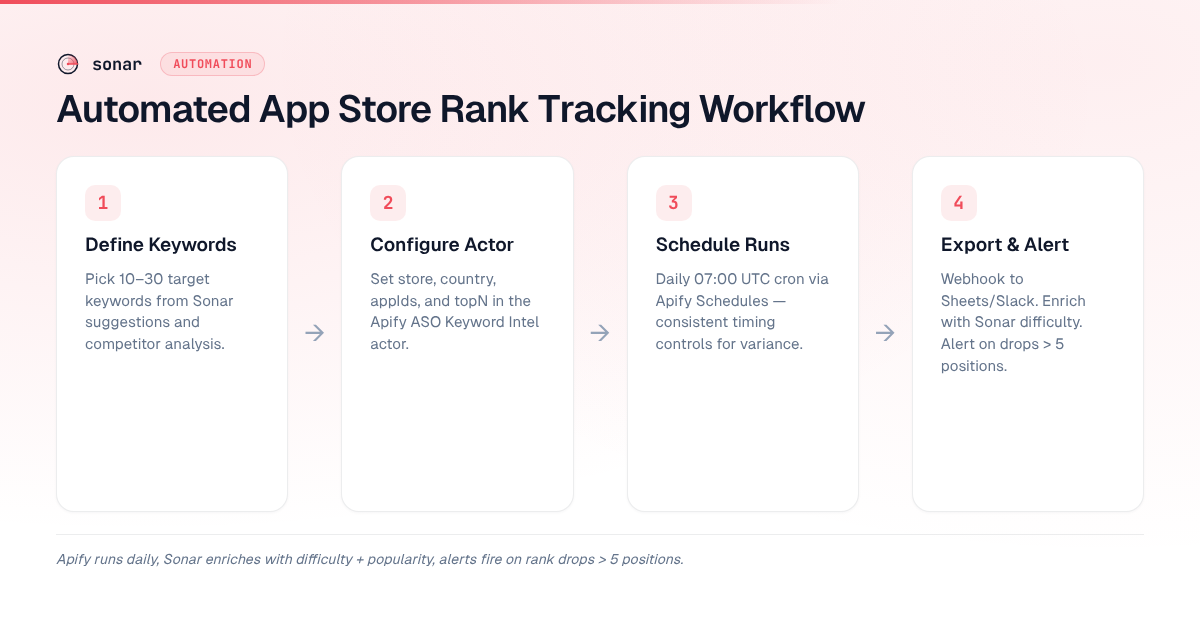
Enriching Rank Data With the Sonar API
The Apify actor gives you positions. The Sonar API gives you context — difficulty scores, popularity data, and competitive density that explain why a position matters.
Fetching Keyword Difficulty and Popularity
Use the /keywords/search endpoint to pull difficulty and popularity for any keyword:
curl -H "Authorization: Bearer YOUR_API_KEY" \
  "https://trysonar.app/api/v1/keywords/search?q=tip%20calculator&store=ios&country=us"
This returns difficulty (0–100), Apple's popularity score (5–100 for iOS), a popularity proxy, and the total number of competing results. For "tip calculator" on iOS, the response shows difficulty 39, popularity 5, proxy 37, and 127 competing results (source: Sonar /api/v1/keywords/search, queried July 2026).
Combining Rank + Difficulty for Prioritization
Raw rank data alone does not tell you where to focus optimization effort. A keyword where you rank #8 with difficulty 39 is a different optimization problem from one where you rank #8 with difficulty 66.
Here is how I prioritize using both data sources:
| Rank position | Difficulty | Action |
|---|---|---|
| 1–3 | Any | Monitor. Defend the position with ongoing keyword tracking. |
| 4–10 | < 40 | High priority. Metadata tweaks can push you into the top 3. |
| 4–10 | > 60 | Needs sustained effort — downloads, ratings, and metadata all matter. |
| 11–50 | < 40 | Target these with metadata changes and monitor for movement. |
| 11–50 | > 60 | Consider whether the keyword is worth the investment. |
| Not ranking | Any | Evaluate if the keyword belongs in your field at all. |
For a deeper understanding of what the difficulty score measures, see our keyword difficulty explainer.
The Cross-Store Comparison Use Case
One of the most actionable insights from combining these tools is cross-store keyword comparison. The same keyword can be low-competition on one store and highly competitive on the other.
From the Sonar API data: "tip calculator" has iOS difficulty 39 with 127 competing results, while on Android the same keyword shows difficulty 16 with only 29 competing results (source: Sonar /api/v1/keywords/search, queried July 2026). If your app is on both platforms, this tells you that Android is the easier win for this keyword — worth tracking rank there first.
The Apify actor's store: "both" setting captures this automatically, giving you side-by-side rank data for every keyword on every run.
Integrating Your App Store Rank Tracker With CI/CD and AI Agents
Because both the Apify actor and the Sonar API return structured JSON, they slot into developer workflows natively.
Sonar CLI and MCP Integration
Sonar also offers a CLI tool and an MCP (Model Context Protocol) server, which means AI agents like Claude can query keyword data directly during conversations. Install the CLI with:
npm install -g @sonarapp/cli
sonar auth login
Then use it in scripts alongside your Apify exports. For more on API and CLI workflows for ASO, we have a dedicated guide covering all ten endpoints.
Alert Automation Example
A practical automation: after each Apify run, check if any tracked keyword dropped more than 5 positions, and send a Slack alert if so. The webhook payload from Apify contains the dataset ID, which you fetch and compare against yesterday's data.
// Pseudo-code for a post-run webhook handler
const today = await fetchDataset(latestDatasetId);
const yesterday = await fetchDataset(previousDatasetId);

for (const keyword of trackedKeywords) {
  const todayRank = today.find(r => r.keyword === keyword)?.rank;
  const yesterdayRank = yesterday.find(r => r.keyword === keyword)?.rank;

  if (todayRank && yesterdayRank && todayRank - yesterdayRank > 5) {
    await sendSlackAlert(
      `⚠ "${keyword}" dropped from #${yesterdayRank} to #${todayRank}`
    );
  }
}
This kind of pipeline is what separates reactive ASO (checking dashboards when you remember) from proactive ASO (getting notified before a ranking drop becomes a download drop).
What This Setup Costs vs. Traditional ASO Tools
Enterprise ASO platforms like Sensor Tower and data.ai charge thousands per month for rank tracking, keyword research, and competitive intelligence bundled together (source: our breakdown of Sensor Tower pricing and alternatives). The Apify + Sonar approach lets you pay only for what you use.
| Component | Cost model | Reference |
|---|---|---|
| Apify actor runs | Pay per event (ranking rows) | Apify pricing — free tier included |
| Sonar API | Pay per request via pricing tiers | Scales with usage; free tier available |
| Apify platform | Free tier covers light usage; paid plans from $49/month | Apify pricing page |
In my experience running 20 keywords daily across both stores, the combined Apify + Sonar cost stays well below what dashboard-based app store rank tracker platforms charge for equivalent data. Exact costs depend on your topN depth and request volume — check each platform's pricing page for current rates.
FAQ
Can I track app store keyword rankings for free?
The Apify platform offers a free tier that includes limited monthly compute credits, which can cover light rank tracking workloads — roughly 5–10 keywords tracked daily. For larger keyword lists, paid Apify plans start at $49/month (source: Apify pricing page). Sonar also offers free-tier API access for low-volume keyword research. For more free options, see our roundup of free ASO tools.
How often should I track keyword rankings?
Daily tracking is the minimum useful cadence for an active app store rank tracker setup. App Store search results can shift within 24–48 hours after a competitor metadata update or an algorithm recalculation (source: Apple Developer documentation on App Store search). Weekly tracking misses short-lived ranking fluctuations that daily data captures. If you are running Apple Search Ads, you may want twice-daily tracking to correlate ad spend with organic position changes.
Does the Apify actor work for both iOS and Google Play?
Yes. Set the store input parameter to "both" and the actor runs keyword rank checks against both the Apple App Store and Google Play in a single execution. Output rows include a store field so you can filter results by platform. This is particularly useful because keyword competitiveness often diverges between stores — for example, "tip calculator" shows difficulty 39 on iOS but only 16 on Android (source: Sonar API, queried July 2026).
What is the difference between Apple popularity score and Sonar difficulty?
Apple's popularity score (the 5–100 scale) reflects relative search volume — how many users type that exact phrase into the App Store search bar. Sonar's difficulty score (0–100) measures how hard it is to rank in the top results for that keyword, factoring in the strength and number of competing apps. A keyword can have high popularity (many searches) and low difficulty (weak competitors), which makes it an ideal target. For a detailed breakdown, read our Apple Search Popularity explainer.
Can I use this setup to track competitor rankings too?
Yes. The Apify actor's appIds input accepts multiple app IDs. Add your competitors' iOS track IDs or Android package names alongside your own, and the actor returns each app's rank position for every tracked keyword. This turns the same daily run into both a self-tracking and competitive intelligence tool. Pair it with the Sonar API's /apps/search endpoint to discover which apps rank for a keyword before deciding who to track.
Want keyword difficulty, popularity, and competitor data for every keyword you track? Try Sonar free — it powers the data behind this entire workflow.