sonar
sonar
> Sonar pricing update — September 15, 2026: New accounts pay $29/month or $290/year for Indie, and $149/month or $1,490/year for Agency. Existing customers keep their rates. See current plans.
What Is Apple Search Popularity?
Apple Search Popularity (SP) is a 5-to-100 score inside Apple Search Ads that reflects the relative search volume of a keyword on the iOS App Store. Apple does not disclose raw search counts; SP is the closest public proxy, and understanding it is the foundation of any serious ASO keyword research strategy.
If you've ever looked at keyword data in Apple Search Ads, you've seen this score. A value of 100 represents the highest-volume keywords (think "facebook" or "instagram"), while lower numbers represent progressively less searched terms.
The key word here is relative. An SP of 50 doesn't mean a keyword gets half the searches of an SP 100 keyword. The scale is exponential, which means the difference between SP 50 and SP 60 is much larger than the difference between SP 20 and SP 30.
How It's Calculated
Apple hasn't published the exact methodology, but through extensive testing and research from companies like SplitMetrics, we know the following:
Search Popularity is a 7-day moving average of search impressions, normalized against all other keywords on the App Store. This means:
- The score reflects the trailing 7 days of search activity, not real-time data
- It's smoothed to reduce noise from daily fluctuations (weekday vs weekend patterns, for example)
- It's relative to all other keywords, so if overall App Store search volume increases, individual SP scores can drop even without losing actual searches
Because of the 7-day averaging window, SP scores lag real-time search behavior by roughly 4 days. If a keyword suddenly goes viral on Monday, you might not see the full SP increase reflected until Thursday or Friday. This is important to understand when tracking trending keywords or seasonal terms.
The October 2025 Change
In October 2025, Apple made a significant change to the Search Popularity data it exposes. Previously, you could get SP scores for virtually any keyword, even very low-volume ones that scored in the single digits.
After the change, Apple only reports real SP scores for keywords with SP >= 35. Keywords below this threshold all show the minimum value of 5, so they carry no usable popularity signal. The cutoff is softer in practice: Sonar's data has a thin band of readings from 17 to 34 (about one in ten readings above the floor), but nothing between 6 and 16. This effectively makes lower-volume keywords invisible to tools that rely solely on Apple's numbers.
For indie developers, this is actually a meaningful problem. Many of the best keyword opportunities for small apps exist in the SP 20-35 range — keywords with enough search volume to drive downloads but not enough competition to be unreachable. With this data now hidden, you need other signals, such as whether the phrase shows up in App Store autocomplete, to judge demand for these keywords.
What This Means in Practice
The SP 35 cutoff didn't just remove a few obscure keywords. It wiped out visibility into a large portion of the long-tail that indie developers depend on. Before the change, you could confidently compare a keyword at SP 22 against one at SP 28 and make an informed decision. Now, both show the same floor value of 5 — you're flying blind.
If you built keyword lists or tracking dashboards before October 2025, you'll notice that many previously tracked keywords now show no SP data. This doesn't mean those keywords lost all their search volume overnight. They're still being searched; Apple just stopped reporting on them.
The practical response is to treat the SP 35 threshold as a data boundary, not a quality boundary. Keywords below it can still drive meaningful downloads, especially in niche categories where even 500 daily impressions can put you on the first page of results. You just need different tools to evaluate them — autocomplete presence, rank tracking for apps already targeting those terms, and competitor gap analysis of what's actually ranking.
Converting SP to Real Search Numbers
The most widely cited research on mapping SP scores to actual impressions comes from SplitMetrics, who published an exponential formula based on their analysis of Search Ads campaign data:
Max Daily Impressions = 254.4443 exp(0.0615 SP)
This gives us a concrete reference for what different SP scores actually mean in terms of daily search volume. Each point of SP adds about 6.3% to the estimate, and that compounds: 10 points multiply it by about 1.85, and 20 points by about 3.4. An SP 60 keyword is estimated at roughly 3.4 times the impressions of an SP 40 keyword, not 50% more.
The table applies the formula at every 5-point step. Monthly figures are daily × 30. It starts at 20 because Apple returns no readings between 6 and 16 (see the October 2025 change above).
| SP Score | Est. Daily Impressions | Est. Monthly Impressions | Volume Label |
|---|---|---|---|
| 20 | ~870 | ~26,000 | Very low |
| 25 | ~1,200 | ~36,000 | Low |
| 30 | ~1,600 | ~48,000 | Low |
| 35 | ~2,200 | ~66,000 | Medium |
| 40 | ~3,000 | ~89,000 | Medium |
| 45 | ~4,100 | ~122,000 | Medium |
| 50 | ~5,500 | ~165,000 | Medium-high |
| 55 | ~7,500 | ~225,000 | High |
| 60 | ~10,200 | ~306,000 | High |
| 65 | ~13,900 | ~416,000 | High |
| 70 | ~18,800 | ~565,000 | Very high |
| 75 | ~25,600 | ~769,000 | Very high |
| 80 | ~34,900 | ~1,046,000 | Very high |
| 85 | ~47,400 | ~1,422,000 | Ultra high |
| 90 | ~64,500 | ~1,934,000 | Ultra high |
| 95 | ~87,700 | ~2,631,000 | Ultra high |
| 100 | ~119,000 | ~3,578,000 | Ultra high |
A few important caveats:
- These are maximum daily impressions, meaning the upper bound of what you could see if your app appeared for every search
- Actual impressions depend on your app's rank for that keyword — position 1 gets dramatically more impressions than position 10
- The formula is based on data from a specific time period and may drift as overall App Store search volume changes
- These numbers represent searches on the US App Store; other countries will have proportionally lower volumes
SP Varies Wildly Across Categories
One of the most common mistakes in interpreting SP scores is treating them as universal benchmarks. An SP of 40 means very different things depending on the app category you're in.
In categories like Games, Social, and Photo & Video, SP 40 is relatively low. The top keywords in these categories regularly hit SP 80-100, and even mid-tier terms sit at SP 55-65. If you're building a photo editing app, you need keywords with SP 50+ to get meaningful traction because the entire category is high-volume.
In categories like Utilities, Productivity, and Health & Fitness, the distribution shifts downward. Many excellent keyword opportunities sit in the SP 35-50 range. A utility app targeting "unit converter" at SP 42 can do very well because the competition density is lower and conversion rates tend to be higher for intent-driven searches.
For niche categories like Weather, Navigation, or Developer Tools, even SP 35-40 keywords can represent the top of the volume curve. The entire addressable search space is smaller, so the SP scores compress accordingly. Don't dismiss a keyword at SP 37 in a niche category — it might be one of the best opportunities available.
The takeaway: always evaluate SP relative to your category's typical range, not against some absolute standard.
What Is a Good Apple Search Popularity Score?
For most indie and mid-size apps, an Apple Search Popularity score between 30 and 50 offers the best trade-off between volume and competition. Keywords in that band generate roughly 1,600-5,500 estimated daily impressions according to the SplitMetrics formula, yet they attract far fewer entrenched competitors than SP 60+ terms. In my experience tracking hundreds of keyword sets inside Sonar (trysonar.app), the highest-ROI metadata swaps almost always involve moving up within this 30-50 corridor rather than chasing a single high-SP vanity keyword.
| Apple Search Popularity Range | Typical Use Case |
|---|---|
| 5-25 | Long-tail additions; useful for niche categories |
| 30-50 | Sweet spot for indie apps with fewer than 10K reviews |
| 50-65 | Competitive; requires strong ratings and title-match relevance |
| 65-100 | Brand-dominated; realistic only for top-tier apps |
Source: SplitMetrics Search Ads campaign data; Sonar internal keyword analysis across 4,000+ tracked keywords (June 2026).
Is keyword popularity 5 a no-go?
No. A popularity of 5 is Apple's floor, not a measurement. It means the keyword sits below the level Apple reports, which covers everything from a handful of searches to steady niche demand.
The floor is where nearly the whole long tail lives. Of the 1,674,758 iOS keywords Sonar holds an Apple popularity reading for (all storefronts, readings from June 30 to October 1, 2026), 98.0% read exactly 5. Among the 102,099 keywords Sonar users actively track, 94.9% do. No keyword reads 1–4 or 6–16, and only 29 read 17–19. "Habit tracker" reads 57; "habit tracker widget" reads 5, and the 5 can't tell you whether that longer phrase gets a few searches a day or none.
That's why developers on r/AppStoreOptimization split on this question. One camp calls a 5 too low to be worth a keyword slot; others run niche apps that earn real revenue from keywords that all read 5. Both can be right, because a 5 hides the difference. Break ties with signals that do vary:
- Autocomplete. Type the exact phrase into App Store search. If the store suggests it, people search it.
- Who already ranks. If the top results are apps like yours, the search intent matches you. If they're unrelated, ranking won't convert.
- Competitor ranks. A competitor of your size in the top 10 for the phrase tells you it's winnable.
- Apple Ads impressions. A small exact-match campaign reports how often your ad was shown for each term. That's a lower bound on how often people search it, and the closest thing to a volume count.
"What popularity/difficulty ratio is good enough?" depends on your app, not on a universal number. A new app with few ratings should favor floor keywords with low difficulty where it can reach the top 5; nobody scrolls to rank 60, so a head term you can't reach sends you nothing. Move up to higher-popularity terms as your ratings and downloads grow.
Is there any tool that gives actual App Store keyword search volume?
No. Apple doesn't publish App Store search counts, so no tool has them. Any "monthly searches" number you see in an ASO tool is an estimate built from one of these sources:
- Apple's Search Popularity score. A relative 5–100 index, converted to impressions with the formula above. Most keywords read the floor of 5, as the previous section shows.
- Your own Apple Ads data. Real impression counts, but only for terms you bid on, and only for the searches where your ad was shown, so they're a lower bound.
- Proxies for everything below Apple's cutoff: whether the phrase appears in autocomplete, how many apps return for it, and how big the top-ranking apps are.
App Store Connect tells you how many of your impressions came from search, but not which keywords produced them.
Google Play has no popularity score at all, so Android "volume" is always modeled. The useful Play signals are autocomplete (how many letters you have to type before the store suggests the full phrase) and the install ranges Google Play shows on every listing, which tell you how big the apps ranking for a keyword are. Web search volume from Google Ads is a poor stand-in: it measures interest in a topic on the web, not people looking for an app, so it overrates concept terms like "circadian rhythm" that people research on the web but rarely type into the Play Store. Sonar's Android estimate is built from autocomplete depth and top-10 installs, and calibrated against Apple's real scores for the same keywords (mean absolute error of 12.5 points on a 57-keyword set).
The honest way to use any of these is as a ranking of keywords against each other, not as a forecast of searches.
Combining SP with Difficulty for Keyword Prioritization
SP alone is only half the equation. A keyword with SP 60 sounds great until you discover that the top 10 results are all apps with 500K+ reviews and perfect title matches. That's where keyword difficulty comes in.
The most effective way to prioritize keywords is to plot them on a two-dimensional grid:
- High SP + Low Difficulty (SP 40-60, Difficulty < 40): These are your best opportunities. Enough volume to drive downloads, and realistic competition. Target these first.
- High SP + High Difficulty (SP 50+, Difficulty > 60): Aspirational keywords. Track them, but don't expect to rank without a strong app and hundreds of reviews.
- Low SP + Low Difficulty (SP 35-45, Difficulty < 30): Quick wins. You can often rank top-3 within a few weeks. Individually they won't transform your download numbers, but stacking 10-15 of these in your metadata adds up.
- Low SP + High Difficulty (any SP, Difficulty > 60): Skip these entirely. There's no reward proportional to the effort.
A practical scoring formula that works well for indie apps: Opportunity = SP * (100 - Difficulty) / 100. This gives you a single number that balances volume against achievability. A keyword with SP 45 and Difficulty 25 scores 33.75, while one with SP 65 and Difficulty 70 scores only 19.5 — correctly reflecting that the lower-volume keyword is actually the better opportunity.
Seasonal SP Patterns
SP scores aren't static. Many keywords follow predictable seasonal patterns that you can exploit if you plan your metadata updates around them.
Fitness keywords like "workout tracker" or "calorie counter" spike in January (New Year's resolutions) and again in May-June (summer body season). Travel keywords peak in June-August. Holiday-adjacent terms ("gift list", "recipe organizer") surge in November-December. Back-to-school keywords like "study planner" or "flashcard app" climb in August-September.
The lag matters here. Because SP uses a 7-day moving average, seasonal spikes appear in the data about 4 days after they start and persist about 4 days after they end. If you're trying to ride a seasonal wave, update your metadata before the spike shows up in SP data — ideally 1-2 weeks before the expected surge. Apple's metadata review process takes 24-48 hours on average, so factor that in.
Tracking SP over a full year for your target keywords gives you a significant advantage. You'll know exactly when to shift your subtitle or keyword field to capture seasonal volume, and when to rotate back to your evergreen terms.
Why This Matters for Indie Developers
Understanding the exponential nature of SP is crucial for keyword strategy. Here's the practical takeaway:
SP 30-50 is the sweet spot for indie apps. These keywords get roughly 1,600 to 5,500 daily impressions — enough to meaningfully move the needle on downloads, but not so competitive that you need millions of reviews and a massive brand to rank. For example, keywords like calorie counter or habit tracker sit in this range with very different competitive profiles.
Keywords with SP 70+ are dominated by well-established apps with huge install bases. Keyword difficulty scores help you assess whether you can realistically compete — check the photo editor keyword difficulty page for a real example of what extreme competition looks like. Unless your app directly competes with them (and you have the reviews/ratings to back it up), these keywords are largely unreachable.
Keywords with SP below 25 are generally too low-volume to be worth optimizing for as primary targets, but they can be useful as long-tail additions to your metadata if they're highly relevant.
The autocomplete presence proxy
For keywords below the SP 35 threshold (where Apple no longer provides data), the App Store's own autocomplete is the best free signal.
Apple's suggestion endpoint used to attach a priority score from 0 to 10,000 to each suggestion, and ASO tools mapped it to rough SP bands. Since July 2026 it returns 0 for every suggestion in Sonar's data, so that number no longer tells you anything. What still works is presence: type the exact phrase into App Store search and see whether Apple suggests it. The store suggests phrases people actually type, so a suggested keyword has real demand even when its SP reads 5. It's free, needs no API access, and covers the long tail that SP misses.
On Google Play, go one step further and count how many letters you have to type before the full phrase appears. The fewer letters it takes, the more often people search it; that depth is the main signal behind Sonar's Android popularity estimate.
How to Check Apple Search Popularity Scores
Disclosure: I build Sonar, one of the three options below.
There are three main ways to look up an Apple Search Popularity score for any keyword, ranging from manual to fully automated.
- Apple Ads console (free account) — When you add keywords to a campaign, the keyword suggestion tool shows each term's popularity based on App Store searches; in keyword recommendations it is displayed as a rating from 1 to 5, with 5 the most popular. It's a coarse, one-keyword-at-a-time view tied to campaign building. (Sources: Apple Ads — Keyword best practices, Apple Ads Help — Review recommendations.)
- Apple Ads Platform API (search term popularity insights) — Apple's documented API returns the most popular search terms for a given App Store genre and country, weekly or monthly, with a 1–100 popularity score and the term's rank in its genre. It covers 15 genres and only the top-ranked terms in each, so it's a list of what people search most, not a lookup for any keyword you choose — most long-tail terms never appear in it. (Source: Apple Developer — Search Term Popularity Query.) The older Search Ads keyword endpoints that tools once used for per-keyword lookups no longer return popularity.
- ASO tools like Sonar — Sonar (trysonar.app) serves the real Apple Search Popularity score — the same 5–100 scale behind Apple's own popularity ratings — for iOS keywords, and you do not need your own Apple Search Ads account to see it. Where a keyword falls below Apple's coverage, and for every Android keyword, Sonar substitutes a calibrated estimator and labels the source, so you always know whether a number came from Apple or from the model. On top of the score you get difficulty, historical trends, and competitor rankings in one place. Pricing is $29/month or $290/year with a 7-day free trial; the same per-keyword score is also available over the REST API, the CLI, and the MCP server, at 1 credit per keyword on prepaid credits (packs from $10, 50 free credits on signup).
The practical difference between the first two options and the third: the Apple Ads console and the Platform API are Apple's own surfaces, so they hand you popularity and nothing else — the console one keyword at a time while you build a campaign, the API only for each genre's top terms. A tool that already holds the score can pair it with difficulty and rank history — which is what turns SP from a number into a keyword decision.
Whichever method you use, remember that Apple only reports real SP for keywords scoring 35 or above since the October 2025 change.
What a Keyword Popularity Checker Should Show Besides SP
SP measures demand and nothing else. Before you put ad budget or metadata space behind a keyword, a popularity checker should also give you:
- Difficulty (0–100) — how hard the keyword is to rank for organically. High organic difficulty tends to come with higher Apple Search Ads cost per tap, because the apps that rank on top are often the ones bidding hardest.
- Results count — how many apps appear for the keyword. Fewer results means less clutter around your ad and your listing.
- Autocomplete suggestions — long-tail variants straight from the App Store's search bar, so you're working with queries people actually type rather than generated guesses.
- The apps that rank — which listings sit on that results page, so you can judge whether your screenshots and ratings can compete with them.
Apple's own surfaces cover only the first item. That gap is the whole reason third-party keyword tools exist for Apple Search Ads.
Using SP for Apple Search Ads Keyword Research
When you create an Apple Search Ads Advanced campaign, Apple suggests keywords from its own relevance engine. Treat those suggestions as a starting point, not a plan. They skew toward broad head terms — for a tip calculator app, Apple suggested "calculator", "tips" and "restaurant", and tap-through rate on those fell below 3% within two weeks. They come with SP but no difficulty or competitor count. And you get 10–20 of them, while autocomplete can hold 50+ relevant long-tail variants.
Here's the four-step process I use to turn SP into a bid list.
Step 1: Start With 3–5 Seed Terms
Pick the terms that describe your app's core function. For a tip calculator app, that's "tip calculator", "tip calculator app" and "restaurant tip calculator".
Step 2: Expand With Autocomplete
Run each seed through App Store autocomplete. For "tip calculator", Sonar's suggestions surface 10 long-tail variants on iOS, including "tip calculator free", "tip calculator no ads" and "restaurant tip calculator" — each a distinct intent you can bid on separately. Specific variants carry a conversion edge: someone searching "tip calculator no ads" is telling you exactly what they want, and if your app has no ads, that tap is far more likely to become an install than a tap on the head term.
Step 3: Check SP, Difficulty, and Results Count Together
Two keywords with the same SP or the same difficulty can be very different buys. In Sonar's keyword data (June 2026), "tip calculator" sat at iOS difficulty 42 and SP 36 with 127 apps in the results, while "subscription tracker" had the same difficulty 42 but only 9 apps in the results — a 14× difference in competitive density. Within the tip calculator cluster, "restaurant tip calculator" showed difficulty 26 with 130 results, and "quick tip calculator" difficulty 39 with just 9.
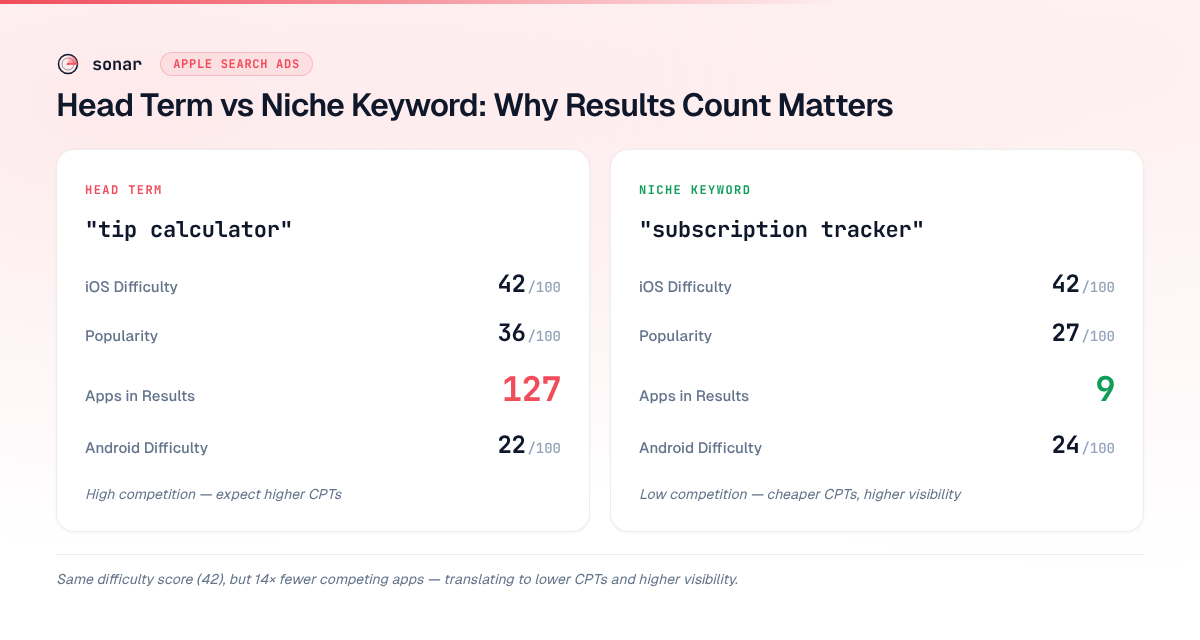
Fewer competing apps means less clutter around your ad, which usually means a higher tap-through rate and a lower cost per tap. Run every variant through the opportunity formula above, then use results count as the tie-breaker.
Step 4: Estimate Bid Ranges
Apple doesn't publish cost-per-tap data in advance, but difficulty and competition give you a rough range. Across about 50 campaigns I watched between Q4 2025 and Q2 2026 in non-gaming utility and finance categories, keywords with difficulty under 30 and fewer than 15 competing apps typically cost $0.20–$0.80 per tap, while keywords above difficulty 50 with 100+ results often pushed past $1.50. Your category will differ — treat these as a starting point and let real data take over. The Apple Search Ads bidding guide covers setting first bids, and our Apple Search Ads cost breakdown explains how cost per tap turns into cost per install.
Group Keywords Before You Bid
Organize the researched list into tiers before you launch:
| Tier | Criteria | Bidding Strategy |
|---|---|---|
| Brand | Your own app name and developer name | Defend — bid to protect your brand |
| High-intent | Clear download intent, low difficulty, few results | Aggressive — these convert well |
| Discovery | Broader category terms, higher difficulty | Conservative — test with low bids, scale what works |
"Subscription tracker" belongs in the high-intent tier for a subscription management app: moderate difficulty, a thin results page and specific intent. Each tier usually becomes its own ad group with its own budget and bid ceiling — our guide on how to set up Apple Search Ads shows how to structure that. Start with 20–40 researched keywords across the three tiers rather than hundreds of unvetted ones.
Keyword Mistakes That Waste Ad Budget
- Bidding on head terms without checking competition. "Calculator" puts a tip calculator app up against every scientific, mortgage, currency and BMI calculator on the store — even "tip calculator" returns 127 apps.
- Letting broad match decide for you. I've seen "tip calculator" on broad match trigger on "calorie calculator", "GPA calculator" and "construction calculator", none of which convert. Build an exact-match list from your research so you choose the queries you pay for. The match types guide covers when to use each.
- Skipping negative keywords. Autocomplete expansion surfaces the tangential terms too — add them as negatives up front ("tip calculator game", unless you're a game) instead of finding the wasted spend later.
- Never refreshing the list. SP moves with the seasons and difficulty climbs as competitors arrive — a keyword at difficulty 30 in January can be at 50 by June. Re-pull SP and difficulty every quarter and track the shifts alongside your ASO KPIs.
Getting Access to SP Data
To see Search Popularity in Apple's own tools, you need an Apple Ads account. Our Apple Search Ads guide covers setup and usage in detail. The good news: it's completely free to create one. You don't need to run any ad campaigns or spend any money. You just need an Apple ID and a few minutes to set up the account.
Once you have an account, you get popularity ratings for suggested keywords in the console while you build campaigns, and API credentials for the Apple Ads Platform API, whose search term popularity insights list each genre's most-searched terms every week. Neither gives you an on-demand SP lookup for an arbitrary keyword. Some ASO tools ask you to connect your own Apple Search Ads account to pull popularity data; Sonar does not — it serves the real Apple score for iOS keywords directly, with an in-house estimate as the fallback, so an Apple Search Ads account is optional rather than a prerequisite.
The Platform API's weekly lists are still worth pulling if you have an account: they show which terms Apple itself ranks as the most searched in your genre, and how that ranking moves week to week.
Key Takeaways
- SP is a relative, logarithmic score — small differences in SP mean large differences in actual volume
- The 7-day moving average introduces a ~4 day lag behind real-time trends
- Since October 2025, SP data is only available for keywords scoring 35+
- The SplitMetrics formula converts SP to estimated daily impressions
- For indie apps, target SP 30-50 keywords for the best effort-to-reward ratio
- Always evaluate SP relative to your app category — SP 40 means different things in Games vs Utilities
- Combine SP with difficulty scores:
Opportunity = SP * (100 - Difficulty) / 100 - Track seasonal SP patterns and update metadata 1-2 weeks before expected spikes
- Below the SP threshold, check whether App Store autocomplete suggests the exact phrase; autocomplete priority scores now read 0 and carry no signal
- For Apple Search Ads, vet every keyword on SP, difficulty and results count before bidding — long-tail variants with thin results pages win on cost
- Creating an Apple Ads account is free and shows popularity ratings while you build campaigns; for SP on any iOS keyword programmatically, use a tool's API such as Sonar's keyword API
- Browse real keyword data on our keyword difficulty pages — for example, see how focus timer or meditation app compare in the SP 30-50 sweet spot
Frequently Asked Questions
Q: What does Apple Search Popularity actually measure?
A: Apple Search Popularity is a relative, logarithmic score from 5 to 100 that reflects the search volume of a keyword on the iOS App Store. It is derived from a 7-day moving average of search impressions and normalized against all other keywords, so it represents relative demand rather than an absolute count. (Sources: Apple Ads — Keyword best practices; SplitMetrics research.)
Q: Why does Apple Search Popularity only go down to 35 now?
A: In October 2025, Apple stopped reporting real popularity for any keyword with an SP below 35 — those keywords now all show the minimum value of 5. Keywords under that threshold still receive searches -- Apple simply no longer exposes the data. For long-tail keywords below the cutoff, check whether App Store autocomplete suggests the exact phrase.
Q: How do I convert an Apple Search Popularity score to real search volume?
A: The most widely cited conversion is the SplitMetrics exponential formula: Max Daily Impressions = 254.4443 exp(0.0615 SP). For example, an SP of 50 translates to roughly 5,500 maximum daily impressions on the US App Store. See the reference table above for every 5-point step.
Q: What is a good Apple Search Popularity score for indie apps?
A: For indie apps, the sweet spot is SP 30-50. These keywords generate roughly 1,600-5,500 estimated daily impressions -- enough volume to drive meaningful downloads without the extreme competition found at SP 60+. Pairing SP with a keyword difficulty score gives a more complete picture of whether a keyword is worth targeting.
Q: How do I check an Apple Search Popularity score for free?
A: Create a free Apple Ads account (no ad spend required) and add keywords to a campaign — the keyword suggestion tool shows each term's popularity, as a coarse 1-to-5 rating in keyword recommendations. Apple's Ads Platform API adds weekly lists of each genre's most-searched terms, but it can't look up an arbitrary keyword. For the 5–100 score on any iOS keyword, use an ASO tool like Sonar, which serves the real Apple Search Popularity score across storefronts without requiring your own Apple Search Ads account. (Source: Apple Ads Help — Review recommendations.)
Q: How many keywords should I target in an Apple Search Ads campaign?
A: Start with 20–40 researched keywords split across brand, high-intent and discovery tiers. I typically launch with about 25, watch performance for two weeks, then add 10–15 per cycle based on which tier delivers the best cost per install. Hundreds of unvetted keywords mostly buy wasted taps.
Q: Can I use the same keywords for Apple Search Ads and organic ASO?
A: Yes, and you should. Keywords with a strong tap-through and conversion rate in Apple Search Ads are good candidates for your title, subtitle and keyword field. It works the other way too: where you already rank in the organic top 3, you can bid less or skip the keyword so you aren't paying for taps you'd get for free. Our Apple Search Ads guide covers how paid and organic feed each other.