 sonar
sonar
How App Store Category Selection Shapes Your Ranking Strategy
Your app store category selection determines which competitors you rank against, which browse charts you appear on, and which users discover you outside of search. Apple lets you pick one primary and one secondary category. Google Play gives you one category plus up to five tags source: [Apple: Choosing a category, Google Play Console Help]. Most developers default to the obvious category and never revisit it. That leaves real ranking leverage on the table.
I have spent years watching how category choices play out in search results through Sonar's keyword data. The patterns are consistent: category selection does not lock you into a single competitive lane. It is one of the few free ASO levers that can shift your visibility with your next release, without a metadata rewrite or a new creative set.
Why Category Choice Is Not Predetermined
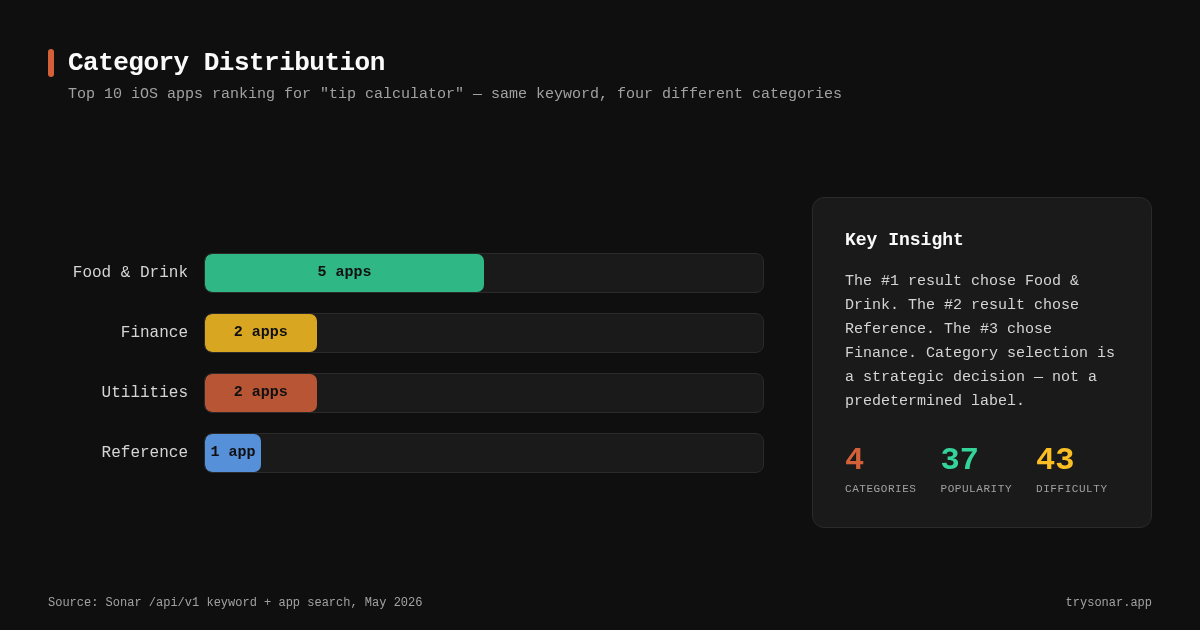
Even for narrowly-defined keywords, the top-ranking apps regularly span multiple categories. Sonar's keyword data shows "tip calculator" has iOS popularity 37 and difficulty 43 with 166 results -- and the top 10 ranking apps span four different App Store categories (Food & Drink, Finance, Reference, and Utilities), proving that category choice is not predetermined even for a single keyword (source: Sonar /api/v1/keywords/search and /api/v1/apps/search, queried May 2026).
Here is what those top 10 look like in practice:
| Rank | App | Category | Reviews |
|---|---|---|---|
| 1 | Tip Calculator % Gold | Food & Drink | 59,183 |
| 2 | Tip Calculator Per Mille | Reference | 9,035 |
| 3 | Tip Check - Tip Calculator | Finance | 12,155 |
| 4 | QuickTip Tip Calculator | Finance | 69 |
| 5 | Tip Calculator % Tap Tip | Food & Drink | 2,508 |
| 6 | Tip Calculator Plus+ | Utilities | 6,920 |
| 7 | Tipsy - Tip Calculator | Food & Drink | 49 |
| 8 | Tips - Tip Calculator | Food & Drink | 154 |
| 9 | iTip Calc by PalaSoftware | Food & Drink | 9,804 |
| 10 | Tip Tap Split | Utilities | 32 |
Five apps chose Food & Drink, two chose Finance, two chose Utilities, and one chose Reference. All ten rank for the exact same keyword. The takeaway: category doesn't decide who gets to rank. Apple does index your primary and secondary category as search text, but it is one text signal next to your title, subtitle and keywords, alongside user behavior such as downloads and ratings source: [Apple's App Store search documentation]. That is how four categories end up sharing one keyword's top 10.
This matters because choosing a less crowded category can give you a higher browse chart position while keeping the same keyword rankings. If your app is a tip calculator and you pick Utilities instead of Food & Drink, you compete against a different set of browse-tab neighbors without losing keyword reach.
Primary vs. Secondary Category: How Each One Works
Apple's primary category is the one that shows on your product page, determines your chart ranking, and is where your app appears when people browse the App Store or filter search results. Your secondary category gives you a second browse listing -- users who tap into that category's charts can see your app there too source: [Apple: Choosing a category].
The critical distinction: search ranking is not filtered by category. An app in the Finance category and an app in the Utilities category both compete equally for the same keyword. But browse ranking is category-specific. A user scrolling the top free charts in Utilities will never see a Finance-categorized app unless Apple editorially features it. One search detail worth knowing: because Apple indexes both category names, it tells you not to repeat words from your category in the keyword field -- "finance" is already covered if Finance is your category.
On Google Play, the single category choice carries more weight because there is no secondary category. Google does offer custom store listings for targeting different audiences, but these do not change your category placement. This is one of several differences between the two platforms -- the Google Play ASO guide covers the rest.
What the secondary category actually gives you
- A second chart listing. If you rank #40 overall in your primary category but your secondary category is smaller, you might place higher in the secondary chart.
- Browse discovery from a different user intent. A meditation app with a primary in Health & Fitness and a secondary in Lifestyle reaches users browsing either section.
- No penalty. Apple indexes both your primary and secondary category in search, so adding a secondary costs your primary nothing source: [Apple's App Store search documentation].
The full list of App Store categories
Apple lists 27 categories for apps and games source: [Apple: Choosing a category]. The examples below are Apple's own, which helps when your app could plausibly sit in two of them:
| Category | Apple's examples |
|---|---|
| Books | Stories, comics, eReaders, graphic novels |
| Business | Document management, VoIP, job search, CRM, point of sale |
| Developer Tools | Coding, testing, debugging, code editing |
| Education | Language learning, test prep, early learning, school portals |
| Entertainment | Television, movies, fan clubs, ringtones, ticketing |
| Finance | Personal finance, mobile banking, investing, budgets, tax, insurance |
| Food & Drink | Recipes, cooking guides, restaurant reviews, dietary and allergy apps |
| Games | Action, puzzle, racing, strategy and other game genres |
| Graphics & Design | Vector design, image editing, drawing and illustration |
| Health & Fitness | Workout tracking, running, yoga, meditation, weight loss |
| Kids | Apps for children 11 and under (iOS and iPadOS only) |
| Lifestyle | Real estate, hobbies, parenting, fashion, home improvement |
| Magazines & Newspapers | Periodicals sold as auto-renewing subscriptions |
| Medical | Medical reference, record-keeping, symptom reference, companion devices |
| Music | Music creation, radio, music discovery, lyric writing |
| Navigation | Driving and walking directions, topographic maps, transit maps |
| News | Newsreaders, digests, digital-first and broadcast news outlets |
| Photo & Video | Capture, editing, effects, sharing, printing |
| Productivity | Tasks, calendars, notes, email clients, cloud storage |
| Reference | Dictionaries, encyclopedias, atlases, how-tos |
| Safari Extensions | Ad blockers, password managers, content bookmarkers |
| Shopping | Commerce, marketplaces, coupons, product reviews |
| Social Networking | Messaging, video calls, dating, special-interest communities |
| Sports | Fantasy sports, teams and leagues, score trackers, sports news |
| Travel | Flight tracking, city guides, booking, vacation planning |
| Utilities | Calculators (including tip), clocks, flashlights, barcode scanners, unit converters |
| Weather | Forecasts, radar, severe weather alerts, tides |
A few categories come with rules of their own:
- Games. A game can add up to two Games subcategories, which have their own browse pages and charts.
- Kids. Kids works differently: you tick Made for Kids in App Store Connect, choose an age band (5 and under, 6-8 or 9-11) and pass review against the Kids guidelines. The app still gets a regular primary and secondary category, such as Education or Games.
- Stickers. Sticker pack apps can use a Stickers category on the App Store for iMessage, but standalone sticker packs don't appear in categories on the iPhone and iPad store; people find them only through search.
- Magazines & Newspapers vs. News. Magazines & Newspapers is for issue-based periodicals and interactive print editions. A newsreader or a frequently updated digital outlet belongs in News.
How to Analyze Category Competition Before You Choose
Before settling on a category, I recommend a three-step process using keyword data to understand where the competition actually sits.
Step 1: Search your core keywords and map categories. Look at which categories the top 10 results occupy. Sonar makes this straightforward -- search any keyword and the results show each app's category alongside its rank.
Step 2: Count the category distribution. When I analyzed the keyword "subscription tracker" on iOS (popularity 23, difficulty 36), 8 out of 10 top-ranking apps chose Finance while 2 chose Utilities -- including MonoBoost Cancel Subscriptions at rank #5 with over 4,000 reviews (source: Sonar /api/v1/apps/search, queried May 2026). That 80/20 split tells you Finance is the default but not the only viable path.
| Rank | App | Category | Reviews |
|---|---|---|---|
| 1 | Rocket Money - Bills & Budgets | Finance | 352,242 |
| 2 | Bobby - Track subscriptions | Finance | 7,912 |
| 3 | Subscription Tracker | Finance | 253 |
| 4 | Subscription Manager: Orbit | Finance | 99 |
| 5 | MonoBoost Cancel Subscriptions | Utilities | 4,028 |
| 9 | Subscription Tracker - Submind | Utilities | 4 |
MonoBoost is proof that picking the minority category does not disqualify you from ranking. It sits at #5 with a Utilities label while eight Finance apps surround it.
Step 3: Compare iOS and Android difficulty. On Android, "tip calculator" has a lower difficulty of 16 compared to iOS's 43, and popularity of 44 vs 37 on iOS -- the cross-platform gap suggests that category competition dynamics differ between stores (source: Sonar /api/v1/keywords/search, queried May 2026). If your app is cross-platform, the right category on iOS might not be the right one on Google Play. For how Google Play weighs category against other signals, see how Play Store ranking works.
The Secondary Category Strategy: When to Zig
The most underused app store category selection move is choosing a secondary category that serves a different browse audience than your primary. Here is when it works best:
- Your app crosses two clear use cases. A habit tracker could be Productivity (primary) and Health & Fitness (secondary). Users in both categories are legitimate audiences.
- Your primary category is oversaturated. If your primary is a crowded category like Finance and your secondary is something smaller like Reference, you can chart higher there.
- You want to test a new positioning. Categories can only be changed alongside a new app version, which goes through App Review source: [App Store Connect Help: editable properties]. Swap your secondary in a release that changes nothing else, observe browse traffic for 2-4 weeks, then decide.
Categories to consider by app type
| App type | Common primary | Strategic secondary | Why |
|---|---|---|---|
| Budget planner | Finance | Productivity | Reaches task-oriented users |
| Meditation | Health & Fitness | Lifestyle | Lifestyle has fewer meditation-specific competitors |
| Tip calculator | Food & Drink | Utilities | Utilities users expect calculator-style tools |
| Subscription tracker | Finance | Utilities | Utilities is the underdog path (2/10 top results use it) |
| Workout timer | Health & Fitness | Utilities | Utility apps have a loyal browse audience |
The key insight from the data: your secondary category is free, it doesn't dilute your primary positioning, and it can surface your app to an entirely different browse audience.
Common Mistakes in App Store Category Selection
Mistake 1: Choosing a category purely based on app function. Function is a starting point, not a decision. Check the keyword data first. If every competitor in your category has 100K+ reviews and your app has 50, a smaller category lets you compete more effectively in the browse charts.
Mistake 2: Ignoring the secondary category. Apple gives you two category slots. Leaving the secondary as "None" is leaving free browse visibility on the table. I have seen apps gain measurable browse impressions simply by adding a secondary category -- you can track this effect in App Store Connect Analytics.
Mistake 3: Never revisiting the choice. Your competitive landscape changes as apps launch, get pulled, or shift categories themselves. I recommend re-evaluating your app store category selection every quarter. Run the same keyword-to-category mapping described above and see if the distribution has shifted.
Mistake 4: Assuming category locks you out of keywords. I have seen developers avoid a certain category because they believed it would hurt their keyword match. Apple indexes the category name as one text signal, but it does not filter search results by category -- the "tip calculator" data above (four categories in the top 10 for one keyword) proves this directly.
Mistake 5: Picking a category for its chart, not its audience. People who browse a category expect a certain kind of app, so a category chosen only because its chart looks thin brings browsers who don't convert. It also breaks App Review guideline 2.3.5 ("Select the most appropriate category for your app"), and Apple says it may change the category for you if you're way off base source: [App Review Guidelines]. A less crowded secondary category is fair game; a mismatched primary is not.
How Category Selection Differs Between iOS and Google Play
Apple and Google handle categories differently, and the implications for your app store category selection strategy are significant.
| Feature | Apple App Store | Google Play |
|---|---|---|
| Primary category | Required (1) | Required (1) |
| Secondary category | Optional (1) | Not available |
| Category change | With the next app version, through App Review | May trigger re-review |
| Category count | 27 (Games has its own subcategories) | 32 app + 17 game categories |
| Browse charts per category | Yes | Yes |
Source: Apple: Choosing a category, App Store Connect Help: editable properties, Google Play Console Help, Google Play categories.
Because Google Play lacks a secondary category, your single category choice carries more weight there. The difficulty differences I showed earlier -- "tip calculator" at 16 on Android vs. 43 on iOS -- suggest that competitive pressure varies by store, meaning the optimal category might also vary. Doing keyword research per platform, not just per app, is essential.
On iOS, the secondary category is your strategic insurance policy. On Google Play, your one category pick is final until you change it, and changes can trigger a review cycle.
How to Track the Impact of a Category Change
After changing your primary or secondary category, you need to isolate its effect from other variables. Here is the measurement approach I use:
- Baseline your browse impressions and chart position 2 weeks before the change using App Store Connect or a rank tracker.
- Make only the category change -- it goes live with your next app version, so ship it in a release that leaves your title, subtitle, screenshots, and keywords alone. One variable at a time.
- Measure browse-source impressions in App Store Connect for 2-4 weeks after the change. Filter by "Browse" in the acquisition source report.
- Compare keyword rankings before and after. They should stay broadly stable. If one moves, check whether the old or new category name matched that keyword, since Apple indexes category as search text.
- Check your chart position in the new category. If it is higher than your old category position, the change is delivering value.
The feedback loop is fast. Browse impressions update daily in App Store Connect, and you can usually see the signal within 7-14 days source: [App Store Connect Help: acquisition sources].
Frequently Asked Questions
How many categories does the App Store have?
Apple lists 27 categories, from Books to Weather, including Kids (iOS and iPadOS only), Magazines & Newspapers and Safari Extensions source: [Apple: Choosing a category]. Every app picks one primary category and can add an optional secondary one. Games has its own subcategories, and a game can choose up to two. Sticker pack apps can also use a Stickers category on the App Store for iMessage.
Does changing my App Store category affect keyword rankings?
Not in the way most developers fear. Apple indexes your primary and secondary category as search text alongside your title, subtitle and keywords source: [Apple's App Store search documentation], so the category name can count as a match. But search results are not filtered by category: for "tip calculator," the top 10 results span four different categories (Food & Drink, Finance, Reference, and Utilities). A category change moves your browse and chart placement, and on the search side it changes which category name Apple indexes for you.
Can I change my App Store category after launch?
Yes, but not on its own. Primary and secondary category are among the App Store Connect properties you can only edit with a new app version, so the change goes live once App Review approves that update source: [App Store Connect Help: editable properties]. On Google Play, a category change may trigger a re-review. Either way, you can test different categories without permanent consequences.
How do I pick a secondary category on iOS?
In App Store Connect, navigate to your app's General information and select a secondary category from the dropdown. Choose a category that represents a legitimate secondary use case for your app -- Apple's review guidelines require that apps fit the categories they select source: [Apple App Store Review Guidelines, Section 2.3.5]. The secondary category gives you a second browse chart listing at no cost.
Does Google Play have a secondary category option?
No. Google Play assigns each app a single category. There is no secondary category option as of May 2026 source: [Google Play Console Help]. This makes the Android category decision higher-stakes than on iOS, where the secondary category provides a fallback browse channel.
Should I pick the same category on iOS and Google Play?
Not necessarily. The competitive dynamics differ by store. Sonar's data shows "tip calculator" has difficulty 43 on iOS but only 16 on Android, with different competitive landscapes on each platform. Analyze the top-ranking apps for your keywords on each store separately, then choose the category that gives you the best positioning for each. A unified brand category is simpler to manage, but data-driven category selection per platform often delivers better results.
---
Want to see which categories your competitors chose -- and find keywords where you can rank? Try Sonar free -- it shows keyword difficulty, popularity, and the full competitive landscape for any App Store or Google Play keyword.
