 sonar
sonar
Free vs Paid Apps: What Changes When You Charge for Downloads
Most ASO advice assumes your app is free. That makes sense — roughly 95% of apps on the App Store and 97% on Google Play use a free or freemium model (Statista, distribution of free and paid apps, 2024). But if you charge upfront, or you're deciding between free and paid, the optimization playbook shifts in ways that matter.
The difference isn't just "free apps get more downloads." Pricing model changes which keywords you target, how your screenshots communicate value, what conversion rate you should expect, and how the store algorithms treat your listing. Here's what the data shows.
The Market Split: Why Pricing Model Defines Your ASO Lane
Tactics aside for a moment — it helps to see the revenue landscape first. Sonar's revenue estimates for Photo & Video category apps illustrate the gap clearly:
| App | Pricing Model | Est. Monthly Revenue | Est. Installs |
|---|---|---|---|
| Picsart AI Photo Editor | Free / Freemium | $1.5M/mo | ~107M |
| Lightroom: AI Photo Editor | Free / Freemium | $422K/mo | ~30.1M |
| ProCam - Pro Camera | Paid ($9.99 upfront) | $146K/mo | ~3.1M |
| Pro Camera by Moment | Paid ($4.99 upfront) | $21K/mo | ~830K |
Source: Sonar revenue estimates via review-derived install methodology.
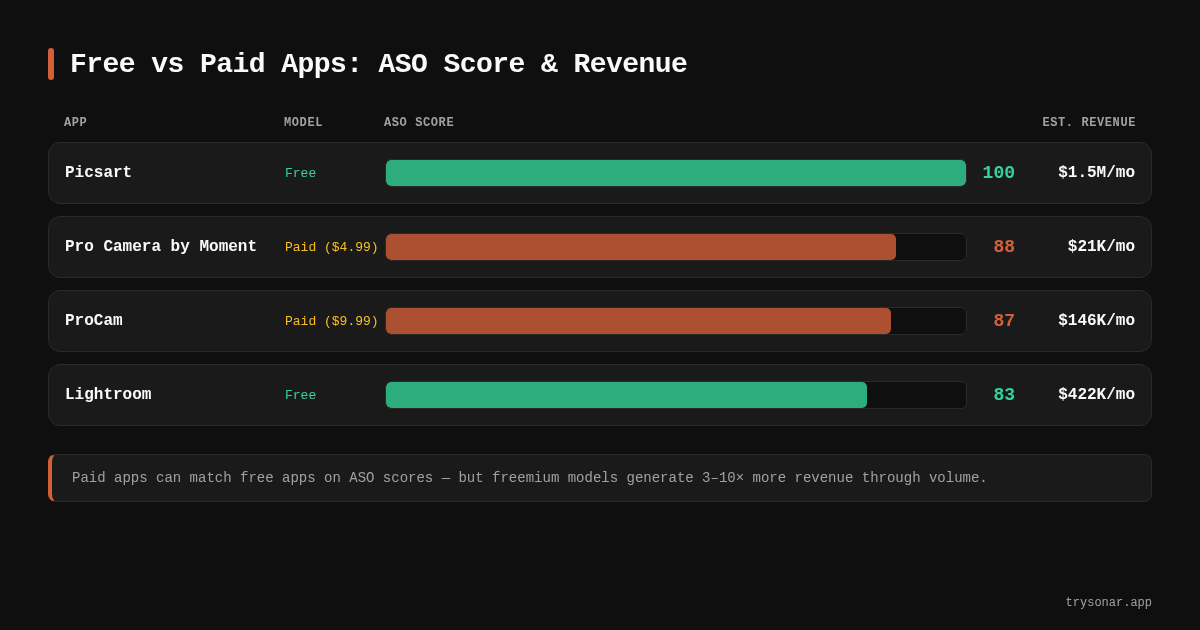
Picsart earns roughly 10x what ProCam generates monthly, driven by a massive install base that funnels into subscription upsells. ProCam's $146K/mo from 3.1M installs is respectable — but the volume gap is enormous. This isn't a reason to avoid paid pricing. It's a reason to understand that free vs paid apps compete in fundamentally different arenas.
Free apps compete on volume. Paid apps compete on intent. Your ASO strategy needs to reflect which game you're playing.
Keyword Strategy: Different Intent, Different Targets
The keyword "free vs paid apps" itself reveals platform differences. Sonar's keyword index puts "free vs paid apps" at difficulty 74 on iOS (popularity 27) and difficulty 52 on Android (popularity 32) — the query gets more traction on Google Play.
This pattern generalizes. Keywords with purchase-intent modifiers ("best pro camera app," "professional photo editor") behave differently than volume-driven discovery terms ("free photo editor," "camera app"). Here's how to approach each:
Free App Keyword Strategy
Free apps benefit from broad, high-volume keywords. You can afford to target competitive terms because your zero-dollar price removes friction from the download decision. The conversion math works: even if only 3% of people who see your listing install, a keyword with popularity 50+ delivers meaningful volume.
- Category head terms — "photo editor," "camera app," "video maker"
- Feature-specific terms — "remove background," "AI photo enhance," "collage maker"
- "Free" modifiers — on Google Play especially, "free" is still a common search qualifier. On iOS, users can see the price badge before tapping, so the modifier matters less in the keyword field.
For a complete walkthrough on finding the right terms, see our keyword research guide.
Paid App Keyword Strategy
Paid apps need keywords where the searcher is already willing to spend. Someone searching "free camera app" won't convert on a $9.99 listing. But someone searching "pro camera manual controls" or "RAW photo editor iPhone" has a different mindset entirely.
- Quality/professional modifiers — "pro," "professional," "best," "advanced"
- Specific feature terms — "manual exposure," "RAW editing," "DSLR controls"
- Competitor brand terms — users searching by name already know the category and are comparison-shopping
- Low-competition long-tail keywords that signal purchase readiness — these convert at higher rates for paid listings
The keyword difficulty score matters more for paid apps. You can't brute-force rankings with install velocity the way free apps can, so you need to pick battles you can actually win.
Metadata Optimization: Same Fields, Different Emphasis
Both free and paid apps use the same metadata fields — title, subtitle (iOS) or short description (Google Play), description, keywords, and screenshots. But the emphasis shifts.
Title and Subtitle
Free apps can lean heavily on keyword density. Picsart's title is "Picsart AI Photo Editor, Video" — it packs in three keyword phrases (AI, photo editor, video). That's not elegant, but it's indexed for everything that matters.
Paid apps need to balance discoverability with perceived value. ProCam's title is "ProCam - Pro Camera" — shorter and brand-focused. Sonar's ASO audit flags this: ProCam scores only 7/15 on the Title Length sub-score (one of nine checks within the audit, where the full title allowance is 30 characters on iOS) because it leaves characters unused. If you're charging money, every unused character is a missed chance to justify the price.
A better approach for paid apps: use the title for brand + primary keyword, then use the subtitle to communicate the value proposition. "ProCam - Pro Camera" could keep the title as-is and pair it with a subtitle like "Manual RAW & DSLR Controls" — still branded, but now indexed for three more high-intent terms.
Description
On Google Play, the long description is fully indexed for search — all 4,000 characters of it (per Google Play developer documentation). Free apps should treat this as keyword real estate, naturally weaving in target terms while describing features.
Paid apps should treat the description as a sales page. The user has already seen your price tag. Your description needs to answer: "Why is this worth paying for?" Lead with the capabilities that justify the cost, use social proof (review quotes, awards, press mentions), and be explicit about what's included. For more on structuring this effectively, see our metadata optimization guide.
On iOS, the description isn't indexed for search at all, but it still affects conversion. Paid app descriptions on iOS should function purely as persuasion — features, benefits, and proof.
Screenshots and Preview Videos
This is where free and paid apps diverge most visually.
Free apps can get away with feature-showcase screenshots: "Here's what the app does." The user's risk is zero (just their time), so demonstrating functionality is enough.
Paid apps need screenshots that sell. Every screenshot should answer: "Is this worth $X?" Show output quality, professional results, exclusive features. If your $9.99 camera app produces noticeably better photos than free alternatives, that comparison is your most powerful screenshot.
Improving screenshot conversion directly impacts your app store conversion rate, and the stakes are higher for paid apps because each lost visitor represents lost revenue — not just a lost user you might monetize later.
ASO Scores: Paid Apps Can Compete
One common misconception: paid apps can't rank well. The data says otherwise.
Sonar's ASO scoring shows paid apps can score competitively. ProCam earns 87/100 and Pro Camera by Moment hits 88/100, while free apps Lightroom scores 83/100 and Picsart achieves a perfect 100/100.
The breakdown across all nine audit checks is revealing:
| Check | Picsart (Free) | Lightroom (Free) | ProCam (Paid) | Moment (Paid) |
|---|---|---|---|---|
| Title Length | 15/15 | 15/15 | 7/15 | 11/15 |
| Title Keywords | 10/10 | 10/10 | 10/10 | 10/10 |
| Description Length | 10/10 | 10/10 | 10/10 | 10/10 |
| Description Quality | 10/10 | 8/10 | 8/10 | 5/10 |
| Screenshots | 15/15 | 0/15 | 15/15 | 15/15 |
| Rating | 15/15 | 15/15 | 15/15 | 15/15 |
| Review Count | 10/10 | 10/10 | 10/10 | 10/10 |
| Recent Update | 10/10 | 10/10 | 7/10 | 7/10 |
| Release Notes | 5/5 | 5/5 | 5/5 | 5/5 |
| Total | 100/100 | 83/100 | 87/100 | 88/100 |
Source: Sonar ASO audit scores.
Notice that both paid apps lose points on Title Length (not using all available characters) and Recent Update (last updated over a month ago). These are fixable. The paid apps actually match or beat the free apps on screenshots, ratings, and review counts. Lightroom — a free, Adobe-backed app — scores lower than both paid camera apps because it has no screenshots detected in Sonar's audit.
The takeaway: paid apps don't have an inherent ASO disadvantage. They have specific, correctable weaknesses. Use an ASO audit to find yours.
Conversion Rate Dynamics
Free and paid apps live in different conversion rate universes. SplitMetrics' analysis of over 300 A/B experiments found the median install rate across all apps is 26.4%, but this average skews heavily toward free listings. Paid apps convert at a fraction of that rate because users face an upfront purchase decision rather than a zero-risk download. That's not a failure — it's the nature of asking someone to pay before trying your product.
- Paid apps need more impressions to generate the same install count. Your keyword strategy should cast a wider net across more long-tail terms to compensate.
- Every conversion rate improvement has outsized impact. Going from 3% to 5% conversion on a paid app means 67% more revenue. The same improvement on a free app might not move the needle on actual monetization.
- A/B testing matters more for paid apps. Test your icon, screenshots, and description variants aggressively. Apple's product page optimization and Google Play's store listing experiments both support this natively.
Platform-Specific Considerations for Free vs Paid Apps
The two stores treat pricing differently in their algorithms and user experience.
iOS App Store
- Price badge is visible in search results. Users see your price before tapping into your listing. This means your icon and first screenshot need to do heavy lifting — they're competing against "$0.00" badges on surrounding results.
- Apple Search Ads levels the field. Paid apps can bid on keywords and appear at the top of results regardless of organic rank. If you're charging $9.99 and your LTV supports it, Search Ads can be highly profitable. See our Apple Search Ads guide for details.
- The keyword field (100 characters) is the same for free and paid apps. No metadata advantage either way. What changes is which keywords make sense to target given your conversion dynamics.
Google Play
- Long description indexing helps paid apps more. Free apps can rely on install velocity to rank. Paid apps — with lower install volumes — benefit disproportionately from thorough keyword coverage in the 4,000-character description. Pack it with relevant terms.
- Google Play's algorithm weights engagement metrics. Retention rate, session length, and uninstall rate all factor into ranking. Paid app users tend to be more committed (they paid for it), which can create a positive ranking signal over time.
- The short description is your conversion pitch. At 80 characters, it's the first text most users read. For paid apps, use it to state the unique value proposition, not just keywords.
Revenue Model Spectrum: It's Not Binary
The free vs paid apps distinction has blurred. The real spectrum looks like this:
| Model | Example | ASO Implication |
|---|---|---|
| Completely free (ad-supported) | Most utility apps | Maximize installs; volume is everything |
| Freemium (free + IAP) | Picsart, Lightroom | Maximize installs, but also attract users likely to upgrade |
| Free trial + subscription | Many productivity apps | Conversion-focused metadata; highlight trial in screenshots |
| Paid upfront | ProCam ($9.99) | Value-focused messaging; target high-intent keywords |
| Paid + IAP | Some pro tools | Hybrid approach; justify the upfront cost AND tease additional value |
All paid models are subject to platform commission — Apple and Google both take 30%, reduced to 15% for developers under $1M/year (Apple Small Business Program, Google Play service fees).
Each model requires slightly different metadata emphasis, screenshot strategies, and keyword targeting. The further right you move on this spectrum, the more your ASO should emphasize value justification over pure volume.
Practical Checklist: Adjusting ASO by Pricing Model
For a broader optimization framework, start with our ASO checklist and layer these pricing-specific adjustments on top.
- Target high-volume, competitive keywords — you can convert on them
- Use every indexed character for keyword coverage
- Focus screenshots on features and social proof (download counts, ratings)
- Update frequently to maintain algorithmic freshness
- Monitor your ASO KPIs weekly, focusing on impression-to-install rate
- Target mid-to-low-competition keywords with purchase intent
- Use the title and subtitle to communicate value, not just keywords
- Design screenshots as sales collateral — show results, not just UI
- Invest in Apple Search Ads if your LTV supports the CPA
- A/B test everything — small conversion gains have large revenue impact
- Keep your app updated at least monthly (both paid apps in our data lost points here)
FAQ
Does charging for an app hurt my App Store rankings?
Not directly. Apple and Google don't penalize paid apps in their algorithms. However, paid apps typically get fewer installs, and install velocity is a ranking factor on both platforms. You'll rank lower on high-volume keywords simply because fewer people download at a $4.99+ price point — not because the store is biased against you.
Should I launch as free and switch to paid later?
This rarely works well. Users who downloaded for free leave negative reviews when they lose access to features. A better approach: launch as freemium with a generous free tier, then convert engaged users through in-app purchases or subscriptions.
Can a paid app rank for competitive keywords?
Yes, but it requires more effort. Paid apps can't rely on download volume alone, so you need stronger metadata optimization, better screenshots, and often supplemental traffic from Apple Search Ads or external marketing. Sonar's data shows ProCam and Pro Camera by Moment scoring 87 and 88 out of 100 on ASO audits — competitive with or above free alternatives.
What conversion rate should I expect for a paid app?
Paid apps convert at significantly lower rates than free apps. SplitMetrics reports the overall median install rate is 26.4%, but that figure is dominated by free listings — paid apps typically see only a small fraction of that rate because of the upfront purchase barrier. On Google Play, rates tend to be slightly lower for paid apps because the platform skews more toward free content. Focus on improving conversion rate rather than benchmarking against free apps — a 1-2 percentage point gain can meaningfully increase revenue.
Is freemium always better than paid upfront?
Not always. Freemium works best when you have a large addressable market and features that naturally tier (basic free, advanced paid). Paid upfront works for niche, professional tools where the audience expects to pay and values simplicity over upsell pressure. ProCam generates $146K/mo from a $9.99 price tag — that's a viable business without any subscription complexity.
Deciding between free and paid — or optimizing whichever model you've chosen? Try Sonar free to see keyword difficulty, search volume, and competitor scores for your exact category.