
The Complete ASO Checklist
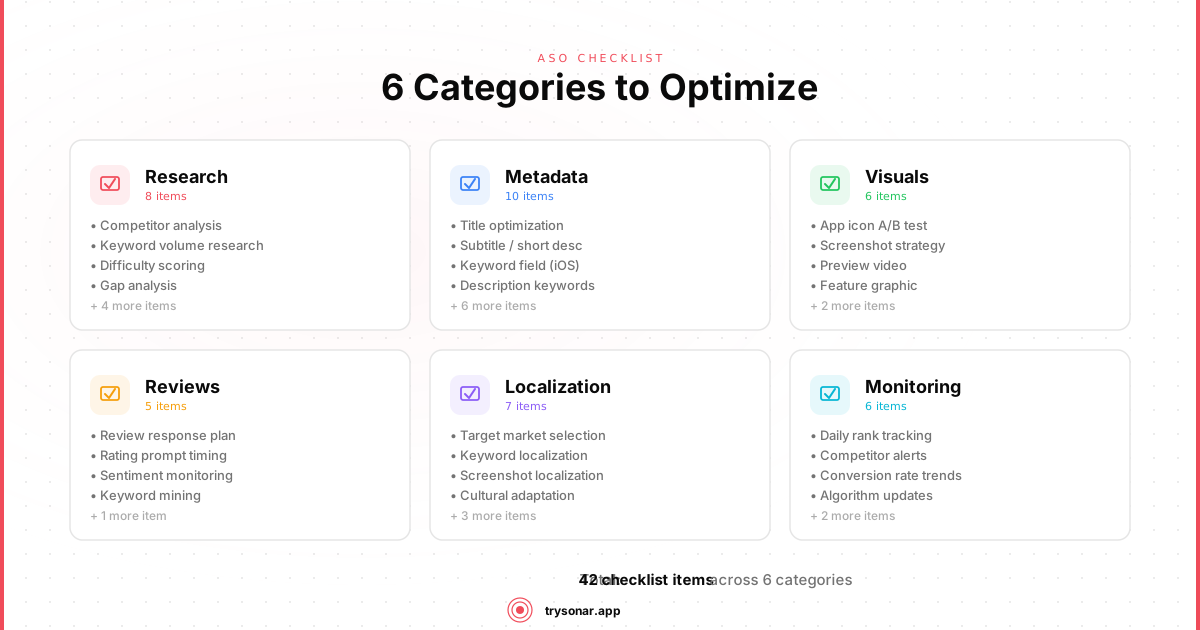
Most ASO guides give you theory. This one gives you a list. Every item below is a specific action that affects your app's search visibility on the App Store and Google Play — from keyword research through post-launch monitoring. It is organized into 11 sections with platform-specific steps for iOS and Android. Work through it section by section and revisit it every update cycle. If you are new to app store optimization, start with our introduction to ASO before diving in.
Where items diverge by platform, you'll see (iOS) or (Android) labels. No label means it applies to both.
---
1. Keyword Research
Before you touch any metadata, you need to know what people actually search for. Skip this and everything else is guesswork.
- Build a seed list of 40-50 candidate keywords. Start with terms that describe what your app does, the problem it solves, and the category it belongs to. A competitor keyword analysis can surface terms you would never brainstorm on your own.
- Mine autocomplete suggestions. Type the first 2-3 letters of each seed keyword into the App Store or Google Play search bar. Every suggestion is a real query with real volume.
- Analyze competitor titles and subtitles. Find the top 5-10 apps in your space and pull every keyword from their names, subtitles, and descriptions.
- Score each keyword for popularity and difficulty. Search Popularity tells you if anyone searches for it. Difficulty tells you if you can realistically rank — browse examples like planner app or vocabulary builder. For indie apps, target SP 35-55 with difficulty under 35.
- Identify 3-5 primary keywords and 15-20 secondary keywords. Primary keywords go in your title and subtitle. Secondary keywords fill out your keyword field (iOS) or description (Android).
- Check for localization opportunities. A keyword that's competitive in the US might be wide open in Germany or Japan. Research volume in your top 3 markets.
- Document your keyword map. Map each keyword to the metadata field where it will appear. This prevents duplication and ensures full coverage. For more detail, see our app store keywords guide.
2. App Name and Title
Your app name is the single most important ranking signal on both stores. Every wasted character is wasted potential.
- Use the full 30 characters. Both stores cap the title at 30 characters. Use them all.
- Place your highest-value keyword in the title. Keywords in the title carry more weight than anywhere else. Lead with your brand, then add your primary keyword:
BrandName - Primary Keyword. - Avoid keyword stuffing. Apple rejects titles like "Best Photo Editor Camera Filter Beauty." Google may suppress your listing. One or two natural keywords in the title is the right balance.
- (iOS) Don't repeat title keywords in the subtitle or keyword field. Apple indexes each word once — repeating it wastes space.
- (Android) Front-load the title. Google Play truncates titles in search results. Put the most important keyword within the first 20 characters.
3. Subtitle and Short Description
- (iOS) Write a subtitle that targets your second-best keyword. You get 30 characters. Don't waste them restating the title. Use a different high-value keyword that complements it.
- (Android) Write a short description with your top keyword in the first sentence. The short description (80 characters) appears in search results and carries ranking weight. Lead with your best keyword, naturally.
- Make it readable for humans. The subtitle/short description is visible to users. A string of keywords with no grammar will hurt conversions even if it helps rankings.
4. Keyword Field (iOS Only)
This is a hidden 100-character field that only Apple's algorithm sees. Users never read it, so optimize purely for the algorithm.
- Use all 100 characters. Every unused character is a missed keyword.
- Separate keywords with commas, no spaces.
focus,timer,pomodoro,study,concentrationnotfocus, timer, pomodoro. Spaces after commas waste characters. - Use single words, not phrases. Apple combines words across your title, subtitle, and keyword field automatically. You don't need to enter "focus timer" — just "focus" and "timer" separately (assuming one is already in your title/subtitle).
- Don't repeat words from your title or subtitle. Apple already indexes those. Repeating them here wastes characters.
- Skip plurals and common prepositions. Apple handles pluralization. Don't waste space on "the," "and," "a," or "for."
- Include common misspellings if they have real search volume. Apple autocorrects most typos, but persistent misspellings can be worth a slot.
5. Promotional Text and What's New
- (iOS) Use the Promotional Text field for timely messaging. This 170-character field can be updated without a new app submission. It does not affect search ranking, but it's the first text users see on your listing. Use it for seasonal promotions, new feature announcements, or social proof ("Used by 50,000 runners").
- Write keyword-rich "What's New" release notes. On Android, Google indexes this field. On iOS, it doesn't affect ranking, but well-written release notes signal an active, maintained app — which improves conversion.
6. Long Description
- (iOS) Understand that the description does not affect search ranking. Apple does not index the long description for keyword search. Write it for conversion, not SEO.
- (Android) Use your target keywords naturally in the description. Google indexes the full description — see our Android ASO guide for detailed placement strategy. Mention your primary keywords 3-5 times across the 4,000-character limit without sounding forced.
- (Android) Front-load the first 1-2 sentences. The first few lines appear before "Read More." They need to sell the app and include your top keyword. See our guide on writing the perfect Google Play short description for more.
- Structure the description with clear sections. Use line breaks and short paragraphs. Wall-of-text descriptions kill conversion rates.
- Lead with the user benefit, not the feature list. "Track your daily habits and build lasting routines" beats "Habit tracking app with reminders and statistics."
- End with a call to action. "Download now and start your first streak today." Simple, but it works.
7. Visual Assets
Visuals are the primary conversion driver. A user who found your listing through search already has intent — screenshots and icons determine whether they tap "Get."
App Icon
- Use a simple, recognizable design with one focal element. Icons render at 27x27pt in search results. Complex icons become muddy blobs.
- Test your icon at small sizes (29px, 40px, 60px). If you can't identify it at the smallest size, simplify.
- Avoid text in the icon. It's unreadable at search-result sizes on both platforms.
- Use colors that stand out against competitors. Search your primary keyword and check whether your icon gets lost in the results.
Screenshots
- Use all available screenshot slots. iOS allows 10, Google Play allows 8. Fill them.
- (iOS) Design for 6.7" and 6.5" displays first. These are required; smaller sizes auto-generate.
- Put your strongest value proposition in the first two screenshots. Most users never scroll further.
- Add captions to every screenshot. Short, benefit-focused text overlays ("Track every keyword in real time") outperform raw screenshots with no context.
- Show the app in use, not empty states. Populate your screenshots with realistic data. An empty dashboard says nothing.
- A/B test your screenshot order. Use Store Listing Experiments (Android) or Product Page Optimization (iOS) to test variants.
Preview Video
- (iOS) Consider an app preview video. It auto-plays in search results (muted). The first frame is critical — it replaces your first screenshot if you add a video.
- (Android) Add a promo video (YouTube link). It appears at the top of your listing. Keep it under 30 seconds and show the core value in the first 5 seconds.
- Design for sound-off viewing. Most users watch muted. Use text overlays and clear visuals rather than narration.
8. Ratings and Reviews
Ratings affect both ranking and conversion. According to conversion-rate benchmarks published by StoreMaven, an app with 4.0 stars converts at roughly half the rate of one with 4.5 stars.
- Use the native rating prompt (SKStoreReviewController on iOS, In-App Review API on Android). The native prompt is trusted by users and required by Apple. Don't build a custom dialog.
- Trigger the prompt after a positive moment. Ask after the user completes a key action (finishes a workout, saves a document), not on first launch or during onboarding.
- Respect prompt frequency limits. iOS allows the system prompt a maximum of 3 times per year. Don't waste triggers on moments where the user is frustrated.
- Respond to negative reviews publicly. A thoughtful response can prompt users to update their rating and signals to prospective users that you're responsive. See our guide on how to get more app reviews for detailed strategies.
- Never incentivize reviews. Both Apple and Google prohibit rewards for reviews. Violations can get your app removed.
- Mine review text for keyword ideas. Users describe your app in their own words — those words are often what other users search for.
9. Localization
Localizing your metadata can double or triple your addressable market with relatively little effort.
- Localize at least your top 5 markets by revenue. For most apps: US, UK, Germany, Japan, France, Brazil.
- (iOS) Use localized keyword fields for each locale. Every locale gets its own 100-character keyword field. This is free real estate for region-specific terms.
- Don't just translate — localize. Direct translations often miss how people actually search in that language. Research autocomplete suggestions in each locale separately.
- Localize screenshots and captions. Text overlays in the user's language increase conversion significantly.
- (Android) Translate the full description. Google indexes it for search, so localized descriptions directly affect rankings in each market.
10. Category and Pricing
- Choose the most relevant primary category. Don't pick a less competitive category hoping to rank higher — Apple and Google penalize miscategorized apps, and users who find you in the wrong category won't convert.
- (iOS) Set a secondary category. iOS lets you choose two. Use a secondary category that captures an adjacent audience.
- Research the top 10 in your chosen category. If every top app has 100K+ reviews, you're in a category where discoverability from browsing is unlikely. Focus on search instead.
- If your app is free with in-app purchases, say so clearly. Users who feel deceived leave 1-star reviews. Transparent pricing builds trust and protects your rating.
11. Post-Launch Monitoring
ASO is not a one-time task. Rankings shift, competitors update their metadata, and seasonal trends change search behavior.
- Track rankings for your top 20 keywords daily. In our experience, a drop from position 3 to 12 can cut impressions by 80% or more. Catch it early.
- Monitor competitor metadata changes. When a competitor targets a keyword you rank for, expect movement. Tools like Sonar can automate this.
- Revisit your keyword map after every app update. Each submission is a chance to refine keywords based on what's working.
- Check conversion rate (impressions to installs) weekly. Low conversion may mean you need better screenshots, not better rankings.
- Track your ratings trend. A slow decline from 4.5 to 4.2 over three months erodes conversion before you notice.
- Re-run keyword research quarterly. New terms emerge constantly. A keyword that didn't exist six months ago could be your best opportunity.
- Update screenshots for major OS releases. Stale-looking screenshots that show an old OS version hurt conversion.
---
How to Use This ASO Checklist
Start with sections 1-6 (keyword research and metadata) — these have the highest impact per hour invested. Move to visuals next, then set up monitoring. If you are launching a new app rather than optimizing an existing one, see our ASO launch checklist for a pre-launch workflow that pairs with this guide.
Revisit this checklist with every app update. ASO compounds: small, consistent improvements to metadata, screenshots, and review management stack over time. The developers who treat optimization as an ongoing process are the ones who build sustainable organic traffic. For a deeper look at measuring those improvements, read our guide to ASO KPIs.
---
Frequently Asked Questions
What is an ASO checklist?
An ASO checklist is a structured, step-by-step list of every optimization action that affects how an app ranks in App Store and Google Play search results. It typically covers keyword research, title and subtitle optimization, the iOS keyword field, descriptions, visual assets, ratings management, localization, and post-launch monitoring. Following a checklist ensures no ranking factor is missed during each metadata update cycle. For a broader overview of the discipline, see our guide on what ASO is and why it matters.
How often should I revisit my app store optimization checklist?
You should revisit your ASO checklist with every app update submission and run a full keyword research refresh at least once per quarter. Rankings shift as competitors update their metadata and seasonal search trends change — according to Apple's App Store Connect documentation, you can update keywords with each new version. In our experience, apps that update metadata monthly see more stable keyword rankings than those that update only at launch.
What is the difference between an ASO checklist for iOS and Android?
The core sections — keyword research, title optimization, visual assets, and ratings — apply to both platforms, but the implementation details differ. iOS has a hidden 100-character keyword field that Android lacks; Android indexes the full long description for search while iOS does not; and Android's short description (80 characters) functions differently from the iOS subtitle (30 characters). This checklist marks each platform-specific item with (iOS) or (Android) labels. For a side-by-side comparison, see our iOS vs Google Play ASO guide.
Do I need an ASO tool to follow this checklist?
You can complete most items manually, but an ASO tool makes keyword research, difficulty scoring, and rank tracking significantly faster. Manually checking autocomplete suggestions across multiple markets and tracking daily ranking changes for 20+ keywords is time-intensive. Tools like Sonar automate keyword scoring, competitor monitoring, and rank tracking so you can focus on the optimization decisions rather than data collection — see Sonar pricing for plans that include competitor tracking.