 sonar
sonar
> Sonar pricing update — September 15, 2026: New accounts pay $29/month or $290/year for Indie, and $149/month or $1,490/year for Agency. Existing customers keep their rates. See current plans.
What Is Astro ASO?
Astro ASO is a macOS-native keyword-research tool for iOS App Store Optimization, priced at $9/month billed annually — $108/year (source: tryastro.app). It has become a default starting point for indie iOS developers thanks to its polished native interface and one of the lowest price tags in the category. I used Astro for over a year while doing keyword research for my own apps before building Sonar as a cross-platform alternative. If you have never used it, the short version is: you type a keyword, the app returns Apple Search Ads popularity, related suggestions, and a side-by-side view of how competing apps use that term in their metadata — all without leaving a Mac app.
The alternatives below each solve at least one of Astro's core constraints — platform lock-in, missing Android data, or lack of API access. If you are early in your ASO journey, our indie developer ASO guide covers the fundamentals before you pick a tool.
Astro ASO at a glance
Short answer: Astro ASO is a $108/year macOS app for iOS keyword research and daily rank tracking, with popularity pulled from Apple Search Ads — strong for Mac-based iOS developers, but with no Android data, no web access, no public API or CLI, and rank checks that run only while the Mac app is open. It does ship an official MCP server, in beta, that works locally on the same Mac (source: tryastro.app and its docs, checked 2026-10-08).
| Astro ASO | |
|---|---|
| Price | $108/year, shown as $9/month and billed annually; single Mac license; 14-day refund window. Free version: 10 keywords, no popularity or difficulty |
| Platform | macOS 14 and up, downloaded directly from tryastro.app |
| Stores covered | Apple App Store only; 91 of 175 storefronts in the app (the site says 60+) |
| Popularity data | Apple Search Ads popularity, served from Astro's backend; difficulty is Astro's own score |
| Rank tracking | Once a day at a time you set (8:00 by default), only while the Mac app is open; historical graphs |
| Other features | Unlimited keywords, suggestions, competitor keyword extraction, colored tags, notes, CSV import/export, DeepL translations (your own key), per-country ratings history, temporary apps for pre-launch research |
| AI / MCP | Official MCP server (beta) built into the app: 12 tools over localhost, only while the app runs, paid license required |
| Best for | Solo iOS developers who work on a Mac |
| Limitations | No Google Play; no Windows, Linux, or web version; no public API or CLI; no rank checks while the app is closed |
All rows above are sourced to tryastro.app and its documentation, plus a hands-on check of Astro 2026.14.0 in October 2026 for the storefront count and tracking schedule. The pricing section below covers what the $108 buys and what it leaves out; for a feature-by-feature matchup see Sonar vs Astro.
Astro ASO pricing
As of October 2026, Astro sells one plan: a Single Mac License at $9/month, billed annually as $108 (source: tryastro.app). Without a license the app runs as a free version capped at 10 keywords. There are no paid tiers, so there is nothing to outgrow: no keyword metering, no app cap, no seat count to plan around. Prices are in USD with tax added where it applies, and billing runs through Lemon Squeezy, where you can generate an invoice with your company details for reimbursement.
| Billing detail | Astro Single Mac License |
|---|---|
| Price | $108/year, shown as $9/month; the pricing page offers no month-to-month option |
| What's metered | Nothing: unlimited keywords, every feature in the at-a-glance table, 91 storefronts |
| Seats | One license per Mac |
| Free version | Up to 10 keywords, without popularity, difficulty, or keyword suggestions (source: Astro docs) |
| Refunds | 14 days to request one after the subscription activates |
What the $108 doesn't cover
The sticker price is honest, but five things sit outside it:
- Annual only. The $9 figure is the yearly price divided by twelve. You pay $108 up front, with the 14-day refund window as the safety net.
- One Mac per license. It's sold as a "Single Mac License". If you work across a laptop and a desktop, or a second person needs the data, budget for another license.
- iOS only. There is no Google Play data at any price, so if you ship on Android the real cost is $108 plus whatever second tool covers Play.
- Tracking needs the app open. Ranks are collected once a day, and only while the Mac app runs. If the Mac is off or Astro is closed, that day gets no data point.
- Automation stops at your Mac. There is no public API or CLI. Astro's official MCP server (beta) lets an AI assistant on the same Mac read and edit your keywords while the app is open, but your keyword history still lives in one desktop app rather than on a server you can query from a script, a CI job, or another machine.
Who the plan fits
Astro is the right buy if you work alone, on a Mac, on iOS apps only, and an AI assistant on that Mac is all the automation you need. For that profile, $108/year for unmetered tracking is the cheapest serious option in the category, and I'd rather say so than pretend otherwise. It stops fitting the moment one of those conditions breaks: an Android build, a Windows machine, a teammate, a pipeline that needs the data, or a rank history that can't have gaps.
If keyword volume is what you're buying, the field narrows fast. Astro (unlimited), ASO.dev's Indie plan (unlimited tracked keywords, iOS only, $39 per seat per month) and Sonar's Indie plan (2,500 keywords at $29/month) all go well past the 100-500 keyword caps on other entry tiers. If 100 keywords genuinely covers you, MobileAction Lite at $15/month is worth a look.
Astro's price against the alternatives
Entry prices from each vendor's public pricing page, checked October 1, 2026:
| Tool | Entry price | Billed yearly | Keywords at entry | Platform | API / CLI / MCP |
|---|---|---|---|---|---|
| Astro | $9/mo | $108/year (annual only) | Unlimited | macOS app, iOS data | Local MCP only (beta) |
| MobileAction Lite | $15/mo | $12.50/mo | 100 | Web | Quote-based API |
| Sonar Indie | $29/mo | $290/year | 2,500 | Web | All three included |
| ASO.dev Indie | $39/seat/mo | $29/mo | Unlimited | Web, iOS data | None |
| ASOMobile Indie | $59/mo | $47/mo | 500 | Web | 1,000 API credits |
| App Radar Essentials | €69/mo | €58/mo | 500 | Web | €199/mo add-on |
| AppTweak Essential | $99/mo | $79/mo | 500 | Web | Separate API plan from $166/mo |
| Appfigures Optimize | $149.99/mo | $119.99/mo | 500 | Web | Billed per API credit |
A full year of Astro costs about what one to two months of ASOMobile, App Radar, or AppTweak cost at their month-to-month rates, and less than a single month of Appfigures Optimize. What the higher prices buy is web access, Google Play coverage, seats for a team and, in most cases, some way to get the data out programmatically.
Why Developers Search for an Astro ASO Alternative
Astro (tryastro.app) is a well-designed Mac-native ASO tool with a loyal following among indie iOS developers. It earned that reputation with a clean interface, low flat pricing, and fast keyword lookups. But four architectural constraints push users to search for an alternative: the tool only runs on macOS, it only covers the Apple App Store, it collects rankings only while its Mac app is open, and it publishes no public API and no CLI — its official MCP server (beta) answers only on the Mac running the app (source: tryastro.app, tryastro.app/docs/mcp). If you ship on Android, work on Linux or Windows, or want to automate keyword research inside CI/CD pipelines, it cannot help you.
This is not a hit piece. I built Sonar to solve problems the tool does not address, and I will be upfront that Sonar is listed first because it is our product. The other four on this list — Appfigures, ASO.dev, Keyword Hunt, and AppTweak — earned their spots by covering gaps it leaves open. Each gets an honest breakdown with pricing, pros, cons, and a concrete data point where I have one.
The astro aso keyword cluster gets roughly 400–450 searches per month across qualified variants like "astro aso tool," "astro app store optimization," and "tryastro alternative," all at keyword difficulty 0–9 (source: DataForSEO Labs, US/EN, queried July 2026). That tells me a meaningful number of developers are actively evaluating options.
What the Tool Does Well (and Where It Stops)
At $108/year for unlimited keywords across 91 App Store storefronts, Astro undercuts most subscription ASO tools, Sonar included. It pulls Apple Search Ads popularity scores, surfaces keyword suggestions, and lets you compare competitor metadata side by side — a workflow similar to what we describe in our competitor keyword analysis guide. For a solo iOS developer who only needs occasional keyword checks, the app delivers solid value.
The limitations become clear when your needs grow:
- Apple-only coverage. No Google Play keyword data, no Play Store difficulty scores, no Android competitor analysis. Many top publishers ship on both platforms, and if you are one of them, you need a cross-platform tool or a second one bolted on.
- Mac-only app. Windows and Linux developers cannot use it. No web interface exists.
- No API or CLI, and MCP stays on your Mac. Astro's official MCP server (beta) gives Claude Code, Cursor, or VS Code on the same Mac 12 tools to read rankings and add apps, keywords, notes, and tags — but only over localhost and only while the app is open (source: tryastro.app/docs/mcp). You cannot script keyword pulls from a server, run them in CI, or connect an agent that runs anywhere else. The "astro aso mcp" search query already has volume (source: DataForSEO keyword_suggestions, 2026-07-03), which signals developer demand for exactly this kind of integration.
- Rank history depends on the app being open. Astro checks rankings once a day at a time you set (8:00 by default) and draws historical graphs (source: tryastro.app), but it does so inside the Mac app: when the Mac is off or Astro is closed, no ranks are collected. In an October 2026 check, a 30-day rank chart in a rarely opened copy of Astro showed a single data point. The history that does exist sits in a single-license desktop app — there is no web dashboard to share with a teammate or client. If you need rankings reachable from any device or script, look at a server-side app store ranking tracker.
- Suggestions depend on other users. Astro's keyword suggestions come from the keywords other Astro users track, and its docs note they can be few or nonexistent for niche apps and less popular countries (source: tryastro.app/docs/how-to-add-keywords). In the same check, a recipe app's competitor returned 12 suggestions.
If your workflow is occasional iOS keyword lookups on a Mac, Astro remains a cost-effective choice. If you need Android coverage, rankings reachable outside one Mac, or the ability to pipe keyword data into scripts or AI agents, you need one of the cross-platform tools compared below. For developers exploring free options first, our free ASO keyword tools guide covers what each free tier actually measures and where the data breaks down.
Head-to-Head Comparison Table
Before the individual breakdowns, here is how all five alternatives stack up against Astro on the features that matter most. In testing these tools side by side, I focused on three dimensions: platform coverage, automation support, and how each handles keyword popularity sourcing.
| Feature | Astro | Sonar | Appfigures | ASO.dev | Keyword Hunt | AppTweak |
|---|---|---|---|---|---|---|
| Platforms | iOS only | iOS + Android | iOS + Android | iOS only | iOS only | iOS + Android |
| OS / Access | Mac app + local MCP | Web + API + CLI + MCP | Web + API | Web | Mac app | Web + API |
| Keyword tracking | Daily, while the Mac app is open | Daily | Daily | Daily | On-demand | Daily |
| Pricing model | $108/yr (billed annually) | From $29/mo | From $44.99/mo; $149.99/mo for 500 keywords | From $39/seat/mo | One-time ~$40 | From $79/mo billed yearly |
| Popularity source | Apple Search Ads | Apple's console SP values | Proprietary estimate | Apple Search Ads | Apple Search Ads | Proprietary estimate |
| API / CLI / MCP | Local MCP only (beta) | All three, included | All three, billed per API credit | None | None | API + MCP, separate API plan |
| Free tier | Free version, 10 keywords | 7-day trial + 50 free API credits | Free Starter plan + Optimize trial | 3-day trial | No | 7-day trial |
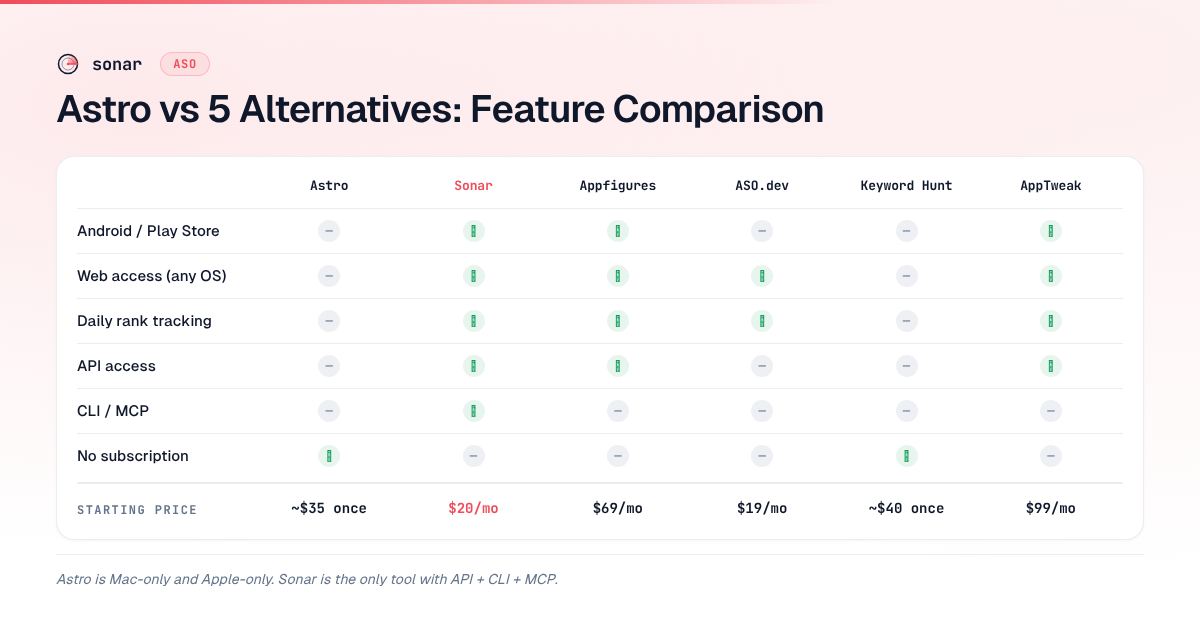
The 5 Best Astro Alternatives for ASO in 2026
1. Sonar (trysonar.app) — Best for Cross-Platform Keyword Research
Disclosure: Sonar is my product. I built it because I needed an alternative that covered both app stores, ran in a browser, and had an API I could script against.
What it does. Sonar is a web-based app store optimization and rank tracking platform covering both the Apple App Store and Google Play. It provides keyword difficulty, search popularity, autocomplete suggestions, competitor keyword analysis, and daily rank tracking. It also exposes a REST API (published OpenAPI spec), a CLI (@sonarapp/cli), and an official MCP server (@sonarapp/mcp) for AI agent integration.
Pricing. The Indie plan is $29/month or $290/year, with a 7-day free trial (full access, card required). Agency is $149/month or $1,490/year for 50 apps, 10,000 keywords, and 5 team seats. For scripts and agents there are prepaid API credit packs from $10 with no subscription, and 50 free credits on signup. There is no free-forever plan, but the web keyword and audit tools need no account and the MCP server runs keyless in free mode. See the full breakdown at Sonar pricing.
A concrete data point. When I compared accuracy across stores, I pulled "budget planner" and "habit tracker" through both platforms. Sonar's keyword index puts "budget planner" at iOS popularity 51 and difficulty 66 — a competitive keyword that iOS-only tools can only analyze on one store, while Sonar covers both (Android: difficulty 59, popularity 44) (source: Sonar /api/v1/keywords/search, queried 2026-07-03). For "habit tracker," Sonar shows iOS popularity 58 and difficulty 67, with the Android side at popularity 51 and difficulty 61 — illustrating why cross-platform keyword coverage matters for ASO (source: Sonar /api/v1/keywords/search, queried 2026-07-03).
Pros:
- Covers both iOS and Google Play with unified keyword metrics
- Popularity scores are the real Apple values from Apple's own Search Ads console scale, matching what developers see in their own accounts — and you do not need to connect an Apple Search Ads account to read them; a calibrated estimator fills in keywords below Apple's coverage and all of Google Play (source: Apple Search Ads documentation)
- REST API, CLI, and MCP server, included on every plan rather than sold separately or metered per call — and the MCP server runs keyless in free mode, so you can try it before subscribing. Developers looking to build agentic ASO workflows will find this relevant
- Autocomplete suggestions surface long-tail variants. Sonar's suggestions for "budget planner" return terms like "budget planner free," "monthly budget planner free," and "free budget planner apps" — the kind of low-competition keywords that a Mac-only interface can surface for iOS but not for Google Play (source: Sonar /api/v1/keywords/suggestions, queried 2026-07-03)
- Daily rank tracking with history
Cons:
- Newer product with a smaller brand footprint than established competitors
- No native Mac app — it is browser-based (though the CLI partially compensates)
- Paid plans required for high-volume keyword research
2. Appfigures — Best for Analytics + ASO in One Dashboard
What it does. Appfigures combines app analytics (downloads, revenue, reviews) with ASO keyword tools across both iOS and Google Play. It is a broader platform aimed at teams that want market intelligence alongside keyword research (source: appfigures.com/aso).
Pricing. As of October 2026, keyword tracking starts on the Monitor plan at $44.99/month for 100 keywords; Optimize, the plan built around ASO, is $149.99/month for 500 keywords, or $119.99/month billed annually. A free Starter plan exists, and the Optimize trial needs no card (source: appfigures.com/pricing).
Pros:
- Cross-platform: iOS and Google Play coverage
- Integrates keyword research with download analytics and revenue tracking
- API access for data export
- Established product with a large keyword database
Cons:
- Significantly more expensive than Astro's $9/month or Sonar's $29/month entry point
- The store optimization module can feel secondary to the analytics features
- CLI and MCP calls bill at 10 API credits each, double what an ASO request costs
- Keyword difficulty scores use proprietary estimates rather than Apple's own console values
3. ASO.dev — Best for Solo iOS Developers on a Budget
What it does. ASO.dev is a web-based keyword research tool focused on Apple App Store optimization. It offers keyword suggestions, competitor analysis, and daily keyword rank tracking. Like the Mac-native option, it pulls Apple Search Ads popularity scores directly (source: aso.dev).
Pricing. Priced per seat. The $19/month Console plan covers metadata and releases only; keyword tracking starts on the Indie plan at $39 per seat per month, or $29 billed annually, with a 3-day trial (source: aso.dev/pricing, checked October 2026).
Pros:
- Uses Apple Search Ads popularity data, matching what you see in your console
- Web-based, so it works on any OS — solving the Mac-only limitation
- Affordable entry point comparable to Sonar
- Daily rank tracking included
Cons:
- iOS only — no Google Play data, which means it shares the single-platform limitation
- No API, CLI, or MCP integration
- Smaller keyword suggestion database compared to Appfigures or AppTweak
- Less established community and fewer learning resources
4. Keyword Hunt — Best for Users Who Want a Similar Mac-Native Experience
What it does. Keyword Hunt is a Mac-native app store optimization tool with an interface and workflow similar to the one developers are switching from. It provides keyword lookups, competitor metadata comparison, and Apple Search Ads popularity scores (source: Mac App Store listing for Keyword Hunt).
Pricing. One-time purchase, approximately $40 on the Mac App Store.
Pros:
- Familiar Mac-native experience for developers already comfortable with the workflow
- One-time purchase model — no subscription
- Apple Search Ads popularity data
- Clean, focused interface
Cons:
- Mac-only — does not solve the OS-lock problem
- iOS only — no Android or Google Play coverage
- No API, CLI, or MCP
- On-demand lookups rather than daily tracking
- If platform limitations are your reason for switching, Keyword Hunt shares most of them
5. AppTweak — Best for Enterprise Teams and Agency Use
What it does. AppTweak is a full-featured store optimization platform covering iOS, Google Play, and Amazon Appstore with keyword research, competitor intelligence, review analysis, and market benchmarking. It targets agencies, enterprise publishers, and growth teams (source: apptweak.com).
Pricing. Essential is $79/month billed annually ($949/year) or $99 month-to-month, for 500 keywords and one seat; Grow and Grow Plus run $299 and $549 a month on annual billing (source: apptweak.com/pricing, US list, October 2026). Enterprise is custom, and API access is a separate plan from $166/month billed annually. The tiers most teams grow into cost several times the entry price — our AppTweak alternatives guide breaks down every tier and add-on.
Pros:
- Broadest platform coverage: iOS, Google Play, and Amazon
- Deep competitor intelligence with historical data
- API access for integrations
- Strong reporting features suited for ASO agencies
Cons:
- Pricing starts at 3–5x what indie developers typically budget for ASO tools
- Keyword popularity scores use a proprietary model, not Apple's console values — which means numbers may differ from what you see in Apple Search Ads
- Overkill for solo developers or small studios
- Official MCP server rides on the REST API, which is sold as a separate product
Choosing the Right Alternative: Decision Framework
The right tool depends on two questions: do you need Android coverage, and do you need programmatic access? In my experience evaluating optimization workflows across dozens of indie apps, these two factors drive the decision more than pricing does.
If you only ship on iOS and prefer a native Mac app: Keyword Hunt is the closest 1:1 swap. You get a similar workflow on the same platform. But you inherit all of the same platform limitations. Before choosing, map out your keyword research needs with a structured 6-step keyword research workflow to see whether an iOS-only tool actually covers your requirements.
If you ship on iOS and want web access or daily tracking: ASO.dev is a lightweight, affordable step up that adds daily rank tracking and runs in any browser.
If you need both iOS and Android coverage: Sonar, Appfigures, or AppTweak. Sonar starts at $29/month with API/CLI/MCP included. Appfigures charges $149.99/month for its 500-keyword ASO plan, with broader analytics. AppTweak starts at $79/month billed annually, with enterprise-grade reporting.
If you want API or automation access: Sonar (API, CLI, and MCP included), Appfigures (API, CLI, and MCP, billed per API credit), or AppTweak (API and MCP on a separate API plan from $166/month billed annually). ASO.dev and Keyword Hunt have no programmatic interfaces, and Astro's is a local MCP server (beta) inside the Mac app, with no API or CLI. If you are building CLI-based ASO workflows, Sonar is the only option here where the CLI and MCP server come with the base subscription.
For a broader view of how these tools fit into the ASO landscape, including free options, see our guide to the best ASO tools for app store optimization.
FAQ
Is Astro ASO available on Windows or Linux?
No. It is a macOS-only application (macOS 14 and up), downloaded directly from its website (source: tryastro.app). There is no Windows, Linux, or web version. Developers on those platforms need a web-based alternative like Sonar, ASO.dev, Appfigures, or AppTweak.
Does Astro support Google Play keyword research?
No. The tool covers only the Apple App Store. It does not provide Google Play keyword data, difficulty scores, or Android competitor analysis. If you publish on both platforms, you need a cross-platform solution. Sonar and Appfigures both cover iOS and Google Play; AppTweak adds Amazon Appstore as well. For a detailed breakdown of how iOS and Android ASO differ, see our Android ASO guide.
How accurate is the popularity data compared to Sonar's?
Both tools pull Apple Search Ads popularity scores that correspond to what developers see in their own console. The key difference is coverage: the Mac-native option shows popularity for iOS keywords only, while Sonar also provides popularity and difficulty data for Google Play keywords (source: Sonar /api/v1/keywords/search, queried 2026-07-03). For a deeper explanation of what Apple Search Popularity scores mean, see our dedicated guide.
Is Astro ASO worth it, and where does its data come from?
For a solo iOS developer on a Mac, usually yes: $108/year buys unlimited keywords, daily rank updates while the app is open, and popularity data that Astro extracts directly from Apple Search Ads, across 91 storefronts, with a 14-day refund window (source: tryastro.app). It stops being worth it once you ship on Google Play, work outside macOS, need unbroken rank history, or need rankings in a script or an AI agent that doesn't run on that Mac — then you are paying for a second tool anyway. Our Apple Search Popularity guide explains what those popularity scores measure, and Sonar's pricing page lists what a cross-platform setup costs.
How much does Astro ASO cost, and is there a free trial?
$108 a year, shown on the site as $9/month billed annually, for a Single Mac License (source: tryastro.app, checked October 2026). It is the only plan: unlimited keywords, popularity and difficulty, competitor keyword extraction, the MCP server, and 91 storefronts are all included, with no tiers to upgrade into. Before paying, you can download the app and use the free version, which tracks up to 10 keywords without popularity, difficulty, or suggestions (source: tryastro.app/docs); once a subscription activates you have 14 days to request a refund.
Is Astro's unlimited keyword tracking really unlimited?
That's what the pricing page states, with no published cap or overage fee. Any tool that pulls store data has rate limits somewhere in its pipeline, but on Astro there is no per-keyword metering or tier jump to plan around — which is the main practical benefit of the model.
Can I use Astro with AI agents or MCP?
Yes, locally. Astro ships an official MCP server, currently in beta, built into the Mac app (source: tryastro.app/docs/mcp). You turn it on in Settings, and it serves 12 tools over HTTP at 127.0.0.1:8089 — list apps, read keywords, rankings, and ratings, add apps and keywords, set notes and tags, search the App Store, and get keyword suggestions — limited to 60 requests a minute per client. It accepts connections from the same Mac only, runs only while the Astro app is open, and needs a paid license. Cursor, VS Code, Claude Code, and Antigravity connect directly; Claude Desktop needs a Cloudflare quick tunnel. There is still no public API or CLI, so nothing outside that Mac can reach your data, and an older community project (TimBroddin/astro-mcp-server) reads the same local database read-only. Sonar includes a REST API, a CLI, and an MCP server you can run hosted or locally on every plan; Appfigures and AppTweak also offer MCP access, but billed per API credit or as a separate API plan. Our ASO MCP server comparison covers the options in detail.
Astro or Sonar: which should I pick?
Astro, at $108/year, if you're a solo iOS developer on a Mac who wants a native app, opens it most days, and needs no automation beyond a local MCP server — that's a coherent set of needs and Astro serves it well. Sonar, at $29/month or $290/year, if you ship on Google Play too, work from more than one machine or operating system, want ranks recorded every day whether your laptop is open or not, need an API, CLI, or MCP server that works from anywhere, or want teammates to see the same data (the Agency plan adds 5 seats at $149/month). Sonar's Indie plan tracks 2,500 keywords against Astro's unlimited, both far beyond the 100-500 caps elsewhere, so the $182/year gap shouldn't be the deciding factor — platform and automation should.
What are the best Astro ASO alternatives for cross-platform developers?
Three tools cover both iOS and Google Play, all with server-side daily rank tracking so your Mac does not need to be open to log positions:
- Sonar (from $29/mo) — covers App Store + Google Play with API, CLI, and MCP included on every plan. Best fit for developers who want the lowest entry price with full automation baked in.
- Appfigures (from $44.99/mo; $149.99/mo for the 500-keyword ASO plan) — covers App Store + Google Play and bundles download and revenue analytics that the other two do not. Best when you need market intelligence in the same dashboard.
- AppTweak (from $79/mo billed annually) — covers App Store, Google Play, and Amazon Appstore. Best for agencies or enterprise teams that require Amazon keyword data (e.g., Alexa skills or Fire TV apps) and white-label reporting.
See the comparison table above for the full feature breakdown (pricing verified at each vendor's site on October 1, 2026).
Is Astro cheaper than the subscription alternatives?
Yes. Astro is $108/year (billed annually, equivalent to $9/month), while the subscription tools in the pricing table above start between $15 (MobileAction Lite, 100 keywords) and $149.99 (Appfigures Optimize) a month at entry — over 12 months that is a saving of roughly $70–1,700. The tradeoff is not the billing model but the coverage: Astro is iOS-only and Mac-only, with its rank history kept in a single-license desktop app and recorded only while that app is open, whereas cross-platform tools add Google Play, server-side daily rank tracking, and API access. For how tool costs compare with hiring help, read our ASO agency vs tool vs DIY breakdown.
Looking for an ASO keyword tool that covers both app stores, tracks rankings daily, and fits into your dev workflow? Start free trial — it shows search popularity, difficulty, and competitor data for every keyword across iOS and Google Play.
