 sonar
sonar
Apple gives subscription apps four discount tools, and only one of them can put your offer on the App Store's Today tab without you running a single ad: the win-back offer. Apple's documentation says a promoted win-back offer "appears on your app's product page and in editorially curated selections and personalized recommendations across the App Store" on iOS 18 and later (App Store Connect Help).
This guide compares the four on eligibility, placement, App Store Connect limits, and StoreKit 2 code — then covers the hard part: measuring whether an offer made money or just discounted people who would have paid full price.
By Peter. Limits checked against Apple's developer documentation on October 1, 2026. Keyword data from Sonar's API, US App Store, pulled the same day.
Apple offer codes, win-back, promotional and intro offers: the short answer
Apple offer codes are redeemable codes (one-time or custom) that you distribute yourself; introductory offers target first-time subscribers; promotional offers target current and past subscribers inside your app; and win-back offers target lapsed subscribers, with Apple surfacing them for you. All four discount an auto-renewable subscription using the same three formats — free trial, pay as you go, or pay up front (Apple: Auto-renewable subscriptions).
Use them like this:
- Acquisition: introductory offers.
- Retention and upsell, you control the trigger: promotional offers.
- Off-App-Store campaigns (email, partners, podcasts, events): offer codes.
- Reacquisition, Apple controls distribution: win-back offers.
Since 2025, offer codes are also the only one of the four that works beyond auto-renewable subscriptions. Apple announced at WWDC25 that "offer codes are now available for consumables, non-consumables, and non-renewing subscriptions" (WWDC25: What's new in StoreKit and In-App Purchase).
The four offer types compared
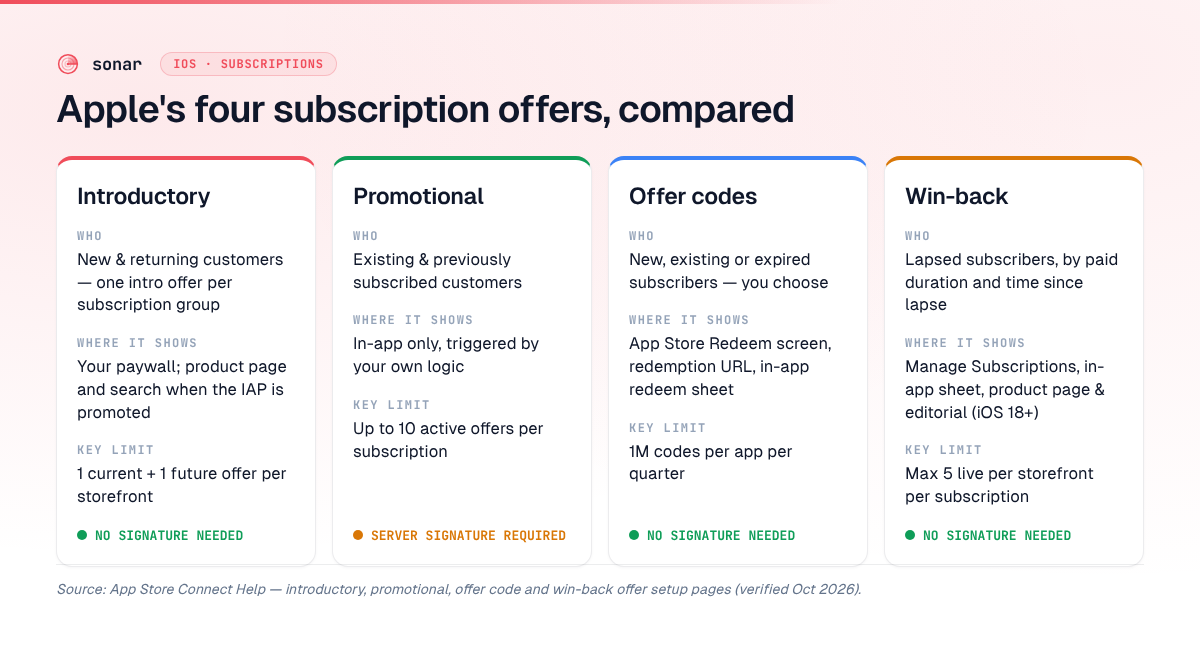
| Offer type | Eligibility | Who it targets | Where it surfaces | Key limits | Signature needed | Min OS |
|---|---|---|---|---|---|---|
| Introductory offer | One intro offer per subscription group, new and returning customers | New subscribers | Your paywall; product page, search, and Today/Games/Apps tabs if the IAP is promoted | One current + one future offer per storefront | No | StoreKit 2 eligibility check (isEligibleForIntroOffer): iOS 15 |
| Promotional offer | Existing and previously subscribed customers; works after an intro offer | Current subscribers (retention, upgrades), lapsed users you can reach in-app | Only inside your app, when your logic presents it | Up to 10 active offers per subscription | Yes — signed on your server (JWS in StoreKit 2) | iOS 12.2; JWS option back-deployed to iOS 15 |
| Offer code | You choose: new, existing, and/or expired subscribers; one code per offer per customer | Anyone you can reach off-store | App Store redeem flow, redemption URL, in-app redemption sheet | 1M codes per app per quarter; 10 active offers per subscription; max 6 months validity | No | App Store: iOS 14.2 (subscriptions); in-app: iOS 14 (subscriptions), iOS 16.3 (other IAP types) |
| Win-back offer | Lapsed subscribers matching your paid-duration and time-since-lapse rules | Churned subscribers | Manage Subscriptions page, in-app win-back sheet, product page + editorial (if promoted), direct link | 5 live per storefront per subscription; 350 configured; min 3-day run | No | Manage Subscriptions: iOS 14.3 / macOS 14; in-app sheet and App Store promotion: iOS 18 |
Introductory offers: the one-time acquisition discount
An introductory offer is a free or discounted first period for people who have never redeemed an intro offer in that subscription group. Apple's rule is strict: "New and returning customers are only eligible to use one introductory offer per subscription group," and you can have "one current and one future introductory offer per storefront" (App Store Connect Help: introductory offers).
Free trials on a monthly plan run 3 days to 1 year (same page). If you promote the subscription as an In-App Purchase, Apple says the offer "appears on your product page and may display in search results as well as on the Today, Games, and Apps tabs" (Apple: Auto-renewable subscriptions).
In StoreKit 2, check Product.SubscriptionInfo.isEligibleForIntroOffer (iOS 15+, Apple Developer Documentation) before you render "Start free trial" — showing a trial to someone who isn't eligible promises a discount the App Store won't honor. WWDC25 also added an introductoryOfferEligibility purchase option so your server can decide eligibility (WWDC25 session 241).
Promotional offers: retention you trigger yourself
Promotional offers are discounts you show to existing or previously subscribed customers, inside your app, based on your own business logic. Apple allows "up to 10 offers for each subscription" (Apple: Auto-renewable subscriptions), and customers can accept a promotional offer even after using an introductory offer (App Store Connect Help: promotional offers). Customers need iOS 12.2, macOS 10.14.4, or tvOS 12.2 or later to accept them (same source).
Typical triggers: a cancellation-intent screen or an annual-to-monthly downgrade.
Signing promotional offers in StoreKit 2
Promotional offers are the only type that needs a server-side signature. WWDC25 introduced the promotionalOffer(_:compactJWS:) purchase option, which takes a compact JWS string and is "back deployed to iOS 15" (WWDC25 session 241; Apple Developer Documentation)).
The flow Apple describes: download your In-App Purchase key from App Store Connect (Users and Access → Integrations → In-App Purchase), then on your server use the App Store Server Library's PromotionalOfferV2SignatureCreator with your bundle ID, key ID, and issuer ID, and call createSignature with the product ID and offer ID. Including the transaction ID in the signature is Apple's recommended practice.
If you are still on the original StoreKit purchase APIs, the StoreKit 2 migration checklist covers the transaction-listener and entitlement changes you need first.
Apple offer codes: campaigns you distribute yourself
Apple offer codes are free or discounted offers that customers unlock with a code, and they are the only offer type built for channels outside your app and the App Store. You can create "one-time-use codes (18-digit unique codes), or custom codes (such as SPRINGPROMO)" (Apple: Auto-renewable subscriptions).
The App Store Connect limits (Help: set up offer codes):
- Quota: 1 million codes per app, per quarter, shared across all subscriptions.
- Active offers: up to 10 at a time per subscription.
- One-time-use codes: generated in batches of 500 to 25,000; expire at most 6 months after creation.
- Custom codes: up to 64 characters, no special characters; optional redemption cap (up to 25,000 per batch). An expiration date isn't required — pick "No End Date" — but if you set one, the maximum is 6 months, and it can't be edited later.
- Eligibility: pick any combination of new, existing, and expired subscribers. Each customer can redeem one code per offer.
One setting changes the economics: with an introductory offer present, you choose whether code redeemers get the intro offer first and then the code's discount (same help page). Stacking them doubles the discount period — fine for a partner bundle, expensive for a public promo.
One upgrade rule: "existing subscribers can only redeem codes that are an upgrade from or at the same level as their current subscription" (Apple).
For consumables, non-consumables, and non-renewing subscriptions, the same 1 million per quarter quota is shared across all In-App Purchases, and in-app redemption needs iOS 16.3 or later (Help: offer codes for In-App Purchases). That makes Apple offer codes usable for lifetime-unlock giveaways too.
How customers redeem Apple offer codes
Customers redeem Apple offer codes in three places: the App Store's redeem screen, a redemption URL, or a redemption sheet inside your app. Subscription codes work in the App Store on iOS 14.2, iPadOS 14.2, and macOS 15 or later (Apple: Auto-renewable subscriptions).
In the App Store
On iPhone, open the App Store, tap your account photo, tap Redeem Code, then enter the code manually or use the camera (Apple Support). Apple's help page lists this redemption flow for one-time-use codes; for custom codes like SPRINGPROMO it lists only a redemption URL or in-app redemption (Help: set up offer codes), so plan custom-code campaigns around a link.
Via a redemption URL
App Store Connect gives you an example redemption link in the offer details; append the code to it and the customer lands in the App Store's redemption flow without typing anything (same help page).
Inside your app
App Store Connect Help says both code types are redeemable in your app on iOS 14, iPadOS 14, or macOS 15 or later, if your app supports the StoreKit redemption method (Help: set up offer codes). The iOS 16 floor applies only to these two specific sheet APIs: in SwiftUI, attach offerCodeRedemption(isPresented:onCompletion:) (iOS 16+); in UIKit, call presentOfferCodeRedeemSheet(in:) (iOS 16+) (Apple Developer Documentation)). Apple is explicit: customers "can only redeem these offers in your app through the redemption sheet; don't use a custom UI." The resulting transaction arrives in Transaction.updates, so start that listener at launch (same source).
Win-back offers: reacquisition Apple distributes for you
Win-back offers discount a churned subscription, and Apple shows them to eligible people automatically. You set eligibility on three dials (Help: set up win-back offers):
- Minimum paid duration: 1 to 24 months, or 3, 4, or 5 years.
- Time since last subscribed: a min–max window between 1 and 24 months (e.g. lapsed 5 to 11 months).
- Wait between offers (optional): 2 to 24 months before the same customer can redeem it again.
You can configure up to 350 win-back offers per subscription but run at most 5 per storefront at once, each live for at least 3 days (same source). Customers qualify only for their most recently lapsed product in each group.
Where win-back offers surface
This is what makes win-back different from Apple offer codes and everything else in the table. Per Apple's help page, win-back offers appear:
- In the customer's Manage Subscriptions page (iOS 14.3, iPadOS 14.3, or macOS 14 and later), even if you don't promote them.
- In a win-back offer sheet inside your app (iOS 18+), shown automatically.
- On your product page and in editorial selections and personalized recommendations across the App Store (iOS 18+), if you choose to promote the offer. Promotion requires an approved subscription image (StoreKit docs: supporting win-back offers).
- Through a direct link in the format
https://apps.apple.com/win-back/that you can email (same StoreKit doc).
That product-page and editorial surface overlaps with in-app events — both are store real estate that, in my opinion, is too valuable to leave empty.
StoreKit 2 handling
StoreKit shows the in-app sheet when it receives a Message.Reason.winBackOffer message (iOS 18+). For a custom paywall, read Product.SubscriptionInfo.winBackOffers and buy with the winBackOffer(_:) purchase option, both iOS 18+ (Apple Developer Documentation). That array ignores eligibility; Apple says to use eligibleWinBackOfferIds from renewal info instead, ordered with the best offer first (StoreKit docs). Check it server-side before emailing a direct link.
Why reacquisition beats fighting for search
Win-back offers matter most in categories where new installs are expensive to earn. In Sonar's data for the US App Store, "meditation" has a difficulty of 79/100 at Apple popularity 53, and "habit tracker" sits at difficulty 67 with popularity 57 (Sonar /api/v1/keywords/search, queried 2026-10-01). The top meditation results are subscription incumbents with huge rating moats: Calm at 1,984,749 ratings, Headspace at 973,833, Insight Timer at 447,154 (Sonar /api/v1/apps/search, same date).
An indie meditation app won't out-rank Calm for its head term soon. But every lapsed subscriber already found you and paid. A win-back offer reaches them through Manage Subscriptions and, if promoted, the product page — no keyword fight required. Easier terms exist ("subscription tracker": difficulty 43, popularity 5, the floor), but they bring little traffic. You can check difficulty for your own category in Sonar.
For the wider pricing picture — trials, tiers, annual anchoring — see app monetization strategies for subscription apps.
How to measure lift without cannibalizing full-price sales
An offer only earns money if it converts people who would not have paid full price. The redemption count tells you nothing about that; a holdout comparison does.
1. Tag every transaction by offer. The App Store Server API's offerType field uses 1 for introductory, 2 for promotional, 3 for offer-code, and 4 for win-back purchases, and every type except 1 carries an offerIdentifier (App Store Server API: offerType). Store both on your server.
2. Keep a holdout for anything you trigger. For promotional offers and offer-code emails, randomly withhold the offer from a slice of eligible users and compare 90-day revenue per user, not conversion rate. Worked example: a 40% discount that lifts conversion by 20% yields 1.2 × 0.6 = 0.72 of baseline revenue per eligible user — a 28% loss over the discounted period, before any later full-price renewals make it back.
3. Use win-back eligibility windows as your experiment. Win-back targeting is Apple's, so you can't hold out inside the same window. Instead, compare lapse cohorts: run an offer for customers lapsed 2–6 months and leave 7–12 months untouched, then swap. Track full-price renewals after the discount ends.
4. Watch for intro-offer stacking and full-price leakage. If your code offers are set to apply after the introductory offer, new customers get two discounted periods. And if a public custom code like SPRINGPROMO escapes to a deal forum, existing full-price prospects will wait for it. Set redemption caps and end dates on custom codes (Help: set up offer codes).
My bias: start with one win-back offer (it surfaces itself, needs almost no code on iOS 18), then add promotional offers at the cancellation screen once you have a holdout in place. Apple offer codes come last, when you have a channel to distribute them through. That ordering is my judgment, not an Apple recommendation.
FAQ
What is the difference between Apple offer codes and promotional offers?
Apple offer codes are redeemed with a code through the App Store, a URL, or an in-app sheet, and you can distribute them anywhere. Promotional offers have no code; your app shows them to existing or past subscribers and your server must sign each one. Both allow up to 10 active offers per subscription.
How many offer codes can I create per quarter?
App Store Connect allows up to 1 million offer codes per app per quarter, shared across all subscriptions and In-App Purchases. One-time-use codes are created in batches of 500 to 25,000 and expire within 6 months (Apple).
Do win-back offers require iOS 18?
Partly. Win-back offers appear in the Manage Subscriptions page on iOS 14.3, iPadOS 14.3, or macOS 14 and later, but the automatic in-app offer sheet and the App Store product-page and editorial placements need iOS 18, iPadOS 18, or macOS 15 (Apple).
Can someone use an introductory offer twice?
No. Each person can redeem one introductory offer per subscription group, regardless of how many subscriptions the group contains. Use a promotional offer, offer code, or win-back offer to discount a returning customer instead.
Can offer codes be used for non-subscription purchases?
Yes, since WWDC25. Offer codes now work for consumables, non-consumables, and non-renewing subscriptions, with in-app redemption on iOS 16.3 and later (Apple).
Offers bring back the users you already won. Sonar shows which keywords bring in new ones — popularity, difficulty, and daily ranks for iOS and Google Play. See plans and start a free trial.