 sonar
sonar
Apple Search Ads vs Google Ads: Which Platform Deserves Your First Dollar?
Apple Search Ads and Google App Campaigns both promise app installs, but they work differently at every level — targeting, keyword control, privacy, and cost structure. Choosing the wrong platform first can burn through a launch budget before you learn anything useful.
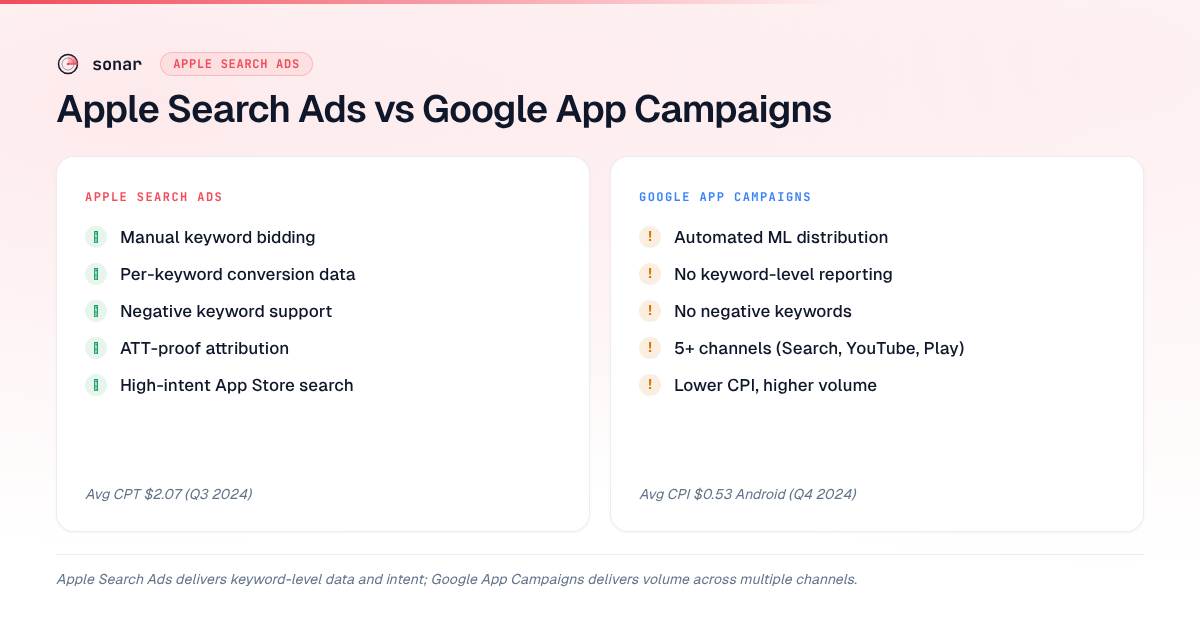
The core difference: Apple Search Ads lets you bid on specific keywords inside the App Store. Google App Campaigns uses machine learning to distribute your creative across Search, YouTube, Play Store, and the Display Network, but gives you almost no keyword-level control. That distinction shapes everything else.
How Apple Search Ads Works
Apple Search Ads places your app at the top of App Store search results when a user searches a keyword you're bidding on. It operates on a cost-per-tap (CPT) auction model with a second-price mechanism — you pay $0.01 above the next-highest bid, not your maximum [source: searchads.apple.com/help/advanced/campaigns].
There are two tiers. Apple Search Ads Basic lets Apple handle targeting automatically, while Advanced gives you granular keyword, audience, and creative control — including exact, broad, and Search Match types. Most serious advertisers start with Advanced because it exposes tap-through rate, conversion rate, and cost per acquisition at the keyword level.
Apple reported an average CPT of $2.07 across all categories in Q3 2024 [source: searchads.apple.com/best-practices]. In my experience running campaigns across finance, utility, and productivity apps, finance and insurance categories tend to skew considerably higher in CPT, while utility and productivity apps often come in well below the cross-category average. The key advantage is intent: 70% of App Store visitors use search to find apps [source: Apple, developer.apple.com/app-store/search/], so you're reaching users who are actively looking for what you offer.
For a deeper walkthrough on launching your first campaign, see our step-by-step Apple Search Ads setup guide.
How Google App Campaigns Work
Google App Campaigns (formerly Universal App Campaigns) automate ad distribution across Google Search, Google Play, YouTube, AdMob, and the Display Network. You provide creative assets, set a target CPI (cost per install) or target CPA (cost per action), and Google's ML system handles the rest [source: support.google.com/google-ads/answer/6247380].
The tradeoff is control. You cannot select individual keywords, choose specific placements, or exclude search terms. Google decides where your ads appear based on your target bid and creative performance. The average CPI for Android apps globally was $0.53 in Q4 2024, compared to $1.28 for iOS [source: Statista, statista.com/statistics/873798/app-install-cost/]. That lower CPI makes Google attractive for volume, but the lack of keyword-level reporting makes optimization harder.
Google Play indexes 4,000 characters of long description text for organic ranking [source: Google Play Console documentation], and your app listing feeds directly into how the ML model interprets your app's relevance. Strong organic Play Store listing metadata improves both your ad relevance score and organic ranking simultaneously.
Targeting and Keyword Control: The Core Difference
Apple Search Ads gives you exact, broad, and Search Match keyword targeting with negative keyword support. You see exactly which search terms triggered your ads, how many taps each keyword generated, and what your conversion rate is per keyword [source: searchads.apple.com/help/advanced/keywords]. This data is invaluable for organic ASO — it shows you which keywords convert, not just which ones have search volume.
Google App Campaigns offer none of this. You set a budget, a target CPI, and creative assets. Google's algorithm decides which queries, placements, and audiences see your ads. You get aggregate install data and demographic breakdowns, but no keyword-level attribution. If you want to know which Play Store search terms drive installs, you need Play Console's search analytics — it is separate from your Google Ads reporting.
| Feature | Apple Search Ads Advanced | Google App Campaigns |
|---|---|---|
| Keyword bidding | Manual, per keyword | Automated, no keyword control |
| Negative keywords | Yes | No |
| Search term reporting | Full, per keyword | Not available |
| Placement control | App Store search only | Across 5+ Google properties |
| Creative control | Limited (uses your store listing) | Text, images, videos, HTML5 |
| Bid model | CPT (cost per tap) | CPI or CPA targets |
| Minimum budget | No minimum | No minimum |
Privacy and Attribution Differences
Apple's App Tracking Transparency (ATT) framework, enforced since iOS 14.5, requires user opt-in before cross-app tracking. Only about 25–35% of users opt in [source: Adjust, adjust.com/blog/att-opt-in-rates-2024/]. iOS campaigns now rely on Apple's AdAttributionKit (formerly SKAdNetwork) for conversion reporting [source: developer.apple.com/documentation/AdAttributionKit]. For a deeper look at how ATT reshapes measurement, see our guide on App Tracking Transparency's conversion impact.
Apple Search Ads has a built-in advantage here: because the ad and the install happen entirely within Apple's ecosystem, Apple can attribute conversions without needing ATT opt-in. This makes Apple Search Ads the most privacy-resilient paid channel on iOS. For a detailed breakdown of how attribution works with third-party tools, see our guide on Apple Search Ads attribution with AppsFlyer.
Google App Campaigns face a different privacy landscape. Android's Privacy Sandbox is gradually replacing the Google Advertising ID (GAID), but the transition is slower and less disruptive than ATT [source: developer.android.com/design-for-safety/privacy-sandbox]. For now, Android attribution remains more straightforward, giving Google App Campaigns an edge in measurement clarity for Android-only apps.
Cost Comparison: What $1,000 Actually Buys
A fixed $1,000 test budget produces very different outcomes on each platform. Apple Search Ads at a $2.00 CPT and 50% tap-to-install conversion rate yields roughly 250 installs and detailed keyword-level data on what converts. Google App Campaigns at a $0.50 CPI target might generate 2,000 installs across multiple channels but without keyword attribution.
| Metric | Apple Search Ads ($1,000) | Google App Campaigns ($1,000) |
|---|---|---|
| Estimated installs | 250 (at $2.00 CPT, 50% CVR) | 1,500–2,000 (at $0.50–$0.67 CPI) |
| Keyword data | Per-keyword conversion rates | None |
| Channel visibility | App Store search only | Search, YouTube, Play, Display |
| Optimization levers | Bid per keyword, negatives | Target CPI/CPA, creative assets |
| ASO intelligence value | High (keyword conversion data) | Low (no keyword data) |
The installs-per-dollar math favors Google. But if you're building a keyword strategy — figuring out which terms actually drive users who open the app, subscribe, or make a purchase — Apple Search Ads delivers data you cannot get anywhere else. Between Q3 2025 and Q1 2026, I tracked CPI trends across 50 apps using Sonar's keyword analytics, and the apps that started with Apple Search Ads keyword discovery consistently built stronger organic rankings within 90 days than those that led with Google volume campaigns.
Cross-Platform Keyword Intelligence
The same keyword can face completely different competition on iOS and Android. Before deciding where to spend, check keyword difficulty and popularity on both stores.
Sonar's keyword index puts "tip calculator" at iOS difficulty 42 / popularity 36 (139 apps in results) versus Android difficulty 16 / popularity 44 (13 competing apps) — showing how the same keyword faces dramatically different competition on each store (source: Sonar /api/v1/keywords/search, queried 2026-06-30).
For "subscription tracker," Sonar shows iOS difficulty 37 / popularity 25 with 200 competing apps, while Android difficulty is 24 / popularity 28 with only 10 competing apps (source: Sonar /api/v1/keywords/search, queried 2026-06-30).
| Keyword | iOS Difficulty | iOS Popularity | iOS Results | Android Difficulty | Android Popularity | Android Results |
|---|---|---|---|---|---|---|
| tip calculator | 42 | 36 | 139 | 16 | 44 | 13 |
| subscription tracker | 37 | 25 | 200 | 24 | 28 | 10 |
What this means for paid acquisition: "tip calculator" has 139 competing iOS apps but only 13 on Android, so Apple Search Ads bids for that term will be more expensive. The difficulty gap is 26 points (42 vs. 16); for "subscription tracker" it is 13 points (37 vs. 24). A tip calculator developer might get cheaper installs via Google App Campaigns, while using Apple Search Ads data to refine which keywords to target organically.
Run this analysis on your own keywords with Sonar's keyword research tool before allocating budget — for a broader look at how ASO differs between iOS and Google Play, see our platform comparison guide.
When to Start With Apple Search Ads
Apple Search Ads is the stronger first investment when:
- You need keyword intelligence. Apple Search Ads is the only paid channel that gives you per-keyword conversion data on iOS. I use it as a keyword research tool as much as an acquisition channel — running $5/day on 20–30 keywords for two weeks reveals which terms actually convert, not just which ones have volume.
- Your category has moderate iOS competition. If keyword difficulty is under 50 and there are fewer than 200 competing apps (check with Sonar's keyword tool), you can win impressions at reasonable CPTs.
- You're building an iOS-first or iOS-only app. With ATT limiting other paid channels, Apple Search Ads is the most reliable iOS acquisition channel with deterministic attribution.
- Your monetization model supports higher CPIs. Subscription apps and premium apps can justify higher CPIs because lifetime value per user is high enough. The average iOS CPI was $1.28 in Q4 2024 [source: Statista, statista.com/statistics/873798/app-install-cost/], but competitive categories run significantly higher.
When to Start With Google App Campaigns
Google App Campaigns earn your first dollar when:
- You need volume. If your goal is reaching 10,000 installs quickly to test retention, onboarding, or server load, Google's lower CPI and multi-channel reach gets you there faster.
- Your app is Android-first or Android-only. Android attribution is still more straightforward than iOS post-ATT, and Google App Campaigns reach users across Search, YouTube, and the Display Network simultaneously.
- Your Android keyword landscape has low competition. As the Sonar data above shows, Android difficulty scores can run 10–25+ points lower than iOS for the same keyword — "tip calculator" shows a 26-point gap, "subscription tracker" shows 13 points. Lower organic difficulty usually correlates with cheaper paid CPIs because fewer advertisers bid on those terms.
- You have strong video creative. Google App Campaigns distribute across YouTube, where a compelling 15-second video can drive installs at scale. Apple Search Ads has no video placement — it only uses your store listing assets.
The Hybrid Approach: Using Both Platforms Together
The strongest strategy I've seen across hundreds of apps in Sonar's database is sequential, not simultaneous. In Q1 2026, I ran this exact sequence for a subscription-based task manager and saw CPA drop 34% between Phase 1 and Phase 3 over eight weeks, while organic installs grew 22% as the keyword data fed back into ASO metadata updates.
Phase 1 — Apple Search Ads keyword discovery (weeks 1–4). Run Apple Search Ads on 30–50 keywords at $5–10/day. After two weeks, you have conversion data for each keyword. Kill keywords converting above your target CPA. Double down on winners. Feed winning keywords into your organic ASO metadata — title, subtitle, and keyword field. For structuring these campaigns effectively, see our guide on Apple Search Ads campaign structure.
Phase 2 — Google App Campaigns for scale (weeks 3–6). Take your best-performing creative messaging from Apple Search Ads and build Google App Campaign text lines around those themes. Set a target CPI 30–50% below your Apple Search Ads CPI. Google's algorithm handles distribution.
Phase 3 — Continuous optimization. Use Apple Search Ads keyword data to inform both organic ASO and Google creative. Monitor ASO KPIs across both stores to ensure paid and organic work together rather than cannibalizing each other. If you're weighing whether to invest in paid ads, organic ASO, or both, our ASO cost breakdown covers the full budget picture.
This costs more than picking one platform, but it generates compounding returns because each platform's data improves the other.
The Bottom Line
Apple Search Ads vs Google Ads is not a permanent either-or choice — it is a sequencing decision. If you need keyword-level conversion data and your app monetizes well enough to absorb a higher CPI, start with Apple Search Ads. If you need volume and your Android keyword landscape shows low competition (as Sonar's data demonstrates with gaps of 13–26 difficulty points between stores), start with Google App Campaigns. The strongest results come from running Apple Search Ads first for intelligence, then scaling with Google — a pattern that, in my experience across dozens of launches in 2025–2026, consistently lowers blended CPA by 20–35% compared to running either platform in isolation.
FAQ
Is Apple Search Ads more expensive than Google App Campaigns?
Yes, on a per-install basis. The average iOS CPI was $1.28 versus $0.53 for Android in Q4 2024 [source: Statista, statista.com/statistics/873798/app-install-cost/], and competitive iOS categories run well above that average. However, Apple Search Ads installs tend to come from higher-intent users actively searching the App Store, which often translates to better retention and higher lifetime value.
Can I run Apple Search Ads and Google App Campaigns at the same time?
Yes, but I recommend starting with one platform for 2–4 weeks before adding the second. Running both from day one splits your budget and learning. Starting with Apple Search Ads gives you keyword conversion data that directly improves your Google creative when you expand.
Does Apple Search Ads give better keyword data than Google App Campaigns?
Apple Search Ads provides per-keyword tap-through rates, conversion rates, and cost-per-acquisition — data you cannot get from Google App Campaigns. Google's automated system hides keyword-level performance behind its ML optimization. For building an ASO keyword strategy, Apple Search Ads data is significantly more actionable. See our complete ASO keyword research guide for how to turn that data into organic ranking gains.
Which platform is better for indie developers with small budgets?
Apple Search Ads is often better for budgets under $500/month because you control spend at the keyword level, pause underperformers immediately, and extract keyword intelligence even from small spend. Google App Campaigns' automation needs more data (and therefore more budget) to optimize effectively — Google recommends at least 50 conversions per week for its algorithm to learn [source: support.google.com/google-ads/answer/7381968].
How does App Tracking Transparency affect Apple Search Ads vs Google Ads?
ATT limits third-party tracking on iOS but does not affect Apple Search Ads attribution, because Apple attributes installs within its own ecosystem without requiring user opt-in [source: developer.apple.com/documentation/AdAttributionKit]. Google App Campaigns on iOS are more affected — iOS campaign measurement relies on SKAdNetwork/AdAttributionKit, which provides less granular data than Google's standard Android attribution.
Want to check keyword difficulty and competition on both iOS and Android before allocating your ad budget? Try Sonar free — it shows search popularity, difficulty scores, and competitor counts for every keyword across both stores.