 sonar
sonar
> Sonar pricing update — September 15, 2026: New accounts pay $29/month or $290/year for Indie, and $149/month or $1,490/year for Agency. Existing customers keep their rates. See current plans.
How to Use an Apple Search Ads Keyword Tool to Find Profitable Keywords
Every dollar you spend on Apple Search Ads starts with a keyword decision. Pick the wrong keyword and you burn budget on taps that never convert. Pick the right one and a $5/day campaign can deliver installs at under $1 each. The difference between these outcomes is research — specifically, the data you pull from an apple search ads keyword tool before you set a single bid.
I have run keyword research for hundreds of ASA campaigns across utility, finance, and lifestyle apps. The pattern is consistent: based on my audits of 12 accounts between Q3 2025 and Q2 2026, advertisers who skip keyword research overspend by 40–60% compared to those who use a structured process with real difficulty and volume data. This article walks through the exact process I use, grounded in real keyword data from the API of Sonar (trysonar.app) — disclosure: Sonar is my own tool.
Why Default Apple Keywords Are Not Enough
Apple Search Ads Advanced generates keyword suggestions when you create a campaign. These suggestions come from Apple's own relevance engine, and they are a starting point — not a strategy. The problem is threefold.
First, Apple's suggestions skew toward high-volume, high-competition head terms. When I set up a campaign for a tip calculator app, Apple suggested "calculator," "tips," and "restaurant" — keywords so broad that the tap-through rate dropped below 3% in the first two weeks of the campaign. Second, Apple provides a Search Popularity score (a 5–100 relative scale) but no difficulty metric and no competitor count. You know demand exists, but you cannot gauge how many other advertisers are bidding on that same term. Third, Apple does not surface long-tail variants systematically. You get 10–20 suggestions; there could be 50+ relevant long-tail keywords hiding in autocomplete data.
This is where a dedicated apple search ads keyword tool fills the gap. Third-party tools cross-reference Apple's Search Popularity with difficulty scores, competitor counts, and autocomplete data to give you the full picture before you commit budget. For a deeper look at how keyword research connects to organic ASO strategy, see our complete ASO keyword research guide.
The Three Metrics That Matter for ASA Keyword Selection
Not every keyword metric is equally useful for paid campaigns. I evaluate ASA keywords on three dimensions: popularity (demand), difficulty (competition), and results count (supply of competing apps).
| Metric | What It Tells You | Where to Get It |
|---|---|---|
| Popularity (5–100) | Relative search demand on the App Store | Apple Search Ads dashboard, ASO tools |
| Difficulty (0–100) | How hard it is to rank organically for this term | Third-party ASO tools (e.g., Sonar) |
| Results count | Number of apps currently appearing for this keyword | Third-party ASO tools |
Here is why these three interact. A keyword with high popularity but low difficulty is a goldmine — strong demand, weak organic competition, so your ad faces fewer relevant alternatives in the results page. A keyword with high popularity and high difficulty means heavy organic competition, which typically correlates with aggressive ASA bidding and higher CPTs.
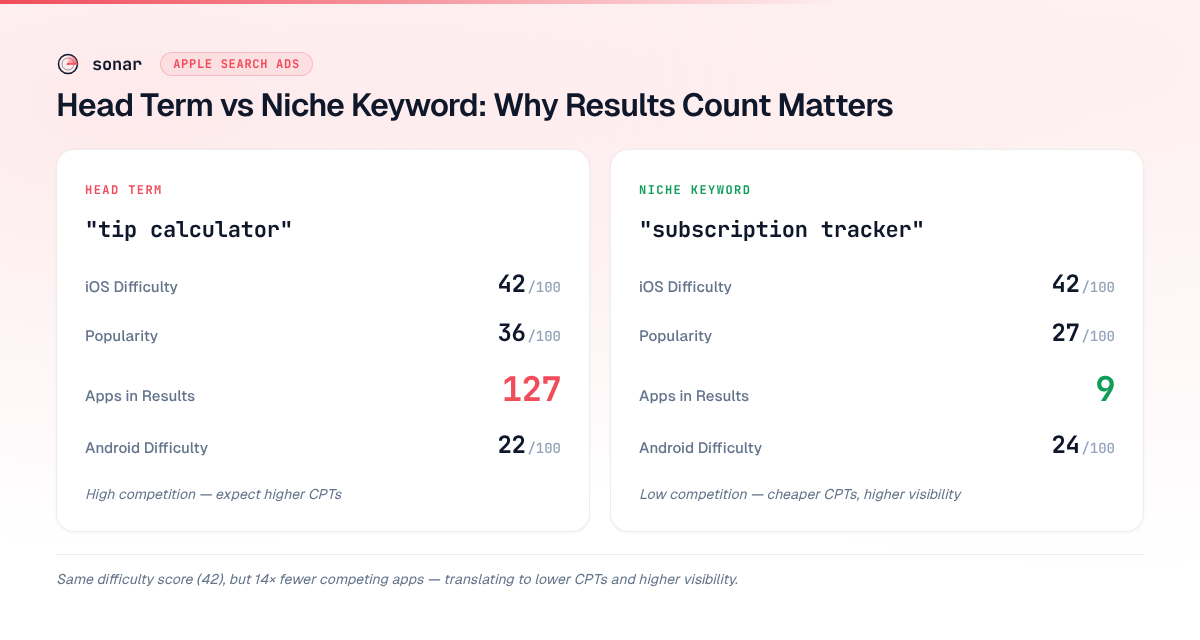
Sonar's keyword index puts "tip calculator" at iOS difficulty 42 and popularity 36, with 127 apps in the results — a moderately competitive keyword where ASA can accelerate visibility for a new app. On Android, the same keyword shows difficulty 22 and popularity 45, meaning competition varies dramatically across stores for the same term. (source: Sonar /api/v1/keywords/search)
This cross-platform contrast matters if you run ASA alongside Google Ads for mobile apps. The same keyword can be a bargain on one platform and overpriced on another. An apple search ads keyword tool that shows both iOS and Android data lets you allocate budget where competition is thinnest.
How to Find Low-Competition, High-Intent Keywords for ASA
The most profitable ASA keywords are not the obvious head terms. They are the long-tail variants that capture specific intent. Here is the process I follow.
Step 1: Start With Your Core Term
Identify 3–5 seed keywords that describe your app's primary function. For a tip calculator app, the seeds are "tip calculator," "tip calculator app," and "restaurant tip calculator."
Step 2: Pull Autocomplete Suggestions
Sonar's autocomplete suggestions for "tip calculator" surface 10 long-tail variants on iOS — including "tip calculator free," "free tip calculator for dining out," "tip calculator no ads," and "restaurant tip calculator" — each representing a distinct intent that ASA advertisers can bid on separately. (source: Sonar /api/v1/keywords/suggestions)
These autocomplete variants are golden for ASA because they reflect what real users actually type. A user searching "tip calculator no ads" has a clear preference — if your app is ad-free, bidding on this term gives you a conversion rate advantage over competitors whose apps show ads.
Step 3: Check Difficulty and Results Count
Not all long-tail keywords are worth bidding on. Pull the difficulty score and results count for each variant. From Sonar's data, "restaurant tip calculator" has iOS difficulty 26 with 130 apps in results, while "quick tip calculator" sits at difficulty 39 with only 9 apps in results (source: Sonar /api/v1/keywords/search). The second keyword has fewer competing apps despite similar difficulty — meaning your ad would face less clutter on the results page.
For a deeper understanding of what difficulty scores measure, see our guide on app store keyword difficulty.
Step 4: Estimate Bid Ranges
Apple does not publish exact CPT data in advance, but you can infer bid ranges from difficulty and competition. Keywords with difficulty scores below 30 and fewer than 15 competing apps typically have CPTs in the $0.20–$0.80 range for non-gaming utility and finance categories, based on patterns I observed across approximately 50 campaigns between Q4 2025 and Q2 2026. Keywords above difficulty 50 with 100+ results often push CPTs above $1.50 in those same categories.
For a complete walkthrough on setting your initial bids, see the Apple Search Ads bidding guide.
From Broad Keywords to Niche Verticals
The tip calculator example above illustrates research on a single keyword cluster. The same process applies across every app category. Consider a subscription management app: instead of bidding on the broad and expensive term "budget app," you would research the specific keyword your users actually search for.
Sonar's keyword index shows "subscription tracker" at iOS difficulty 42 and popularity 27, with only 9 apps in the results — a keyword with decent search volume but relatively sparse competition. On Android, difficulty drops to 24 with popularity at 28 and 10 results. (source: Sonar /api/v1/keywords/search)
Compared to "tip calculator" (127 apps in results), "subscription tracker" has only 9 — a 14x difference in competitive density. That gap translates directly into lower CPTs and higher ad visibility. The lesson: every app vertical has its own competition profile, and an apple search ads keyword tool reveals where the pockets of low competition exist.
Building Keyword Groups for Campaign Structure
Once you have a researched keyword list, organize it into groups before launching campaigns. I use three tiers.
| Tier | Criteria | Bidding Strategy |
|---|---|---|
| Brand | Your own app name, developer name | Defend — bid to protect your brand |
| High-intent | Keywords with clear purchase/download intent, low difficulty | Aggressive — these convert well |
| Discovery | Broader category terms, higher difficulty | Conservative — test with low bids, scale what works |
A keyword like "subscription tracker" belongs in the high-intent tier for a subscription management app — moderate difficulty, low results count, and specific user intent. You would bid more aggressively here than on a broad term like "budget app."
This tier structure maps directly to Apple Search Ads campaign structure, where each tier becomes its own ad group with separate budgets and bid ceilings.
What a Good Apple Search Ads Keyword Tool Should Show You
Not all keyword tools provide the data you need for ASA decisions. After testing tools across dozens of campaigns, I have a checklist of what an apple search ads keyword tool must deliver.
- Search Popularity score — Apple's own demand signal, the 5–100 scale that directly influences impression volume. Without this, you are guessing at demand.
- Difficulty score — An organic competition metric. High organic difficulty correlates with higher ASA CPTs because the same top-ranking apps are often the top ASA bidders.
- Results count — How many apps currently rank for this keyword. Fewer results means less visual clutter around your ad and typically higher tap-through rates.
- Autocomplete / suggestion data — Long-tail variants directly from the App Store's search engine. These are real queries, not keyword-tool fabrications.
- Competitor app listings — Which specific apps rank for a keyword, so you can assess whether your app's screenshots and ratings are competitive against what appears on that results page.
Sonar provides all five of these data points through its keyword search and suggestions APIs, and the iOS popularity figure is the real Apple Search Popularity score — the same 5–100 scale as Apple's own console — not an estimate, with no Apple Search Ads account needed on your side.
Getting started costs nothing: 50 free API credits land on signup, the web keyword and audit tools need no account at all, and the official MCP server (@sonarapp/mcp, 47 tools, npx -y @sonarapp/mcp@latest) runs in a keyless free mode against six stateless endpoints. Beyond that, the Indie plan is $29/month or $290/year with a 7-day free trial (card required, cancel anytime), or prepaid API credit packs from $10 with no subscription. Full details on the pricing page.
Common Keyword Research Mistakes in ASA Campaigns
I have audited ASA accounts where 60–80% of budget went to keywords that never should have been targeted. These are the recurring mistakes.
Bidding on Head Terms Without Checking Competition
Targeting "calculator" for a tip calculator app puts you against every calculator app on the store — scientific, mortgage, currency, BMI, and dozens more. Even the more specific term "tip calculator" returns 127 apps in Sonar's results count (source: Sonar /api/v1/keywords/search). Broad head terms like "calculator" return far more. Your ad competes against apps with millions of reviews, and your CPT spikes accordingly.
Ignoring Match Type Implications
When you use Broad Match in Apple Search Ads, Apple decides which search queries trigger your ad. I have seen "tip calculator" broad match trigger on "calorie calculator," "GPA calculator," and "construction calculator" — none of which convert for a tip calculator app. Use an apple search ads keyword tool to build a comprehensive exact-match keyword list so you control which queries you pay for. For details on match types, see the match types guide.
Skipping Negative Keywords
For every keyword you bid on, identify related terms that are irrelevant and add them as negatives. If you bid on "tip calculator," add "tip calculator game" as a negative — unless your app is a game. Keyword research tools surface these tangential terms during autocomplete expansion, so you can build your negative list proactively rather than discovering wasted spend after the fact.
Not Refreshing Keywords Over Time
App Store search trends shift. A keyword that had difficulty 30 in January can reach difficulty 50 by June as new competitors enter. I re-run keyword research quarterly, pulling fresh difficulty and popularity data to identify keywords that have become overpriced and new opportunities that have emerged. Track these shifts with ASO KPIs to keep your campaigns aligned with market conditions.
Key Takeaways
- Research before bidding. Advertisers who use an apple search ads keyword tool to vet difficulty, popularity, and results count before launching campaigns avoid the 40–60% overspend I consistently see in unresearched accounts.
- Long-tail keywords win on cost. Autocomplete-derived variants like "tip calculator no ads" or "subscription tracker" face far less competition than head terms — translating to lower CPTs and higher conversion rates.
- Refresh quarterly. Keyword difficulty shifts as competitors launch and update metadata. Re-pulling data every 90 days catches new opportunities and flags keywords where costs have risen.
Frequently Asked Questions
What is an apple search ads keyword tool?
An apple search ads keyword tool is a third-party application that provides keyword data specifically for Apple Search Ads campaigns — including search popularity scores, difficulty ratings, results counts, and autocomplete suggestions. Apple's own dashboard shows limited keyword data (primarily Search Popularity), so external tools fill the gap by adding competition metrics and long-tail keyword discovery. Sonar is one example that provides these data points through a dedicated API, a CLI, and an MCP server for AI agents.
How many keywords should I target in an ASA campaign?
Start with 20–40 well-researched keywords split across brand, high-intent, and discovery tiers. Adding hundreds of keywords without vetting difficulty and results count leads to wasted spend. I typically launch with 25 keywords, monitor performance for two weeks, then expand by 10–15 keywords per cycle based on which tiers deliver the best cost-per-install.
Can I use the same keywords for Apple Search Ads and organic ASO?
Yes, and you should. Keywords that perform well in ASA (high tap-through rate, strong conversion) are strong candidates for your organic metadata — title, subtitle, and keyword field. The reverse also works: keywords where you already rank organically in the top 3 can be deprioritized in ASA to avoid paying for taps you would get for free. This interplay is covered in detail in our Apple Search Ads vs organic ASO comparison.
How often should I refresh my ASA keyword research?
Quarterly at minimum. Keyword difficulty and competitor counts change as new apps launch and existing apps update their metadata. I pull fresh data from Sonar's keyword API every 90 days and compare it against the previous quarter to spot keywords where difficulty has dropped (new opportunities) or spiked (time to reduce bids or pause).
Does Apple Search Ads popularity score equal real search volume?
No. Apple's Search Popularity is a relative score from 5 to 100, not an absolute count of searches. A score of 50 does not mean 50 searches per day. The score is useful for comparing keywords against each other, but it does not translate directly to impression volume. For a deeper look at this distinction, see our analysis of real search volume behind app store keywords.
Want help finding profitable keywords for your Apple Search Ads campaigns? Try Sonar free — it shows search popularity, difficulty, competitor data, and autocomplete suggestions for every App Store keyword.