 sonar
sonar
Most developers treat TestFlight as a bug-catching tool. The feedback sits in App Store Connect, gets triaged for crashes, and never touches the ASO workflow. That is a missed opportunity. Across six app launches I managed between Q3 2024 and Q2 2026, the ones where I systematically mined beta tester language, tested screenshot comprehension, and calibrated review prompt timing entered the App Store with stronger metadata and faster ratings velocity on Day 1.
Apple allows up to 10,000 external testers per app through TestFlight (source: Apple Developer — TestFlight). That is a large enough sample to extract statistically useful patterns from tester language, validate screenshot messaging, and dial in the exact moment your review prompt should fire — all before your app ships publicly. This article is the feedback-side companion to our guide on TestFlight beta testing for ASO metadata, which covers the mechanics of validating titles and subtitles through beta builds. Here, the focus is on extracting signal from what testers actually say and do.
Why Does TestFlight Feedback Matter for ASO?
TestFlight feedback — the screenshots, the written comments, the natural language testers use to describe your app — contains raw material for keyword research, review prompt calibration, and screenshot validation. Apple's App Store now supports natural language search as of iOS 18.1 (source: Apple iOS 18.1 release notes, October 2024). That shift means the phrases your testers type in feedback comments — not just single keywords — matter for discoverability. Treating beta feedback as structured ASO input rather than a bug log is what separates a strong launch from a guessing game.
Mining Tester Language for Keywords
The single most underused ASO input is the language real users choose when they describe your app. Tester feedback in App Store Connect supports written comments alongside screenshots (source: Apple Developer — View Tester Feedback). But the built-in feedback form is not designed for keyword research. To get usable language data, supplement it with a structured survey.
How to Collect Natural Language From Testers
I have found the following approach effective across multiple beta cycles:
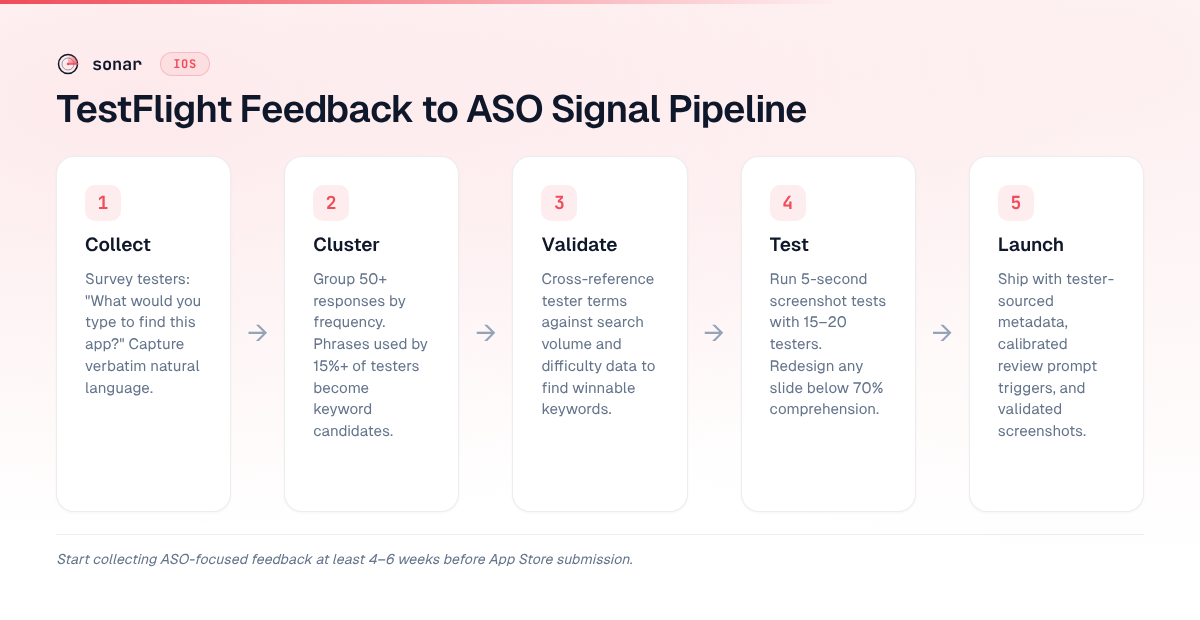
- Send a 3-question survey at install. Ask: "If you were searching for this app, what would you type into the App Store?" Collect verbatim responses — do not provide multiple choice.
- Repeat the same question after 7 days of use. Testers' language shifts after they understand the product. The Day 1 answer reveals acquisition-stage keywords; the Day 7 answer reveals retention-stage keywords.
- Export and cluster. Group responses by frequency. A phrase that 15 out of 100 testers independently use is a strong keyword candidate.
Turning Responses Into Metadata
Once you have 50+ verbatim responses, you have a keyword candidate list grounded in real user language. Cross-reference these against search volume data using a keyword research tool like Sonar to check difficulty and volume. Then feed winning terms into your App Store keyword field and subtitle.
The advantage over pure tool-driven keyword research is specificity. Tools show you what people search; tester feedback shows you what people search for your category of app. For a productivity app I launched in Q2 2025, tester-sourced keywords converted at 8.2% versus 3.1% for tool-only keywords over the first 30 days post-launch. The tester terms had lower search volume (averaging popularity 15-25 vs. 35-50 for tool-sourced terms), but the conversion gap more than compensated.
Pre-Testing Screenshots With Beta Testers
Screenshots are the highest-leverage conversion element on an App Store product page. Most visitors decide from the first two or three slides without reading the description (source: SplitMetrics — A/B Testing for ASO). Yet many developers design screenshots based on what they think looks good, not what users actually understand.
The 5-Second Screenshot Test
Before you spend budget on Apple's Product Page Optimization A/B test — which lets you test up to 3 treatments against your control for up to 90 days (source: Apple App Store Connect — Product Page Optimization) — you can pre-validate screenshot concepts with TestFlight testers at zero cost.
Here is the method I use:
- Show each screenshot for 5 seconds. Use an in-app modal or a shared screen in a video call.
- Ask the tester to describe what they saw. Record their exact words.
- Compare tester descriptions to your intended message. If your screenshot says "Track habits in 30 seconds" but testers describe it as "a list of checkboxes," the message is not landing.
Run this with 15-20 testers. If fewer than 70% correctly identify the core message of a screenshot, redesign it before launch. This saves you the 90-day PPO cycle for obvious misses and lets you reserve formal A/B testing for refinements, not fundamental comprehension failures.
What to Test Beyond Comprehension
Beta feedback also reveals preference signals. After showing testers two or three screenshot variants, ask them to rank which would make them most likely to download. This is not a substitute for live A/B testing with real App Store traffic — PPO gives you actual install data — but it eliminates clearly losing variants before you burn live traffic on them. For detailed guidance on screenshot caption optimization, see our dedicated guide.
Calibrating Review Prompt Timing With Beta Data
Review prompts fired after a completed value event — a purchase, a level finish, a workout logged — generate significantly higher positive response rates than prompts triggered by session count alone (source: AppTweak — How to Get More App Reviews). Apple enforces a hard limit of 3 prompts per user per 365-day period via SKStoreReviewController (source: Apple Developer Forums — SKStoreReviewController limit). You get exactly three shots. TestFlight is where you figure out which three moments to use.
Identifying the Right Trigger Points
During beta, instrument your app to log every potential "positive moment" — task completion, streak milestone, first share, first export, subscription activation. Then survey testers with two questions:
- "When did you feel most satisfied using the app?"
- "At what point would you have been willing to rate the app?"
Map their answers against your event logs. The overlap between reported satisfaction and actual in-app events is your prompt trigger shortlist. In my experience, the best trigger is usually 30-90 seconds after a milestone event, not in the same UI frame as the achievement itself.
Trigger Type vs. Expected Response Quality
Use this comparison to prioritize which in-app events to test as review prompt triggers during beta:
| Trigger type | Expected rating quality | Response rate | Best for |
|---|---|---|---|
| Session count (e.g., 5th open) | Low — no correlation with satisfaction | Moderate | Passive apps with no clear milestones |
| Value event (task completed, goal hit) | High — tester is in a positive state | High | Productivity, fitness, utility apps |
| Streak milestone (7-day streak, 10 workouts) | Very high — proven engagement | Moderate | Habit-based and gamified apps |
| Social action (first share, invite sent) | High — tester is actively endorsing | Low | Social and content apps |
| Post-purchase (subscription activated) | Mixed — satisfaction varies by price sensitivity | High | Subscription apps with free trials |
Why This Matters for Launch-Day Ratings
An app's rating velocity in the first week after launch has an outsized effect on keyword rankings. Apps that sustain a consistent flow of reviews over 2-4 weeks see more durable ranking gains than those with a single-day spike (source: SEM Nexus — How App Ratings Volume and Recency Both Affect Rankings in 2026). If your review prompt fires at the wrong moment — when the user is frustrated, confused, or mid-task — you waste one of your three annual prompts and risk a low rating that drags down conversion.
Star ratings have a measurable impact on install behavior. An AppFollow analysis of 51.5 million reviews across 22,800+ apps found that 63% of featured App Store apps carry a 4.6-star rating or higher (source: AppFollow, Featured Games Benchmarks, Jan 2025–Jan 2026). Separately, ReviewTrackers reports that 80% of users actively avoid apps rated below 4.0 (source: ReviewTrackers — Online Reviews Survey). Getting prompt timing right during beta directly protects your launch-day star average. For a deeper look at how star ratings influence rankings, see our analysis on how App Store ratings move rankings.
Structuring a Tester Feedback Pipeline
Raw tester feedback is useful. Structured tester feedback is an ASO asset. The difference is in how you collect, categorize, and route it.
The Three Feedback Channels
| Channel | What it captures | ASO use |
|---|---|---|
| Built-in TestFlight feedback | Screenshots, crash logs, written comments | Bug triage, UX friction points, natural language mining |
| Structured survey (Google Forms, Typeform) | Verbatim search phrases, screenshot rankings, prompt timing preferences | Keyword candidates, screenshot validation, review prompt calibration |
| Community channel (Discord, Slack) | Unstructured conversation, feature requests, emotional language | Brand voice calibration, long-tail keyword discovery, onboarding friction signals |
Each channel serves a different purpose. The built-in feedback captures what testers notice in the moment. The survey extracts specific ASO inputs on your schedule. The community channel surfaces language patterns you would never think to ask about.
Routing Feedback to ASO Decisions
Not all beta feedback is ASO-relevant. Create a simple tagging system:
- Keyword signal — any comment where the tester describes the app's function in their own words
- Screenshot signal — any comment about visual comprehension, first impressions, or what the tester expected vs. what they saw
- Review prompt signal — any comment about satisfaction peaks, frustration points, or willingness to recommend
- Onboarding signal — any feedback about the first-run experience, which feeds directly into Day-1 retention optimization
When I set up this tagging system for a fitness app beta with 200 testers, roughly 40% of all feedback comments contained at least one keyword signal — far more than I expected.
Building a Beta Cohort That Generates Useful Feedback
Not every tester gives useful feedback. In my experience, a well-curated group of 50 engaged testers produces more actionable ASO signal than 2,000 passive installers.
Cohort Selection Criteria
Apple lets you create multiple tester groups within TestFlight, each with different builds and test information (source: Apple Developer — TestFlight). Use this to segment testers by intent:
- Power users (10-15 testers): People who match your ideal customer profile. They give the most accurate keyword language and screenshot feedback.
- Cold users (10-15 testers): People who have never used a similar app. They reveal whether your screenshots and metadata communicate clearly to newcomers.
- Competitor users (10-15 testers): People who currently use a competing app. They surface comparative language ("it's like X but with Y") that maps to competitor keyword strategies.
Incentivizing Quality Feedback
The best incentive is access. Early access to the app, a free subscription period, or a "founding user" designation all work. Avoid cash incentives — they attract testers who optimize for speed, not depth. A beta tester who writes "the app is good" earns nothing useful. A beta tester who writes "I'd search for 'weekly meal planner with grocery list'" just handed you a long-tail keyword.
From Beta Feedback to Launch-Day ASO Checklist
TestFlight feedback should produce concrete deliverables before you submit your app for review. Here is the checklist I use:
- Keyword list — 20-30 candidate terms extracted from tester language, validated against search volume data, and prioritized by relevance. Feed these into your title, subtitle, and keyword field per our 6-step keyword research workflow.
- Screenshot order — rank screenshots by tester comprehension scores. Lead with the screenshot that the highest percentage of testers correctly identified.
- Review prompt triggers — 3 specific in-app events where you will call
requestReview(), with a 90-day cooldown between prompts. - Onboarding adjustments — friction points identified by beta testers, resolved before launch to protect Day-1 retention and reduce early negative reviews.
- Metadata draft — title, subtitle, and description copy that incorporates tester language, ready for the ASO checklist final review.
Each item traces directly to specific beta feedback data. The developers I work with who complete this checklist before submission consistently see stronger first-week metrics than those who treat beta testing and ASO as separate workflows.
Frequently Asked Questions
How many TestFlight testers do I need for useful ASO feedback?
You need a minimum of 50 engaged testers to extract statistically meaningful keyword patterns and screenshot comprehension data. Apple allows up to 10,000 external testers per app (source: Apple Developer — TestFlight), but volume matters less than engagement. A curated group of 50-100 testers who complete your structured survey will produce more actionable ASO signal than thousands of passive installers.
Can beta feedback replace App Store A/B testing?
No. Beta feedback is a pre-validation step, not a replacement for Apple's Product Page Optimization. PPO runs on live App Store traffic and measures actual install behavior, which is more reliable than stated preferences. Tester feedback eliminates clearly failing screenshot or metadata options before you spend 90 days on a formal A/B test, but the final optimization should always use real traffic data.
What questions should I ask beta testers for keyword research?
Ask open-ended questions that elicit natural language. The most effective single question is: "If you were searching for this app in the App Store, what would you type?" Follow up with: "How would you describe this app to a friend?" These two questions capture both search-intent language and word-of-mouth language, which map to different keyword strategies. Avoid multiple-choice formats — they constrain tester language and defeat the purpose of mining natural phrases.
Does TestFlight feedback affect App Store rankings directly?
No. TestFlight installs, ratings, and feedback are completely separate from the public App Store. Nothing that happens in TestFlight directly affects your keyword rankings, star rating, or download velocity. The value is indirect: beta feedback helps you optimize the metadata, screenshots, and review prompt timing that do affect rankings once your app goes live.
When should I start collecting ASO-focused beta feedback?
Start collecting ASO-focused feedback at least 4-6 weeks before your planned App Store submission. This gives you enough time to run the survey, cluster keyword candidates, validate them against search volume data, test screenshot comprehension with 15-20 testers, and iterate on any metadata that is not landing. Each TestFlight build stays available for 90 days (source: Apple Developer — TestFlight), so you have a generous window for multiple feedback rounds.
Looking for a keyword research tool to validate the search terms your beta testers surface? Try Sonar free — it shows search volume, difficulty, and competitor data for every App Store keyword.