 sonar
sonar
How the app store age rating system works in 2026
Apple's App Store now uses five age ratings — 4+, 9+, 13+, 16+ and 18+ — and you don't pick one. You answer a questionnaire in App Store Connect, and Apple calculates the rating from your answers. Apple announced the updated system on July 24, 2025, saying it "adds 13+, 16+, and 18+ to the existing 4+ and 9+ ratings." The old 12+ and 17+ tiers no longer appear in Apple's list of rating values. Apple also updated the ratings of every app and game on the store automatically to fit the new system, and those ratings show on devices running iOS 26, iPadOS 26, macOS Tahoe 26, tvOS 26, visionOS 26 and watchOS 26.
Most developers only think about the app store age rating when a submission is blocked. It deserves more attention than that. It decides whether a child's device shows your app at all, whether you can apply for the Kids category, and — since July 2026 — whether your product page carries a Social Media descriptor. Answer one question wrong and you can hide from the audience you built the app for, or get pulled into a review dispute.
The five tiers and what drives each one
A rating is set by the most restrictive content you declare, and by how often it appears ("Infrequent" or "Frequent"). The drivers below come from Apple's age ratings values and definitions reference — the standard values Apple applies in all regions; regional exceptions are covered below.
| Rating | Content that can push an app to this tier (examples from Apple's definitions) |
|---|---|
| 4+ | No objectionable material. Parental controls, age assurance, user-generated content, messaging and chat, advertising, infrequent contests |
| 9+ | Infrequent profanity or horror themes, health and wellness topics, infrequent mature or suggestive themes, infrequent cartoon or fantasy violence, loot boxes |
| 13+ | Social media (even if disabled for under-13s), frequent profanity or horror, infrequent alcohol/tobacco/drug references, infrequent realistic violence, infrequent simulated gambling, frequent contests |
| 16+ | Unrestricted web access, frequent medical or treatment information, frequent mature or suggestive themes |
| 18+ | Frequent alcohol/tobacco/drug references, frequent sexual content or nudity, frequent realistic violence, real gambling, frequent simulated gambling |
| Unrated | Graphic sexual content and nudity, or prolonged graphic or sadistic realistic violence — can't be published on the App Store at all |
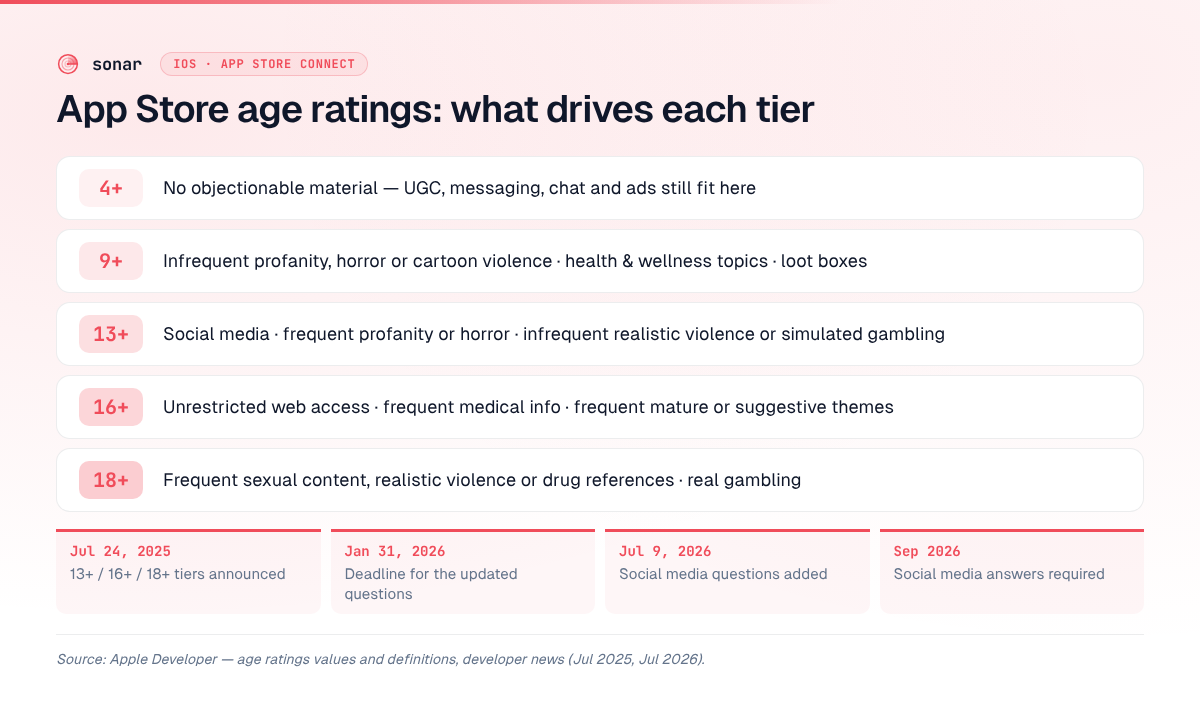
Three details catch people out:
- Messaging, user-generated content and ads don't raise your rating by themselves. Apple lists them under 4+. Social media is the one capability that starts at 13+.
- Unrestricted web access means 16+. An in-app browser that can go anywhere puts a calculator app in the same tier as frequent medical content.
- Loot boxes start at 9+ but real gambling is 18+. Simulated gambling lands at 13+ (infrequent) or 18+ (frequent).
What changed in the questionnaire, and which deadlines applied
The questionnaire changed twice in a year, and both changes come with a submission deadline.
The July 2025 questions (deadline: January 31, 2026)
The 2025 update added required questions on "in-app controls, capabilities, medical or wellness topics, and violent themes in your app or game," according to Apple's announcement. It also let you set a higher rating than the calculated one if your own policy requires a higher minimum age. Apple's wording on timing: "Please provide responses to the updated age rating questions for each of your apps by January 31, 2026, to avoid an interruption when submitting your app updates in App Store Connect." That date has passed. If an app you haven't touched since then is due for an update, expect to answer the questionnaire before you can submit it.
The July 2026 social media questions (required from September 2026)
On July 9, 2026 Apple added questions about social media capabilities, which it defines as "the ability to redistribute, amplify, or interact with user-generated content through a social feed or similar discovery method." By that definition, one-to-one chat isn't the trigger — a feed or discovery surface that spreads user posts is.
The deadline, in Apple's words: "beginning in September 2026, responses will be required when submitting new apps or updates to the App Store, or when submitting apps for notarization for alternative distribution." It is now late September 2026, so that requirement applies to your next submission.
Answering "yes" has three effects, per the same notice:
- A new Social Media content descriptor appears on your product page.
- Your app counts toward the Social Media category in Screen Time's time allowances, "regardless of the app category selected."
- If you turn social features off for everyone under 13, the app is kept out of that Social Media allowance for under-13 users.
That last point is a real product decision. A creative or fitness app with a community feed can keep younger users away from its social surface. Apple's definitions still put "Social media disabled for users under 13" at 13+, so the rating doesn't drop, but kids under 13 won't lose that app to their parents' social-media time cap.
How to set the age rating in App Store Connect
Setting an app store connect age rating takes a few minutes if you know your app's content. The steps from Apple's help page:
- In Apps, select your app.
- In the sidebar, under General, click App Information.
- Below Age Ratings, click Set Up Age Ratings.
- Select the in-app controls and capabilities your app includes (parental controls, age assurance, web access, user-generated content, messaging, advertising, social media), then click Next.
- Go through each section of the progress bar and pick a frequency for every content description, then click Next.
- Under Age Categories and Override, choose Not Applicable, Made for Kids (with an age band), or Override to Higher Age Rating.
- Optionally add an Age Suitability URL if you publish age guidance on your site.
- Click Save.
Apple's rule for overrides is strict: "If your app has a EULA with minimum age requirements that exceed the rating that Apple calculated, you must override to a rating that adheres to the requirements." A dating app whose terms say 18+ can't ship at a calculated 13+. Apple adds that "the override will apply in all regions where your app is available and may override to a different rating value per region."
How to change the age rating on the App Store after release
To change an age rating on the App Store, open App Information and click Edit at the top of the page, per Apple's help. The catch is when that button is available. An App Store Connect engineer answered it on the Apple Developer Forums: "You'll be able to update your app's age ratings when you submit a new version of your app." In practice that means creating a new version in App Store Connect and submitting it for review.
Two selections are harder to undo:
- Made for Kids — "You can't change this selection once your app is approved by App Review." Every later update must follow the Kids category rules.
- Korea RCN overrides — once the app is approved, "your RCN and rating are locked and can no longer be edited."
If you're planning a feature that changes your answers, like a public feed, a web view or gambling mechanics, update the questionnaire in the same version that ships the feature. A mismatch between what reviewers see and what you declared is how an app store age rating becomes a rejection.
Per-country ratings: one questionnaire, many labels
Your answers produce a rating "assigned to each country or region based on their specific age suitability standards," Apple says. Most regions show the standard five tiers. Apple's definitions page lists the exceptions:
| Region | How it differs |
|---|---|
| Australia | Social media or loot boxes show as 16+; infrequent simulated gambling shows as R 18+ |
| Brazil | Own pictograms (AL, A6, A10, A12, A14, A16, A18); fixed-odds betting needs a license from the Secretariat of Prizes and Bets |
| Republic of Korea | All, 12+, 15+, 19+; frequent or intense simulated gambling needs a Rating Classification Number (RCN) |
| Vietnam | Own labels under Decree 147, starting at 00+ |
Regional differences matter in practice. A loot-box game that is 9+ in the US shows as 16+ in Australia. If an app will be rated by a local regulator, check that country's column before you launch.
Age rating, the Kids category and visibility to younger users
Your app store age rating decides who can see your app. Apple's June 2025 announcement says that when a parent sets content restrictions, apps above the allowed rating "will not appear on the App Store in places like the Today, Games, and Apps tabs, or in editorial stories." For a teen-focused app, landing at 16+ instead of 13+ can take the product out of every browse surface a 14-year-old sees. For guidance on those browse surfaces, see app store category selection.
Kids category rules
Only apps with a calculated rating of 4+ or 9+ can choose Made for Kids, per Apple. You then pick one of three age bands: 5 and under, 6–8, or 9–11. Guideline 1.3 adds the hard constraints. There can be no links out and no purchases unless they sit behind a parental gate, and Apple says "Kids Category apps should not include third-party analytics or third-party advertising," with narrow exceptions. The SDKs you ship matter here, so read up on the iOS privacy manifest before you opt in.
The Kids category is a browse shelf, not a search shortcut, and search is where the competition is. In Sonar's data, "kids games" on the US App Store has an Apple Search Popularity of 66 and a difficulty of 83. Only 2 of the 9 top-ranking apps Sonar analyzed have the term in their title. Three of the top nine are licensed kids brands: Bluey: Let's Play! at #1 (Budge Studios, 1,103,871 ratings), PAW Patrol Rescue World at #4 (573,744) and PBS KIDS Games at #9 (371,895) (source: Sonar /api/v1/keywords/search and /api/v1/apps/search, queried 2026-09-29). A new kids app has to earn its place against those brands. The Kids category gives it a separate place to be discovered, but you can't reverse that choice.
The Declared Age Range API
Apple's newsroom post also introduced the Declared Age Range API, which lets developers "provide age-appropriate experiences" without the parent sharing a child's birth date. It pairs with the rating: if your social feature is off for under-13s, this is one way to know who is under 13.
Rejection risk when the rating doesn't match your content
Guideline 2.3.6 is short: "Answer the age rating questions in App Store Connect honestly so that your app aligns properly with parental controls." Apple warns that a mis-rated app "could trigger an inquiry from government regulators." Mis-rating is an avoidable cause of App Store rejection.
The mismatches that come up most often:
- UGC or social apps without moderation. Guideline 1.2 requires filtering, reporting, blocking and published contact details regardless of your rating.
- Creator content that goes past your rating. Guideline 1.2.1(a) requires a way to flag content that exceeds the app's rating and "an age restriction mechanism based on verified or declared age."
- Mini apps, games and chatbots inside your app. Guideline 4.7.5 applies the same requirement to software you host.
- A EULA age that doesn't match the rating. If your terms require 18+ and the store shows 13+, you have to override.
Adult categories show why the override matters. "Dating app" on the US App Store has a popularity of 59 and a difficulty of 85, and 9 of the top 10 apps use the term in their title (source: Sonar /api/v1/keywords/search, queried 2026-09-29). Every serious competitor there needs an 18+ rating that matches its terms of service, so a missing override is an easy rejection to avoid.
Google Play's IARC questionnaire compared
Google Play also uses a questionnaire, but the ratings come from outside rating bodies through IARC. You complete it under Policy > App content in Play Console, and it produces ratings from several authorities at once, per Google.
| Aspect | Apple App Store | Google Play |
|---|---|---|
| Who assigns the rating | Apple, calculated from your answers | IARC authorities (ESRB, PEGI, USK, ClassInd, ACB, GRAC) plus Google's own rating for Korea apps and Russia |
| Scale | 4+, 9+, 13+, 16+, 18+ (regional variants) | Differs by authority, e.g. ESRB Everyone to Adults Only, PEGI 3 to 18 |
| When to redo it | Answer the new questions when you next submit; edits go with a new version | "All app updates where there has been a change to your content or features" |
| Missing or wrong rating | Unanswered questions interrupt submissions; misrating breaks guideline 2.3.6 | Unrated apps can be removed; "Misrepresentation of your app's content may result in its removal or suspension" |
| Kids program | Kids category (4+/9+, three age bands) | Families policies for apps targeting children |
If you ship on both stores, answer the two questionnaires from the same feature list. A social feed you declare to IARC but leave off Apple's form is the kind of inconsistency reviewers notice. For the other store-specific differences, see our metadata optimization guide.
FAQ
What are the App Store age ratings now?
The App Store uses 4+, 9+, 13+, 16+ and 18+. Apple added the three teen and adult tiers in July 2025 and automatically re-rated every existing app. Content that would be "Unrated" can't be published on the App Store at all.
How do I change the age rating on the App Store after release?
Create a new app version in App Store Connect, open App Information, click Edit, update your answers, and submit that version for review. An App Store Connect engineer confirmed that ratings update "when you submit a new version of your app." You can't reverse Made for Kids after approval.
Is the age rating questionnaire mandatory for existing apps?
Yes. Apple asked for answers to the 2025 questions by January 31, 2026 to avoid interrupted updates. The social media questions have been required since September 2026 for new apps, updates and notarization submissions.
Can I choose a higher age rating than Apple calculates?
Yes. Choose Override to Higher Age Rating under Age Categories and Override. If your EULA sets a minimum age above the calculated rating, Apple says you must override to match it.
Does the age rating affect App Store ranking?
Apple doesn't document the rating as a search ranking factor. It does control visibility. With content restrictions on, apps above the allowed rating are hidden from the Today, Games and Apps tabs and from editorial stories, per Apple.
Your age rating decides who can see your app. Your keywords decide whether they find it. Sonar tracks Apple Search Popularity, difficulty and daily ranks for every keyword your app competes on — Start free trial.