 sonar
sonar
Apple Search Ads reporting via API: export before the detail expires
Apple's reporting API only returns daily rows for date ranges that start within the last 90 days. Ask for anything older and you get weekly or monthly buckets at best (Apple Ads Platform API: Managing Reports). That single constraint is the real reason to export Apple Search Ads reporting data on a schedule: if you don't copy the day-level keyword numbers somewhere you own, the API stops serving them at daily granularity after 90 days and you're left with weekly or monthly rollups.
The second reason is a deadline. The Campaign Management API (v5, api.searchads.apple.com) that every old tutorial and most GitHub wrappers use is deprecated and "will be sunset on January 26, 2027," per Apple's own OAuth page. Anything you build today should target the Apple Ads Platform API at api.ads.apple.com/v1.
This post is the hands-on export guide: credentials, a working Google Apps Script, a Looker Studio layer, and a warehouse loader for BigQuery, Redshift or Postgres. If you want the tour of the Platform API itself — Maps campaigns, client libraries, the search-term popularity endpoint — read the Apple Ads Platform API guide first. Here we only care about getting report rows out.
Old v5 endpoints and their Platform API replacements
Every report in the Platform API is a POST .../query call parameterized by promoted object type — apps for App Store campaigns (Apple docs). The mapping from v5:
| Report level | Campaign Management API v5 (sunsetting) | Apple Ads Platform API v1 |
|---|---|---|
| Campaigns | POST /api/v5/reports/campaigns | POST /v1/reports/apps/campaigns/query |
| Ad groups | POST /api/v5/reports/campaigns/{campaignId}/adgroups | POST /v1/reports/apps/adgroups/query |
| Keywords | POST /api/v5/reports/campaigns/{campaignId}/keywords | POST /v1/reports/apps/keywords/query |
| Search terms | POST /api/v5/reports/campaigns/{campaignId}/searchterms | POST /v1/reports/apps/searchterms/query |
| Context header | X-AP-Context: orgId=... | X-AP-Context: adAccountId=... |
Sources: v5 keyword reports, v5 calling guide, Platform API calling guide.
The campaign ID moved from the URL path into the body. In the Platform API, "campaignId is a required filter for every apps report request" (AppsReportingRequest) — so an export always starts by listing campaigns.
The export pipeline in five steps
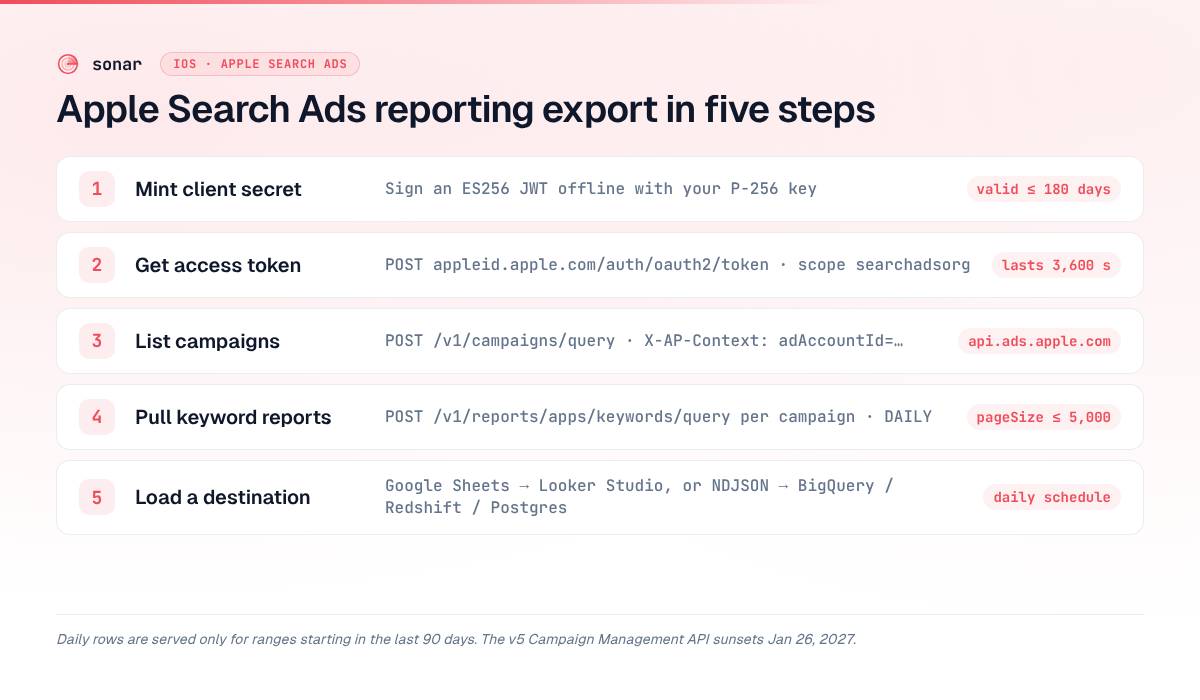
A DIY Apple Search Ads reporting export is five steps, and only the first one needs a real programming language:
- Mint a client secret — an ES256-signed JWT valid for up to 180 days, generated once on your laptop.
- Exchange it for an access token —
POST https://appleid.apple.com/auth/oauth2/tokenwithscope=searchadsorg; the token lives 3,600 seconds. - List campaigns —
POST /v1/campaigns/query. - Pull report rows per campaign —
POST /v1/reports/apps/keywords/query(or campaigns/adgroups/searchterms) with acampaignIdfilter,DAILYgranularity,pageSizeup to 5,000. - Write JSON to a destination — a Google Sheet (then Looker Studio), or newline-delimited JSON loaded into BigQuery, Redshift or Postgres.
The token numbers come from Apple's Platform API OAuth guide; the page-size cap from RequestPagination.
Step 1: credentials and the 180-day client secret
Apple Ads uses the OAuth 2 client-credentials grant, not user logins. An admin invites a user with an API role — for a pure export job, pick API Account Read Only; the full role list is on Apple's Platform API help page. Then, per Apple's OAuth guide:
openssl ecparam -genkey -name prime256v1 -noout -out private-key.pem
openssl ec -in private-key.pem -pubout -out public-key.pem
Paste public-key.pem into Account Settings > API in the Apple Ads UI. Apple shows you a clientId, teamId and keyId.
Now the part every Google Sheets tutorial skips. The client secret is a JWT whose header must use alg: ES256, with aud set to https://appleid.apple.com and an exp that is "less than 180 days from the iat timestamp" (Apple). Apps Script's Utilities service offers RSA and HMAC signing, but nothing for ECDSA — so don't try to sign inside the spreadsheet. Sign offline, twice a year, with a dependency-free Node script:
// make-client-secret.mjs — run: node make-client-secret.mjs
import { createPrivateKey, sign } from "node:crypto";
import { readFileSync } from "node:fs";

const clientId = "SEARCHADS.xxxx"; // from Account Settings > API
const teamId = "SEARCHADS.xxxx";
const keyId = "xxxx-xxxx";

const b64 = (obj) => Buffer.from(JSON.stringify(obj)).toString("base64url");
const iat = Math.floor(Date.now() / 1000);
const exp = iat + 86400 * 180 - 3600; // stay just under Apple's 180-day cap

const header = b64({ alg: "ES256", kid: keyId });
const payload = b64({ sub: clientId, iss: teamId, aud: "https://appleid.apple.com", iat, exp });

const key = createPrivateKey(readFileSync("private-key.pem"));
const signature = sign("sha256", Buffer.from(`${header}.${payload}`), {
  key,
  dsaEncoding: "ieee-p1363", // JWT wants raw r||s, not DER
}).toString("base64url");

console.log(`${header}.${payload}.${signature}`);
The ieee-p1363 flag is the bug magnet: Node's default ECDSA signature encoding is DER, while a JWT's ES256 signature must be the raw 64-byte concatenation of the r and s values (RFC 7518) — get it wrong and the token endpoint rejects the secret. Put a calendar reminder at day 170 to rerun this.
Step 2: Apple Search Ads to Google Sheets with Apps Script
With the client secret stored in Script Properties, Apps Script only needs UrlFetchApp — the token exchange is a plain form POST (UrlFetchApp reference). In the Sheet, open Extensions > Apps Script and add three Script Properties: ASA_CLIENT_ID, ASA_CLIENT_SECRET and ASA_AD_ACCOUNT_ID (from GET /v1/acls, per Apple's access overview). The private key never touches Google.
const API = "https://api.ads.apple.com/v1";
const P = PropertiesService.getScriptProperties();

function getToken_() {
  const cache = CacheService.getScriptCache();
  const hit = cache.get("asa_token");
  if (hit) return hit;
  const res = UrlFetchApp.fetch("https://appleid.apple.com/auth/oauth2/token", {
    method: "post",
    payload: {
      grant_type: "client_credentials",
      client_id: P.getProperty("ASA_CLIENT_ID"),
      client_secret: P.getProperty("ASA_CLIENT_SECRET"),
      scope: "searchadsorg",
    },
    muteHttpExceptions: true,
  });
  if (res.getResponseCode() !== 200) throw new Error("Token: " + res.getContentText());
  const token = JSON.parse(res.getContentText()).access_token;
  cache.put("asa_token", token, 3000); // token lives 3600s
  return token;
}

function post_(path, body) {
  for (let wait = 2; ; wait = Math.min(wait * 2, 16)) {
    const res = UrlFetchApp.fetch(API + path, {
      method: "post",
      contentType: "application/json",
      headers: {
        Authorization: "Bearer " + getToken_(),
        "X-AP-Context": "adAccountId=" + P.getProperty("ASA_AD_ACCOUNT_ID"),
      },
      payload: JSON.stringify(body),
      muteHttpExceptions: true,
    });
    const code = res.getResponseCode();
    if (code === 429) {
      const retry = Number(res.getHeaders()["Retry-After"]) || wait;
      Utilities.sleep(retry * 1000);
      if (wait === 16) throw new Error("Rate limited");
      continue;
    }
    if (code !== 200) throw new Error(path + " " + code + ": " + res.getContentText());
    return JSON.parse(res.getContentText());
  }
}

function isoDay_(daysAgo) {
  const d = new Date(Date.now() - daysAgo * 86400000);
  return Utilities.formatDate(d, "UTC", "yyyy-MM-dd");
}

function exportKeywordReport() {
  const start = isoDay_(7), end = isoDay_(1); // last 7 complete days
  const campaigns = post_("/campaigns/query", {
    filters: [{ field: "promotedObjectType", operator: "EQUALS", value: "APPSTORE_APP" }],
    pagination: { offset: 0, pageSize: 1000 },
  }).result;

  const out = [];
  campaigns.forEach((c) => {
    for (let offset = 0; ; offset += 1000) {
      const page = post_("/reports/apps/keywords/query", {
        filters: [{ field: "campaignId", operator: "EQUALS", value: [String(c.id)] }],
        timeRange: { start, end, timeZone: "UTC", granularity: "DAILY" },
        pagination: { offset, pageSize: 1000 },
      });
      page.result.rows.forEach((r) => {
        (r.granularMetrics || []).forEach((g) => {
          out.push([g.date, c.id, c.name, r.metadata.adGroupId, r.metadata.id,
            r.metadata.text, r.metadata.matchType, g.impressions || 0, g.taps || 0,
            g.tapInstalls || 0, Number(g.localSpend ? g.localSpend.amount : 0)]);
        });
      });
      if (offset + 1000 >= page.pagination.totalCount) break;
    }
  });

  const sh = SpreadsheetApp.getActive().getSheetByName("asa_keywords");
  // Replace the re-pulled window so late-attributed installs overwrite old values.
  const kept = sh.getDataRange().getValues().filter((row, i) => {
    if (i === 0) return true;
    const day = Utilities.formatDate(new Date(row[0]), "UTC", "yyyy-MM-dd");
    return day < start || day > end;
  });
  const all = kept.concat(out);
  if (!all.length) return; // empty tab and no new rows
  sh.clearContents();
  sh.getRange(1, 1, all.length, all[0].length).setValues(all);
}
Create a tab called asa_keywords with a header row (date, campaign_id, campaign, ad_group_id, keyword_id, keyword, match_type, impressions, taps, installs, spend), run exportKeywordReport once to authorize, then add a daily time-driven trigger. Re-pulling a 7-day window instead of just yesterday is deliberate: the job becomes idempotent, so a failed trigger run heals itself the next day instead of leaving a hole in the data.
Apps Script limits that matter here
Consumer Google accounts get 20,000 UrlFetch calls per day, 6 minutes per execution and 90 minutes of trigger runtime per day; Workspace accounts get 100,000 calls and 6 hours (Apps Script quotas). An indie account with a handful of campaigns uses a few dozen calls per run, so the 6-minute wall is the only ceiling you'll realistically hit — split the job per campaign if you have dozens. Script Properties values cap at 9 KB, which comfortably fits a client-secret JWT.
Apple Search Ads to Looker Studio
Looker Studio is where most Apple Search Ads reporting ends up, because it can blend the paid numbers with your other data sources in one report. The simplest Looker Studio setup has no Apple connector at all: add the asa_keywords Sheet as a Google Sheets data source. Sheets-backed sources refresh every 15 minutes by default, with 1-, 4- and 12-hour options (Looker Studio data freshness), which is far faster than a once-a-day export needs.
Three calculated fields do most of the work:
CPT      = SUM(spend) / SUM(taps)
CPA      = SUM(spend) / SUM(installs)
TTR      = SUM(taps) / SUM(impressions)
Compute ratios from summed columns, never average Apple's per-row ttr or cpt — averaging ratios over-weights keywords with two impressions. A time series by date, a table by keyword sorted by spend, and a scorecard row for CPA covers what most indie advertisers look at. For which numbers deserve attention in the first place, the campaign structure guide explains why brand, category, competitor and discovery campaigns should be read separately.
Apple Search Ads to BigQuery, Redshift or Postgres
For a warehouse, skip the Sheet and emit newline-delimited JSON. BigQuery requires it — "JSON data must be newline-delimited" (BigQuery docs) — and Redshift's COPY ... FORMAT AS JSON 'auto' reads one object per record from S3 (Redshift COPY from JSON). The same Python script feeds both:
import json, os, time, datetime as dt
import requests

API = "https://api.ads.apple.com/v1"

def token():
    r = requests.post("https://appleid.apple.com/auth/oauth2/token", data={
        "grant_type": "client_credentials",
        "client_id": os.environ["ASA_CLIENT_ID"],
        "client_secret": os.environ["ASA_CLIENT_SECRET"],
        "scope": "searchadsorg"})
    r.raise_for_status()
    return r.json()["access_token"]

HEAD = {"Authorization": f"Bearer {token()}",
        "X-AP-Context": f"adAccountId={os.environ['ASA_AD_ACCOUNT_ID']}"}

def post(path, body):
    for wait in (2, 4, 8, 16):
        r = requests.post(API + path, json=body, headers=HEAD)
        if r.status_code != 429:
            r.raise_for_status()
            return r.json()
        time.sleep(float(r.headers.get("Retry-After", wait)))
    raise RuntimeError("rate limited")

end = dt.date.today() - dt.timedelta(days=1)
start = end - dt.timedelta(days=6)
campaigns = post("/campaigns/query", {"filters": [
    {"field": "promotedObjectType", "operator": "EQUALS", "value": "APPSTORE_APP"}],
    "pagination": {"offset": 0, "pageSize": 1000}})["result"]  # paginate if you run 1,000+ campaigns

with open("asa_keywords.ndjson", "w") as f:
    for c in campaigns:
        offset = 0
        while True:
            page = post("/reports/apps/keywords/query", {
                "filters": [{"field": "campaignId", "operator": "EQUALS", "value": [str(c["id"])]}],
                "timeRange": {"start": str(start), "end": str(end),
                              "timeZone": "UTC", "granularity": "DAILY"},
                "pagination": {"offset": offset, "pageSize": 5000}})
            for row in page["result"]["rows"]:
                m = row["metadata"]
                for g in row.get("granularMetrics", []):
                    f.write(json.dumps({
                        "date": g["date"], "campaign_id": c["id"], "keyword_id": m["id"],
                        "keyword": m["text"], "match_type": m["matchType"],
                        "impressions": g.get("impressions", 0), "taps": g.get("taps", 0),
                        "installs": g.get("tapInstalls", 0),
                        "spend": g.get("localSpend", {}).get("amount", "0")}) + "\n")
            offset += 5000
            if offset >= page["pagination"]["totalCount"]:
                break
Then load it:
# BigQuery (delete the 7-day window first, then append)
bq load --source_format=NEWLINE_DELIMITED_JSON asa.keywords_daily asa_keywords.ndjson ./schema.json

# Redshift (after aws s3 cp to your bucket)
# COPY asa_keywords_daily FROM 's3://your-bucket/asa_keywords.ndjson'
#   IAM_ROLE 'arn:aws:iam::123456789012:role/RedshiftLoad' FORMAT AS JSON 'auto';
For Postgres, COPY the file into a staging table with a single jsonb column and INSERT ... ON CONFLICT (date, keyword_id) DO UPDATE into the real table. Keeping spend as a string until it lands avoids float rounding — AWS explicitly recommends quoting numbers in JSON to keep precision (Redshift docs). Schedule it with cron, a GitHub Action or Cloud Scheduler. Once the data sits in a warehouse, Qlik, Tableau or Power BI connect to the warehouse — none of them needs to speak Apple's API.
Report limits that break exports
Most failed Apple Search Ads reporting jobs trip over one of these documented rules (Managing Reports, TimeRange):
| Rule | What Apple documents | What to do |
|---|---|---|
DAILY granularity | Start within the last 90 days; range longer than one day | Run daily from now on; backfill older periods as weekly |
WEEKLY | Start within the last 365 days; end at least 14 days ago | Use for the one-off historical backfill |
MONTHLY | End at least 90 days in the past | Only for long-range trend tables |
HOURLY | Span of 7 days or less; not for ad or search-term reports | Rarely worth exporting |
| Single day | Omit granularity; data comes back in totalMetrics only | Don't read granularMetrics on 1-day pulls |
| Search-term reports | Time zone must be ORTZ | Don't mix with UTC-based keyword tables without labeling |
pageSize | Default 100, maximum 5,000 | Always paginate on pagination.totalCount |
| Rate limits | RateLimit-Remaining headers; 429 with Retry-After | Back off, doubling up to ~16 s (Apple) |
Apple doesn't publish a fixed requests-per-minute number for reporting; the quota arrives in the RateLimit-Limit header on every response (rate limits). And note what the API does not give you: post-install revenue or retention. That lives in your MMP — see Apple Search Ads attribution with AppsFlyer for joining those.
Connector vs DIY: which should you use?
Paid connectors exist for every destination in this post — Supermetrics, for example, has Apple Search Ads connectors for Google Sheets, Looker Studio and BigQuery. Pricing changes often, so check the vendor's page rather than trusting a blog number.
| Connector (Supermetrics, Catchr, ReportDash, etc.) | DIY (this guide) | |
|---|---|---|
| Setup time (my estimate) | Minutes — sign in and pick fields | An afternoon, including key generation |
| Cost | Recurring subscription | Free; your time plus warehouse storage |
| Client-secret rotation | Handled for you | Manual, every ≤180 days |
| Sunset migration (Jan 26, 2027) | Vendor's problem | Yours — though this code already targets the Platform API |
| Custom joins (MMP, organic data) | Limited to what the tool models | Anything you can write in SQL |
| Credential exposure | Vendor holds API access to your account | Read-only key stays with you |
My take as someone who runs small campaigns: if you manage one or two apps and just want a Looker Studio chart, the Apps Script path costs nothing and takes an afternoon. If you're an agency with 20 client accounts, the connector subscription is cheaper than your hours babysitting 20 rotating secrets.
Join paid keyword reports with organic keyword data
The most useful thing to do with exported keyword rows is to put them next to organic metrics. Apple's report tells you what a keyword costs you; it doesn't tell you whether you could rank for it for free. Here is real organic data for five iOS keywords from Sonar's /api/v1/keywords/search (US storefront, pulled 2026-09-28; popularity is Apple's Search Popularity, difficulty is Sonar's 0-100 score where lower is easier):
| Keyword | Apple popularity | Organic difficulty | Read for a paid campaign |
|---|---|---|---|
| calorie counter | 59 | 78 | Hard to win organically — paid coverage earns its keep |
| free calorie counter app | 55 | 73 | Same story; bid if your CPA allows it |
| habit tracker | 57 | 67 | Real demand, stiff organic competition |
| budget planner | 51 | 64 | Borderline; test both channels |
| habit tracker widget | 5 | 47 | Popularity at Apple's floor of 5; easier to rank, little volume to buy |
The rule of thumb: high Apple popularity plus high organic difficulty (the calorie-counter rows) is where Search Ads spend is defensible, because the organic route is expensive or slow. A low-difficulty term you're already paying for is a candidate to win organically through your title, subtitle or keyword field — then cut the bid and watch whether installs hold. The Search Ads vs organic ASO comparison goes deeper on that trade-off, and the match types guide explains which paid keywords belong on exact match before you compare them.
Mechanically, add a keyword_metrics tab (or table) keyed on keyword text, fill it from Sonar's REST API — included in the Indie plan — and VLOOKUP or JOIN it onto the Apple export. If you're building the full picture, build your own ASO dashboard covers the rest of the stack.
FAQ
Can I export Apple Search Ads data to Google Sheets for free?
Yes. The Apple Ads Platform API has no usage fee, and a Google Apps Script using UrlFetchApp can pull reports on a daily trigger within the free 20,000 fetch calls per day for consumer accounts (Apps Script quotas). The only non-Google step is signing the ES256 client secret offline, once every 180 days.
What is the Apple Search Ads reporting API endpoint?
In the current Apple Ads Platform API it's POST https://api.ads.apple.com/v1/reports/apps/{level}/query, where level is campaigns, adgroups, ads, keywords or searchterms (Apple). The older api.searchads.apple.com/api/v5/reports/... endpoints still work but are deprecated and sunset on January 26, 2027.
How far back can I pull daily Apple Search Ads data?
About 90 days. Daily granularity requires the range to start within the last 90 days; weekly reaches back 365 days, and monthly needs an end date at least 90 days ago (Managing Reports). That's why a scheduled export matters — it's the only way to keep daily history.
How do I export Apple Search Ads data to JSON?
The report endpoints already return JSON. Flatten each row's granularMetrics into one object per keyword per day and write newline-delimited JSON, which BigQuery and Redshift both load directly (BigQuery). The Python script above does exactly that.
Why does my Apps Script token request fail?
The usual cause is the client secret, not the script: an expired JWT (more than 180 days old), a DER-encoded signature instead of raw ES256, or a wrong aud value, which must be https://appleid.apple.com (Apple OAuth guide). Log the token endpoint's response body with muteHttpExceptions: true to see which.
Your Apple Search Ads export shows what each keyword costs. Sonar shows what it would take to rank for it organically — real Apple Search Popularity, difficulty and daily rank tracking, all available over the REST API. Start free trial and put both columns in the same sheet.