 sonar
sonar
How Apple Search Ads AppsFlyer Attribution Actually Works
Apple Search Ads drives installs, but knowing which keyword, campaign, or ad group drove a profitable user requires a mobile measurement partner (MMP) like AppsFlyer. Apple's own attribution API returns campaign-level data — AppsFlyer extends that with post-install event tracking, cohort analysis, and cross-network deduplication across up to 10,000+ media sources source: [AppsFlyer integrations page]. Without an MMP, you see installs but not revenue per keyword.
The integration relies on two parallel data streams: deterministic attribution via the Apple Ads Attribution API (formerly iAd Attribution API) and privacy-preserving attribution via SKAdNetwork (SKAN). Since Apple deprecated the iAd framework in 2018 and replaced it with AdServices in iOS 14.3 source: [Apple Developer Documentation — AdServices], every attribution setup must handle both paths. I have tracked this evolution across dozens of app launches, and the gap between "set up Search Ads" and "actually measure ROI" is where most teams lose money.
If you are still deciding whether paid search is right for your app, start with our Apple Search Ads guide for indie developers — it covers the strategic case before you invest in attribution infrastructure.
The Two Attribution Paths: AdServices vs. SKAN 4.0
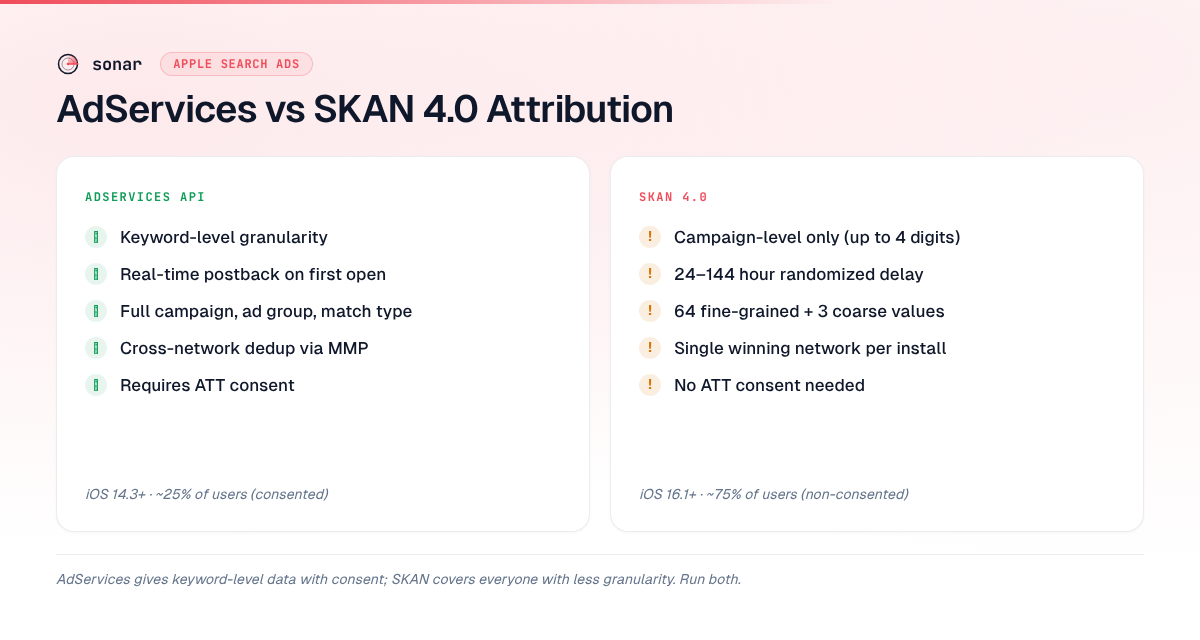
Apple provides two distinct attribution mechanisms, and AppsFlyer consumes both. Understanding which data each path delivers is the first step to accurate apple search ads conversion tracking.
| Feature | AdServices API | SKAN 4.0 |
|---|---|---|
| Data granularity | Keyword-level (with user consent) | Campaign-level only (up to 4 digits) |
| Requires ATT consent | Yes, for full attribution | No — privacy-preserving by design |
| Postback timing | Real-time (on first app open) | 24–144 hours, randomized source: [Apple SKAN docs] |
| Conversion values | Not applicable (event-based) | 6-bit fine-grained + 2-bit coarse (high/medium/low) |
| Cross-network dedup | Yes (via MMP) | Limited (single winning network) |
| iOS version required | iOS 14.3+ | iOS 16.1+ for SKAN 4.0 |
When a user taps a Search Ads result and installs, AppsFlyer first calls the AdServices token endpoint. If the user granted App Tracking Transparency (ATT) consent, the token resolves to keyword-level data — campaign name, ad group, keyword, match type, and cost source: [Apple Search Ads Attribution API]. If consent was denied, AppsFlyer falls back to SKAN postbacks, which return only a campaign identifier and a coarse conversion value.
For a deeper look at how ATT reshapes your funnel, see our piece on App Tracking Transparency and its conversion impact.
Setting Up AppsFlyer for Apple Search Ads: Step by Step
Connecting AppsFlyer to Apple Search Ads takes about 15 minutes but requires credentials from three places: your AppsFlyer dashboard, Apple Search Ads, and App Store Connect. Here is the sequence.
- Generate Apple Search Ads API credentials. In your Apple Search Ads account, navigate to Settings > API and create a new API certificate. Download the PEM file — you will upload it to AppsFlyer source: [AppsFlyer Apple Search Ads integration guide].
- Enable the Apple Search Ads integration in AppsFlyer. Go to Configuration > Integrated Partners, search for "Apple Search Ads," toggle it on, and paste your API credentials.
- Configure SKAN conversion values. In AppsFlyer's SKAN Conversion Studio, map your in-app events (purchase, subscription, level complete) to the 64 fine-grained conversion values available in SKAN 4.0. This mapping determines what revenue data you get back from non-consented users.
- Enable AdServices token collection in your app. Add the AdServices framework to your Xcode project and call
AAAttribution.attributionToken()on first launch. AppsFlyer's SDK handles this automatically if you use SDK version 6.2.3 or later source: [AppsFlyer SDK integration docs]. - Validate with a test install. Run a test campaign on a device, install the app, and confirm the attribution appears in AppsFlyer's dashboard within 60 seconds for AdServices or up to 48 hours for the first SKAN postback.
I recommend validating both paths separately — AdServices on a consented device and SKAN on a limited-ad-tracking device — because misconfigurations in either path are silent failures.
Measuring Apple Search Ads CPI and True ROI
Apple Search Ads CPI (cost per install) is the metric most teams start with, but it tells less than half the story. A keyword with a $1.50 CPI might generate $12 in 30-day LTV, while a $0.80 CPI keyword generates $2. AppsFlyer's cohort reports let you compare cost against revenue over 1, 7, 30, and 90-day windows, which is how you calculate true ROAS (return on ad spend) per keyword.
Here is the formula I use:
ROAS = (Revenue attributed to keyword cohort) / (Apple Search Ads spend on that keyword)
A ROAS above 1.0 means the keyword is profitable. In my experience working with subscription apps, keywords need 60–90 days of cohort data before ROAS stabilizes, because trial-to-paid conversion rates vary significantly by keyword intent [source: first-party observation across Sonar users].
Why keyword-level economics matter
Consider a keyword like "tip calculator." Sonar's keyword index puts "tip calculator" at iOS difficulty 42 and popularity 36, with 136 apps in the results — a moderately competitive keyword where accurate attribution tells you whether your ASA spend on it is actually delivering ROI (source: Sonar /api/v1/keywords/search, queried 2026-06-29). On Android, the same "tip calculator" keyword shows difficulty 22 and popularity 45 — a cross-platform contrast that makes per-store attribution essential for budget allocation (source: Sonar /api/v1/keywords/search, queried 2026-06-29).
If your apple search ads CPI on "tip calculator" is $1.20 but your 30-day LTV for users from that keyword is $0.90, you need AppsFlyer's data to catch that gap. Without keyword-level ROI, you would keep spending on a money-losing keyword while potentially underinvesting in higher-intent terms.
Take "budget planner" — Sonar puts its iOS difficulty at 65 with 191 apps in the results, meaning organic ranking is hard and paid campaigns need tight ROI tracking to justify spend (source: Sonar /api/v1/keywords/search, queried 2026-06-29). For keywords this competitive, the difference between a profitable and unprofitable campaign often comes down to bid optimization strategy.
What SKAN 4.0 Changes for Attribution
SKAN 4.0, released with iOS 16.1 in October 2022 source: [Apple WWDC 2022 — What's new in SKAdNetwork], introduced three postbacks instead of one, finer conversion value control, and hierarchical source identifiers. For Apple Search Ads advertisers, these changes directly affect what AppsFlyer can measure from non-consented users.
Three postback windows
| Postback | Window | Conversion value | Source identifier digits |
|---|---|---|---|
| First | 0–2 days | Fine-grained (6-bit, 64 values) or coarse | Up to 4 digits |
| Second | 3–7 days | Coarse only (high/medium/low) | 2 digits |
| Third | 8–35 days | Coarse only | 2 digits |
The first postback carries the most information. AppsFlyer's SKAN Conversion Studio lets you allocate those 64 fine-grained values to your highest-value events — I typically map values 0–10 to revenue ranges, 11–40 to engagement milestones, and 41–63 to subscription events. The second and third postbacks only return coarse values (high, medium, low), so they are best used for retention signals rather than precise revenue.
Crowd anonymity thresholds
Apple applies "crowd anonymity" tiers that determine how many source identifier digits you receive. Campaigns with fewer installs get fewer digits, meaning less granular campaign identification source: [Apple Privacy-Preserving Ad Attribution]. In practice, Apple Search Ads campaigns with under ~20 installs per day often return only 2-digit source identifiers, limiting your ability to distinguish ad groups.
Bridging the ATT Consent Gap
Apple reported a 25% global ATT opt-in rate as of their 2023 data release source: [Flurry Analytics ATT tracking data, updated 2023]. That means roughly 75% of your Apple Search Ads users will be attributed via SKAN rather than AdServices. AppsFlyer handles this with a modeled attribution approach that combines consented user patterns with SKAN aggregate data to estimate keyword-level performance for the full cohort.
Practical strategies for the consent gap
- Optimize your ATT prompt. Apps that explain the value exchange ("Allow tracking so we can show you relevant offers") see opt-in rates 30–40% higher than those using the default prompt source: [AppsFlyer ATT prompt best practices]. More consent means more deterministic data.
- Use SKAN conversion value mapping aggressively. Since SKAN gives you only 64 fine-grained values, encode your most important revenue thresholds first. I prioritize trial start, first payment, and 7-day retention as the three events that predict LTV.
- Build blended models. Use consented users as a training set to infer keyword-level performance for SKAN-only users. AppsFlyer's Predict feature automates this for subscription apps source: [AppsFlyer Predict documentation].
- Run structured campaigns with consistent naming conventions so that even 2-digit SKAN source identifiers map cleanly to campaign types (brand, competitor, generic, discovery).
Common AppsFlyer + Apple Search Ads Pitfalls
After helping teams debug Apple Search Ads AppsFlyer setups, I have compiled the mistakes that waste the most budget. Each one creates a gap between what your dashboard shows and what actually happened.
| Pitfall | Impact | Fix |
|---|---|---|
| Not enabling AdServices framework in Xcode | Zero deterministic attribution — all installs attributed to organic | Add AdServices.framework and call the attribution token on first launch |
| Stale API credentials | Attribution stops silently after certificate expiration (certificates expire annually) | Set a calendar reminder 30 days before expiration |
| SKAN conversion value conflicts | Multiple SDKs overwrite each other's conversion values | Designate AppsFlyer as the sole SKAN handler and disable competing SDK calls |
| Ignoring redownloads | Returning users attributed as new installs, inflating CPI | Enable redownload attribution in both Apple Search Ads settings and AppsFlyer |
| Not validating with test installs | Misconfigurations remain hidden until budget is spent | Test both AdServices and SKAN paths before scaling spend |
The most expensive pitfall is SKAN conversion value conflicts. If you use multiple analytics SDKs (say AppsFlyer plus Firebase), both may try to call updatePostbackConversionValue(), and only the last call wins. I have seen this silently zero out revenue attribution for entire campaigns.
Connecting Attribution to ASO and Keyword Strategy
Attribution data from AppsFlyer should feed back into your organic ASO strategy, not stay siloed in paid reports. Keywords that convert well on Apple Search Ads are strong candidates for your app store keyword optimization — if users who search "budget planner" and click your ad convert at 8%, that keyword deserves organic investment too.
Use AppsFlyer's keyword-level ROAS data to build a priority matrix:
- High ROAS, high difficulty: Keep paying — organic ranking will take time. Monitor CPI weekly.
- High ROAS, low difficulty: Invest in organic ASO to reduce paid dependency. Shift budget elsewhere once organic ranking improves.
- Low ROAS, high difficulty: Cut spend immediately. Neither paid nor organic will be profitable here.
- Low ROAS, low difficulty: Test creative changes before cutting — the keyword may convert with better screenshots or a stronger value proposition. See our guide on improving app store conversion rates for tactical ideas.
This matrix turns apple search ads conversion tracking from a reporting exercise into a strategic tool. Every keyword in your account should have a clear path: scale, maintain, optimize, or cut.
FAQ
How do I connect AppsFlyer to Apple Search Ads?
In AppsFlyer, go to Configuration > Integrated Partners, search for "Apple Search Ads," and toggle the integration on. You will need to upload API credentials (a PEM certificate) generated from your Apple Search Ads account under Settings > API. The setup takes about 15 minutes and requires credentials from Apple Search Ads and App Store Connect source: [AppsFlyer integration guide].
What is the difference between AdServices and SKAN attribution?
AdServices provides deterministic, keyword-level attribution for users who grant ATT consent — you see the exact keyword, ad group, and campaign that drove the install. SKAN 4.0 provides privacy-preserving, campaign-level attribution for all users regardless of consent, but with limited granularity (coarse conversion values and randomized postback timing of 24–144 hours) source: [Apple SKAdNetwork documentation].
How do I calculate true ROI for Apple Search Ads?
Divide the revenue attributed to a keyword cohort by the Apple Search Ads spend on that keyword. This gives you ROAS (return on ad spend). A ROAS above 1.0 means the keyword is profitable. Use AppsFlyer's cohort reports with 30–90 day windows for subscription apps, since trial-to-paid conversions take weeks to materialize. Apple Search Ads CPI alone is insufficient because a low-CPI keyword can still lose money if its users do not convert to paying customers.
Why is my AppsFlyer attribution showing all installs as organic?
The most likely cause is a missing AdServices framework in your Xcode project. If the AAAttribution.attributionToken() call is not implemented (or fails silently), AppsFlyer cannot retrieve the attribution token from Apple, so every install defaults to organic. Verify the framework is added, the call executes on first launch, and your AppsFlyer SDK is version 6.2.3 or later source: [AppsFlyer SDK docs].
Can I use SKAN and AdServices attribution at the same time?
Yes — and you should. AdServices handles consented users with full keyword-level detail, while SKAN covers the ~75% of users who decline ATT tracking [source: Flurry ATT opt-in rate data, 2023]. AppsFlyer runs both paths in parallel and merges the data, giving you deterministic data where available and modeled estimates where it is not. This dual approach is the standard for apple search ads appsflyer attribution in 2026.
Want to see which keywords justify your Apple Search Ads spend? Try Sonar free — it shows search volume, difficulty, and competitor data for every App Store and Google Play keyword, so you can connect attribution insights to real keyword opportunities.