 sonar
sonar
How Apple Search Ads Bidding Actually Works
Apple Search Ads uses a second-price auction model: you set a maximum cost-per-tap (CPT) bid, but you only pay $0.01 more than the next-highest bidder source: [Apple Search Ads documentation]. That means your bid is a ceiling, not a price. I have seen advertisers confuse the two, set a $3.00 max CPT, and assume they will always pay $3.00. In practice, the median CPT across categories is closer to $0.50–$2.00 depending on vertical source: [SplitMetrics 2025 Apple Search Ads Benchmark Report].
There are two campaign types that affect how you bid:
- Search Results campaigns — appear at the top of App Store search. You set a max CPT bid per keyword or ad group.
- Search Tab campaigns — appear on the Search tab before a user types anything. Apple optimizes delivery automatically; you set a CPA goal rather than a per-keyword CPT source: [Apple Search Ads campaign types].
Understanding the auction mechanics before picking numbers is the difference between a profitable campaign and one that burns budget on irrelevant taps. If you are new to Apple's paid channel entirely, start with our complete Apple Search Ads guide — it covers account setup, match types, and attribution before you get into bidding specifics.
CPT vs CPA: Which Bid Model Should You Use?
CPT (cost-per-tap) is the default and only direct bidding lever in Search Results campaigns. CPA (cost-per-acquisition) goals exist as a guardrail — you tell Apple what you want to pay per install, and the system throttles delivery to stay near that target source: [Apple Search Ads Help — CPA goals]. The CPA goal does not replace your CPT bid; both work together.
| Metric | What you control | Where it applies | How Apple uses it |
|---|---|---|---|
| Max CPT bid | Maximum you will pay per tap | Search Results campaigns | Hard ceiling in auction |
| CPA goal | Target cost per install | Search Results + Search Tab | Throttles impressions to hit target |
| Daily budget | Maximum daily spend | All campaign types | Stops delivery when hit |
A common mistake: setting a CPA goal without a competitive CPT bid. If your max CPT is $0.50 but the auction clears at $1.20 for your keyword, you will win zero impressions regardless of your CPA goal. The CPA goal only shapes delivery within impressions you can actually win.
In testing campaigns for utility apps, I have found that starting with a CPT 20–30% above Apple's suggested bid — then layering a CPA goal equal to your target install cost — gives the algorithm enough headroom to learn which users convert. After 1,000 taps (roughly the minimum sample for statistically meaningful conversion data), you can tighten the CPT back down.
How to Calculate Your Maximum CPT Bid
Your maximum CPT bid for apple search ads bidding should be derived from your unit economics, not guessed. The formula is one multiplication:
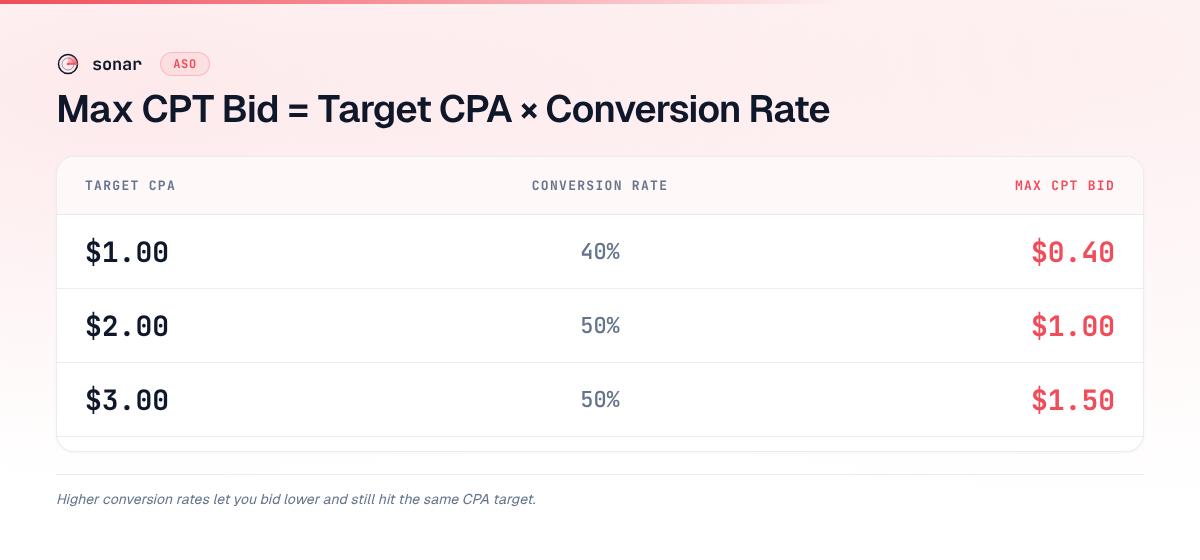
Max CPT = Target CPA x Conversion Rate (CR)
If your target CPA is $2.00 and your App Store listing converts at 50% of taps to installs (which is realistic for a well-optimized listing source: [SplitMetrics benchmarks]), your max CPT should be $1.00. Here is a reference table:
| Target CPA | Conversion rate | Max CPT bid |
|---|---|---|
| $1.00 | 40% | $0.40 |
| $2.00 | 50% | $1.00 |
| $3.00 | 50% | $1.50 |
| $5.00 | 60% | $3.00 |
| $10.00 | 45% | $4.50 |
Your conversion rate depends heavily on your App Store product page — screenshots, ratings, description. That is why improving your App Store conversion rate directly lowers your required CPT bid: every percentage point of CR improvement means you can bid less and still hit the same CPA.
Why Keyword Data Matters Before You Bid
Apple Search Ads bidding decisions should start with keyword-level competition data, not Apple's suggested bid range alone. The suggested range tells you what other advertisers are paying, but it does not reveal how many apps compete for that keyword or how difficult it is to rank organically — both of which affect your conversion rate and, therefore, the CPT you can afford.
Sonar's keyword index puts "tip calculator" at iOS difficulty 39 and Apple popularity 35 — a moderately competitive keyword where bidding without data means overpaying. On Android, the same term has difficulty 22 and popularity 45, suggesting cheaper bids and more traffic on Google Play.
For "subscription tracker," Sonar measures iOS difficulty 36 and Apple popularity 25, while Android shows difficulty 24 and popularity 28. The cross-platform gap tells you where your budget will stretch further.
These numbers matter for bidding because keyword difficulty correlates with auction competition. A keyword at difficulty 39 will have more advertisers bidding on it than one at difficulty 22 — which means higher clearing prices and a need for higher max CPT bids to win impressions.
Among the top 5 iOS apps ranking for "tip calculator," Sonar surfaces Tip Calculator % Gold (59,759 reviews), Tip Calculator‰ (9,051 reviews), and Tip Check (12,167 reviews) — all free apps competing on the same Apple Search Ads real estate. If you are bidding on that keyword, you are competing against apps with tens of thousands of reviews. Your CR will likely be lower than theirs unless your listing is exceptional, which means you need to either bid higher or find lower-competition keywords where your budget goes further.
I built Sonar's keyword index specifically because I kept seeing indie developers waste money bidding on keywords they had no realistic chance of converting on. The keyword difficulty score tells you whether spending ad dollars on a given term is even worth attempting before you set a single bid.
Setting Bids by Match Type: Exact vs Broad
Apple Search Ads offers two match types — exact match and broad match — and your bidding strategy should differ for each source: [Apple Search Ads match types].
Exact match targets the precise keyword you specify. Because intent is clear and competition is focused, CPT bids tend to be higher but conversion rates are also higher. I typically set exact-match bids 30–50% above broad-match bids for the same keyword.
Broad match lets Apple show your ad for related terms, synonyms, and misspellings. The traffic volume is larger but the intent is fuzzier. Bid lower and use negative keywords aggressively to filter out irrelevant queries.
Search Match is a third option where Apple decides which queries trigger your ad based on your app metadata. I recommend running Search Match in a separate ad group with a conservative bid (50% of your average exact-match bid) purely as a keyword discovery tool. Check the search terms report weekly, promote winners to exact match, and add losers as negative keywords.
A practical bid structure looks like this:
| Match type | Bid strategy | Typical bid relative to suggested | Purpose |
|---|---|---|---|
| Exact match | Aggressive on proven converters | 100–130% of suggested | Drive installs on known keywords |
| Broad match | Conservative, capped by CPA goal | 60–80% of suggested | Discover new keyword opportunities |
| Search Match | Very conservative | 40–60% of suggested | Pure keyword discovery |
For a deeper breakdown of how to organize these match types into ad groups, see our guide on Apple Search Ads campaign structure.
When to Raise, Lower, or Pause Bids
Apple Search Ads bids require weekly review at minimum because auction dynamics, competitor bids, and your own conversion rates shift constantly. Below is the decision framework I use, organized by the three actions available: raise, lower, or pause.
Raise your bid when:
- Impression share is below 30% for a keyword you know converts. You are losing auctions and leaving installs on the table. Apple shows your impression share in the Keywords tab source: [Apple Search Ads reporting].
- Your CPA is well below target. If you are targeting a $3.00 CPA and delivering at $1.50, you have room to bid up and capture more volume.
- A keyword has high TTR (above 8%) and strong CR (above 40%). That is a signal the keyword matches user intent for your app.
Lower your bid when:
- CPA exceeds your target by more than 20% after 200+ taps. The keyword may be competitive but poor-converting for your specific app.
- TTR is low (below 3%). Users see your ad but do not tap. This may also indicate a creative problem — test different ad variations before cutting the bid.
Pause the keyword entirely when:
- After 500+ taps, CR is below 20% and CPA is 2x or more above target. The keyword does not match your app's value proposition.
- The keyword is a branded term for a competitor with 50,000+ reviews. You will rarely win the conversion battle against an entrenched incumbent unless your app offers something genuinely differentiated.
Connecting Apple Search Ads Optimization to Organic ASO
Apple Search Ads bidding does not exist in a vacuum. Your organic ASO directly affects your paid performance in three concrete ways:
- Conversion rate is shared. The same product page that organic visitors see is what ad-tapped users land on. A poorly optimized listing hurts both organic and paid CR. Investing in ASO fundamentals improves paid efficiency dollar-for-dollar.
- Keyword relevance affects ad rank. Apple uses a relevance score alongside your bid to determine ad placement source: [Apple Search Ads relevance]. Apps with the target keyword in their title, subtitle, or keyword field get a relevance boost — meaning they can win the auction with a lower bid than a less-relevant competitor.
- Search Ads data feeds organic keyword strategy. Your Search Ads search terms report reveals exactly which queries drive taps and installs. Feed those winning keywords back into your ASO keyword research to improve organic rankings on the terms you know convert.
In my experience optimizing apple search ads bidding for indie apps, the single biggest lever is not the bid itself — it is the product page. I have seen conversion rates jump from 35% to 55% after screenshot and subtitle changes, which effectively cut CPA by 36% without touching a single bid.
Budget Allocation: How Much to Spend on Apple Search Ads
Apple Search Ads budget allocation breaks down by growth stage: $10–$30/day for pre-launch learning, $50–$200/day for scaling, and $5,000–$20,000/month for mature apps in competitive categories source: [SplitMetrics 2025 benchmarks]. Here is how each stage works:
- Pre-launch / soft launch: $10–$30/day across 5–10 exact-match keywords. The goal is learning which keywords convert, not scale. In my experience, I run new campaigns for at least 14 days and target roughly 200 conversions per keyword before trusting the CPA numbers enough to make budget decisions.
- Growth phase: $50–$200/day, expanding into broad match and new keyword groups. Use CPA goals to maintain unit economics as you scale.
- Mature app: Budget varies widely by category. SplitMetrics reports median monthly Search Ads spend of $5,000–$20,000 for mid-tier apps in competitive categories like Finance and Health source: [SplitMetrics 2025 benchmarks].
A practical rule: never allocate more than 30% of your budget to unproven keywords. Keep 70% on exact-match keywords with demonstrated ROI, and use the remaining 30% for keyword discovery through broad match and Search Match campaigns.
For a broader perspective on how paid acquisition fits into your overall ASO investment, see our breakdown of what ASO costs across tools, agencies, and DIY approaches.
Frequently Asked Questions
What is a good CPT bid for Apple Search Ads?
A "good" CPT bid depends entirely on your app's conversion rate and target CPA. The median CPT across all categories is roughly $0.50–$2.00 according to SplitMetrics' 2025 benchmark data, but competitive categories like Finance can see CPTs above $4.00. Calculate your max CPT as Target CPA multiplied by your conversion rate — if your target CPA is $2.00 and you convert 50% of taps, your max CPT should be $1.00.
How does Apple Search Ads bidding differ from Google Ads bidding?
Apple Search Ads uses a second-price CPT auction — you only pay $0.01 more than the next bidder — while Google Ads uses a generalized second-price auction that factors in quality score more heavily source: [Apple Search Ads pricing model]. Apple also incorporates app relevance into ad rank, meaning a well-optimized App Store listing can win auctions at lower bids. Unlike Google, Apple does not offer CPC bidding for display or video — all Search Results campaigns use CPT.
Should I use Apple's suggested bid range?
Apple's suggested bid range is a starting point, not a recommendation. It reflects what other advertisers are bidding, not what the keyword is worth to your specific app. I recommend starting at the midpoint of the suggested range for exact-match keywords, then adjusting up or down after 200–300 taps based on your actual CPA. For broad match, start at 60–80% of the suggested range.
Can I set a CPA goal without a CPT bid?
No. In Search Results campaigns, the CPT bid is required — it is the actual value used in the auction. The CPA goal is an optional throttle that tells Apple to reduce delivery if your cost per install trends above your target. Without a competitive CPT bid, a CPA goal alone will not win you any impressions source: [Apple Search Ads CPA goals].
How often should I adjust Apple Search Ads bids?
Review bids weekly at minimum. For new campaigns, daily monitoring during the first 7–14 days helps catch underperforming keywords before they drain budget. Once a campaign stabilizes (typically after 1,000+ taps per keyword), bi-weekly reviews are sufficient. Always wait for statistical significance — at least 100 taps on a keyword — before making bid changes based on CPA data.
Ready to see which keywords are worth bidding on before you spend a dollar? Try Sonar free — it shows keyword difficulty, popularity, and competitor data so you can set smarter bids from day one.