 sonar
sonar
What Is App Deep Linking and Why Does It Matter for SEO?
App deep linking is a mechanism that routes a web URL directly into a specific screen inside a mobile app — or to the app store if the app isn't installed. Universal Links (iOS) and Android App Links use standard HTTPS URLs, meaning a single link works for both web crawlers and mobile users source: [Apple Developer Documentation, Android Developers].
The SEO value is straightforward: one URL earns Google ranking and drives app installs. Google confirmed in its app indexing documentation that deep-linked app content can appear in mobile search results, giving deep-linked pages a dual distribution channel that pure web pages or pure app store listings lack.
I've seen this compounding effect firsthand while building Sonar. A keyword like "budget planner" generates search volume on both Google and the App Store simultaneously. Sonar's keyword index puts "budget planner" at iOS popularity 51 (Apple's own metric) and difficulty 63, with an estimated 410 downloads per day at rank 1 — meaning this is a keyword worth defending across both web and store discovery channels. If you rank a web page for that same keyword and deep-link it to your app, you're capturing demand from both surfaces with a single piece of content.
This article covers the mechanics of Universal Links and App Links, deferred deep linking for new users, the implementation files you need (AASA and assetlinks.json), and when deep linking is — and isn't — worth the engineering investment.
Universal Links (iOS) vs. Android App Links: A Side-by-Side Comparison
Universal Links and Android App Links both use HTTPS URLs verified by a server-hosted file, but they differ in implementation details that affect your SEO strategy.
| Feature | Universal Links (iOS) | Android App Links |
|---|---|---|
| Verification file | apple-app-site-association (AASA) | assetlinks.json |
| File location | /.well-known/apple-app-site-association | /.well-known/assetlinks.json |
| Verification timing | App install time (cached by iOS) | App install time + runtime |
| Fallback behavior | Opens Safari if app not installed | Opens browser if app not installed |
| SEO impact | URL remains indexable by Google | URL remains indexable by Google |
| Deep link format | Standard HTTPS URL | Standard HTTPS URL |
Both systems require HTTPS — plain HTTP links won't verify source: [Apple AASA docs, Android App Links verification]. This is a feature, not a limitation: it means every deep link is also a crawlable, indexable web page by default.
The critical SEO advantage over custom URL schemes (like myapp://) is that Universal Links and App Links are real web URLs. Google crawls them, indexes them, and ranks them. Custom URI schemes (myapp://screen) are invisible to search engines and provide zero web SEO value source: [Google Search Central on app indexing].
The AASA and assetlinks.json Files: What They Do
The Apple App Site Association (AASA) file is a JSON file hosted at https://yourdomain.com/.well-known/apple-app-site-association. It tells iOS which URL paths your app handles. Apple's CDN fetches this file when a user installs your app, and as of iOS 14+, Apple's CDN caches and distributes AASA files rather than fetching directly from your server source: [Apple WWDC 2020, "What's New in Universal Links"].
A minimal AASA file looks like this:
{
  "applinks": {
    "apps": [],
    "details": [
      {
        "appID": "TEAMID.com.example.app",
        "paths": ["/recipes/*", "/budget/*"]
      }
    ]
  }
}
On Android, the equivalent is assetlinks.json, hosted at https://yourdomain.com/.well-known/assetlinks.json. It uses SHA-256 certificate fingerprints to verify your app's identity source: [Android Digital Asset Links spec].
[{
  "relation": ["delegate_permission/common.handle_all_urls"],
  "target": {
    "namespace": "android_app",
    "package_name": "com.example.app",
    "sha256_cert_fingerprints": ["AA:BB:CC:..."]
  }
}]
Three implementation requirements that affect SEO:
- Both files must be served with
Content-Type: application/json— misconfigured MIME types cause silent verification failures. - No redirects allowed. The verification file must be served directly at its canonical URL. A 301 redirect breaks verification on iOS source: [Apple Developer Forums, Technical Note TN3155].
- The AASA file must be publicly accessible — no authentication, no robots.txt blocking. This is convenient: it means the same URLs you deep-link are also crawlable by Googlebot.
Deferred Deep Linking: Routing Users Who Haven't Installed Yet
Standard deep links fail when the app isn't installed — they fall back to the browser. Deferred deep linking solves this by preserving the intended destination through the install flow: user taps link, goes to the app store, installs the app, and on first launch lands on the correct screen source: [Branch.io documentation].
This matters for SEO-driven acquisition because most users who discover your app through a Google search won't have it installed. Without deferred deep linking, they land on your web page, see a "download the app" banner, install, open the app — and land on the home screen with no context. The conversion chain breaks.
There are three common approaches to deferred deep linking:
- Clipboard-based matching. The web page copies a token to the clipboard; the app reads it on first launch. Works on Android; restricted on iOS since iOS 16 due to clipboard access prompts source: [Apple Developer Documentation on UIPasteboard].
- Fingerprint matching. A server-side SDK matches device attributes (IP, user agent, screen resolution) between the web click and the app open. Accuracy has dropped to roughly 50–70% due to privacy restrictions from both Apple's App Tracking Transparency framework and Android's privacy sandbox source: [Branch.io accuracy benchmarks].
- Platform-native APIs. Google's Play Install Referrer API passes referral data through the Play Store install flow with near-100% accuracy on Android. Apple has no equivalent API — this is the biggest gap in iOS deferred deep linking as of 2026.
For apps targeting keywords with high store competition, deferred deep linking adds a web-based acquisition channel that pure ASO can't provide. For "recipe app," Sonar shows iOS difficulty 74 and popularity 5 (Apple-reported) — a highly competitive keyword where deep-linked web content can provide an acquisition edge that pure ASO alone can't.
If you're building an organic-first user acquisition strategy, deferred deep linking is the bridge between web traffic and app installs that makes the whole funnel work.
How Indexed App Content Helps Both Web SEO and Store Rankings
Google's app indexing system allows deep-linked app content to surface in mobile search results with an "Open in app" button. According to Google's Firebase App Indexing documentation, apps that implement App Links see their web content and app content unified in Google's index — meaning rankings earned by your web pages can directly generate app opens.
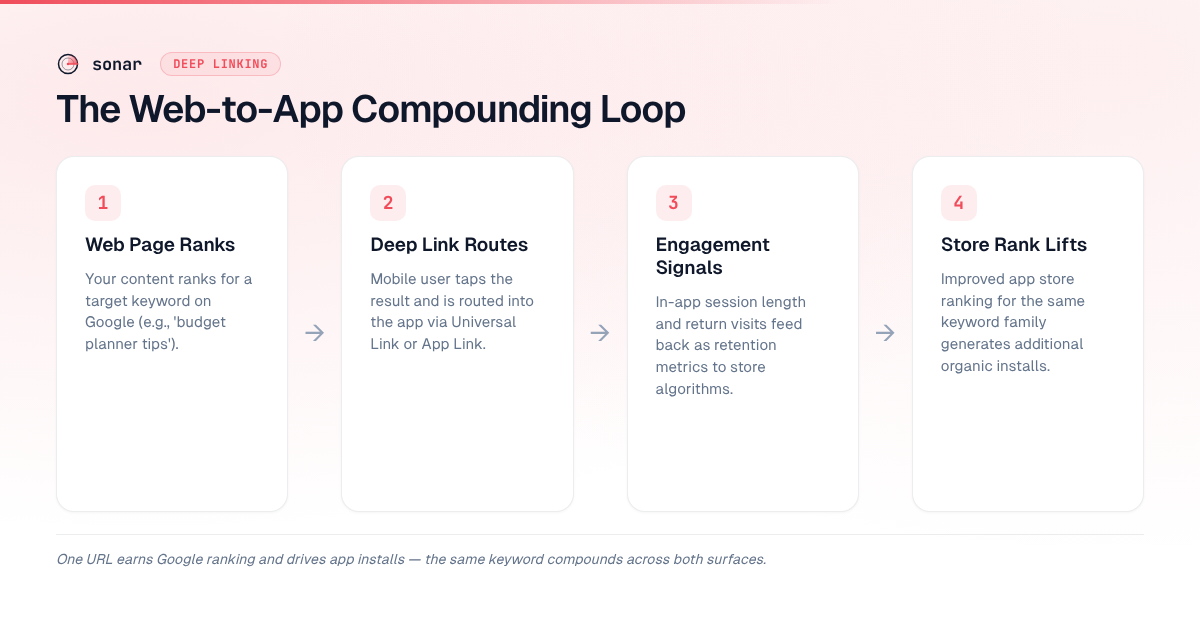
The compounding loop works like this:
- Web page ranks for target keyword (e.g., "budget planner tips").
- User on mobile taps the result and is routed into the app via a deep link.
- In-app engagement signals (session length, return visits) feed back into app store algorithms as retention metrics.
- Improved app store ranking for the same keyword family generates additional organic installs.
This is where the difference between ASO and SEO stops being academic. A keyword like "budget planner" lives on both surfaces. On Android, "budget planner" shows Sonar difficulty 59 and popularity 41 — slightly easier to crack than iOS, which matters when you're choosing which platform to deep-link first. If your web content already ranks for variations of this keyword, deep linking lets you capture app installs from that existing traffic without additional ad spend.
Google has also stated that apps with Firebase App Indexing enabled may receive a "ranking signal boost" in mobile search results, though the magnitude of this boost is not publicly documented source: [Google Search Central Blog, "App Indexing"].
When App Deep Linking Is Worth the Engineering Effort
Not every app needs deep linking. The implementation cost — AASA file setup, server-side verification, handling edge cases across iOS and Android versions, testing deferred flows — is real. Here's a decision framework I use when advising apps through Sonar:
Deep linking is high-ROI when:
- Your app has content that maps to web-searchable queries (recipes, articles, product pages, listings).
- You already rank (or could rank) for keywords that also have app store search volume.
- Your app store conversion rate from web referrals is measurably lower than from direct store search — deep linking can close that gap.
- You're in a competitive store keyword category where a web acquisition channel provides differentiation.
Deep linking is low-ROI when:
- Your app is utility-focused with no browsable content (e.g., a flashlight app, a single-purpose calculator).
- You have no existing web presence and no web SEO strategy.
- Your app's core keywords have no web search volume — the web-to-app bridge has nothing to bridge.
- Your team doesn't have engineering capacity to maintain the verification files and handle platform-specific edge cases across OS updates.
I've tested this framework across dozens of apps. The pattern holds: content-rich apps with overlapping web and store keyword demand see the highest ROI from deep linking. Utility apps with no web-searchable content see almost none.
Implementation Checklist: 7 Steps to Ship App Deep Linking
Here's the minimum viable implementation for both platforms. Each step has a specific deliverable — no optional steps here.
- Choose your URL structure. Map app screens to web URL paths. Each deep-linkable screen needs a corresponding web page. Example:
yourdomain.com/recipes/pasta-carbonaraopens the pasta carbonara screen in the app.
- Create and host the AASA file (iOS). Place it at
/.well-known/apple-app-site-association. Validate with Apple's AASA validator or theswcutilcommand-line tool on macOS source: [Apple Technical Note TN3155].
- Create and host assetlinks.json (Android). Place it at
/.well-known/assetlinks.json. Validate with Google's Digital Asset Links API.
- Implement link handling in the app. On iOS, handle
NSUserActivityin yourAppDelegateorSceneDelegate. On Android, add intent filters in yourAndroidManifest.xmlwithautoVerify="true"source: [Android Developers guide].
- Build web fallback pages. Every deep-linked URL must serve useful content to users without the app. This is both an SEO requirement (Google needs content to index) and an Apple requirement (AASA verification fails if the URL returns a redirect-only smart banner). Your mobile app landing page for each content type should stand on its own.
- Add deferred deep linking (optional but recommended). Use the Play Install Referrer API on Android. On iOS, consider a third-party SDK like Branch or Firebase Dynamic Links' successor for fingerprint-based matching. Track deferred attribution in your analytics stack.
- Test across OS versions. AASA caching behavior changed in iOS 14 (moved to Apple's CDN), and again in iOS 16.4 (added developer mode for testing). Test on at least iOS 15+, iOS 17+, and Android 10+ source: [Apple WWDC 2020, Android App Links testing guide].
Common Deep Linking Pitfalls and How to Avoid Them
Three mistakes I see repeatedly when reviewing deep linking implementations:
1. Blocking the verification file with robots.txt. Both Apple and Google need to fetch /.well-known/ paths. If your robots.txt disallows /.well-known/, verification silently fails. No error message — links just stop working source: [Apple Technical Note TN3155].
2. Serving AASA with incorrect headers. The AASA file must be served with Content-Type: application/json and no redirects. A common mistake: placing the file behind a CDN that adds a 301 redirect from the non-www to the www domain. Apple's CDN follows the redirect but marks verification as failed.
3. Not building real web pages for deep-linked URLs. If your deep-link URLs return an empty page with just a JavaScript redirect to the app store, Google won't index them — and you lose the entire web SEO benefit. Each deep-linked URL needs real, crawlable HTML content that delivers value to visitors who don't have the app. This ties directly into your keyword research workflow: the web content should target the same keywords you're optimizing for in the store.
Frequently Asked Questions
What is the difference between deep linking and universal links?
Deep linking is the general concept of routing a URL to a specific screen inside a mobile app. Universal Links are Apple's specific implementation of deep linking for iOS, using standard HTTPS URLs verified through an Apple App Site Association (AASA) file. The Android equivalent is called App Links. Both Universal Links and App Links are "verified" deep links, meaning the operating system confirms that the app developer controls the web domain source: [Apple Developer Documentation].
Does app deep linking directly improve Google search rankings?
Google has stated that apps with Firebase App Indexing may receive a ranking signal in mobile search results, but the company has never published the magnitude of that signal source: [Google Search Central]. The more reliable SEO benefit is indirect: deep-linked web pages serve real content to both users and crawlers, which supports traditional ranking factors like time on page and lower bounce rates. The compounding effect comes from a single URL generating both web traffic and app installs.
How do I test if my Universal Links or App Links are working?
For iOS, use Apple's swcutil command-line tool (swcutil dl -d yourdomain.com) to verify your AASA file, or check the device console logs for swcd errors during testing source: [Apple Technical Note TN3155]. For Android, use the adb shell am start command with your deep link URL, or check verification status with adb shell pm get-app-links on Android 12+ source: [Android Developers testing guide]. Test with the app both installed and uninstalled to verify fallback behavior.
When should I use deferred deep linking vs. standard deep linking?
Use deferred deep linking when your primary acquisition channel involves users who don't yet have the app installed — which is the typical case for web SEO traffic. Standard deep linking only works when the app is already installed; if it's not, the user falls back to the browser with no app context. Deferred deep linking preserves the intended destination through the install flow, so users land on the right screen after downloading. On Android, the Play Install Referrer API provides near-100% accuracy; on iOS, fingerprint matching is the best available option but accuracy ranges from 50–70% due to privacy restrictions source: [Branch.io documentation].
Is app deep linking worth it for small indie apps?
It depends on whether your app has web-searchable content. If your app contains recipes, articles, workout routines, or any content that maps to queries people type into Google, deep linking can compound your organic growth across both channels. If your app is a single-screen utility with no browsable content, the engineering investment likely won't pay back. I'd recommend starting with a strong ASO foundation first, then adding deep linking once you have web content worth linking to.
Want to find the keywords where your web and app store traffic overlap? Try Sonar free — it shows search volume, difficulty, and competitor data for every keyword across iOS and Android.