 sonar
sonar
App cross-promotion is the one install channel Apple documents by name
App cross-promotion means using one app you own to send users to another app you own — through in-app placements, store surfaces, and shared keyword strategy. Apple's StoreKit docs describe the practice directly: "Use your own provider token when cross promoting your own apps. This token lets you track the effectiveness of the cross promotion effort separate from any affiliate campaign" source: developer.apple.com/documentation/storekit/skstoreproductparameterprovidertoken.
That sentence matters because when I checked the US Google results for "app cross promotion" on September 23, 2026, the top ten were glossaries, vendor posts, and attribution help pages — not an indie how-to. If you run two or three small apps, you already own an audience that costs nothing per impression. The question is how to spend it without annoying people, breaking store policy, or making your apps compete with each other in search.
This guide covers what each store allows, the placements and store features that do the work, how a two-app portfolio should split keywords, and the situations where app cross-promotion costs you more than it earns.
By Peter. Policies and docs checked September 23, 2026. Keyword data from Sonar's API, US storefront, pulled the same day.
Is app cross-promotion allowed by Apple and Google?
Yes — both stores allow promoting your own apps inside your apps. Apple ships a system class, SKOverlay, described as "an overlay you can use to recommend another app" (iOS 14+) source: developer.apple.com/documentation/storekit/skoverlay. Google's Play Console help explicitly lists "promote my other apps" as a use case when you fill in the "Contains ads" declaration source: support.google.com/googleplay/android-developer/answer/9859455.
What neither store allows is cross-promotion that turns into spam, deception, or a fake storefront. The rules that actually bite:
| Store | Rule | What it means for cross-promo |
|---|---|---|
| App Store | Guideline 3.2.2(i) | No interface "similar to the App Store or as a general-interest collection" of apps source |
| App Store | Guideline 4.2.2 | Apps "shouldn't primarily be marketing materials, advertisements... or a collection of links" source |
| App Store | Guideline 4.3(a) | Don't ship multiple Bundle IDs of the same app — the example is a separate map app per city source |
| Google Play | "Contains ads" declaration | A banner, interstitial, ad wall, or widget promoting your other apps = answer "yes"; a non-intrusive "More apps" menu item = "no" source |
| Google Play | Ads policy | Full-screen interstitials that show unexpectedly, or can't be closed after 15 seconds, are not allowed source |
| Google Play | App Promotion policy | No tactics that "redirect users to Google Play or download apps without informed user action" source |
The practical line: a "More apps" row, a contextual card, or a StoreKit overlay is fine. A "Top apps" grid of your catalog, an auto-opening Play listing, or a portfolio of near-identical apps is where review trouble starts.
In-app placements that turn users into installs
The best in-app cross-promotion placement shows up at the moment a user's need extends past what the current app does, and opens the other app's product page without leaving the current app. Both platforms give you native tools for that; the placement decision is yours.
SKOverlay and SKStoreProductViewController (iOS)
SKOverlay presents a small App Store banner at the bottom of the screen, available since iOS 14 source: developer.apple.com/documentation/storekit/skoverlay. SKStoreProductViewController is a full "page where customers can purchase media from the App Store," available since iOS 6 source: developer.apple.com/documentation/storekit/skstoreproductviewcontroller. Both keep the user inside your app, so a "no thanks" doesn't cost you the session.
I use the overlay for a soft suggestion and the view controller for an explicit "Get the app" tap. Pass a campaign token (a string of up to 40 bytes) plus your provider token so App Store Connect can report the installs separately source: developer.apple.com/documentation/storekit/skstoreproductparametercampaigntoken.
Linking from Android
On Android, open the other listing with an ACTION_VIEW intent on https://play.google.com/store/apps/details?id= and call setPackage("com.android.vending") so users land in the Play app instead of an app chooser source: developer.android.com/distribute/marketing-tools/linking-to-google-play. For a full catalog link, the developer page URL is play.google.com/store/apps/dev?id= (same source).
Don't promote an app the user already has
Showing an install card to someone who already has the app wastes the slot. On iOS, give the target app a custom URL scheme, list it under LSApplicationQueriesSchemes, and check with canOpenURL(_:) — it returns false for undeclared schemes source: developer.apple.com/documentation/uikit/uiapplication/canopenurl(_:)). On Android 11+ targets, declare the sibling package inside PackageManager can see it source: developer.android.com/training/package-visibility/declaring. If it's installed, swap the card for a deep link that opens the other app.
App Store and Google Play surfaces for cross-promotion
The stores give you five cross-promotion surfaces outside your own UI: custom product pages, custom store listings, the Google Play developer page, in-app events, and app bundles.
| Surface | Store | Limit / key fact | Cross-promo use |
|---|---|---|---|
| Custom product pages | App Store | Up to 70 per app, each with a unique URL; can be assigned keywords for organic search source | A page for "users coming from my other app," passed via customProductPageIdentifier to SKOverlay |
| Custom store listings | Google Play | Up to 50 per app; reachable via &listing= URLs source | Same idea — a listing that speaks to the sister app's users |
| Developer page | Google Play | Icon, header image, 140-character description, one featured app; requires one published app source | Feature the app you're pushing this quarter |
| In-app events | App Store | Up to 10 live at once, max 31 days, shown on the product page, in search, and in editorial selections source | Run a joint event (e.g. a 30-day challenge) promoted in both apps |
| App bundles | App Store | Up to 10 bundles, an app in up to 3; paid bundles must be discounted; free apps can be bundled only if every app offers an approved auto-renewable subscription source | Sell the pair; "Complete My Bundle" credits apps already bought |
Custom product pages deserve the most attention. The page a user sees after tapping your cross-promo card can lead with "Works with your habit streaks" instead of generic screenshots — and Apple lets ad networks and StoreKit use the same page ID source: developer.apple.com/app-store/custom-product-pages. For event mechanics, see in-app events for ASO.
Portfolio keyword strategy: split the search terms, share the audience
App cross-promotion works best when your apps share an audience but not a keyword set. Two apps chasing the same search term split ranking signals — the cannibalization problem covered in our keyword research workflow. Cross-promo only moves users between apps; search should bring each app a different stream.
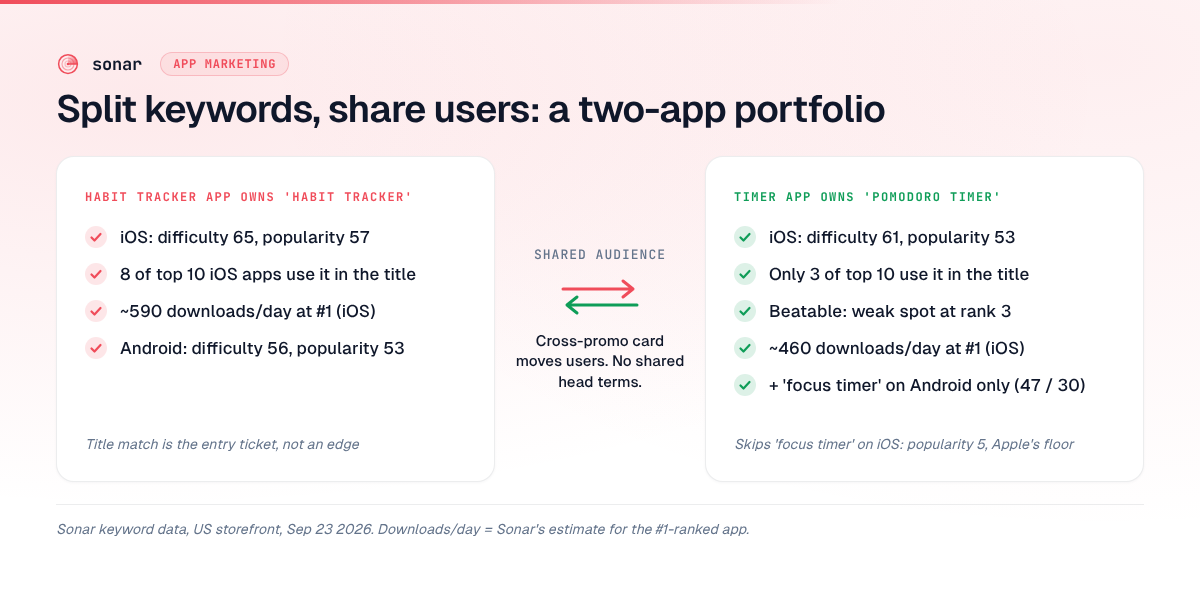
Take an illustrative portfolio: an indie with a habit tracker and a pomodoro/focus timer. Productivity-minded users overlap heavily, but the keywords don't need to. Here's what Sonar's data shows for the three head terms (source: Sonar /api/v1/keywords/search, US, queried 2026-09-23):
| Keyword | iOS difficulty | iOS popularity | iOS top-10 title matches | Android difficulty | Android popularity |
|---|---|---|---|---|---|
| habit tracker | 65 | 57 | 8 of 10 | 56 | 53 |
| pomodoro timer | 61 | 53 | 3 of 10 | 52 | 36 |
| focus timer | 61 | 5 | — | 47 | 30 |
How I'd split it:
- Habit tracker app owns "habit tracker." On iOS, 8 of the top 10 apps carry the term in their title, so having it in the title is the entry ticket, not an edge. Sonar estimates the #1 app gets about 590 downloads/day from this keyword — a rough order-of-magnitude figure from the popularity curve.
- Timer app owns "pomodoro timer." Only 3 of the top 10 iOS apps have the exact phrase in their title, and Sonar flags the SERP as beatable, with a weak spot at rank 3. Sonar's estimate for #1 is about 460 downloads/day. That's the clearest opening in the set.
- "Focus timer" goes to the timer app on Google Play only. On iOS its Apple Search Popularity is 5 — Apple's floor, meaning too little volume to measure — so it doesn't deserve title characters there. On Android it has the lowest difficulty of the three (47) at popularity 30, which makes it a reasonable short-description target.
- Neither app spends keyword-field characters on the other's head term. The habit tracker doesn't need "pomodoro" in its keyword field; the cross-promo card handles that audience.
The logic: search brings each app its own users, and cross-promotion moves them across the overlap. If both apps ranked for "habit tracker," you'd be splitting one stream of users instead of feeding two. Track your own terms with Sonar's rank tracking before and after the split, so you can see if either app slips.
How to measure whether app cross-promotion works
Measure cross-promotion installs as their own campaign, and judge them on incremental installs, not raw taps. On iOS, the campaign token plus your provider token in SKStoreProductViewController separates cross-promo installs in App Store Connect from any affiliate campaign that shares the same campaign token source: developer.apple.com/documentation/storekit/skstoreproductparameterprovidertoken. On Google Play, a dedicated custom store listing URL gives you a separate listing to read source: support.google.com/googleplay/android-developer/answer/9867158.
If you already run an MMP, AppsFlyer supports cross-promotion attribution with impressions and clicks, so you can calculate click-through rate and installs per impression source: support.appsflyer.com/hc/en-us/articles/115004481946. Most two-app indies don't need one — see whether you need a mobile measurement partner.
One identifier helps even without an MMP: Apple's identifierForVendor "is the same for apps that come from the same vendor running on the same device" source: developer.apple.com/documentation/uikit/uidevice/identifierforvendor. Log it in both apps' analytics and you can join a user's journey across your portfolio.
The number that matters is incremental: I hold out 10% of eligible users who never see the card, and compare how many of them install the sister app anyway. Some of your users would have found the other app through search or your developer page. A cross-promo campaign that only claims those users is taking credit for installs you'd have gotten anyway.
When app cross-promotion nets negative
App cross-promotion loses money when the traffic you send away is worth more than the traffic you gain. That happens in five common situations:
- You promote before activation. A card during onboarding pulls a user out of an app they haven't learned yet. Put cross-promo after the core action succeeds — after a completed focus session, not on first launch. The same logic from app onboarding that protects day-1 retention applies.
- You send paying users to a weaker business model. A subscriber in a paid app who moves to a free, ad-supported app can shrink your revenue per user. Compare models first using app monetization strategy: 4 models compared — cross-promo should flow toward the app with the stronger monetization or into a shared bundle.
- The apps are too similar. Near-duplicate apps invite Guideline 4.3(a) rejections source and compete for the same keywords. Merge them.
- The placement is intrusive. On Google Play, an unexpected full-screen interstitial or one that can't be closed after 15 seconds violates the Ads policy even when it promotes your own app source.
- The audiences don't overlap. A habit tracker and a baby-sleep app share a developer, not a user. No placement fixes that — paid channels will do better; see mobile app promotion channels ranked by CPI.
My rule of thumb: if you can't describe the moment when a user of app A needs app B in one sentence, don't ship the placement.
A cross-promotion checklist for a two-app portfolio
Use this sequence to set up app cross-promotion in a way that stays policy-safe and measurable:
- Confirm audience overlap. Write the one-sentence moment ("finished a streak day, wants a focused work block").
- Split keywords. Give each app its own head term; remove the sibling's head term from each keyword field.
- Build a custom listing. One Apple custom product page and one Google custom store listing for "users arriving from my other app."
- Add one contextual placement.
SKOverlayor a card after the core action; Android intent withsetPackage("com.android.vending"). - Hide it from existing users.
canOpenURLon iOS, - Add a static "More apps" row. On Google Play, this format alone keeps the "Contains ads" answer at "no."
- Tag everything. Campaign + provider tokens on iOS, listing parameter on Android, a 10% holdout.
- Review in 30 days. Compare incremental installs and the source app's retention.
FAQ
Does Apple allow cross-promotion of your own apps?
Yes. Apple provides SKOverlay specifically to "recommend another app," and its provider-token docs tell developers to use their own token "when cross promoting your own apps" source. The limits are Guideline 3.2.2(i), which bans App Store–like collections, and 4.2.2, which bans apps that are primarily marketing.
Does cross-promoting my other apps count as ads on Google Play?
It depends on the format. Banners, interstitials, ad walls, or widgets promoting your other apps require answering "yes" to "Contains ads"; a non-intrusive "More apps" section in the main menu can be declared "no" source.
Should two of my apps target the same keyword?
Usually not. Two apps from one developer on the same term split ranking signals and compete for the same users. Give each app its own head term and let in-app cross-promotion move users across the overlap.
What's the best place to put a cross-promotion prompt?
Right after a user completes the core action of the current app, when their need extends into what your other app does. Avoid onboarding and avoid full-screen interruptions — Google Play bans interstitials that show unexpectedly source.
How do I track installs from cross-promotion?
On iOS, pass a campaign token and your provider token to SKStoreProductViewController so App Store Connect reports those installs separately. On Google Play, point cross-promo traffic at a custom store listing URL. Keep a holdout group to measure incremental installs.
Split your portfolio's keywords with real popularity and difficulty data, then track both apps' rankings daily. Start free trial.
